

How to Achieve More Accurate Data Extraction From Invoices
Document extraction accuracy improves most when multiple independent sources with failure modes are combined, and values are selected based on weighted agreement.
Join the DZone community and get the full member experience.
Join For FreeExtracting structured data from invoices looks straightforward until you run it at scale. Invoices arrive as PDFs, scans, and photos; they follow different layouts, languages, and fonts, and many contain tables, stamps, handwritten notes, or low-quality images. Even when the information is present, it is often split across lines, repeated in multiple places, or labeled inconsistently, which makes simple pattern matching unreliable. Moreover, we can face issues in numeric and alphanumeric fields, such as VINs and invoice numbers, which are especially error-prone because visually similar characters get swapped, for example, o and 0, w and v, 5 and s, or i and l.
The hardest part is that small errors are costly. A single misread character in an invoice number, a swapped decimal separator in a total amount, or a billing address confused with a shipping address can break downstream automation and trigger manual review. A robust solution usually combines several layers: document ingestion and preprocessing, classic OCR and PDF text extraction, rule-based parsing for predictable patterns, business validation rules such as total consistency and identifier checks, and a workflow that routes low-confidence cases to human review.
In this case, vLLMs can dramatically improve coverage on messy layouts and map textual descriptions. Accuracy at scale typically comes from the full pipeline working together, with normalization, validation, monitoring, and clear fallbacks when any method fails.
Advantages and Disadvantages of Using an OCR Engine and vLLM
OCR extraction is fast, relatively deterministic, and often very strong for reading printed text, especially numbers in totals, dates, and IDs when the scan quality is good. It also produces outputs that are easier to debug because you can inspect the raw text and bounding boxes, and you can layer simple rules on top for predictable fields. The downside is that OCR is brittle when invoices are skewed, low resolution, noisy, or visually complex, and it does not understand meaning. It can confuse similar characters, lose table structure, drop line breaks in the wrong places, or return multiple candidates without knowing which one is the real total.
AI-based extraction is better at handling layout variation and semantics. It can infer which amount is the payable total, distinguish seller versus buyer, and map messy text into a clean JSON schema even when labels differ. It is also a good fit for unstructured fields like addresses and item descriptions. The tradeoffs are variability and control. Model outputs can change with small prompt differences, and confidence is harder to interpret unless you design for it. AI can also hallucinate missing values, misread numbers when the image is unclear, or choose the wrong candidate when multiple values look plausible.
Architecture Overview
The proposal walks through a pragmatic way to push accuracy higher by combining independent “opinions” and selecting the best value using a weighted voting approach. So instead of searching for a single winner, we let each approach do what it is good at, then vote.
In practice, there are two effective strategies to improve the accuracy of extracting data, depending on how much you want to rely on OCR.
- The first approach stays purely in the vLLM world. You run the same document through the same vision model multiple times, but with different prompts that focus on different field descriptions or reasoning styles, then you vote across the results.
- The second approach mixes OCR engines with vLLMs, leveraging the strengths of both worlds.
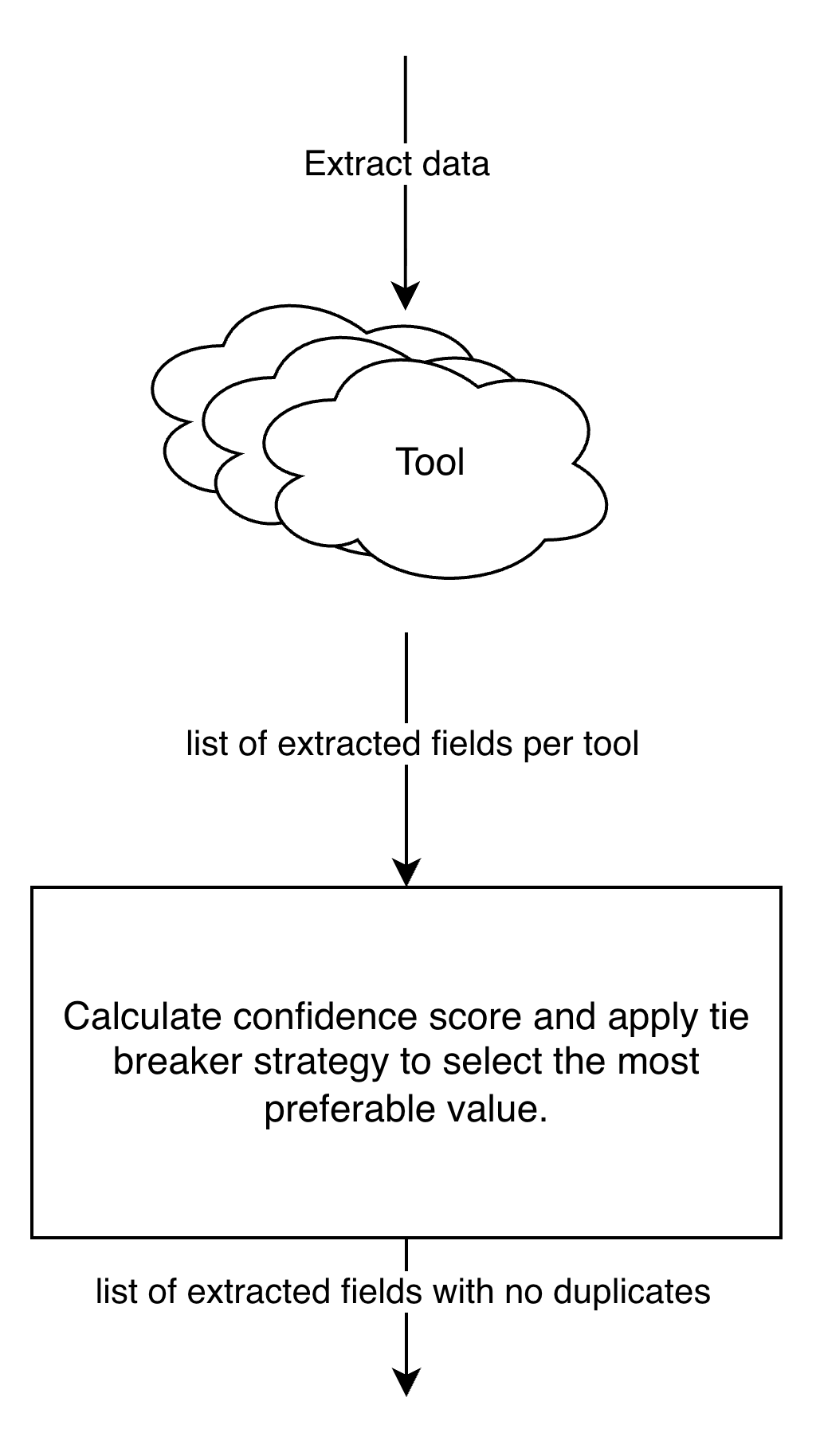
Figure 1. Overall approach to voting.
After extraction, we calculate a confidence score for each field and select a value based on voting rules.
The number of sources you include in the vote is a practical trade-off between accuracy, latency, and cost. Adding more extractors can reduce error rates, but it can complicate operations when one provider degrades or changes behavior.
Invoice Data Extraction Using Gemini, Mistral OCR, and AWS Textract
For this practical use case, we are going to choose a three-source ensemble built around Mistral OCR, AWS Textract, and Gemini as the minimum for a meaningful vote. The reason is simple: these tools fail in different ways, which makes their disagreement useful for voting.
The applied sources:
- Gemini-3-pro is the strongest at understanding visual inputs according to https://lmarena.ai/leaderboard/vision.
- Mistral OCR 3 is an excellent backup option that has proven to have high text recognition performance according to benchmarks.
- AWS Textract adds a second OCR interpretation plus solid layout and table awareness, which helps when totals and line items are embedded in structured blocks.
It’s a great combination of Mistral OCR and AWS Textract, as the former produces Markdown-formatted text and the latter extracts raw text. These different formats will serve as part of the prompts of any LLM to parse data; for simplicity, we have chosen the provided Gemini model.
Here, you intentionally create different inputs and different failure modes. OCR tools provide grounded text signals that tend to be strong for numeric and structured content, and then a vLLM turns those signals into a consistent JSON schema. In parallel, a vision-capable LLM extracts directly from the document. Because each path “sees” the invoice differently, disagreements become informative, and voting becomes more reliable than prompt-only diversity.
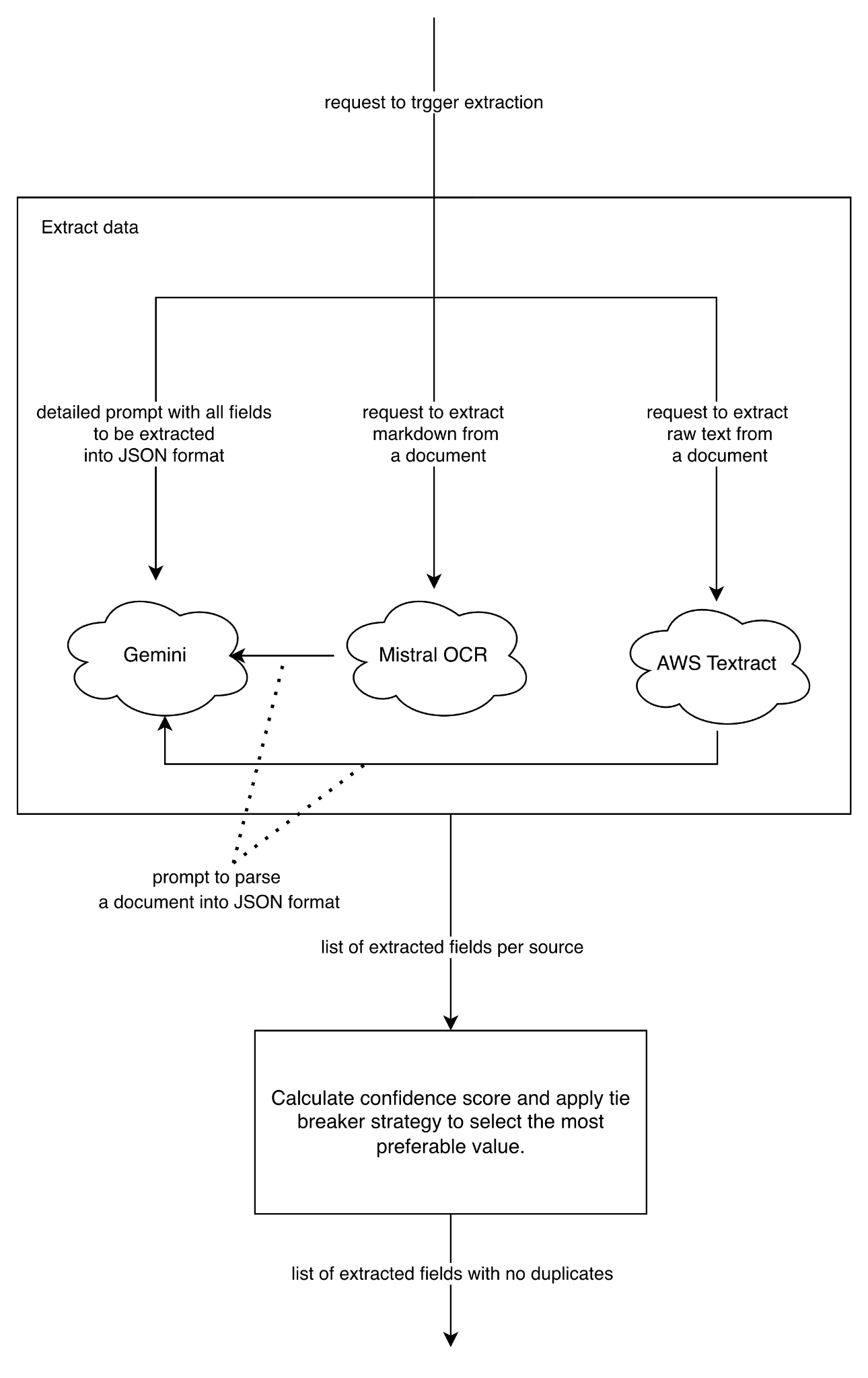
Figure 2. Invoice data extraction leveraging Gemini, Mistral OCR, and AWS Textract.
- Gemini extracts fields directly into JSON format from the document
- Mistral OCR extracts data as markdown text, then Gemini structures that text into JSON
-
AWS Textract extracts data as raw text, then Gemini parses it into structured output
We are calling sources in parallel, then scoring each value and computing per-field confidence based on agreement.
Normalize Before You Compare
Do not vote on raw strings; normalize first, per field type:
- Numbers: Remove currency symbols, normalize decimal separators, remove thousands separators
- Identifiers: Remove spaces, uppercase, collapse line breaks
- Dates: Parse to the needed format (e.g., ISO)
- Addresses: Normalize whitespace, standardize country codes where possible
- Any other business rules
Compute Per-Field Confidence With Weighted Agreement and Select the Value
We need a baseline confidence. Let’s imagine that we want to extract the total price of the invoice, whereas each tool has the following trust coefficient:
- Gemini: 90
- Mistral OCR: 85
- AWS Textract: 80
Set these trust scores from an evaluation set, then tune them by field. A practical starting point:
- For numeric-heavy fields, raise OCR-based tools slightly
- For descriptive text fields, raise Gemini directly slightly
Keep it simple at first. Overfitting trust scores is a fast way to make the system brittle.
To compute a field confidence, we sum the trust coefficients for the value and divide by the sum of the trust coefficients of the sources.
Imagine Gemini and Mistral OCR selected the same value, then:
A (90 * 1) + B (85 * 1) + C (80 * 0) = 175
We divide by total trust (90 + 85 + 80) = 255
And receive the confidence score: 175/255 ≈ 0.7
Don’t forget to track metrics to see the changed level of accuracy, average confidence per field, and correlate it with human corrections. That lets you set thresholds, for example, auto-accept if confidence is at least 0.7, otherwise queue for review.
Decision rules per field to select a value:
- If at least two tools agree after normalization, pick the agreed value.
- If all values differ, pick the value from the tool with the highest trust score.
-
Otherwise, select the value with the default tool or according to your preferences.
Always return confidence and provenance so downstream validation can decide what needs review.
Conclusion
A voting approach works because it embraces variance instead of fighting it. You intentionally generate multiple different interpretations, normalize them, then pick the result that has the strongest weighted agreement. The more sources you use, the more confident the result will be. And finally, you have to test any tool and pipeline with your inputs to achieve the most accurate result.
Opinions expressed by DZone contributors are their own.
Comments