

Replacing LEADTOOLS Scanner With AWS Textract (Step-by-Step Migration)
LEADTOOLS is a scanning tool that needs to be migrated to the AWS Cloud using an equivalent service, such as AWS Textract, for real-time document scanning.
Join the DZone community and get the full member experience.
Join For FreeReplacing LEADTOOLS Scanner with AWS Textract service is a strategic move if you’re aiming to leverage cloud-native, scalable, and AI-powered document processing.
By transitioning from custom or any other tools to AWS, you can take full advantage of its equivalent services. This end-to-end migration offers numerous benefits, including improved efficiency, cost-effectiveness, and advanced capabilities.
To ensure a smooth transition, it's important to understand the step-by-step details of both the LEADTOOLS Scanner and AWS Textract, along with a breakdown of how the migration process works and key considerations to keep in mind. By doing so, you can effectively harness the power of AWS cloud for your document processing needs.
What is the LEADTOOLS Scanner?
LEADTOOLS Scanner is a component of the LEADTOOLS SDK suite by LEAD Technologies. It offers tools for image and data capture, used to develop scanning and document processing software.
Core Functionality
- TWAIN, WIA, and SANE protocols for scanning from various devices (e.g., flatbed scanners, cameras).
- Mobile capture from phones and tablets.
- Screen capture and virtual printer functionality
- OCR (Optical Character Recognition) to extract text from scanned images
- Barcode detection and decoding
- Form recognition and data extraction (e.g., ID cards, passports, checks, business cards)
- Multimedia capture, including audio and video streams
Use Cases
- Document Management Systems:
- Scan and digitize paper documents.
- Convert scanned documents to searchable PDFs or editable formats like DOCX.
- Healthcare Applications:
- Capture and process medical forms and patient records.
- Integrate with medical imaging systems.
- Financial Services:
- Scan checks and extract account information.
- Validate identity documents for KYC processes.
- Enterprise Workflow Automation:
- Automate data entry from forms.
- Integrate scanning into business apps for archiving and compliance.
- Mobile Apps:
- Enable users to scan documents using their phone camera.
- Real-time capture and OCR for on-the-go document processing.
- Web Applications:
- Browser-based scanning using TWAIN or SANE.
- Upload and process documents directly from the web interface
Amazon Textract is a cloud-based service provided by AWS (Amazon Web Services) that uses machine learning (ML) to automatically extract text, handwriting, and data from scanned documents. Unlike traditional OCR (Optical Character Recognition), Textract goes beyond simple text extraction by also identifying the structure of the document, such as:
- Forms (key-value pairs)
- Tables
- Checkboxes
- Handwritten text (in English)
Key Features of AWS Textract:
- Text Detection: Extracts printed and handwritten text from images and PDFs.
- Form Extraction: Detects key-value pairs (e.g., "Name: Prabhakar Mishra").
- Table Extraction: Recognizes rows and columns in tables.
- Query-based Extraction: You can ask specific questions like “What is the invoice number?” and Textract will find the answer.
- Integration with Other AWS Services: Works well with Amazon S3, Lambda, Comprehend, and more.
Developer Support
LEADTOOLS supports multiple platforms and languages, including:
- .NET (Framework, Core, MAUI)
- C++, Java, Objective-C, Swift
- HTML, JavaScript for web apps
Replacing LEADTOOLS Scanner With AWS Textract
Use Cases
- Document management systems
- Healthcare applications
- Financial services
- Enterprise workflow automation
- Mobile apps
- Web applications
- Automated data extraction
- Form processing
- Table parsing
Integration With AWS Services
AWS Textract in:
- Automated data extraction from scanned documents (PDFs, images).
- Form processing (e.g., invoices, receipts, applications).
- Table parsing for structured data extraction.
- Integration with AWS services like Lambda, S3, Comprehend, and DynamoDB.
Migration Strategy
To replace LEADTOOLS Scanner with AWS Textract, start here:
- Document capture:
- Use a local or mobile scanner to capture documents.
- Upload scanned images or PDFs to Amazon S3.
- Processing with Textract:
- Use StartDocumentAnalysis or AnalyzeDocument API.
- Extract text, forms, and tables.
- Post-processing:
- Store results in DynamoDB or another database.
- Use Amazon Comprehend for NLP tasks (e.g., entity recognition).
- Frontend Integration:
- Build a web/mobile interface to upload documents and view results.
- Use AWS Amplify or custom APIs via API Gateway + Lambda.
- Workflow overview:
User scans document → Uploads to S3 → Textract analyzes → Results stored in DynamoDB → Displayed in web app
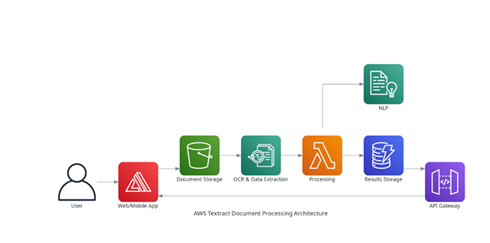
AWS Textract Document Processing Architecture
- User uploads a document via a web or mobile app (using AWS Amplify).
- The document is stored in Amazon S3.
- AWS Textract analyzes the document for OCR and data extraction.
- AWS Lambda processes the extracted data.
- Optionally, Amazon Comprehend performs NLP tasks (e.g., entity recognition).
- Results are stored in Amazon DynamoDB.
- Data is accessed via API Gateway and displayed back in the frontend.
Step-by-Step Migration Process
Here are the details on the step-by-step migration process:
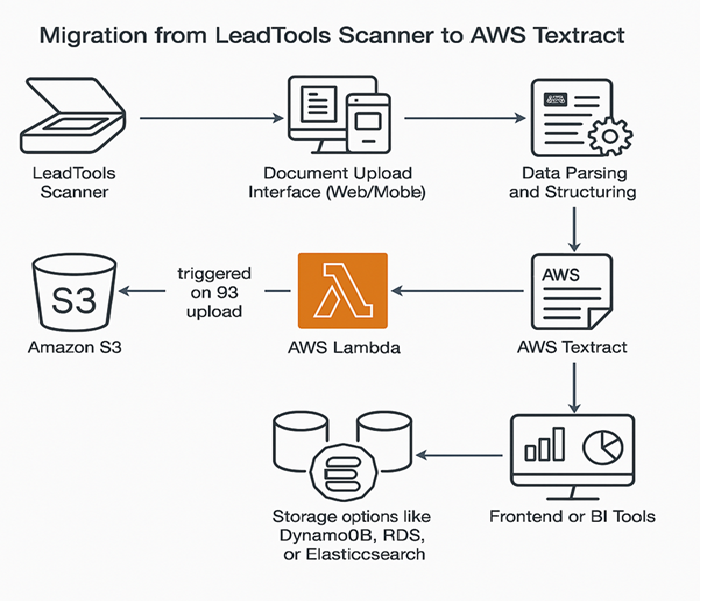
Step 1: Assessment and Planning
- Identify all document types and formats currently processed by LEADTOOLS.
- Evaluate Textract capabilities (e.g., OCR, forms, tables) against current needs.
- Define success criteria and KPIs for migration.
Step 2: AWS Environment Setup
- Create an S3 bucket for document storage.
- Set up IAM roles and permissions for Textract and Lambda.
- Configure AWS Textract (synchronous or asynchronous mode).
Step 3: Document Upload Workflow
- Replace LEADTOOLS scanning interface with a web/mobile upload interface.
- Store uploaded documents in S3.
- Trigger Lambda function on S3 upload.
Step 4: Textract Integration
- Use AWS SDK (e.g., Boto3 for Python) to call Textract APIs.
- Extract text, tables, and forms from documents.
- Parse and structure the output JSON.
Step 5: Data Storage and Access
- Store extracted data in DynamoDB, RDS, or Elasticsearch, depending on use case.
- Enable search, filtering, and analytics via APIs or dashboards.
Step 6: Frontend and Reporting
- Update frontend to display extracted data.
- Integrate with BI tools (e.g., QuickSight) for reporting.
Step 7: Testing and Validation
- Run parallel processing with LEADTOOLS and Textract.
- Validate accuracy, performance, and completeness.
- Optimize Textract settings and post-processing logic.
Step 8: Deployment and Monitoring
- Deploy the solution using CI/CD pipelines.
- Monitor using CloudWatch and set up alerts.
- Plan for continuous improvement and feedback loops.
Example of AWS Textract Cost Calculation
Here’s a detailed breakdown of Amazon Textract pricing and price can be change/vary based on AWS and check the AWS service cost documents
- Detect Document Text API for 100,000 pages:
- $0.0015/page → $150 total
- Analyse Document API (Forms + Tables)for 5,000 pages:
- $0.015 (Tables) + $0.05 (Forms) → $325 total
- Based on API and pages we can get the cost of AWS service and it would cost based on the need since it is AWS SaaS service.
Conclusion
Migrating from LEADTOOLS Scanner to AWS Textract offers:
- Scalability: Handle large volumes of documents effortlessly.
- Automation: Reduce manual effort with serverless workflows.
- Accuracy: Leverage AI for better OCR and data extraction.
- Cost-efficiency: Pay-as-you-go model with reduced infrastructure overhead.
- Resiliency: Automatically fail over between zones, ensuring high availability and fault tolerance
- Security: Textract service complies with major standards like SOC 1, SOC 2, SOC 3, ISO 27001, ISO 27017, ISO 27018, making it suitable for regulated industries like finance and healthcare
In summary, AWS Textract is efficient in performance and resilient due to its serverless architecture, eliminating maintenance costs. The pay-as-you-go model allows customers to focus on business use cases and quick implementation. After the migration, all complex documents previously processed by LEADTOOLS were copied to Amazon S3. New documents are now processed using AWS Textract, with results also stored in S3. Document quality scanning has been reconfigured to match the standards of the old LEADTOOLS setup, ensuring a smooth and successful migration to the AWS Cloud.
Opinions expressed by DZone contributors are their own.
Comments