

Advanced Guide to Helm Charts for Package Management in Kubernetes
This guide breaks down the key concepts underlying Helm's structure and walks through some best practices.
 CORE
·
CORE
·
Join the DZone community and get the full member experience.
Join For FreeThis is an article from DZone's 2022 Kubernetes in the Enterprise Trend Report.
For more:
Read the Report
Helm is undoubtedly one of the most popular and successful open-source projects in the Kubernetes ecosystem. Since it was introduced at the inaugural KubeCon in 2015, Helm's usage has steadily grown to solidify its status as the de facto package manager for Kubernetes. It graduated from the Cloud Native Computing Foundation in 2020, and in the CNCF Survey 2020, more than 60% of the survey respondents reported Helm as their preferred method for packaging Kubernetes applications. This rates significantly higher than Kustomize and other managed Kubernetes offerings.
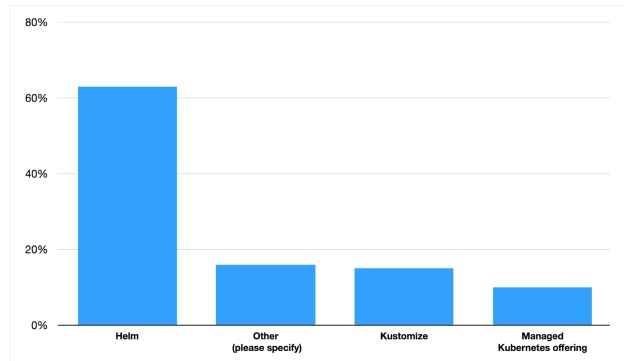
Figure 1: Kubernetes package management preference survey results
Image credit: "CNCF Survey 2020," Cloud Native Computing Foundation
Given Helm's popularity and ubiquity, it's important to understand the architecture and usage patterns to utilize the tool effectively. In this guide, we'll break down the key concepts underlying Helm's structure and walk through some best practices.
Helm Structure
Helm packages Kubernetes applications into charts, which is a collection of templated Kubernetes manifest files. Each chart contains the following content:
example-chart/
├── .helmignore
├── Chart.yaml
├── values.yaml
├── charts/
└── templates/
   └── tests/
   ...
Let's dive deeper into each file:
.helmignore– Defines files or patterns to ignore when packaging up the Helm chart (e.g.,.vscode,.git, secret files).Chart.yaml– Contains top-level metadata about the Helm chart including the name, version, and other dependencies if the chart bundles multiple applications together. Examples of dependent charts include packaging Zookeeper with Kafka or grouping Prometheus and Grafana together.values.yaml– Sets default values for all templated portions of the chart under the templates directory. These default values can be overridden via–valuesor–setflags.charts– Stores tar files of dependent charts if it was specified inChart.yaml.templates– Holds all the Kubernetes manifest files that define the application, including but not limited to Deployment, Services, autoscaling, ConfigMaps, and Secrets. Along with core Kubernetes files, it can also hold template helpers, NOTES.txt, and test files.
Underneath the hood, Helm uses Go templates to coalesce values into the corresponding template files. This means that it's important to understand YAML syntax as well as Go's data types to create, update, or use a Helm chart.
Helm Lifecycle
Once the chart is created, it is ready to be deployed into a Kubernetes cluster. The Helm CLI uses install or upgrade commands to trigger a new release. Each release is an isolated, deployed artifact of a versioned, templated chart. This means that it is possible to have multiple releases of the same chart as long as the underlying values do not conflict. For example, a PostgreSQL Helm chart can be deployed with the same configurations to two different namespaces.
Also, Helm keeps a history of each release, allowing easy rollbacks. To see the release history, run helm history <name-of-release>. Then to roll back, use helm rollback <name-of-release> <version>. While these CLI commands are useful for development, these will most likely be controlled by a more robust CD system in production.
Helm Best Practices
Now that we have a good understanding of Helm's structure and lifecycle, we'll review some best practices and useful tips to interact with Helm charts.
Bootstrap Charts With Helm CLI
Helm provides an excellent skeleton to bootstrap a new Helm chart via the helm create command. Instead of handcrafting individual Helm files from scratch, take advantage of the create command to get default manifest files (e.g., deployment.yaml, hpa.yaml, ingress.yaml, service.yaml, and serviceaccount.yaml) as well as templates to provide unique names and annotations.
Check for Errors With Helm CLI
Helm also provides several tools to validate the chart before deploying. YAML and Go template syntax can be difficult to debug, especially when it's due to simple indentation or empty value errors.
helm lint– Examines the chart for syntax issues such as poorly formatted YAML indentation or missing values. Running this command with the–debugflag can provide more information.helm template– Locally renders the templates using provided values. This can be useful to see if the override values are correctly inserted into the manifest templates. To focus on a single template, use the-sflag:helm template my-chart -s templates/deployment.yaml.--dry-run– Lint and template commands can only catch templating issues via static analysis. To catch Kubernetesrelated errors (e.g., using a deprecated Kubernetes API version), run the--dry-runcommand before invoking the upgrade or install commands.
For advanced guides on template functions, flow controls, and other debugging tricks, refer to the Helm documentation section under "Chart Template Guide."
Package With Subcharts
As mentioned in the Helm structure section, sometimes it makes sense to package multiple applications together into a single Helm chart. This pattern is useful to group related applications or databases together into a single deployable unit. Common use cases include packaging PostgreSQL and Redis with a Django app or bundling all the components of the ELK/EFK stack together. Another way to use subcharts is to bundle common helper templates to add annotations, labels, or default values. A good example can be found with Bitnami's charts:
apiVersion: v2
appVersion: "3.2.1"
dependencies:
  - condition: zookeeper.enabled
    name: zookeeper
    repository: "https://charts.bitnami.com/bitnami"
    version: 10.x.x
  - name: common
    repository: "https://charts.bitnami.com/bitnami"
    tags:
      - bitnami-common
    version: 2.x.x
name: kafka
version: 18.2.0
Use Annotations
Since Kubernetes only watches changes in the deployment spec, by default, changing the contents of a ConfigMap or a Secret that's mounted to a Pod does not automatically trigger a rolling update. This may be unexpected behavior for users expecting a restart with updated values when invoking an upgrade command.
To automatically roll deployments, you can use tools like Reloader or add a checksum annotation in the deployment spec:
kind: Deployment
spec:
  template:
    metadata:
      annotations:
        checksum/config: {{ include (print $.Template.BasePath "/config.yaml") . | sha256sum }}
Annotations are also useful to define hooks for jobs that should run before or after an install or upgrade. Common use cases may include running a Flyway migration or running clean-up jobs. While this can be achieved with other CD tools, Helm hooks provide a native way to alter release lifecycle behavior:
apiVersion: batch/v1
kind: Job
metadata:
  annotations:
    "helm.sh/hook": post-install
    "helm.sh/hook-weight": "-5"
    "helm.sh/hook-delete-policy": hook-succeeded
Limitations of Helm
While Helm comes with a suite of features to make packaging and releasing Kubernetes applications easier, it's important to note that Helm is simply a package manager — it is not a fully featured CD tool. In other words, organizations should not rely on Helm alone for an end-to-end Kubernetes CI/CD tool. Instead, Helm should integrate with more robust tools such as ArgoCD, JenkinsX, or Spinnaker to keep deployments consistent. Also, since Helm uses plaintext YAML as the primary templating interface, Secrets and non-YAML files are not handled very well. This means Secrets or configuration binaries (e.g., public keys, .dat files) can be better handled outside of Helm via another CI/CD tool.
Finally, while subcharts are useful for organizing related components together, deeply nested subcharts can cause templating issues. If the application truly requires multiple nested subcharts, look for other deployment patterns such as ArgoCD's ApplicationSet to group multiple Helm charts together instead.
Final Thoughts
Helm is a powerful tool that has stood the test of time. Compared to verbose, vanilla Kubernetes manifest files, Helm allows for advanced templating techniques to package Kubernetes applications into deployable units. In this guide, we went over the high-level Helm structure as well as some best practices to use Helm effectively. We then walked through some of the limitations of Helm — mainly the fact that it should not be used as a standalone CD tool.
Nonetheless, with a wide selection of public, production-ready Helm charts, it's easier than ever to download, modify, and install various Kubernetes components.
This is an article from DZone's 2022 Kubernetes in the Enterprise Trend Report.
For more:
Read the Report
Opinions expressed by DZone contributors are their own.
Comments