

Introduction to Helm Charts
How to install Helm Charts as a package manager for Kubernetes. Helm Charts provide a dynamic way to bind different configurations and also generate YAML.
Join the DZone community and get the full member experience.
Join For FreeA package manager for Kubernetes can take care of the application packaging that is required for deployment on Kubernetes. It is an easy application installation and deployment on Kubernetes. Below are the resources you will need:
- Installing Helm
- Artifact Hub — Helm central point for package lookup
Let's say we want to run MySQL on Kubernetes. First, search for MySQL on Artifact Hub, add its rep, and install:
$ helm repo add bitnami https://charts.bitnami.com/bitnami
$ helm install mysql bitnami/mysql
One can easily connect to MySQL now just by following the instructions shown on the console during installation. Behind the scenes, what Helm install does is download, configure, and run the required application in a container for which one would otherwise have to write YAML files. To know all the services, pods, etc. that are created, simply type the below command:
$ kubectl get all

NAME                     READY   STATUS    RESTARTS   AGE
pod/my-release-mysql-0   1/1     Running   0          4m53s

NAME                                TYPE        CLUSTER-IP      EXTERNAL-IP   PORT(S)    AGE
service/kubernetes                  ClusterIP   10.96.0.1       <none>        443/TCP    22d
service/my-release-mysql            ClusterIP   10.98.171.245   <none>        3306/TCP   4m54s
service/my-release-mysql-headless   ClusterIP   None            <none>        3306/TCP   4m54s

NAME                                READY   AGE
statefulset.apps/my-release-mysql   1/1     4m54s
Structure of Helm Chart
Run the below command and it will download the compressed package file. Unzip it.
$ helm pull bitnami/mysql

$ls
mysql-8.8.8.tgz
Upon exploring, we can easily identify that the Helm Chart is a collection of YAML template files that are organized into a specific directory structure.
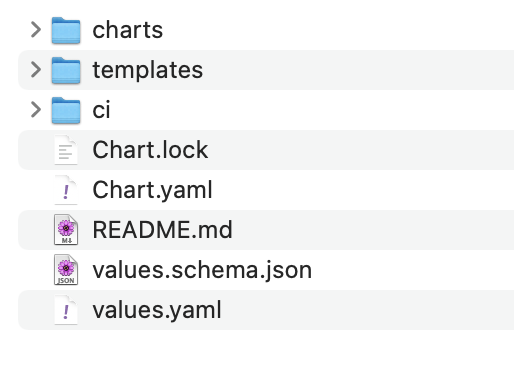
You can create your own custom Helm Charts for distribution or deployment.
$ helm create my-helm-chartGenerating YAML Descriptor From Helm Chart
From the Helm Chart, you can generate the final output of the YAML file using the Helm template commands and provide a way to run the application on a cluster using kubectl and without using Helm to install.
$ helm template assign-name ./downloaded-chart --values=./downloaded-chart/values.yaml > descriptor.yaml
$ kubectl apply -f descriptor.yaml -n app-dev-env
Helm Charts provide a dynamic way to bind different configurations, where Kubernetes YAML only provides a static way. Using the above method, we can generate YAML for different configurations.
Happy learning!
Opinions expressed by DZone contributors are their own.
Comments