

Agentic AI: Autonomous AI Agent With PostgreSQL
Agentic AI builds goal-driven systems with planning, tools, memory, and state. This guide shows how to build one with PostgreSQL.
 ·
·
Join the DZone community and get the full member experience.
Join For FreeThis guide explains agentic AI from first principles, starting with fundamental concepts and progressing through architecture design, implementation details, and complete working examples. By the end, readers can build production agent systems.
Traditional AI systems have limitations. They respond to single queries only, process input and generate output, but do not maintain state between interactions. They cannot:
- Plan multi-step tasks
- Use external tools
- Learn from experience
- Remember past conversations
- Execute actions beyond text generation
Consider a traditional chatbot. A user asks about database performance. The chatbot generates a response from training data. When the user asks a follow-up question, the chatbot treats it as a new conversation. The chatbot cannot remember the previous question, query a database, execute actions, or plan a sequence of steps.
Agentic AI systems solve these problems. Agents:
- Maintain a persistent state across sessions
- Plan sequences of actions to achieve goals
- Use tools to interact with external systems
- Store memories for future reference
- Execute complex tasks autonomously
- Adapt behavior based on experience
- Remember past interactions
- Coordinate multiple steps
Consider an agentic system. A user asks about database performance. The agent plans a sequence of steps:
- Step one: queries the database documentation
- Step two: retrieves relevant articles
- Step three: analyzes the information
- Step four: generates a comprehensive response
The agent stores important facts in memory. When the user asks a follow-up question, the agent retrieves relevant memories, uses context from previous interactions, and provides a coherent response.
What Is Agentic AI?
Agentic AI refers to systems that act autonomously to achieve goals. The term "agentic" refers to the capacity to act. Agents:
- Receive goals from users
- Break goals into actionable steps
- Execute steps using available tools
- Observe results from actions
- Adjust plans based on outcomes
- Persist state across sessions
- Learn from experience
Understanding Agents from First Principles
Agents are software systems that exhibit autonomous behavior. They differ from traditional programs in key ways.
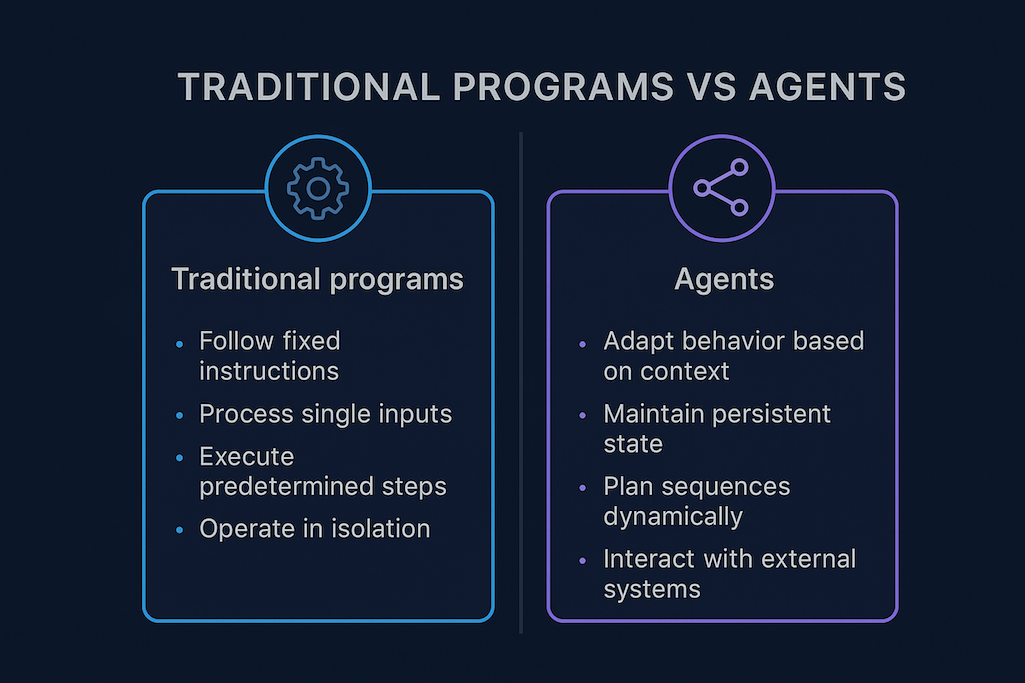
The diagram illustrates the fundamental differences between traditional programs and agentic systems. Traditional programs follow fixed execution paths defined at development time, while agents adapt their behavior based on context and goals. This adaptive capability enables agents to handle situations that were not explicitly programmed, making them more flexible and powerful for complex, dynamic environments.
Comparison With Traditional AI Systems
Traditional AI systems:
- Process single requests
- Generate responses from training data
- Lack of persistent memory
- Cannot execute actions
- Cannot plan multi-step tasks
- Cannot learn from interactions
- Treat each request independently
- Cannot coordinate multiple steps
Traditional systems have fixed behavior, follow predetermined patterns, cannot adapt to new situations, cannot use external tools, cannot remember past interactions, and cannot improve over time.
Agentic systems change this paradigm fundamentally. Agents:
- Maintain a persistent state across sessions
- Plan sequences of actions dynamically
- Use tools to interact with external systems
- Store memories for future reference
- Execute complex tasks autonomously
- Adapt behavior based on experience
- Learn from successful patterns
- Improve performance over time
Agents vs. Chatbots: Fundamental Differences
Agents differ from chatbots in fundamental ways. Understanding these differences is essential for building agentic systems.
| ASPECT | CHATBOTS | AGENTS |
|---|---|---|
| Context Handling | Respond to individual messages without context; each message is processed independently; context is lost between interactions. | Maintain conversation context across sessions; previous interactions inform current responses; context accumulates over time; memory enables continuity. |
| Action Execution | Generate text only; cannot execute actions; cannot interact with systems; cannot query databases; cannot call APIs | Execute actions through tools; query databases; call APIs; run code; interact with systems. |
| Memory | No memory beyond the current session; when the session ends, all context is lost | Store long-term memories in vector databases; memories persist across sessions; enable learning; improve responses over time. |
| Adaptability | Follow fixed patterns; use predetermined templates; cannot adapt behavior | Adapt plans dynamically; adjust strategies based on results; optimize for success |
| Planning Capabilities | No planning; responds immediately to each message; cannot break down complex tasks; cannot coordinate multiple steps. | Generate multi-step plans; break complex goals into actionable sequences; handle conditional logic; manage step dependencies. |
| Tool Usage | Cannot use external tools; limited to text generation; no database access; no API integration | Access comprehensive tool registry; execute SQL queries; make HTTP requests; run code snippets; interact with external systems |
| Multi-Step Tasks | Handle single-turn conversations only; cannot coordinate sequential actions; cannot manage task workflows. | Execute complex multi-step workflows; coordinate sequential actions; manage task dependencies; handle parallel execution. |
| Error Handling | Limited error recovery; cannot retry failed operations; cannot adapt to failures | Robust error handling; automatic retry mechanisms; graceful failure recovery; adaptive error strategies |
| Learning Ability | Static behavior; cannot learn from interactions; responses do not improve over time | Continuous learning; improve from experience; adapt based on feedback; optimize performance over time |
| State Management | Stateless operation; no persistent state; cannot resume interrupted tasks | Persistent state management; track execution progress; resume interrupted tasks; maintain state across sessions |
| Personalization | Generic responses; no user-specific adaptation; same responses for all users | Personalized interactions; learn user preferences; adapt to individual needs; build user-specific knowledge |
| Integration Capabilities | Limited integration; primarily text-based interfaces; minimal external system connectivity | Deep system integration; connect to databases; integrate with APIs; interact with cloud services; access file systems |
| Response Quality | Template-based responses; limited depth; no fact verification; may provide outdated information | Context-aware responses; fact-checked answers; real-time information retrieval; comprehensive and accurate answers |
| Scalability | Limited scalability; each conversation is isolated; no shared knowledge; resource-intensive per conversation | Highly scalable; shared knowledge base; efficient resource usage; optimized for production workloads. |
| User Experience | Simple question-answer format; limited interactivity; no proactive assistance | Rich interactive experience; proactive assistance; guided workflows; comprehensive task completion |
| Cost Efficiency | High per-conversation cost; no knowledge reuse; repeated processing of similar queries | Cost-efficient; knowledge reuse across sessions; optimized resource utilization; reduced redundant processing |
Core Components of Agentic Systems
Agentic systems include five core components. Each component serves specific functions. Understanding each element is essential for building agents.
- Planning system: Breaks goals into actionable steps, handles conditional logic for decision-making, manages step dependencies to ensure correct ordering, validates plan feasibility before execution, ranks plans by quality metrics, and selects optimal execution plans.
- Tool registry: Provides functions for external actions, validates tool calls against schemas, manages tool permissions for security, handles tool errors gracefully, retries failed operations when appropriate, and tracks tool usage for monitoring.
- Memory system: Stores and retrieves context efficiently, uses vector search for semantic retrieval, maintains long-term knowledge bases, ranks memories by relevance, filters memories by context, and updates memories based on new information.
- State machine: Manages execution flow systematically, tracks current state accurately, handles state transitions correctly, manages error recovery automatically, coordinates multi-step tasks effectively, and persists state for reliability.
- Runtime: Orchestrates all components seamlessly, coordinates execution across components, manages error recovery comprehensively, monitors performance continuously, logs activities for debugging, and provides observability for operations.
Agent Architecture
Agents follow a structured architecture. The architecture separates concerns, each component handles specific responsibilities, and components communicate through well-defined interfaces.
User interface: Sends messages to the agent. Messages include user queries and goals. The interface may be a web application or API, and messages are formatted as text or structured data.
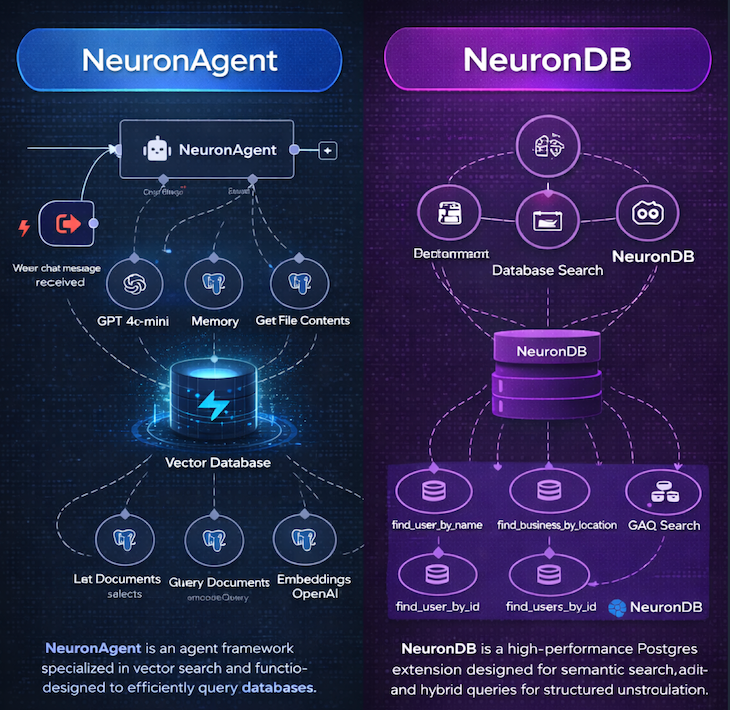
The architecture diagram shows component relationships. User input flows to the runtime. The runtime queries the planner for execution plans. The planner generates steps and validates feasibility. Steps flow to the tool executor for action execution. Results flow to memory for storage. Memory feeds back to the planner for context. The state machine coordinates all transitions. The response generator formats the final output.
Planning Systems
Planning systems convert goals into action sequences. They use language models to generate plans, break complex tasks into steps, handle conditional logic, and manage dependencies between steps. Planning is the core capability that enables autonomous behavior. Without planning, agents cannot break down complex goals, coordinate multiple actions, or adapt to changing conditions.
Planning systems use language models to understand goals. Models analyze goal requirements, identify required resources, determine the necessary steps, and account for constraints and dependencies.
The planning process begins with goal analysis. The system receives a goal statement. The language model parses the goal, identifies key requirements, determines success criteria, and estimates complexity. Goal analysis produces a structured representation that includes:
- Required actions
- Resource needs
- Constraints
- Success metrics
The system queries available tools after goal analysis. The planner examines the tool registry, identifies relevant tools, assesses their capabilities, and verifies their availability. Tool querying enables informed planning. The planner knows which actions are possible, matches goals to capabilities, identifies missing tools, and suggests alternatives.
The planner generates candidate plans using tool information. Each plan is a sequence of steps. Steps specify tool calls, include parameters, and define dependencies. Plan generation considers multiple factors:
- Step ordering: steps must execute in the correct sequence
- Resource availability: tools must be available when needed
- Error handling: plans must handle potential failures
The system validates generated plans. The validation checks plan feasibility, verify step dependencies, confirm resource availability, and ensure goal achievement. Validation includes multiple checks:
- Verifying all steps are executable
- Confirming dependencies are satisfied
- Ensuring resources are available
- Validating the goal achievement path
Valid plans are ranked by quality. Ranking considers execution time, resource usage, success probability, and error resilience. The best plan is selected from ranked candidates. Selection uses quality scores, considers current context, accounts for constraints, and optimizes for success.
Steps are extracted from the selected plan. Each step becomes an executable action. Dependencies order steps, include error handling, and are ready for execution.
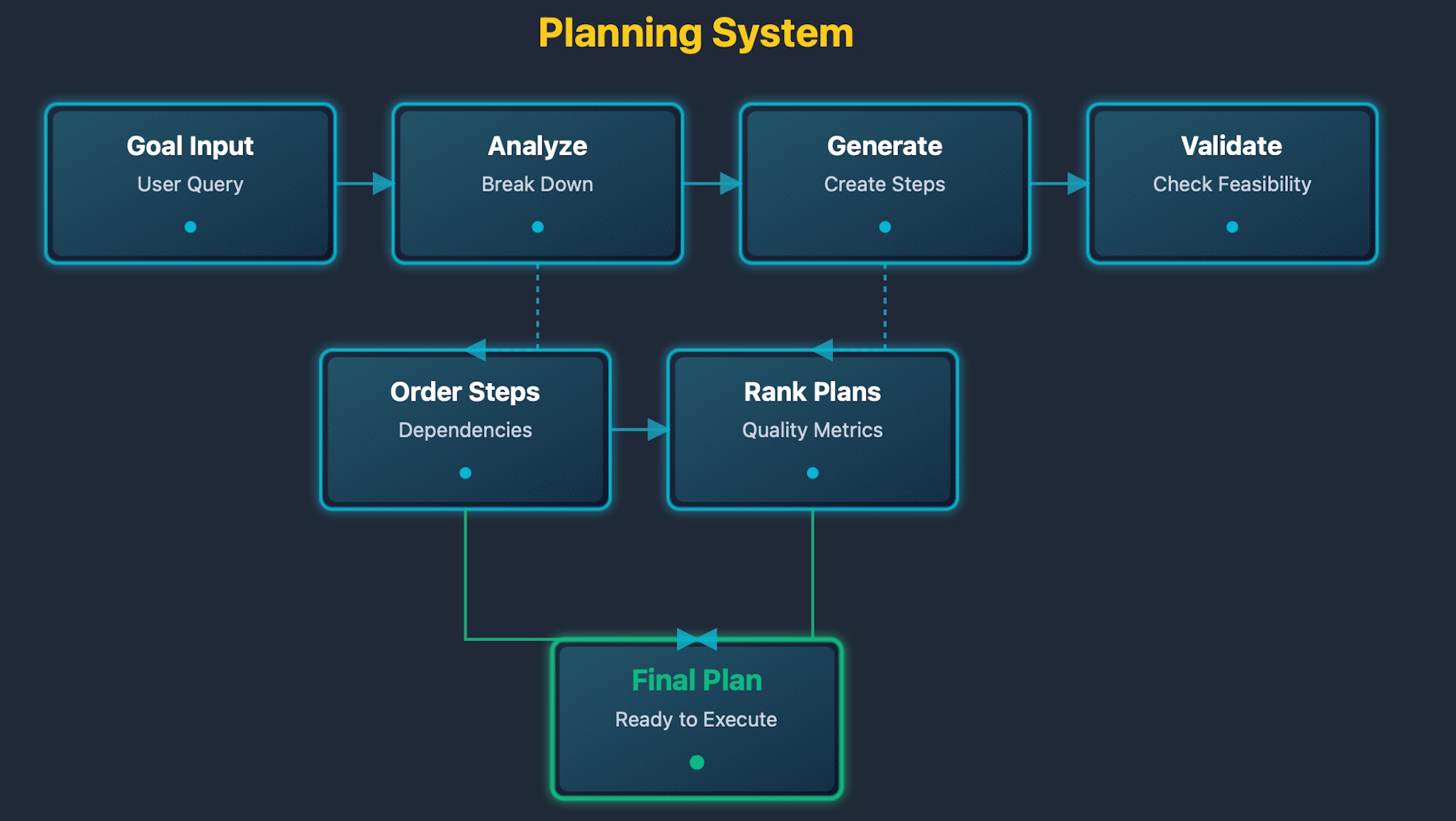
The planning diagram shows the decision flow. Goals enter the planner for analysis. The planner queries available tools to understand capabilities. The planner generates candidate plans with step sequences. Plans are validated for feasibility and correctness. Quality metrics rank valid plans. The best plan is selected based on scores. Steps are extracted for execution by the runtime.
Tool Execution
Tools enable agents to interact with external systems. Tools provide functions for specific actions. Agents call tools during execution; tools return results, which agents use for subsequent steps.
Tools are the bridge between agents and external systems. Without tools, agents can only generate text. With tools, agents can query databases, make API calls, execute code, and run commands. Tools transform agents from text generators into action executors.
Tool execution is fundamental to agentic behavior. Agents identify required actions during planning, select appropriate tools from the registry, format parameters correctly, invoke tools and process results, and use the results for subsequent steps.
Tools include four primary types:
- SQL tools: Execute database queries, enable data retrieval, support data analysis, and provide structured data access.
- HTTP tools: Make web requests, fetch external data, interact with APIs, and retrieve current information.
- Code tools: Execute code snippets, perform computations, process data, and generate outputs.
- Shell tools: Run system commands, interact with the operating system, execute scripts, and manage files.
Each tool type serves specific purposes:
- SQL tools: Enable database interactions where agents query structured data, retrieve relevant information, and analyze data relationships
- HTTP tools: Enable web interactions where agents fetch current information, call external APIs, and retrieve real-time data
- Code tools: Enable computation where agents perform calculations, process data, and generate results
- Shell tools: Enable system interactions where agents execute commands, manage files, and interact with the environment
Tool execution follows a structured flow:
Tool execution includes error handling. Tools may fail due to:
- Network issues
- Invalid results
- Timeouts
- Authentication requirements
The executor handles errors gracefully:
- Retries transient failures
- Reports permanent failures
- Updates the agent state
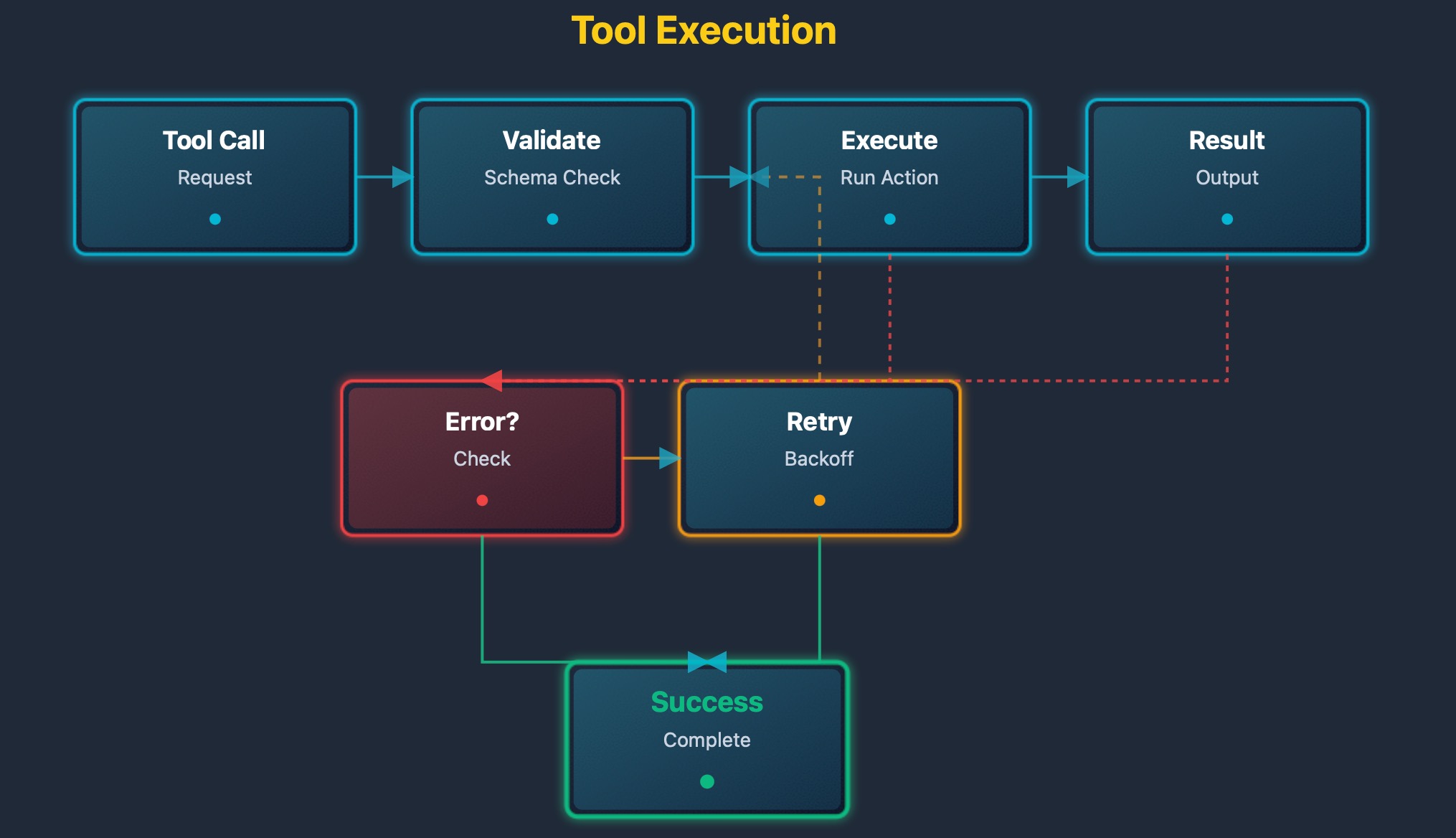
The tool execution diagram shows the interaction flow. The agent requests a tool call with parameters. The tool registry validates the request against tool metadata. The tool executor runs the action in the tool environment. Results are returned in a structured format. The agent processes results for validation. The agent updates the state with new information. The agent continues planning with updated context.
Memory Systems
Memory systems store and retrieve context. They enable agents to remember past interactions, support long-term knowledge retention, and provide semantic search over memories.
Memory is essential for agentic behavior. Without memory, agents cannot learn from experience, repeat mistakes, or build on past knowledge. Memory transforms agents from stateless responders into learning systems.
Memory systems enable persistent knowledge. Agents store important facts from interactions, retrieve relevant context for new queries, build knowledge bases over time, and improve performance through experience.
Memory includes three distinct types:
- Short-term memory: Stores recent conversation context, maintains session state, enables multi-turn conversations, and provides immediate context.
- Long-term memory: Stores essential facts and events, persists across sessions, enables knowledge accumulation, and supports learning over time.
- Working memory: Stores temporary computation state, holds intermediate results, supports complex reasoning, and clears after task completion.
Each memory type serves specific purposes:
- Short-term memory: Enables conversation continuity where agents remember recent exchanges, maintain context within sessions, and provide coherent responses
- Long-term memory: Enables knowledge accumulation where agents remember essential facts, build expertise over time, and avoid repeating mistakes
- Working memory: Enables complex reasoning where agents hold intermediate results, perform multi-step calculations, and manage temporary state
Memory storage follows a structured process:
Memory retrieval uses vector similarity search:
Vector search enables semantic retrieval. Memories are found by meaning, not keywords. Queries match conceptually similar content, synonyms and related concepts are handled automatically, and context retrieval improves response quality.
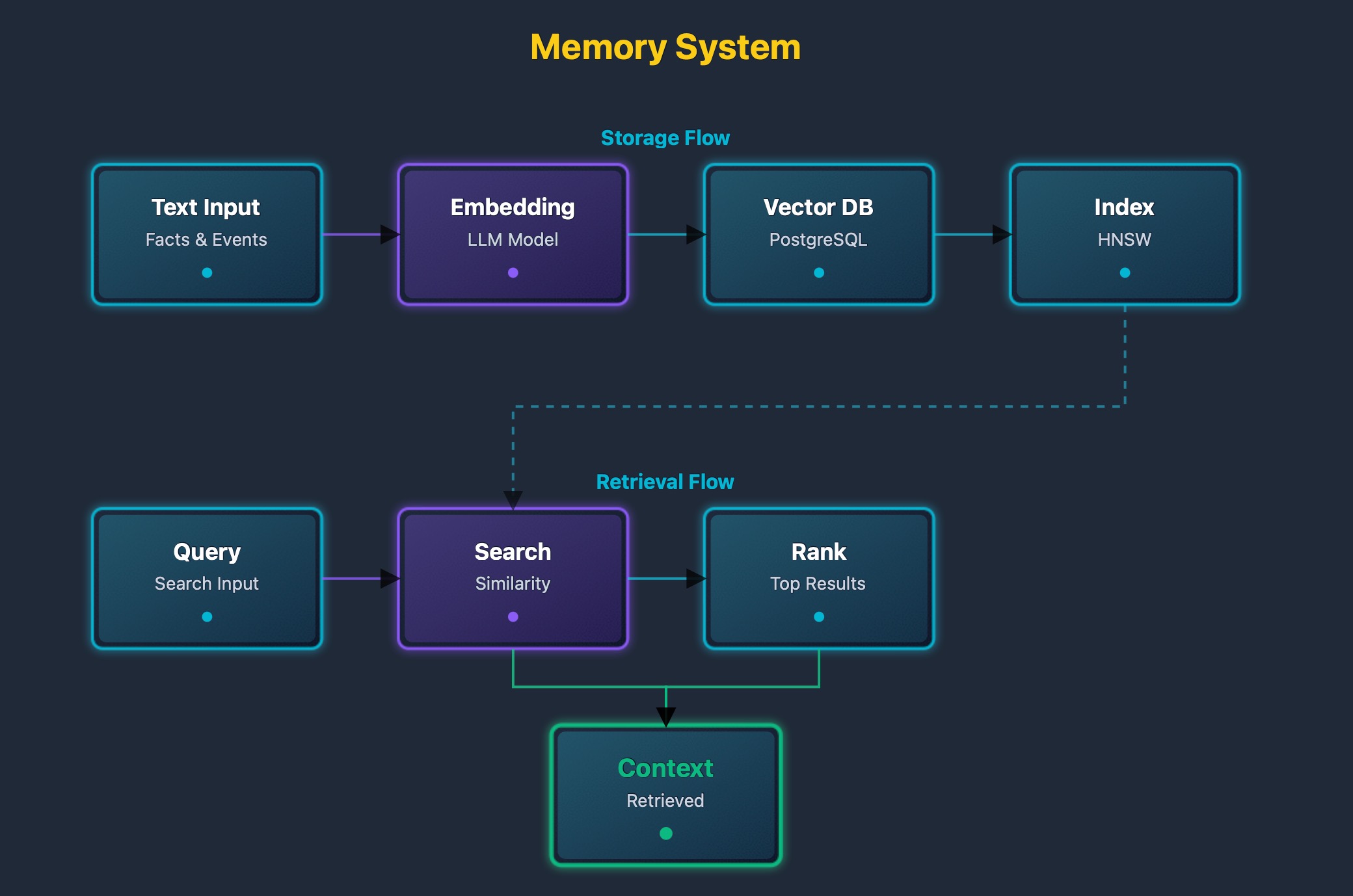
The memory diagram shows storage and retrieval processes. New memories are extracted from interactions. Text is converted to embeddings using language models. Embeddings are stored in vector databases with metadata. Queries are converted to embeddings for search. Similarity search finds relevant memories using vector distance. Relevance scores rank matches. Top matches are returned as context for agent prompts.
State Machines
State machines manage agent execution flow. They track current state, handle state transitions, manage error recovery, and coordinate multi-step tasks.
States include five types:
- Idle: The agent waits for input.
- Planning: The agent generates execution plans.
- Executing: The agent runs tool calls.
- Waiting: The agent waits for tool results.
- Completed: The agent finished the task.
State transitions follow rules:
- Idle → Planning: On a new goal
- Planning → Executing: On plan ready
- Executing → Waiting: On tool call
- Waiting → Executing: On result received
- Executing → Completed: On goal achieved
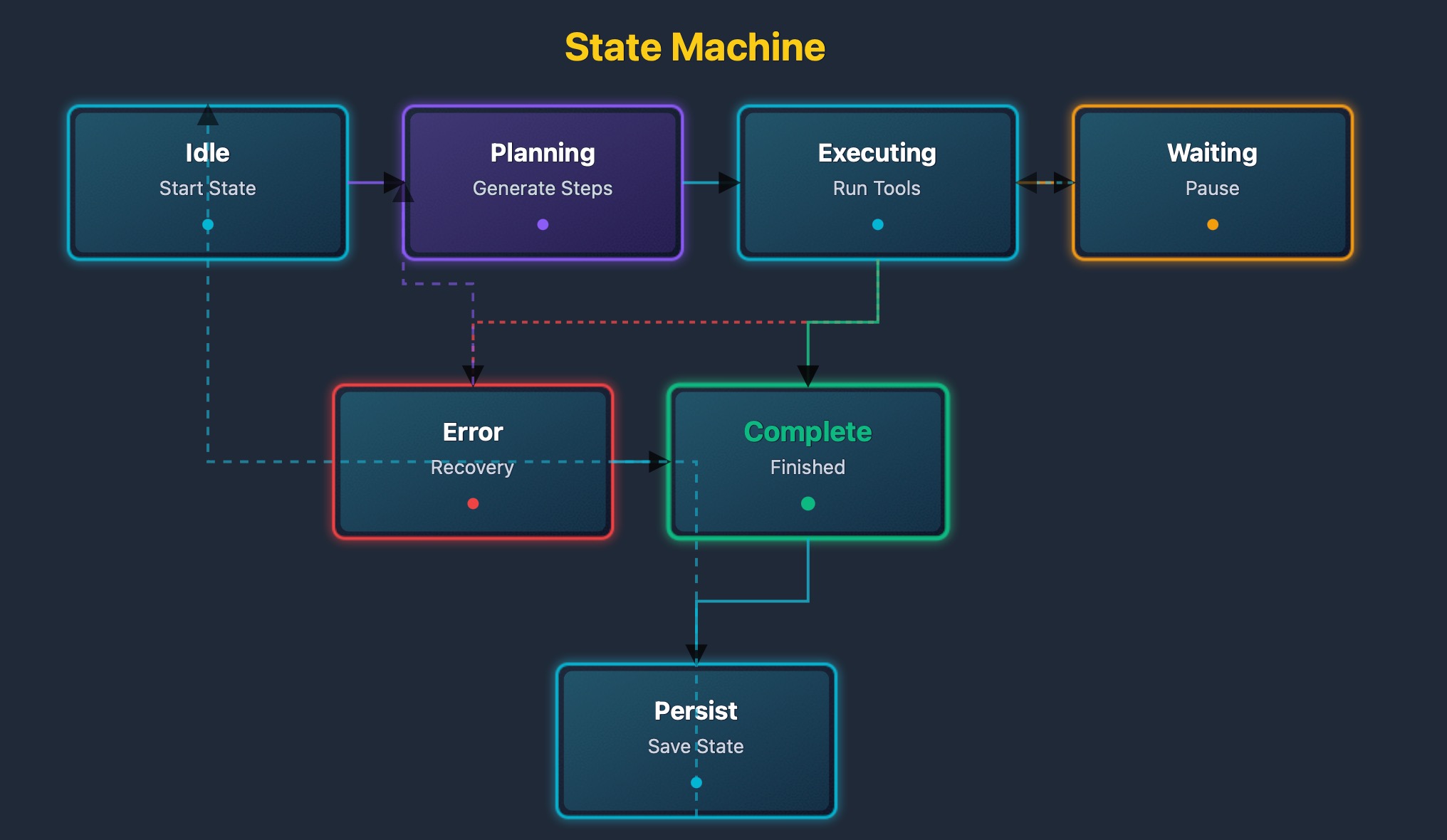
The state machine diagram shows all states and transitions. States are represented as nodes. Transitions are depicted as arrows. Each transition has a condition. Conditions trigger state changes. Error states handle failures. Recovery paths restore regular operation.
Agent Components in Detail
Planning Component
The planning component generates execution plans. It uses language models to analyze goals, breaks goals into actionable steps, and handles conditional logic and loops.
Planning works in three phases:
- Phase one is goal analysis: The system understands the desired outcome.
- Phase two is step generation: The system creates a sequence of actions.
- Phase three is plan validation: The system checks plan feasibility.
Plans include step dependencies. Some steps require previous steps to complete. The planner orders steps correctly and handles parallel execution when possible.
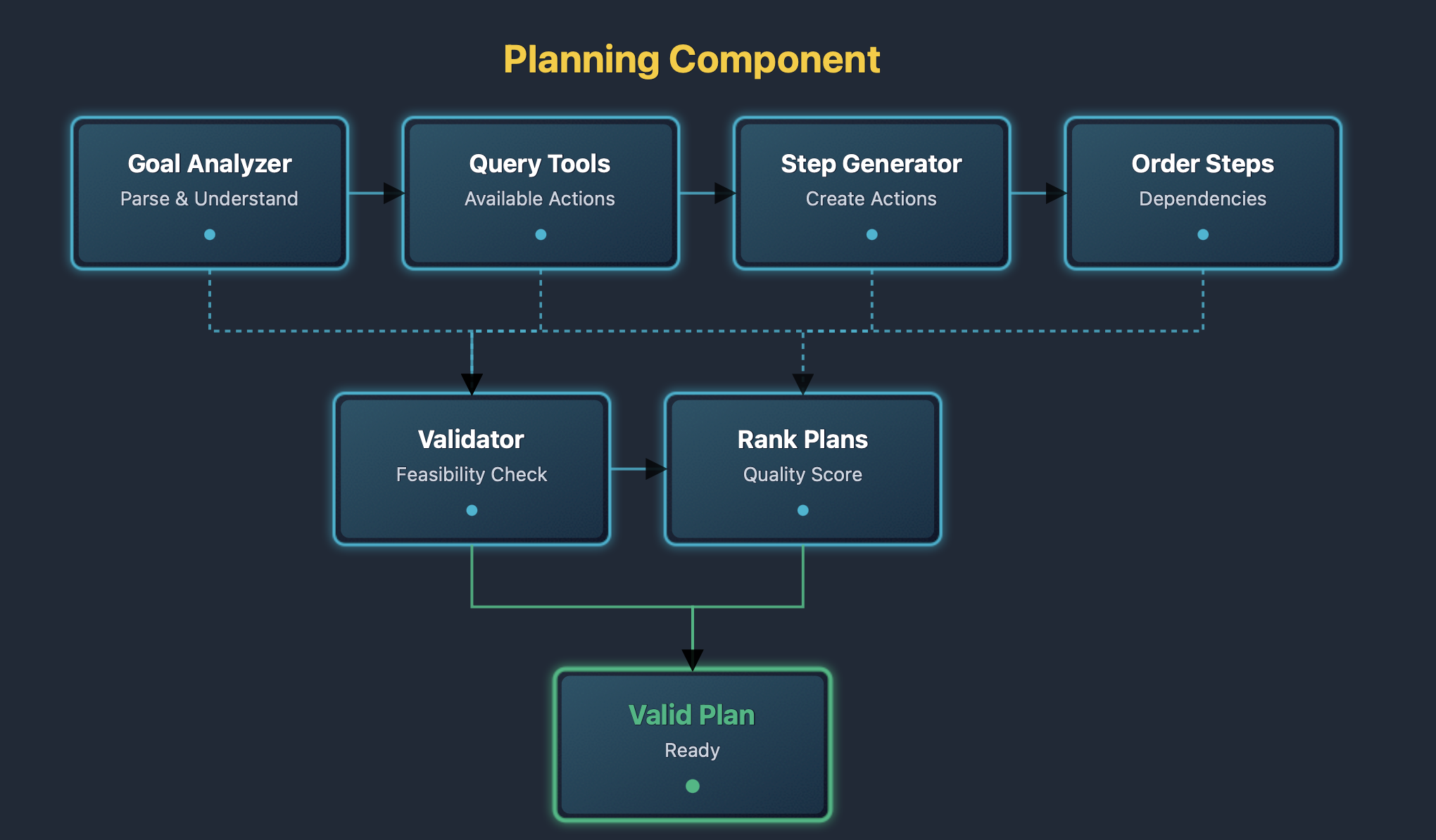
The planning component diagram shows the internal structure. Goals enter the analyzer. The analyzer queries available tools. The analyzer generates candidate steps. Dependencies order steps. The validator checks feasibility. Valid plans are output.
Tool Registry
The tool registry manages available tools. It provides tool discovery, validates tool calls, handles tool execution, and manages tool permissions.
Tools are registered with metadata. Metadata includes tool name, description, parameters, and return types. The registry validates calls against metadata and enforces security policies.
Tool execution includes error handling. Tools may fail due to network issues or return invalid results. The registry handles errors gracefully and retries failed calls when appropriate.
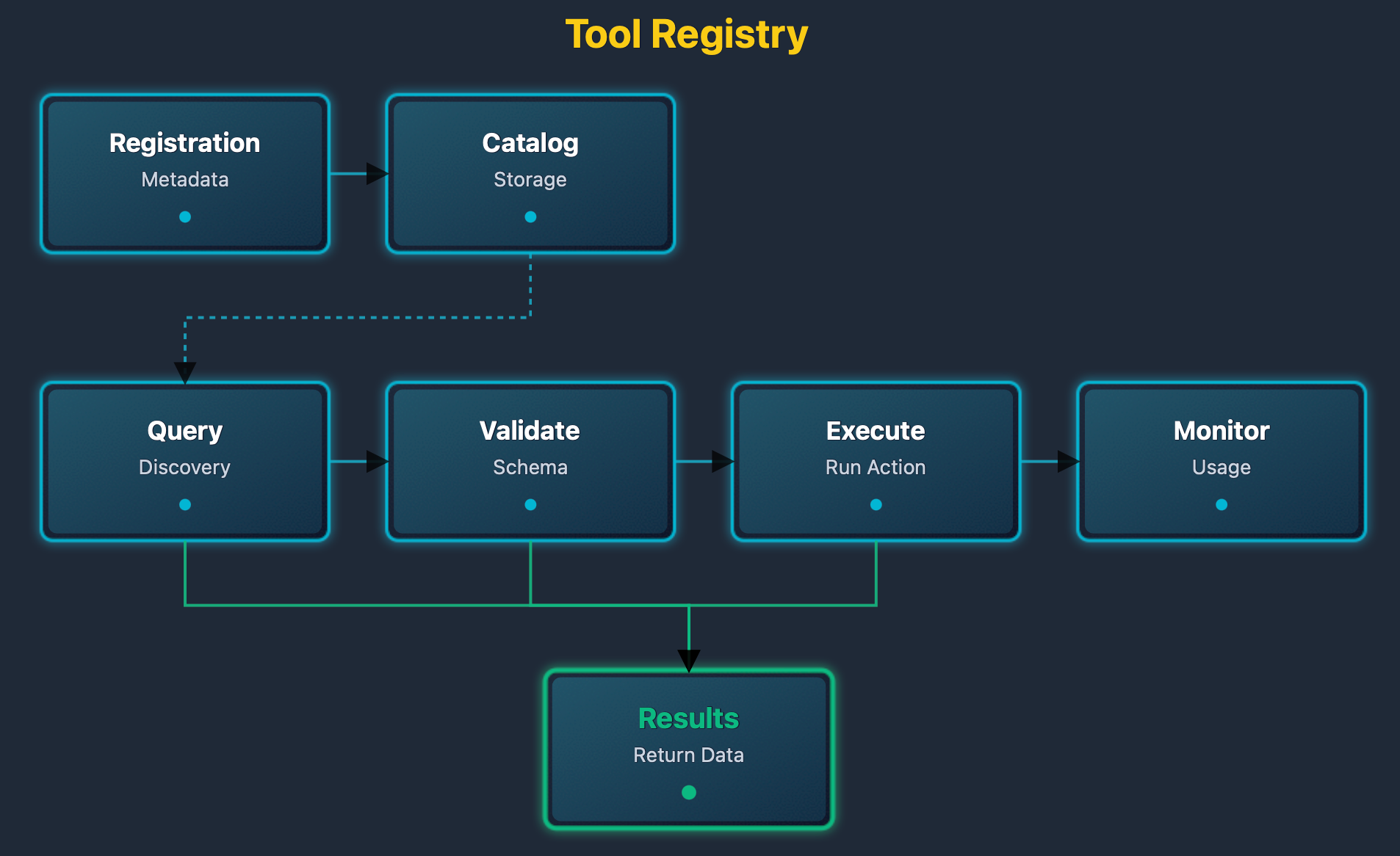
The tool registry diagram shows tool management. Tools are registered with metadata. The registry maintains a catalog. Agents query the catalog. The registry validates requests. The registry executes tools. Results are returned to agents.
Memory Component
The memory component stores agent experiences. It converts text to embeddings, stores embeddings in vector databases, and retrieves relevant memories using similarity search.
Memory storage follows this process:
- Text is extracted from interactions
- Converted to embeddings
- Stored with metadata including timestamps and tags
- Vector indexes enable fast retrieval
Memory retrieval uses semantic search:
- Queries are converted to embeddings
- Similarity search finds relevant memories
- Results are ranked by relevance
- Top results are returned as context
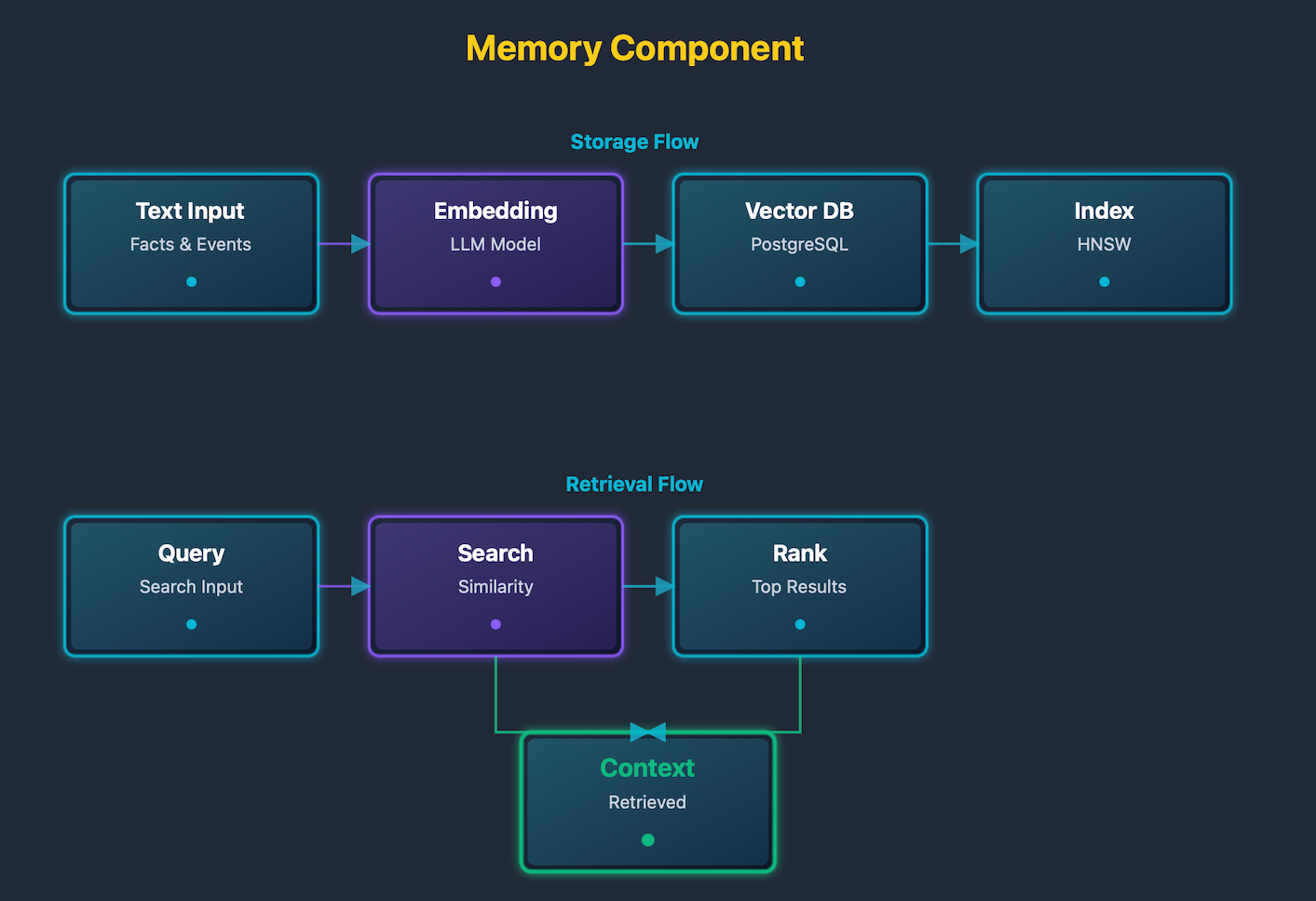
The memory component diagram shows storage and retrieval. Text enters the embedding generator. Embeddings are stored in a vector database. Queries are embedded. Similarity search finds matches. Matches are ranked and returned.
Memory systems enable agents to maintain context across interactions and learn from past experiences. The embedding-based approach allows semantic retrieval, where agents can find relevant memories even when the exact wording differs. This capability is crucial for building agents that can have meaningful conversations over extended periods. The vector database enables efficient similarity search across large collections of stored memories. Ranking mechanisms ensure that the most relevant memories are retrieved and used for context, improving the quality of agent responses.
State Machine Component
The state machine manages execution flow. It tracks the current state, handles transitions, manages error recovery, and coordinates multi-step tasks.
State tracking includes persistence:
- States are saved to databases
- Survive system restarts
- Enable resuming interrupted tasks
Error handling includes recovery paths:
- Failed steps trigger error states
- Error states attempt recovery
- Recovery may retry steps or adjust plans
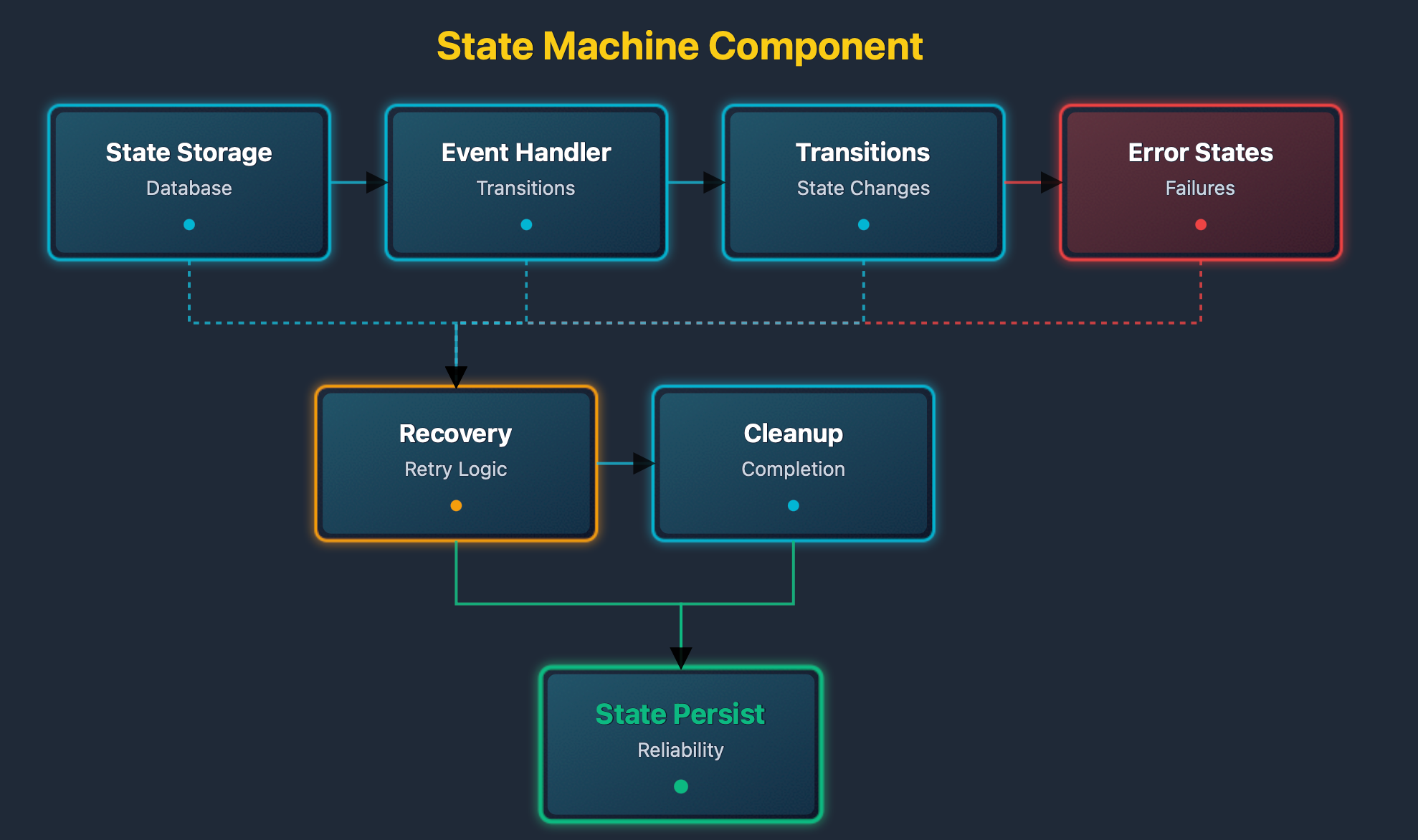
The state machine diagram shows state management. States are stored in the database. Events trigger transitions. Error states have recovery paths. Completed states trigger cleanup.
State machine components provide reliable execution control for agent operations. They ensure that agents progress through execution phases in a controlled and recoverable manner. Database persistence allows state machines to survive system restarts and continue execution from the last known state. Event-driven transitions enable agents to respond dynamically to changing conditions during execution. Recovery mechanisms built into error states allow agents to handle failures gracefully and continue operations when possible.
Agent Execution Flow
Complete Execution Cycle
Agent execution follows this cycle. The cycle starts with user input, ends with response generation, and includes planning, execution, and memory updates.
- Step one: The agent receives user input, loads the conversation context, and retrieves relevant memories.
- Step two generates an execution plan: The planner analyzes the goal, queries available tools, generates a step sequence, and validates the plan.
- Step three executes plan steps: The executor runs each step in order. Steps may call tools, query memory, or update state.
- Step four processes results: Tool results are collected, validated, used for subsequent steps, and update the agent state.
- Step five updates memory: important facts are extracted, converted into embeddings, stored in memory, and the memory index is updated.
- Step six generates a response: The response generator formats output. Output includes execution results and explanations and is returned to the user.
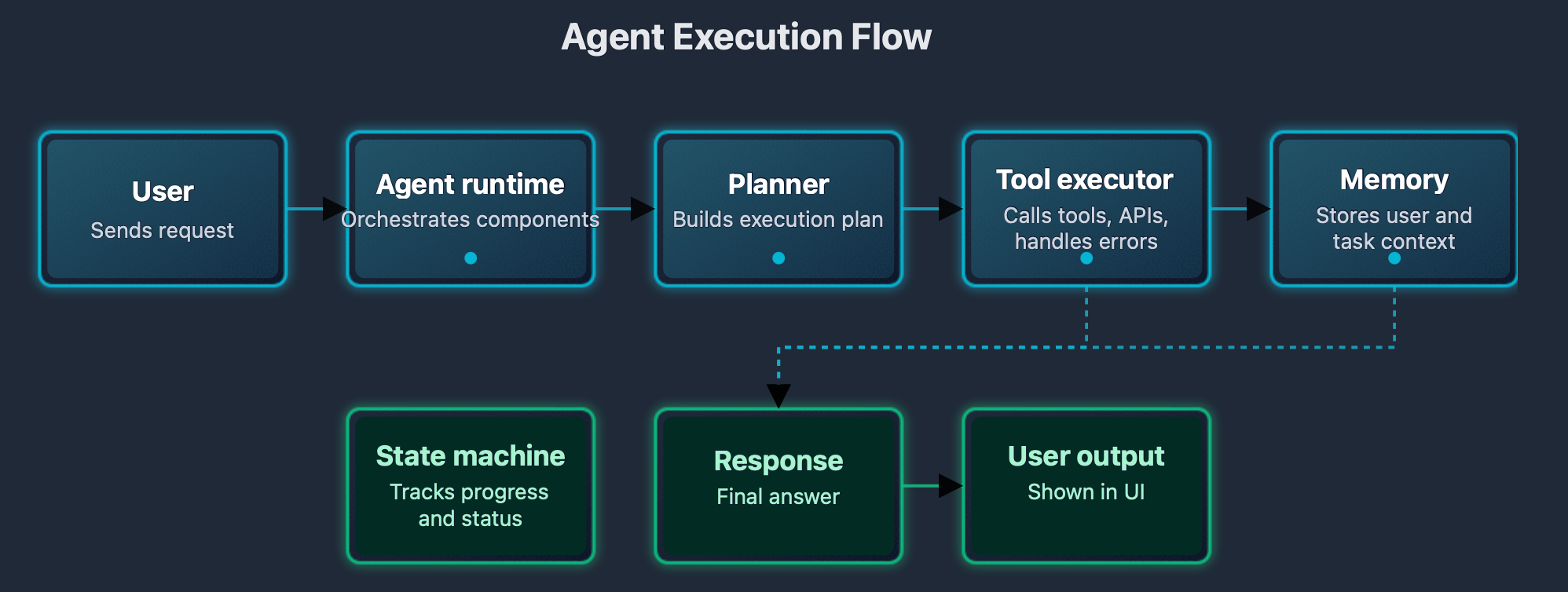
The execution flow diagram shows the complete cycle. Input flows through planning. Planning flows to execution. Execution flows to memory. Memory flows to response. Response flows to the user.
Multi-Step Task Execution
Multi-step tasks require coordination. Agents:
- Break tasks into steps
- Execute steps sequentially
- Handle step dependencies
- Manage step failures
Step dependencies require ordering. Some steps must be completed before others:
- The planner orders the steps correctly
- The executor waits for dependencies
Step failures require recovery:
- Failed steps trigger error handling
- Error handling may retry steps
- Error handling may adjust plans
- Error handling may skip steps
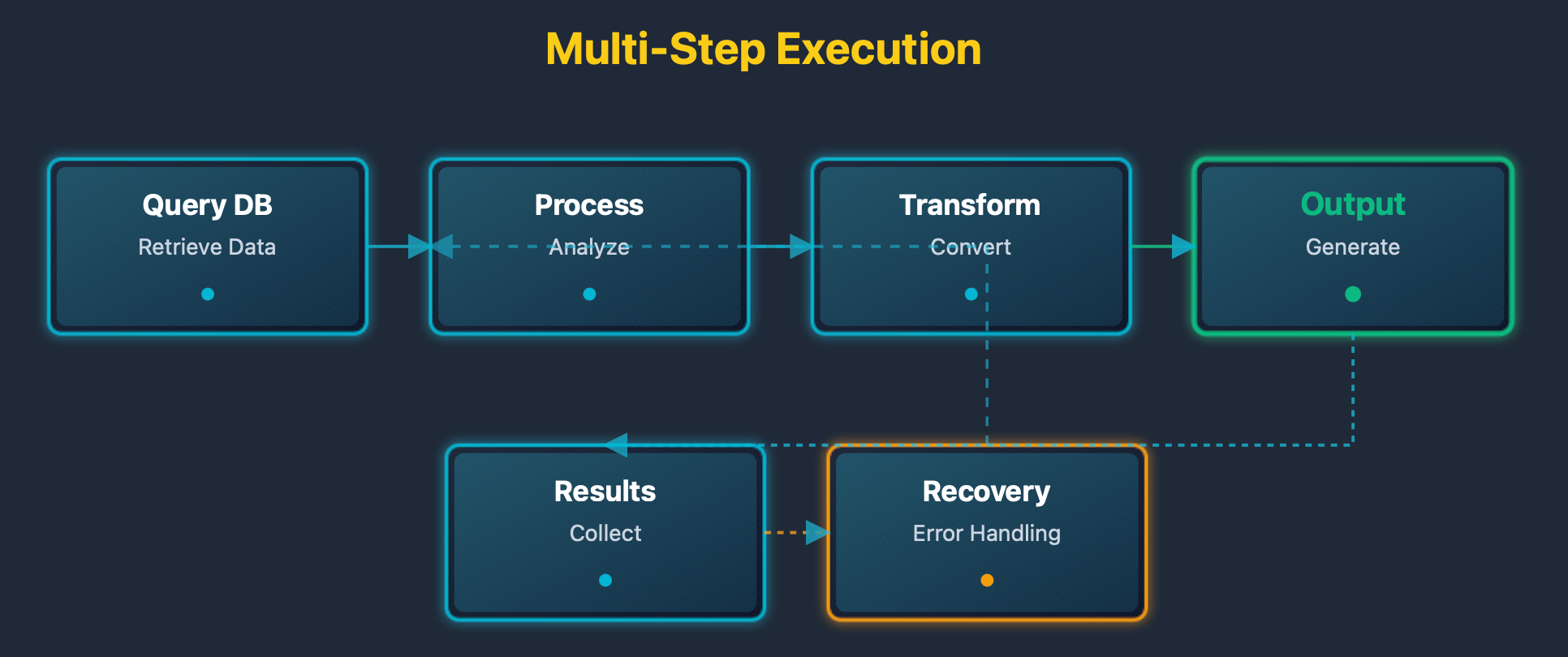
The multi-step diagram shows step coordination. Dependencies order steps. Execution follows the order. Results flow between steps. Failures trigger recovery.
Error Handling and Recovery
Error handling ensures robust operation. Agents encounter various errors:
- Network failures affect tool calls
- Invalid inputs cause validation errors
- Resource limits cause timeouts
Error handling includes detection. The system:
- Monitors execution
- Detects failures
- Categorizes errors
- Selects recovery strategies
Recovery strategies include retries:
- Transient errors trigger retries
- Retries use exponential backoff
- Retries have a maximum attempts
- Permanent errors skip retries
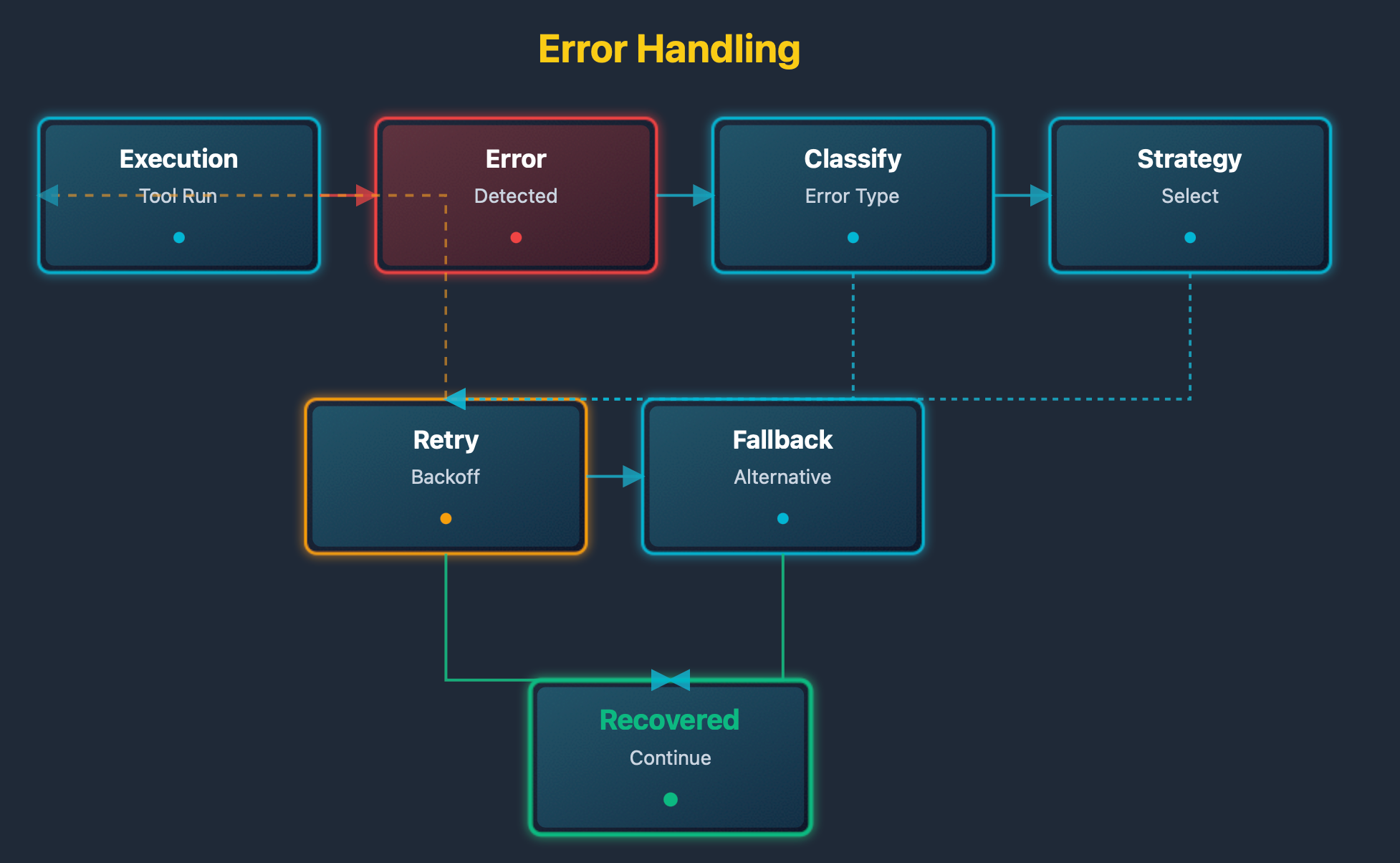
The error handling diagram shows the recovery flow. Errors are detected. Errors are categorized. Recovery strategies are selected. Strategies are executed. Success restores normal flow.
Robust error handling is essential for production agent systems. Errors can occur at any stage of execution, from tool failures to network issues to validation errors. Effective error handling requires both detection mechanisms and recovery strategies. Categorization of errors enables appropriate response selection, distinguishing between transient issues that can be retried and permanent failures that require different handling. Recovery strategies must be designed to minimize disruption to ongoing operations while ensuring system integrity and reliability.
Building an Agent With NeuronDB and NeuronAgent
This section provides a complete step-by-step guide to building a production agent. The guide covers:
- Installation and setup
- Configuration
- Agent creation
- Session management
- Message handling
- Tool execution
- Memory management
- Troubleshooting tips
- Best practices
The example creates a research assistant agent. The agent:
- Answers questions using document retrieval
- Uses SQL tools to query databases
- Uses HTTP tools to fetch web content
- Stores memories for future reference
- Maintains conversation context
- Adapts behavior based on results
Prerequisites
Before building an agent, install the required components. The setup requires PostgreSQL, NeuronDB extension, and NeuronAgent server. Each component must be configured correctly.
Step 1: Install PostgreSQL
PostgreSQL version 16 or later is required. Download and install PostgreSQL for your operating system. Verify installation by checking the version.
# Check PostgreSQL version
psql --version

# Expected output:
# psql (PostgreSQL) 16.0
Step 2: Create Database
Create a database for the agent system. The database stores agents, sessions, messages, and memories.
# Create database
createdb neurondb

# Connect to database
psql -d neurondb

# Verify connection
SELECT version();
Step 3: Install NeuronDB Extension
NeuronDB provides vector search and embedding capabilities. Download the extension for your PostgreSQL version. Install the extension files. Enable the extension in the database.
# Install NeuronDB extension
psql -d neurondb -c "CREATE EXTENSION neurondb;"

# Verify installation
psql -d neurondb -c "SELECT * FROM pg_extension WHERE extname = 'neurondb';"

# Expected output:
# extname  | extversion | nspname
#----------+------------+----------
# neurondb | 1.0        | neurondb
Step 4: Install NeuronAgent Server
NeuronAgent provides the agent runtime. Download the NeuronAgent binary. Extract the files. Configure the server. Start the server.
# Download NeuronAgent (example)
# wget https://github.com/neurondb-ai/neurondb/releases/download/v1.0.0/neuronagent-linux-amd64
# chmod +x neuronagent-linux-amd64
# mv neuronagent-linux-amd64 ./bin/neuronagent

# Run NeuronAgent migrations
psql -d neurondb -f migrations/001_initial_schema.sql
psql -d neurondb -f migrations/002_add_indexes.sql
psql -d neurondb -f migrations/003_add_triggers.sql

# Verify migrations
psql -d neurondb -c "\dt"

# Expected output shows tables:
# agents, sessions, messages, memory_chunks, etc.

# Start NeuronAgent server
./bin/neuronagent

# Server starts on port 8080 by default
# Verify server is running
curl http://localhost:8080/health

# Expected output:
# {"status":"healthy"}
Step 5: Generate API Key
API keys authenticate requests to NeuronAgent. Generate an API key for your application. Store the key securely.
# Generate API key
./bin/neuronagent generate-key

# Expected output:
# API Key: sk-xxxxxxxxxxxxxxxxxxxxxxxxxxxxxxxx

# Store the key securely
export NEURONAGENT_API_KEY="sk-xxxxxxxxxxxxxxxxxxxxxxxxxxxxxxxx"
The setup creates the complete database schema. The schema includes agent tables for configurations. Session tables track conversations. Message tables store interactions. Memory tables enable long-term context. Indexes enable fast queries. Triggers maintain data consistency. The server provides REST API and WebSocket endpoints.
Database Schema Explained
The database schema provides the foundation for agent systems. Understanding each table is essential for building agents. This section explains the schema in detail.
Agents Table
The agents table stores agent configurations. Each agent has a unique identifier. The name field identifies the agent. The system_prompt defines agent behavior. The model_name specifies the language model. The enabled_tools array lists available tools. The memory_table specifies where memories are stored. The config field stores additional settings.
-- Agents table stores agent configurations
CREATE TABLE IF NOT EXISTS agents (
    id UUID PRIMARY KEY DEFAULT gen_random_uuid(),
    name TEXT NOT NULL,
    system_prompt TEXT NOT NULL,
    model_name TEXT DEFAULT 'gpt-4',
    enabled_tools TEXT[] DEFAULT ARRAY['sql', 'http'],
    memory_table TEXT,
    config JSONB DEFAULT '{}',
    created_at TIMESTAMP DEFAULT CURRENT_TIMESTAMP
);

-- Explanation of each field:
-- id: Unique identifier for the agent (UUID)
-- name: Human-readable name for the agent
-- system_prompt: Instructions that define agent behavior
-- model_name: Language model to use (gpt-4, gpt-3.5-turbo, etc.)
-- enabled_tools: Array of tool names the agent can use
-- memory_table: Table name where agent memories are stored
-- config: Additional configuration as JSON
-- created_at: Timestamp when agent was created
The system_prompt is critical. It defines how the agent behaves. It specifies agent capabilities. It guides decision-making. It sets the response style. It defines tool usage patterns.
Sessions Table
The sessions table tracks conversation sessions. Each session belongs to an agent. Sessions maintain conversation context. Sessions enable multi-turn conversations. Sessions persist across requests.
-- Sessions table stores conversation sessions
CREATE TABLE IF NOT EXISTS sessions (
    id UUID PRIMARY KEY DEFAULT gen_random_uuid(),
    agent_id UUID REFERENCES agents(id),
    external_user_id TEXT,
    metadata JSONB DEFAULT '{}',
    created_at TIMESTAMP DEFAULT CURRENT_TIMESTAMP
);

-- Explanation of each field:
-- id: Unique identifier for the session (UUID)
-- agent_id: Reference to the agent handling this session
-- external_user_id: Optional identifier for external user systems
-- metadata: Additional session metadata as JSON
-- created_at: Timestamp when session was created
Sessions enable context continuity. Messages within a session share context. Agents remember previous messages. Agents build on past interactions. Sessions can be resumed after interruptions.
Messages Table
The messages table stores conversation messages. Each message belongs to a session. Messages have roles (user or assistant). Messages contain text content. Messages may include tool calls. Messages are ordered by timestamp.
-- Messages table stores conversation messages
CREATE TABLE IF NOT EXISTS messages (
    id UUID PRIMARY KEY DEFAULT gen_random_uuid(),
    session_id UUID REFERENCES sessions(id),
    role TEXT NOT NULL,
    content TEXT NOT NULL,
    tool_calls JSONB,
    created_at TIMESTAMP DEFAULT CURRENT_TIMESTAMP
);

-- Explanation of each field:
-- id: Unique identifier for the message (UUID)
-- session_id: Reference to the session containing this message
-- role: Message role ('user' or 'assistant')
-- content: Text content of the message
-- tool_calls: JSON array of tool calls made by the agent
-- created_at: Timestamp when message was created
The role field indicates the message origin. User messages come from users. Assistant messages come from agents. Tool calls are stored in the tool_calls field. Tool calls show which tools were used. Tool calls include parameters and results.
Memory Chunks Table
The memory chunks table stores agent memories. Memories are converted to embeddings. Embeddings enable semantic search. Memories persist across sessions. Memories improve agent responses over time.
-- Memory chunks table stores agent memories
CREATE TABLE IF NOT EXISTS memory_chunks (
    id UUID PRIMARY KEY DEFAULT gen_random_uuid(),
    agent_id UUID REFERENCES agents(id),
    session_id UUID REFERENCES sessions(id),
    content TEXT NOT NULL,
    embedding VECTOR(384),
    metadata JSONB DEFAULT '{}',
    created_at TIMESTAMP DEFAULT CURRENT_TIMESTAMP
);

-- Explanation of each field:
-- id: Unique identifier for the memory chunk (UUID)
-- agent_id: Reference to the agent that owns this memory
-- session_id: Reference to the session where memory was created
-- content: Text content of the memory
-- embedding: Vector embedding of the content (384 dimensions)
-- metadata: Additional metadata as JSON (tags, importance, etc.)
-- created_at: Timestamp when memory was created
The embedding field stores vector representations. Embeddings are generated using language models. Embeddings enable semantic similarity search. The VECTOR(384) type stores 384-dimensional vectors. This matches the embedding model dimensions.
Indexes for Performance
Indexes enable fast queries. Vector indexes enable fast similarity search. B-tree indexes enable fast lookups. Proper indexing is essential for performance.
-- Create vector index for memory search
CREATE INDEX IF NOT EXISTS idx_memory_embedding
ON memory_chunks USING hnsw (embedding vector_cosine_ops)
WITH (m = 16, ef_construction = 64);

-- Explanation:
-- HNSW index enables fast approximate nearest neighbor search
-- m = 16: Number of connections per layer (higher = more accurate, slower)
-- ef_construction = 64: Quality parameter during index construction
-- vector_cosine_ops: Uses cosine distance for similarity

-- Create indexes for fast lookups
CREATE INDEX IF NOT EXISTS idx_sessions_agent_id ON sessions(agent_id);
CREATE INDEX IF NOT EXISTS idx_messages_session_id ON messages(session_id);
CREATE INDEX IF NOT EXISTS idx_memory_agent_id ON memory_chunks(agent_id);

-- Explanation:
-- These indexes enable fast filtering by agent_id and session_id
-- Essential for retrieving session messages and agent memories
The HNSW index enables sub-10ms similarity search. It uses cosine distance for semantic similarity. The index parameters balance speed and accuracy. Higher values improve accuracy but slow queries.
The schema provides a complete agent infrastructure. Agents store configurations for behavior definition. Sessions track conversations for context continuity. Messages store interactions for conversation history. Memories enable long-term context through semantic search. Indexes ensure fast queries for production performance.
Create Agent
Create a research assistant agent. The agent uses SQL tools to query documents. The agent uses HTTP tools to fetch web content. The agent stores memories for future reference.
import requests
import json

# NeuronAgent API endpoint
BASE_URL = "http://localhost:8080"
API_KEY = "your-api-key-here"

headers = {
    "Authorization": f"Bearer {API_KEY}",
    "Content-Type": "application/json"
}

# Create research assistant agent
agent_data = {
    "name": "research-assistant",
    "system_prompt": """You are a research assistant. Your role is to:
1. Answer questions using available tools
2. Retrieve relevant documents from the database
3. Synthesize information from multiple sources
4. Store important facts in memory for future reference
5. Provide accurate and cited responses

Always use SQL tools to query the document database. Always use HTTP tools to fetch current information when needed. Always store important facts in memory.""",
    "model_name": "gpt-4",
    "enabled_tools": ["sql", "http"],
    "memory_table": "memory_chunks",
    "config": {
        "temperature": 0.7,
        "max_tokens": 2000,
        "top_p": 0.95
    }
}

response = requests.post(
    f"{BASE_URL}/api/v1/agents",
    headers=headers,
    json=agent_data
)

agent = response.json()
print(f"Agent created: {agent['id']}")
The agent configuration defines behavior. The system prompt guides agent actions. Enabled tools specify available functions. The memory table enables context storage.
Create Session
Create a conversation session. Sessions track individual conversations. Sessions maintain message history. Sessions enable context continuity.
# Create session for the agent
session_data = {
    "agent_id": agent["id"],
    "external_user_id": "user-001",
    "metadata": {
        "topic": "research",
        "language": "en"
    }
}

response = requests.post(
    f"{BASE_URL}/api/v1/sessions",
    headers=headers,
    json=session_data
)

session = response.json()
print(f"Session created: {session['id']}")
Sessions isolate conversations. Each user gets a separate session. Sessions persist across requests. Sessions enable multi-turn conversations.
Send Messages
Send messages to the agent. The agent processes messages. The agent uses tools as needed. The agent generates responses.
# Send a research query
message_data = {
    "content": "What are the key features of vector databases?",
    "role": "user"
}

response = requests.post(
    f"{BASE_URL}/api/v1/sessions/{session['id']}/messages",
    headers=headers,
    json=message_data
)

result = response.json()
print(f"Response: {result['response']}")
print(f"Tokens used: {result.get('tokens_used', 0)}")
The agent processes the query. The agent uses SQL tools to query documents. The agent retrieves relevant information. The agent generates a response.
Tool Execution Example
The agent uses SQL tools to query documents. This example shows the tool execution flow.
# The agent automatically uses SQL tools when needed
# Example: Agent receives query about vector databases
# Agent generates SQL query:
query = """
SELECT chunk_text, doc_title, similarity
FROM (
    SELECT
        dc.chunk_text,
        d.title AS doc_title,
        1 - (dc.embedding <=> embed_text('vector databases features', 'sentence-transformers/all-MiniLM-L6-v2')) AS similarity
    FROM document_chunks dc
    JOIN documents d ON dc.doc_id = d.doc_id
    ORDER BY dc.embedding <=> embed_text('vector databases features', 'sentence-transformers/all-MiniLM-L6-v2')
    LIMIT 5
) results;
"""

# Agent executes query via SQL tool
# Tool returns results
# Agent uses results to generate response
Tool execution happens automatically. The agent identifies needed information. The agent selects appropriate tools. The agent formats tool calls. Tools execute and return results.
Memory Storage
The agent stores important facts in memory. Memory enables future context retrieval.
# Agent automatically stores memories
# Example: After answering about vector databases
# Agent extracts key facts:
facts = [
    "Vector databases store high-dimensional embeddings",
    "HNSW indexes enable fast similarity search",
    "Vector databases support semantic search"
]

# Agent stores facts in memory_chunks table
# Each fact is converted to embedding
# Embeddings enable semantic retrieval
Memory storage happens automatically. The agent extracts important facts. Facts are converted to embeddings. Embeddings are stored in the database.
Memory Retrieval
The agent retrieves relevant memories for context. Memory retrieval uses semantic search.
-- Agent retrieves relevant memories for query context
WITH query_embedding AS (
    SELECT embed_text(
        'vector database features',
        'sentence-transformers/all-MiniLM-L6-v2'
    ) AS embedding
)
SELECT
    content,
    1 - (embedding <=> qe.embedding) AS similarity
FROM memory_chunks mc
CROSS JOIN query_embedding qe
WHERE agent_id = 'agent-uuid-here'
ORDER BY embedding <=> qe.embedding
LIMIT 5;
Memory retrieval finds relevant context. Similarity search ranks memories. Top memories are added to the context. Context improves response quality.
Complete Example
This complete example shows agent usage from start to finish.
#!/usr/bin/env python3
"""
Complete NeuronAgent Example: Research Assistant
"""

import requests
import json
import time

BASE_URL = "http://localhost:8080"
API_KEY = "your-api-key-here"

headers = {
    "Authorization": f"Bearer {API_KEY}",
    "Content-Type": "application/json"
}

# Step 1: Create agent
print("Creating research assistant agent...")
agent_data = {
    "name": "research-assistant",
    "system_prompt": """You are a research assistant. Answer questions using SQL tools to query documents and HTTP tools to fetch current information. Store important facts in memory.""",
    "model_name": "gpt-4",
    "enabled_tools": ["sql", "http"],
    "memory_table": "memory_chunks"
}

response = requests.post(f"{BASE_URL}/api/v1/agents", headers=headers, json=agent_data)
agent = response.json()
print(f"Agent created: {agent['id']}")

# Step 2: Create session
print("Creating session...")
session_data = {"agent_id": agent["id"]}
response = requests.post(f"{BASE_URL}/api/v1/sessions", headers=headers, json=session_data)
session = response.json()
print(f"Session created: {session['id']}")

# Step 3: Send research queries
queries = [
    "What are vector databases?",
    "How does semantic search work?",
    "What is the difference between HNSW and IVFFlat indexes?"
]

for query in queries:
    print(f"\nQuery: {query}")
    message_data = {"content": query, "role": "user"}
    response = requests.post(
        f"{BASE_URL}/api/v1/sessions/{session['id']}/messages",
        headers=headers,
        json=message_data
    )
    result = response.json()
    print(f"Response: {result['response'][:200]}...")
    print(f"Tokens used: {result.get('tokens_used', 0)}")
    time.sleep(1)

print("\nExample completed!")
The complete example demonstrates the full agent workflow. Agent creation sets up capabilities. Session creation starts conversations. Message sending triggers agent execution. The agent uses tools automatically. Agent stores memories automatically.
Advanced Patterns
Advanced patterns extend basic agent functionality. Patterns include multi-agent systems, agent orchestration, and specialized agents.
Multi-agent systems use multiple agents. Each agent handles specific tasks. Agents communicate through shared memory. Agents coordinate through message passing.
Agent orchestration manages agent workflows. Orchestrators route tasks to agents. Orchestrators coordinate multi-step processes. Orchestrators handle failures and retries.
Specialized agents focus on specific domains. Research agents handle information retrieval. Code agents handle programming tasks. Analysis agents handle data processing.
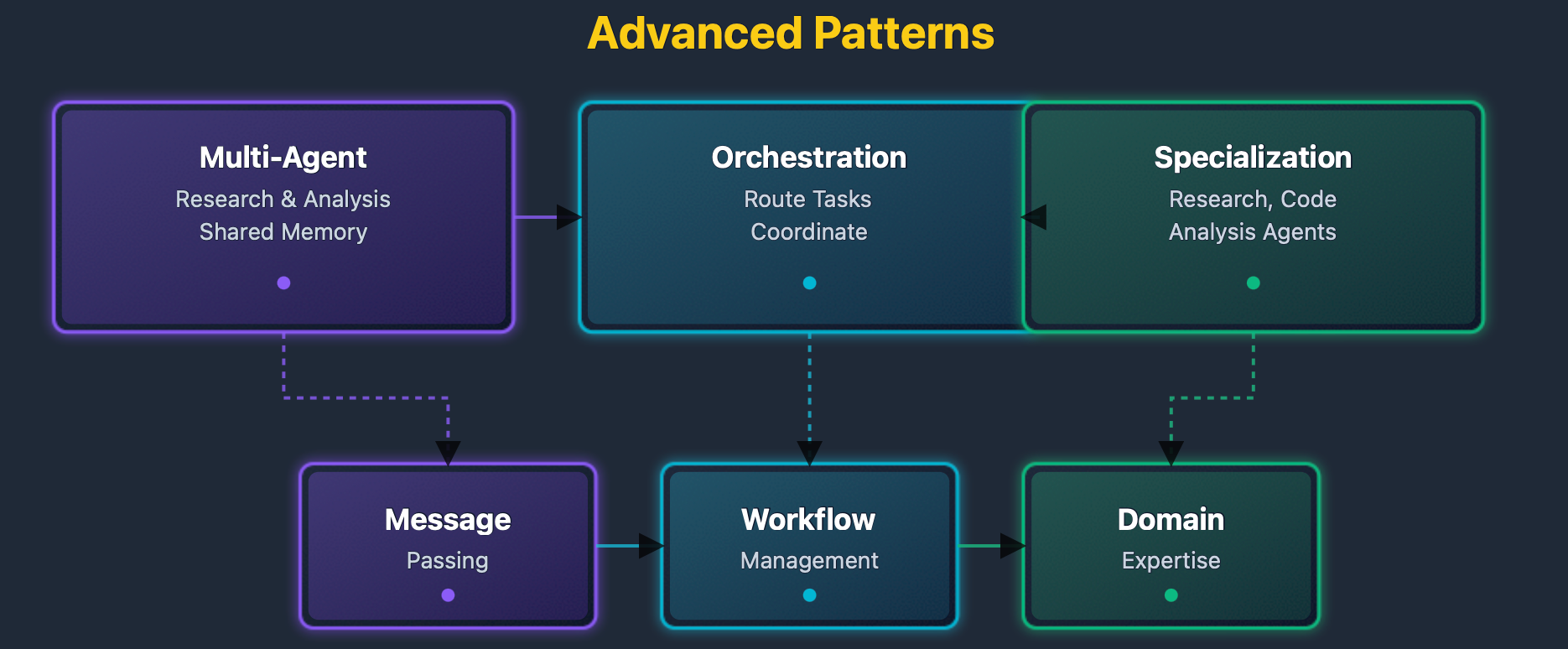
The advanced patterns diagram shows system architectures. Multi-agent systems show agent coordination. Orchestration shows workflow management. Specialization shows domain-specific agents.
Advanced patterns enable scaling agent systems to handle complex, distributed scenarios. Multi-agent systems allow multiple specialized agents to work together on complex problems that exceed the capabilities of individual agents. Orchestration patterns coordinate agent activities to ensure proper sequencing and resource management. Specialized agents can focus on specific domains, leveraging domain knowledge to provide superior performance in their areas of expertise. These patterns enable building sophisticated agent ecosystems that can tackle enterprise-scale challenges.
Production Considerations
Performance Optimization
Agent performance depends on several factors. Planning time affects response latency, tool execution time affects task duration, and memory retrieval time affects context loading.
Optimization strategies include caching. Query embeddings, tool results, and memory retrievals are cached, reducing computation time.
Index optimization improves memory search. HNSW indexes enable fast similarity search. Index parameters affect query performance, and index maintenance helps ensure optimal performance.
-- Monitor memory search performance
SELECT
    COUNT(*) AS total_memories,
    AVG(vector_dims(embedding)) AS avg_dimensions,
    pg_size_pretty(pg_total_relation_size('memory_chunks')) AS table_size
FROM memory_chunks;

-- Check index usage
SELECT
    schemaname,
    tablename,
    indexname,
    idx_scan,
    idx_tup_read,
    idx_tup_fetch
FROM pg_stat_user_indexes
WHERE tablename = 'memory_chunks';
Performance monitoring tracks system health. Query statistics show usage patterns. Index statistics show search efficiency. Size statistics show storage requirements.
Security Considerations
Agent security requires careful design. Tool execution must be sandboxed, SQL queries must be restricted, HTTP requests must be validated, and code execution must be isolated.
Security measures include authentication. API keys authenticate requests, rate limiting prevents abuse, and role-based access controls provide permissions.
Tool security includes validation. SQL tools are limited to read-only queries; HTTP tools validate URLs; code tools restrict file access; and shell tools restrict commands.
-- Example: Restrict SQL tool to read-only
CREATE ROLE agent_user;
GRANT SELECT ON ALL TABLES IN SCHEMA public TO agent_user;
REVOKE INSERT, UPDATE, DELETE ON ALL TABLES IN SCHEMA public FROM agent_user;
Security configuration limits agent capabilities. Read-only access prevents data modification. URL validation prevents malicious requests. Command restrictions avoid access to the system.
Monitoring and Observability
Monitoring tracks agent behavior. Metrics include request counts, response times, tool usage, and error rates. Logs record execution details, and traces show request flows.
Key metrics include latency. Planning latency measures plan generation time, execution latency measures tool call time, memory latency measures retrieval time, and total latency measures end-to-end time.
Error tracking identifies issues. Failed tool calls are logged, planning failures are recorded, memory retrieval errors are tracked, and state machine errors are monitored.
-- Track agent metrics
CREATE TABLE agent_metrics (
    id SERIAL PRIMARY KEY,
    agent_id UUID,
    metric_name TEXT,
    metric_value NUMERIC,
    timestamp TIMESTAMP DEFAULT CURRENT_TIMESTAMP
);

-- Log tool executions
CREATE TABLE tool_executions (
    id SERIAL PRIMARY KEY,
    agent_id UUID,
    tool_name TEXT,
    execution_time_ms INTEGER,
    success BOOLEAN,
    error_message TEXT,
    timestamp TIMESTAMP DEFAULT CURRENT_TIMESTAMP
);
Metrics tables track system performance. Agent metrics show usage patterns. Tool metrics show execution efficiency. Error metrics show failure rates.
Conclusion
Agentic AI systems enable autonomous task execution. Agents plan multi-step tasks, use tools to interact with systems, store contextual memories, and manage state across sessions.
This guide explained agent architecture. It covered planning systems, tool execution, memory management, and state machines. It provided implementation examples using NeuronDB and NeuronAgent.
NeuronDB provides a vector search for memory systems. NeuronAgent provides agent runtime infrastructure. Together, they enable production agent systems.
Use agents for:
- Complex tasks requiring multiple steps
- Tasks requiring external tool access
- Tasks requiring long-term memory
- Tasks requiring autonomous operation
Published at DZone with permission of Damil Shahzad. See the original article here.
Opinions expressed by DZone contributors are their own.
Comments