

Agentic AI: An Architecture Blueprint for Intelligent Clients
Agentic AI turns Android apps into intelligent clients that understand user goals, plan multi-step tasks, and call tools safely.
Join the DZone community and get the full member experience.
Join For FreeThis article outlines an agentic AI architecture for Android clients, where on-device agents perceive context, reason over user goals, and coordinate with cloud services. It details patterns for secure orchestration, offline resilience, and explainable decisions, enabling intelligent Android apps that can adapt, personalize, and act autonomously while preserving user trust.
Why Agentic AI on Android?
Most Android apps today are still “screen and API” applications: they render views, call REST endpoints, and wait for the backend to decide everything important. Even when we bolt on AI—say, a chatbot or autocomplete — it’s usually a single LLM call hidden behind a button.
Agentic AI is a step beyond that. Instead of treating AI as a one-shot model call, we treat it as an agent that can:
-
Understand user goals, not just individual taps
-
Plan multi-step workflows
-
Call different tools/skills (APIs, local actions)
-
React to context (device state, network, history)
-
Act with guardrails and explainable decisions
On Android, that means moving part of the intelligence directly into the client. The app isn’t “just a UI” anymore; it becomes an intelligent orchestrator that collaborates with cloud AI, not just defers to it.

What Is an Agentic Android Client?
An agentic client is an Android app where a dedicated “agent layer” sits between the UI and the backend, responsible for:
-
Interpreting user intent (natural language + interaction signals)
-
Planning tasks and sub-tasks
-
Choosing which tools to call (network APIs, local storage, device features)
-
Managing state and progress across steps
-
Explaining what it’s doing and why
From a user’s perspective, instead of tapping through 6 screens and forms, they might say:
“Help me set up recurring reminders to pay my rent and sync it with my calendar.”
From an architecture perspective, that translates into:
Intent → Plan → Tool calls → Validation → Feedback → Next step.
Let’s look at an architecture blueprint that makes this concrete.
High-Level Architecture Overview
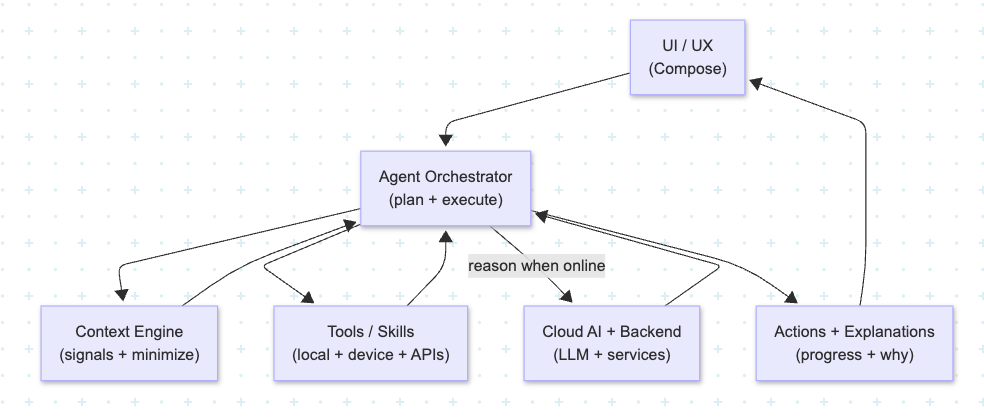
At a high level, an agentic Android client has these layers:
-
Presentation Layer (UI & UX)
-
Jetpack Compose screens, navigation, and UI state.
-
Collects user input (text, voice, gestures) and displays agent responses and actions.
-
-
Agent Orchestrator (Core Agent Layer)
-
The “brain” on the device.
-
Receives intents, holds the current plan, and coordinates tool execution.
-
Responsible for retries, fallbacks, and error handling.
-
-
Context Engine
-
Aggregates relevant signals: recent actions, screen, user preferences, network state, cached data.
-
Filters and normalizes context before sending to the LLM/tools (to avoid leaking sensitive or irrelevant data).
-
-
Tooling / Skills Layer
-
Typed interfaces for things the agent can do:
-
Network APIs (REST, gRPC, GraphQL)
-
Local database queries (Room, DataStore)
-
Device capabilities (notifications, calendar integration, offline cache)
-
-
Implemented as use cases or repository-style classes with clear contracts.
-
-
Cloud AI & Backend Services
-
LLMs, function calling, domain services, and business rules.
-
May perform heavy reasoning, long-term memory, or cross-device coordination.
-
The key idea: the agent layer is a first-class architecture concept, not an afterthought.
Agent Flow: From Intent to Action
A typical interaction might look like this:
-
User Intent
-
The user types or speaks a goal: “Summarize my recent activity and suggest next actions.”
-
-
Context Gathering
-
Context Engine collects:
-
Last few screens visited
-
Relevant local data (e.g., recent transactions, messages, tasks)
-
Network status and feature flags
-
-
-
LLM Reasoning (Cloud or On-Device)
-
The agent sends a structured prompt including:
-
User intent
-
Context snapshot
-
Available tools and schemas (e.g.,
fetchRecentActivity,createReminder,openScreen)
-
-
The LLM responds with a plan:
-
Steps to fetch data
-
How to call tools
-
What to show the user
-
-
-
Tool Execution on Android
-
The orchestrator maps the plan to real tool calls:
-
Invokes repositories, use cases, or SDKs
-
Handles retries, cancellation, and timeouts via coroutines/Flows
-
-
-
Result Aggregation & Explanation
-
The agent composes a user-friendly response and UI update:
-
“Here’s a summary of your last 7 days…”
-
Offers buttons / chips for the next steps (“Set a reminder”, “View details”).
-
-
-
Feedback Loop
-
Telemetry logs which plan steps succeeded or failed.
-
The architecture supports adjusting prompts and policies based on real-world behavior.
-
Offline Resilience and Degraded Modes
A purely cloud-driven agent will fall apart when the user has poor connectivity. The architecture should explicitly design for offline and degraded modes:
-
Local-first tools:
-
Let the agent call local data sources even when the LLM isn’t reachable.
-
For example: “Show my recently viewed items” can work entirely from local cache.
-
-
Deferred intent execution:
-
Queue certain intents (e.g., “Send this later”) and sync when online.
-
The agent can acknowledge: “I’ll send this when you’re back online.”
-
-
Fallback templates:
-
If the LLM is unavailable, fall back to deterministic flows (“wizard mode”) using predefined rules.
-
The same agent interface, but simpler logic.
-
Architecturally, this means the agent orchestrator abstracts over the reasoning engine: it can use LLM when available, or a local rules engine when not.
Security, Privacy, and Guardrails
Agentic AI without guardrails is a recipe for trouble. On Android, your architecture must explicitly encode:
-
Tool Contracts & Permissions
-
Tools should be strongly typed and narrow in scope.
-
Example:
CreateCalendarEventToolshould only create events, not read arbitrary contacts or files. -
Require explicit user consent for sensitive actions.
-
-
Policy Layer
-
A local policy engine that checks each planned action:
-
Is this allowed?
-
Does it require extra confirmation?
-
Is the user in the right state / role?
-
-
-
Data Minimization
-
The Context Engine should aggressively filter out PII and unnecessary fields before sending any context to the cloud.
-
Tokenize or redact where possible.
-
-
Explainability Hooks
-
The agent should be able to explain:
-
“I’m suggesting this because…”
-
“I’m asking for this permission because…”
-
-
Architect your plan representations so they capture why a step exists, not just what it does.
-
Implementation Tips for Android Teams
A few practical recommendations if you want to start building this on a real Android codebase:
-
Treat the Agent as a Feature Module
-
Isolate the agent orchestrator, tools, and context engine into a dedicated module.
-
This keeps dependencies clean and makes it easier to test.
-
-
Define Tool Interfaces First
-
Design tools as interfaces with data classes for requests/responses.
-
Use these same schemas in your LLM function-calling definitions to keep client and server aligned.
-
-
Use Flows for Long-Running Plans
-
Multi-step tasks can emit progress events (
Loading,StepCompleted,Error,Done). -
Your UI can observe these and render progress in a user-friendly way.
-
-
Test Agents with Recorded Sessions
-
Record real user sessions (with proper privacy safeguards) and replay them against your agent logic.
-
This helps you catch unexpected edge cases and regressions in planning/execution.
-
-
Start Narrow, Then Expand
-
Don’t try to make the entire app agentic on day one.
-
Pick one vertical: onboarding, search, or a “help me” surface.
-
Prove out the architecture, then generalize.
-
Closing Thoughts
Agentic AI on Android isn’t just about sprinkling LLM calls into your app. It’s about elevating the client to an intelligent, policy-aware orchestrator that can understand goals, plan actions, call tools safely, and adapt to real-world conditions like flaky networks and privacy constraints.
By introducing a clear Agent Orchestrator, Context Engine, and Tooling layer into your Android architecture, you give your app a foundation for truly intelligent experiences — where the user feels like they’re collaborating with a capable assistant, not fighting through a maze of screens.
That’s the blueprint: start with a solid architecture, treat the agent as a first-class citizen, and build intelligence that’s not only powerful, but also resilient, secure, and worthy of your users’ trust.
Opinions expressed by DZone contributors are their own.
Comments