

Building AI Agents With .NET: A Practical Guide
Build autonomous, goal-driven AI agents in .NET using OpenAI’s GPT models. Learn how to integrate perception, reasoning, action, and learning in C#.
Join the DZone community and get the full member experience.
Join For FreeAs software systems evolve, there's a growing demand for applications that are not just reactive but proactive, adaptive, and intelligent. This is where Agentic AI comes in. Unlike traditional AI that simply follows instructions, Agentic AI involves autonomous agents that can perceive, reason, act, and learn just like intelligent assistants.
In this article, we’ll explore how to bring Agentic AI concepts into the world of .NET development, creating smarter, self-directed applications.
What Is Agentic AI ?
Agentic AI is a form of artificial intelligence that behaves like a virtual AI agent with a brain that doesn’t just react to commands , but actively pursuing goals, making decisions, and taking action, often without human help. Think of it like having a virtual teammate that says:
“I see a problem. I know what needs to be done. Let me handle it.”
While traditional AI models focused on prediction or classification, Agentic AI emphasizes autonomy, collaboration, and goal-orientation.
|
Feature |
Generative AI |
Agentic AI |
|---|---|---|
|
Primary Function |
Content creation |
Autonomous action and decision-making |
|
Autonomy |
Requires user input for generation |
Operates independently, pursuing goals with minimal human guidance |
|
Learning |
Learns from data to recognize patterns |
Learns from interactions with the environment and adapts its behavior |
|
Output |
New content (text, images, etc.) |
Actions, decisions, and goal achievement |
|
Examples |
GPT-4, Stable Diffusion, music/code generation |
Self-driving cars, autonomous drones, AI-powered robotic surgery |
Why Use Agentic AI in .NET?
.NET is widely used in enterprise and cloud-native development. Integrating Agentic AI can:
- Enhance automation and decision-making
- Enable adaptive workflows
- Improve system scalability and resilience
- Support intelligent microservices
By combining .NET’s robust architecture with Agentic AI, developers can build future-ready, intelligent systems.
Core Components of Agentic AI
Agentic AI systems typically consist of four main stages:
1. Perception
- Collects data from APIs, databases, sensors, etc.
- Converts raw input into meaningful context
2. Reasoning
- A large language model (LLM) interprets tasks and goals
- Coordinates with other models/tools for specialized actions
- May use RAG (Retrieval-Augmented Generation) to fetch up-to-date, accurate data
3. Action
- Makes decisions and executes actions autonomously
- Interfaces with APIs, UI layers, or databases
4. Learning
- Evaluates results of its actions
- Continuously improves based on feedback and data
How to Use Agentic AI in .NET Applications
Agentic AI can be seamlessly integrated into .NET applications without disrupting existing systems. By combining .NET’s robustness with the reasoning power of Large Language Models (LLMs), developers can create intelligent, goal-driven agents that interact with users and systems autonomously.
Core Technology Stack
- .NET 7 or newer version – Framework for building and hosting the intelligent agent.
- C# – Primary language for implementing logic, orchestration, and decision-making.
- OpenAI SDK (NuGet) – Enables communication with GPT models for reasoning and language understanding.
Building an AI Agent in .NET
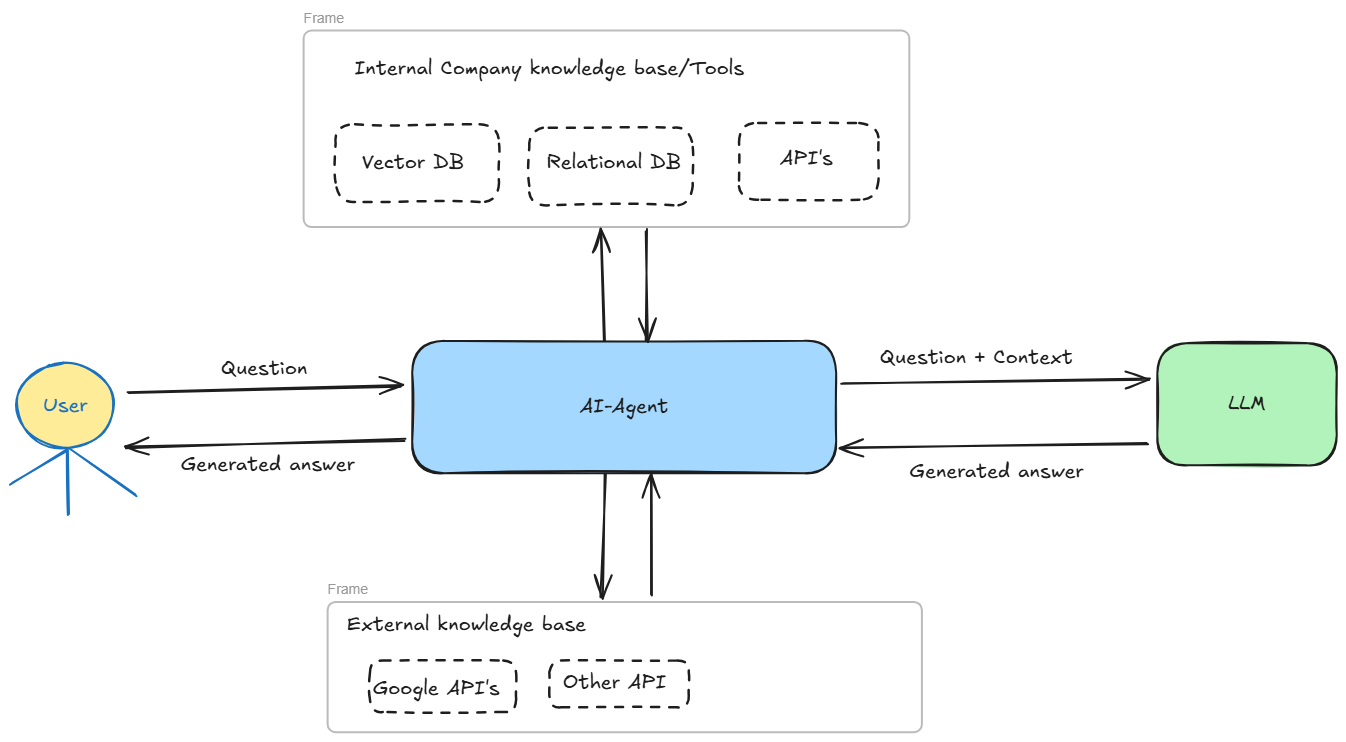
To build an AI agent in .NET, integrate natural language processing (such as OpenAI’s GPT models) with your application’s business logic. This allows the system to understand context, make decisions, and perform actions—mimicking human-like behavior. A common example is a customer service AI agent.
Below are the steps to create a console-based AI agent in .NET, designed to handle typical customer service scenarios like order inquiries, address updates, and support ticket creation.
Use Cases
Each user request is interpreted by the AI agent and routed to a backend service:
- Order Status: Calls an internal
OrderServiceto get delivery info - Address Update: Calls a
CustomerServiceAPI to update the address - Support Ticket: Calls a
SupportServiceto log an issue or request - General Questions: Uses OpenAI's reasoning (LLM) and can integrate with external APIs (like Google Search, etc.)
- Logs information
Architecture Layers
| Layer | Description |
|---|---|
| Console UI | Reads user input and shows agent responses |
| Agent Service | Uses OpenAI GPT to understand intent and decide what action to take |
| Router/Dispatcher | Routes interpreted intent to the right service method |
| Action Services | Mock/internal services for Order, Customer, Ticket, or external lookup |
| LLM Backend | OpenAI GPT via SDK handles natural language reasoning |
Project Structure
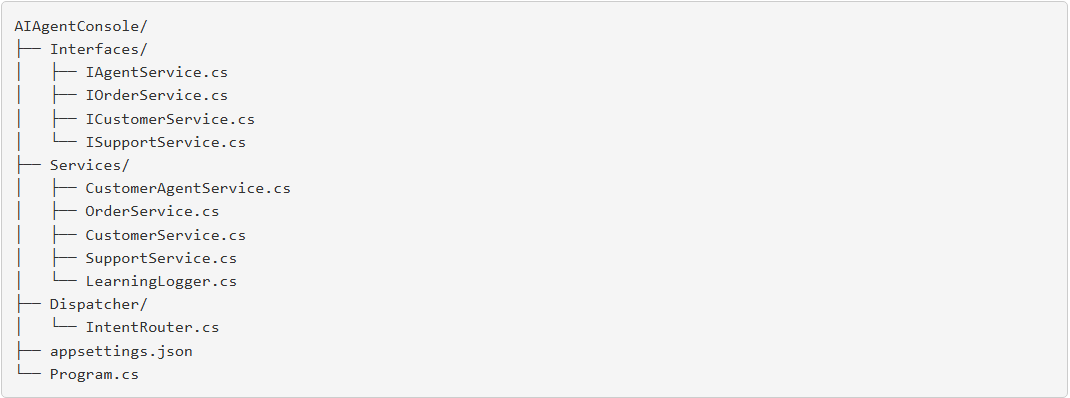
Create a console app and install package
dotnet new console -n AIAgentConsole
cd AIAgentConsole
dotnet add package OpenAI
appsettings.json
{
  "OpenAI": {
    "ApiKey": "your-openai-api-key",
    "Model": "gpt-3.5-turbo"
  }
}
Program.cs
using Microsoft.Extensions.DependencyInjection;
using Microsoft.Extensions.Configuration;
using AIAgentConsole.Interfaces;
using AIAgentConsole.Services;
using AIAgentConsole.Dispatcher;

var config = new ConfigurationBuilder()
    .AddJsonFile("appsettings.json")
    .Build();

var services = new ServiceCollection();
services.AddSingleton<IConfiguration>(config);
services.AddSingleton<IAgentService, CustomerAgentService>();
services.AddSingleton<IOrderService, OrderService>();
services.AddSingleton<ICustomerService, CustomerService>();
services.AddSingleton<ISupportService, SupportService>();
services.AddSingleton<IntentRouter>();

var serviceProvider = services.BuildServiceProvider();
var agent = serviceProvider.GetRequiredService<IAgentService>();

Console.WriteLine("AI Customer Service Agent (type 'exit' to quit)\n");

while (true)
{
    Console.Write("You: ");
    var input = Console.ReadLine();
    if (string.IsNullOrWhiteSpace(input) || input.ToLower() == "exit") break;

    var reply = await agent.HandleRequestAsync(input);
    Console.WriteLine($"Agent: {reply}\n");
}
IAgentService.cs
namespace AIAgentConsole.Interfaces
{
    public interface IAgentService
    {
        Task<string> HandleRequestAsync(string userInput);
    }
}
CustomerAgentService.cs
using OpenAI;
using OpenAI.Chat;
using OpenAI.Models;
using AIAgentConsole.Interfaces;
using AIAgentConsole.Dispatcher;

namespace AIAgentConsole.Services
{
    public class CustomerAgentService : IAgentService
    {
        private readonly OpenAIClient _client;
        private readonly string _model;
        private readonly IntentRouter _router;
        private readonly LearningLogger _logger;

        public CustomerAgentService(IConfiguration config, IntentRouter router, LearningLogger logger)
        {
            _model = config["OpenAI:Model"];
            _client = new OpenAIClient(new OpenAIAuthentication(config["OpenAI:ApiKey"]));
            _router = router;
            _logger = logger;
        }

        public async Task<string> HandleRequestAsync(string userInput)
        {
            var prompt = $"""
You are a smart customer support agent. Identify if the user wants to:
1. Get order status
2. Update address
3. Create a support ticket
4. General question
Return only: order_status, update_address, create_ticket, general_question
User: {userInput}
""";

            var request = new ChatRequest(new[] { new Message(Role.User, prompt) }, model: _model);
            var response = await _client.ChatEndpoint.GetCompletionAsync(request);
            var intent = response.FirstChoice.Message.Content.Trim().ToLower();

            var result = await _router.RouteAsync(intent, userInput);

            _logger.Log(userInput, intent, result);

            return result;
        }
    }
}
Interfaces: IOrderService.cs, ICustomerService.cs, ISupportService.cs
namespace AIAgentConsole.Interfaces
{
    public interface IAgentService
    {
        Task<string> HandleRequestAsync(string userInput);
    }

    public interface IOrderService
    {
        string GetOrderStatus(string input);
    }

    public interface ICustomerService
    {
        string UpdateAddress(string input);
    }

    public interface ISupportService
    {
        string CreateTicket(string input);
    }
}
OrderService.cs, CustomerService.cs, SupportService.cs
using AIAgentConsole.Interfaces;

namespace AIAgentConsole.Services
{
    public class OrderService : IOrderService
    {
        public string GetOrderStatus(string input)
        {
            return "Your order #123456 is in transit and will arrive tomorrow.";
        }
    }

    public class CustomerService : ICustomerService
    {
        public string UpdateAddress(string input)
        {
            return "Your address has been successfully updated.";
        }
    }

    public class SupportService : ISupportService
    {
        public string CreateTicket(string input)
        {
            return "A support ticket has been created. Your ticket number is TCK-98765.";
        }
    }
}
IntentRouter.cs
using AIAgentConsole.Interfaces;

namespace AIAgentConsole.Dispatcher
{
    public class IntentRouter
    {
        private readonly IOrderService _orderService;
        private readonly ICustomerService _customerService;
        private readonly ISupportService _supportService;

        public IntentRouter(IOrderService orderService, ICustomerService customerService, ISupportService supportService)
        {
            _orderService = orderService;
            _customerService = customerService;
            _supportService = supportService;
        }

        public async Task<string> RouteAsync(string intent, string input)
        {
            return intent switch
            {
                "order_status" => _orderService.GetOrderStatus(input),
                "update_address" => _customerService.UpdateAddress(input),
                "create_ticket" => _supportService.CreateTicket(input),
                _ => "I'm not sure how to help with that. Let me search online."
            };
        }
    }
}
LearningLogger.cs
namespace AIAgentConsole.Services
{
    public class LearningLogger
    {
        private const string LogFile = "learning_log.txt";

        public void Log(string userInput, string intent, string agentResponse)
        {
            var logEntry = $"[{DateTime.Now}] INPUT: {userInput} | INTENT: {intent} | RESPONSE: {agentResponse}";
            File.AppendAllText(LogFile, logEntry + Environment.NewLine);
        }
    }
}
AI agent and User conversation:
AI Customer Service Agent (type 'exit' to quit)
You: Where is my order?
Agent: Your order #123456 is in transit and will arrive tomorrow.
You: I want to change my delivery address.
Agent: Your address has been successfully updated.
You: I’m not able to log in to my account.
Agent: A support ticket has been created. Your ticket number is TCK-98765.
You: exit
Conclusion
The integration of AI agents into .NET applications marks a pivotal advancement in intelligent software development. This guide has demonstrated how .NET’s robust ecosystem enables the creation of agents that are not only technically sound but also capable of autonomous reasoning and adaptation. By embracing these practices, developers can design systems that respond proactively to user needs and evolving environments.
As the field of AI continues to advance, the combination of .NET and intelligent agents offers a powerful foundation for building next-generation digital solutions. Ultimately, fostering innovation in this space is about more than technology; it is about empowering people and organizations to realize the full potential of intelligent, adaptive systems.
Opinions expressed by DZone contributors are their own.
Comments