

My First Practical Agentic App: Using Firebase and Generative AI to Automate Office Tasks
A virtual office assistant that streamlines everyday office duties — drafting emails, summarizing meetings, etc., driven by Generative AI and Firebase.
Join the DZone community and get the full member experience.
Join For FreeWhy I Built This App
Being a full-stack engineer, I was curious about agentic applications — tools that propose and act, rather than just waiting for the next command. Instead of a showy travel itinerary robot, I asked myself:
“What’s one piece of software I’d be thrilled to have every morning?”
The answer was a lightweight web app that tackles the tiny, repeatable stuff that chips away at my focus:
- Drafting courteous emails that don’t sound canned
- Translating meeting chatter into concise to-do lists
- Condensing rambling Slack threads into bite-sized summaries
- Piecing together the week’s status into a polished report
Tech Stack
| Layer | TECH USED |
|---|---|
|
Frontend |
React (or Angular, pick one) |
|
Backend |
Firebase Firestore + Hosting |
|
AI Logic |
OpenAI GPT-4 or Gemini |
|
Hosting |
Firebase |
Step-by-Step Setup
1. Firebase Project Setup
Go to Firebase Console

Create a new project: office-agent-app

Enable:
Firestore Database
Hosting
Firebase Authentication (optional)
2. Local Setup
npm install -g firebase-tools

firebase login

firebase init

Choose:
Firestore
Hosting
JavaScript for simplicity
3. Frontend UI
React Version (Quick Start)
npx create-react-app office-agent
cd office-agent
npm install axios firebase
In App.js:

import { useState } from 'react';
import { generateTaskOutput } from './api';

function App() {
  const [taskType, setTaskType] = useState('email');
  const [input, setInput] = useState('');
  const [output, setOutput] = useState('');

  const handleSubmit = async () => {
    const result = await generateTaskOutput(taskType, input);
    setOutput(result);
  };

  return (
    <div className="App">
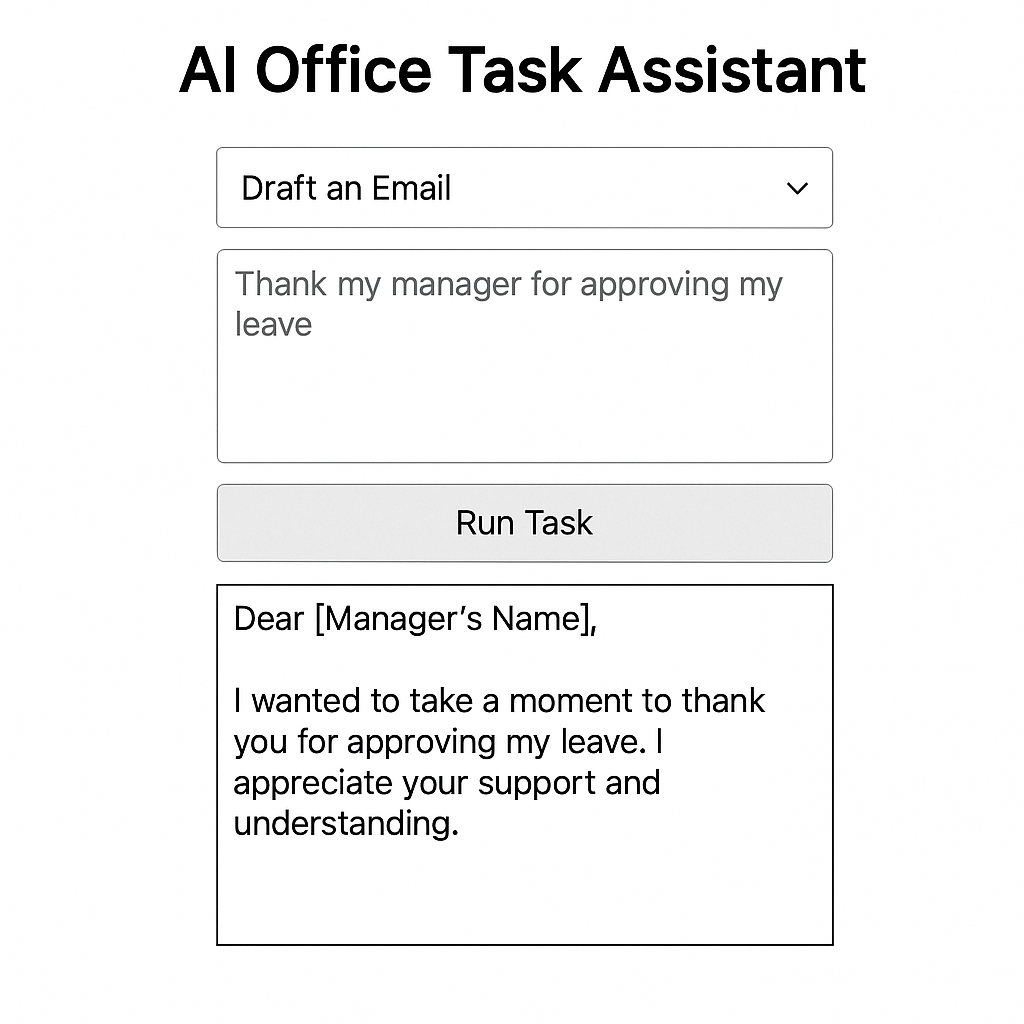
      <h2>AI Office Task Assistant</h2>
      <select value={taskType} onChange={(e) => setTaskType(e.target.value)}>
        <option value="email">Draft an Email</option>
        <option value="todo">Create a To-Do List</option>
        <option value="summary">Summarize Text</option>
        <option value="status">Weekly Status Report</option>
      </select>

      <textarea
        rows="5"
        placeholder="Paste your input here..."
        value={input}
        onChange={(e) => setInput(e.target.value)}
      />

      <button onClick={handleSubmit}>Run Task</button>

      <pre>{output}</pre>
    </div>
  );
}
4. AI Agent Logic
You can keep it simple and call OpenAI directly from the frontend (dev only) or via Firebase Functions.
Example Prompt Logic:
js

export const generateTaskOutput = async (task, inputText) => {
  const prompts = {
    email: `Write a professional email for the following context:\n${inputText}`,
    todo: `Extract action items as a to-do list from the following:\n${inputText}`,
    summary: `Summarize this message clearly:\n${inputText}`,
    status: `Create a weekly status update from this:\n${inputText}`
  };

  const response = await fetch("https://api.openai.com/v1/chat/completions", {
    method: "POST",
    headers: {
      "Authorization": `Bearer YOUR_OPENAI_API_KEY`,
      "Content-Type": "application/json"
    },
    body: JSON.stringify({
      model: "gpt-4",
      messages: [{ role: "user", content: prompts[task] }],
      temperature: 0.7
    })
  });

  const data = await response.json();
  return data.choices?.[0]?.message?.content;
};
5. Storing in Firebase Firestore (Optional)
You can store every task and output in Firestore for reuse:
import { getFirestore, collection, addDoc } from 'firebase/firestore';
import { initializeApp } from 'firebase/app';

const firebaseConfig = { /* Firebase config */ };
const app = initializeApp(firebaseConfig);
const db = getFirestore(app);

export const saveTaskResult = async (userId, taskType, input, output) => {
  await addDoc(collection(db, "tasks"), {
    userId,
    taskType,
    input,
    output,
    timestamp: new Date()
  });
};
6. Deploy to Firebase Hosting
firebase deploy

Your app is now live on a Firebase URL — ready to help you every day!
Examples
Example 1: Drafting an Email
Input: “I need to thank my manager for approving my leave and ask about the next sprint planning meeting.”
Output:
Dear [Manager's Name],
Thank you for approving my leave request. I really appreciate the support. Also, I wanted to check when the next sprint planning meeting is scheduled. Let me know at your convenience.
Example 2: Weekly Status Update
Input: “Finished login UI revamp, fixed 3 bugs in backend auth, planning to onboard Firebase Auth next week.”
Output:
Weekly Update:
- Completed login UI revamp
- Fixed 3 auth bugs
- Planning: Firebase Auth integration next week
What Makes This “Agentic”?
This isn’t just basic prompt-and-response. The app:
- Understands the user task
- Chooses the right prompt
- Processes and formats output
- Optionally stores data
- Can be extended to act autonomously (e.g., send emails via Gmail API)
Now, let's extend the architecture to send emails as well with the following flow:
User Input ➡️ Agent (AI prompt) ➡️ Task Output ➡️ Firebase Store
↘️ If taskType === email ➡️ Gmail API send()
Task Flow
- You enter a prompt like “Thank my manager for the leave approval.”
- The AI agent creates a polished email draft.
- You preview the result.
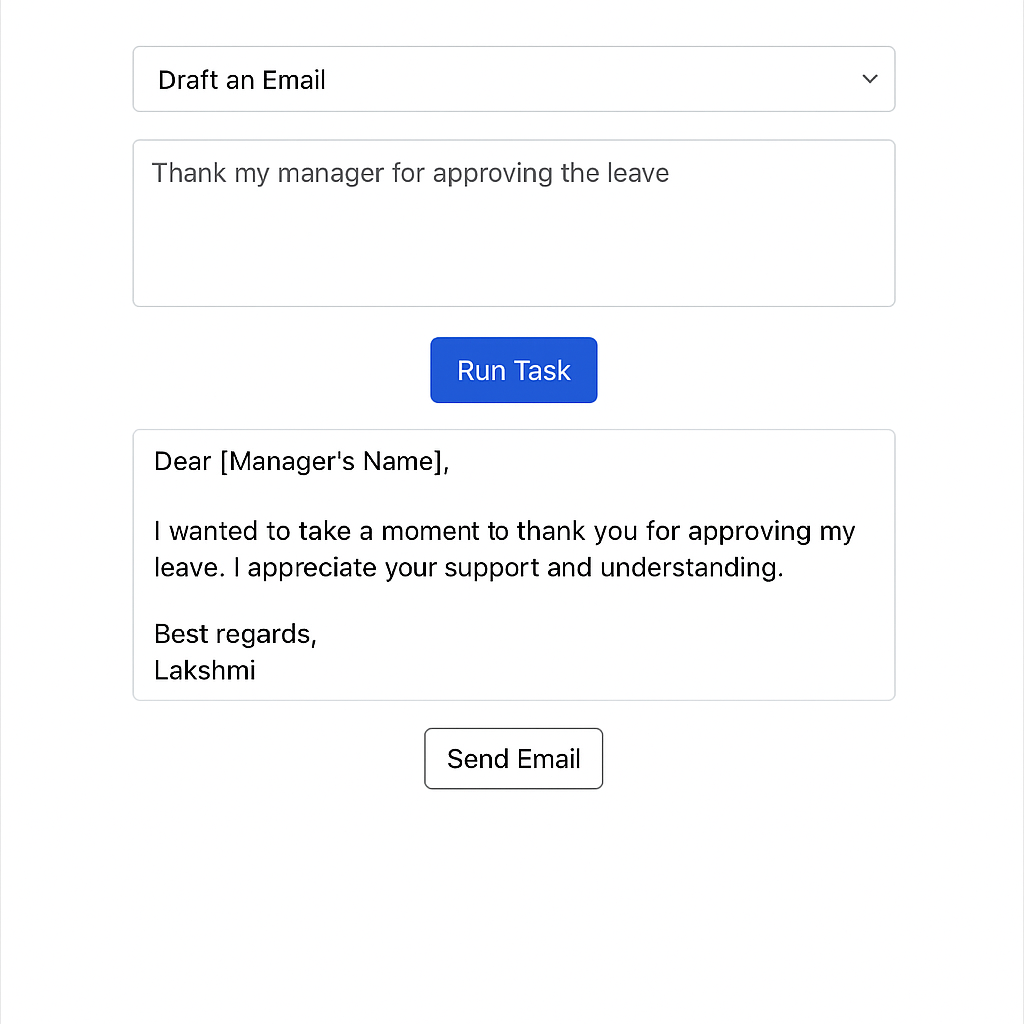
- With just one click, you can send an email from your Gmail!
7. Enable Gmail API
On Google Cloud Console:
- Go to: https://console.cloud.google.com/.
- Create a new project or use an existing one.
- Enable Gmail API.
- Set up OAuth 2.0 Client ID with redirect URI (if frontend flow).
- Download the credentials JSON (for server use) or configure the client ID.
8. Modify UI App
{taskType === 'email' && output && (
  <button onClick={() => sendEmail(output)}>Send Email</button>
)}


const { google } = require('googleapis');

async function sendGmail(subject, body, toEmail) {
  const oAuth2Client = new google.auth.OAuth2(
    CLIENT_ID, CLIENT_SECRET, REDIRECT_URI
  );

  oAuth2Client.setCredentials({ refresh_token: REFRESH_TOKEN });

  const gmail = google.gmail({ version: 'v1', auth: oAuth2Client });

  const rawMessage = [
    `To: ${toEmail}`,
    'Subject: ' + subject,
    'Content-Type: text/plain; charset=utf-8',
    '',
    body
  ].join('\n');

  const encodedMessage = Buffer.from(rawMessage)
    .toString('base64')
    .replace(/\+/g, '-')
    .replace(/\//g, '_')
    .replace(/=+$/, '');

  await gmail.users.messages.send({
    userId: 'me',
    requestBody: {
      raw: encodedMessage
    }
  });
}
Examples
Example 1 – Drafting an Email
Input: “Thank my manager for approving the leave.”
Output:
Dear [Manager’s Name],
I wanted to take a moment to thank you for approving my leave. I appreciate your support and understanding.
Best regards,
Lessons Learned
Adding “action-taking” to AI responses makes a huge difference. Instead of just generating text, the app can now close the loop, like a real assistant would.
Agentic apps are more than smart UIs — they’re decision-making, action-taking helpers. And connecting Firebase, OpenAI, and Gmail made this real.
Final Thoughts
This small app has changed how I think about productivity tools. Instead of switching between apps and typing the same boilerplate content, I let the AI do the heavy lifting — and it’s surprisingly accurate!
If you're a developer thinking of using generative AI for real-world productivity, this is a great place to start. You’ll learn how to:
- Structure prompt-driven logic
- Handle dynamic frontend UX
- Orchestrate AI + cloud backend together
Opinions expressed by DZone contributors are their own.
Comments