

How AI Coding Assistants Are Changing Developer Flow
In this article, I want to share our team's experience in applying AI to accelerate development, covering both the benefits and risks.
Join the DZone community and get the full member experience.
Join For FreeAs someone who runs a software development company, I’m closely watching how AI is changing the way developers work day to day. I see it in our team as well. AI coding assistants are not just speeding things up, but reshaping how developers think, build, and collaborate.
At the same time, I stay cautious. AI doesn’t always produce correct output, and overrelying on AI tools in developing software products can lead to a false sense of confidence, where code looks right but lacks a solid system behind it.
So, here I want to share our team's experience in using artificial intelligence to accelerate development, covering both the benefits and risks.
Traditional vs. AI-Assisted Development
A few years ago, a typical development workflow looked like this: read requirements, write code, debug, repeat. Much of the time was spent on context switching. Now, the process looks different.
Developers sketch part of the solution, use the assistant to fill gaps, test quickly, then adjust. AI coding assistants help with specific tasks, such as writing a function, suggesting a query, or fixing an error, while the developer still drives the structure.
AI assistants shift the developer's role from writing every line to shaping the outcome.
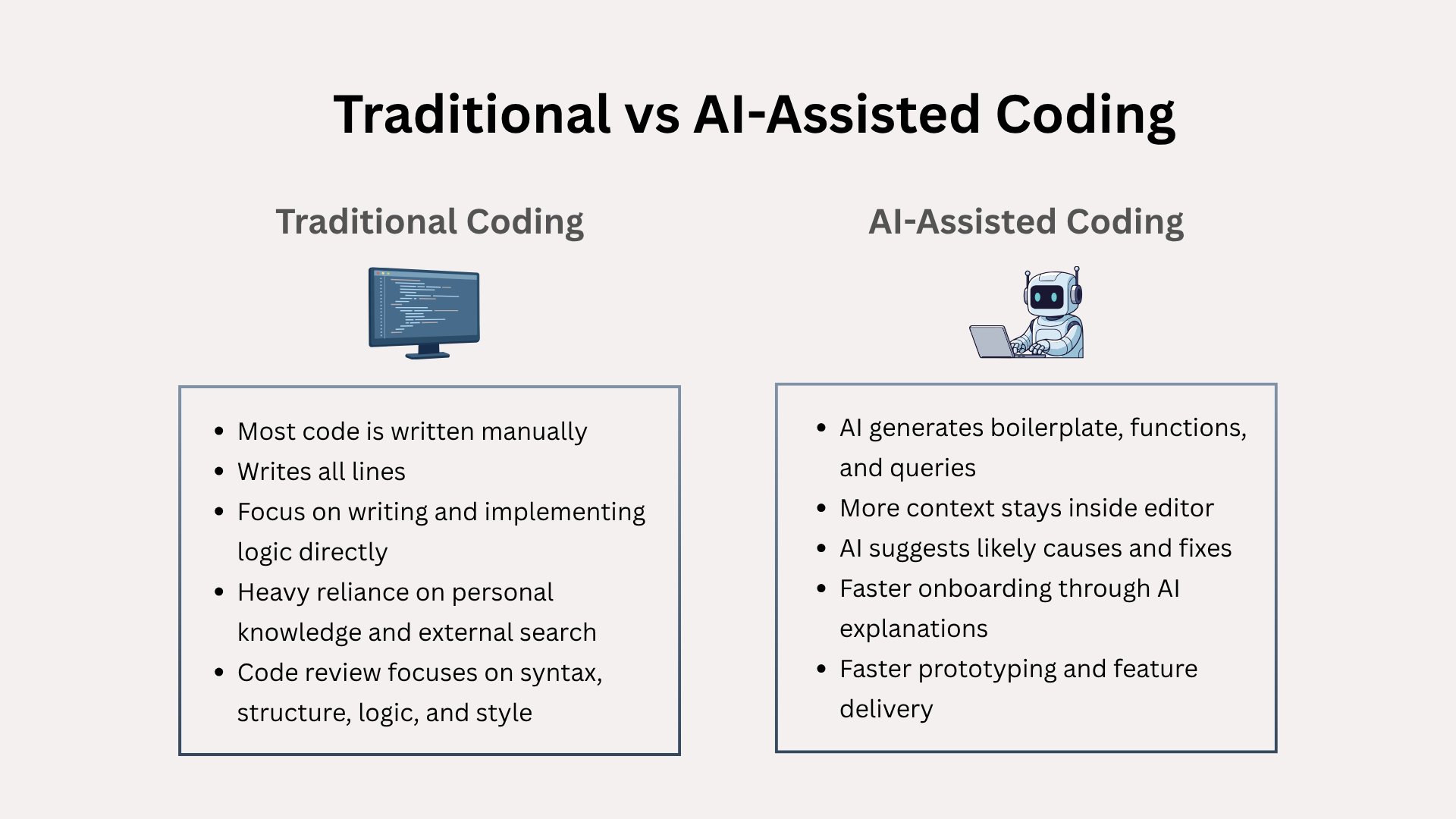
Despite all the panic that developers are no longer needed in this workflow, in my opinion, strong developers stand out even more in this model. Less experienced developers benefit too, but in a different way. They get a starting point faster. They learn patterns through exposure rather than slow accumulation.
This creates an interesting dynamic inside teams. The gap between knowing and doing becomes more visible.
The Rise of Prompt Engineering
There is a new emerging skill in software development called prompt engineering.
Developers now think about how to express intent clearly to a system that can generate code. A vague instruction leads to vague output. So, engineers who can break down problems into clean, structured intent get better outcomes.
Less Searching, More Context
One of the biggest time sinks in development has always been searching. Even experienced engineers spend a surprising amount of time looking up small details.
AI assistants reduce that need by bringing context into the editor. They answer questions and suggest fixes without forcing a context switch.
Even though this doesn’t eliminate the need for documentation, it changes how developers use it. Instead of scanning pages for answers, they ask direct questions and refine based on feedback. The result feels more like a conversation than a lookup.
Debugging Feels Different
With AI assistants, debugging becomes more interactive. You can paste an error, explain the situation, and get possible causes instantly. Not all suggestions are correct, but they often point in the right direction.
This shortens the feedback loop. Developers still need to validate everything, but they start from a better position. But the risk here is over-reliance. Engineers must resist the urge to accept suggestions blindly.
Onboarding Feels Faster
New developers need time to understand codebases, patterns, and internal tools. AI assistants can help here. A new hire can ask questions about unfamiliar code and get explanations quickly.
Senior engineers still provide guidance, but they spend less time answering repetitive questions. The onboarding curve becomes less steep. That matters for growing and outstaffing teams.
The Risks of AI in Software Development
There is a downside to all of this. It’s easier than ever to produce code without fully understanding it. This creates a validation bottleneck. Developers may accept solutions that work but don’t fit the system well. Over time, this can lead to fragile codebases.
That’s why in our team, we encourage developers to treat AI suggestions as drafts, not final answers. Here are some other practices we apply to ensure both efficiency from AI automation and code quality:
- Validate every output with unit tests
- Review logic, not just syntax
- Cross-check critical parts manually (logic or edge cases)
- Discourage AI-generated boilerplate in critical infrastructure code unless it’s reviewed by a senior engineer
- Keep architecture decisions outside of AI workflows
In my opinion, developers can’t ignore AI, so we need to learn how to use it properly. We are still early in this shift, but it’s already clear that teams applying this technology move faster and more efficiently.
AI Doesn’t Reduce the Need for Developers, but Shifts the Kind of Expertise Required
There are dozens of stories online about someone building a product with AI in a matter of hours. That can easily create the impression that developers are becoming less important to business value. From my experience, that is not the case.
What has changed is the type of work people bring to engineers. Many teams and founders can now spin up a prototype or even an MVP with AI to test an idea and validate product-market fit much faster than before.
But these early builds often come with trade-offs. They usually lack clear structure, consistent patterns, and long-term maintainability. This is where senior engineering work becomes critical. Turning a fast prototype into a reliable production system still requires strong architecture decisions and disciplined engineering practices.
Such tasks can include refactoring, migrating vibe code to back-end infrastructure, introducing proper architecture boundaries, adding type safety and validation layers, improving test coverage, and fixing hidden edge cases.
Wrapping Up
So, AI coding assistants are already changing how developer teams operate. From what I see, the biggest change is not speed alone. These tools are also changing how we search, debug, and onboard.
AI-assisted development workflows are becoming a new best practice for businesses seeking greater efficiency and for engineers aiming to optimize their daily operations.
Opinions expressed by DZone contributors are their own.
Comments