

Building AI-Powered Java Applications With Jakarta EE and LangChain4j
Integrate AI into Java apps with Jakarta EE, CDI, MicroProfile Config, and LangChain4j. Build AI services from simple prompts to type-safe domain-driven interactions.
 CORE
·
CORE
·
Join the DZone community and get the full member experience.
Join For FreeArtificial intelligence is rapidly transforming software development. Many developers now use AI-powered tools to generate code, but the next advancement is integrating AI directly into applications. Modern systems increasingly use large language models (LLMs) to answer questions, automate workflows, summarize information, and enhance user experiences. Software engineers must therefore combine traditional enterprise development practices with AI capabilities while ensuring reliability, scalability, and maintainability.
This evolution offers Jakarta EE developers a significant opportunity. Jakarta EE provides a mature platform for enterprise applications, with standards for dependency injection, RESTful services, configuration, persistence, and cloud-native development. By integrating Jakarta EE with LangChain4j, developers can access advanced AI models through a straightforward Java API, adding intelligent features without leaving the familiar Jakarta EE environment.
In this article, we will build a simple "Hello World" AI application to demonstrate how easily a Large Language Model can be integrated into a Jakarta EE application using LangChain4j.
Configuring LangChain4j With Jakarta EE Technologies
Before developing your first AI-powered application, it is important to understand LangChain4j’s role in the Java ecosystem and its popularity for AI integration.
LangChain4j serves as an orchestration layer between Java applications and AI providers. It simplifies AI integration by offering a consistent programming model, regardless of the underlying vendor. If you are familiar with Spring Data or Jakarta Data, this concept will be familiar.
With Spring Data and Jakarta Data, developers define repository interfaces and use annotations to specify behavior. Implementation details are handled by a provider that generates the concrete implementation and manages database communication. This allows developers to focus on business logic rather than low-level database operations.
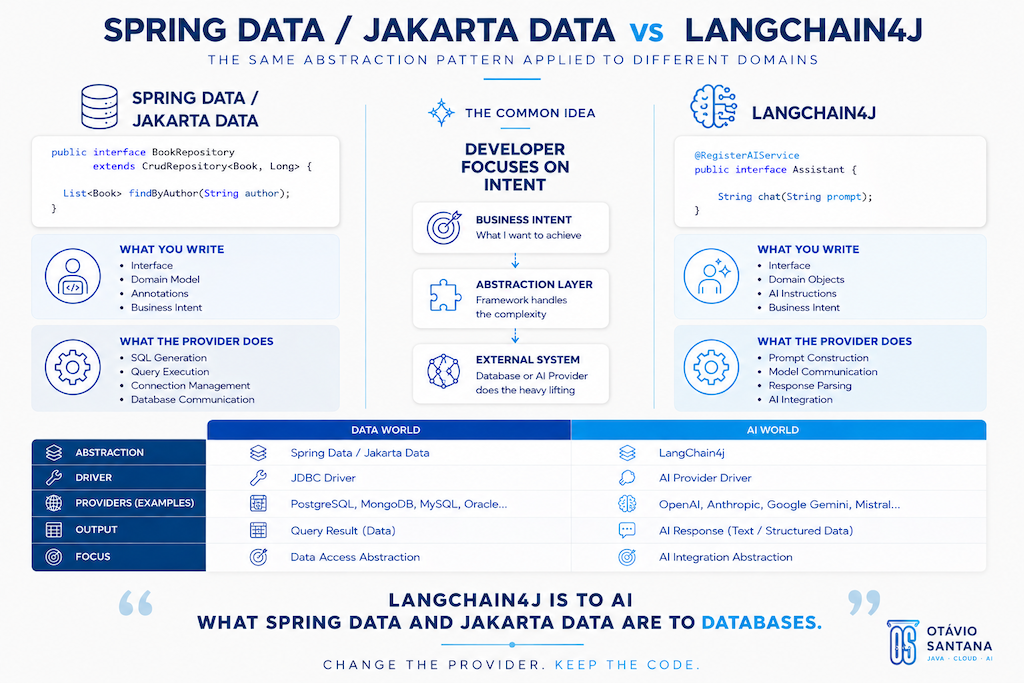
LangChain4j uses a similar approach for artificial intelligence. Instead of writing HTTP clients, building JSON payloads, and managing provider-specific APIs, developers define Java interfaces representing AI capabilities. LangChain4j then generates the implementation and manages communication with the chosen AI provider.
LangChain4j can be viewed as the AI equivalent of Jakarta Data or Spring Data, with the AI provider dependency functioning like a JDBC driver. Switching from one AI provider to another, such as from OpenAI to a different provider, usually only requires updating the dependency and configuration, while the application code remains largely unchanged.
While this article uses a Java SE application for simplicity, the same approach applies to Jakarta EE, Spring Boot, Quarkus, Helidon, Micronaut, and other Java platforms.
Project Dependencies
The first step is to create a Maven Quickstart project and add the required dependencies for CDI, Eclipse MicroProfile Config, and LangChain4j:
<dependency>
    <groupId>io.smallrye.config</groupId>
    <artifactId>smallrye-config-core</artifactId>
    <version>3.17.2</version>
    <scope>compile</scope>
</dependency>

<dependency>
    <groupId>io.smallrye.config</groupId>
    <artifactId>smallrye-config</artifactId>
    <version>3.17.2</version>
</dependency>

<dependency>
    <groupId>org.jboss.weld.se</groupId>
    <artifactId>weld-se-core</artifactId>
    <version>6.0.4.Final</version>
</dependency>

<dependency>
    <groupId>dev.langchain4j.cdi</groupId>
    <artifactId>langchain4j-cdi-portable-ext</artifactId>
    <version>${langchain4j-cdi.version}</version>
</dependency>

<dependency>
    <groupId>dev.langchain4j.cdi.mp</groupId>
    <artifactId>langchain4j-cdi-config</artifactId>
    <version>${langchain4j-cdi.version}</version>
</dependency>

<dependency>
    <groupId>dev.langchain4j</groupId>
    <artifactId>langchain4j-open-ai</artifactId>
    <version>1.15.0</version>
</dependency>
This example uses the langchain4j-open-ai dependency, which serves as the provider-specific driver for communicating with OpenAI models. The application code remains independent of the provider implementation.
Configuring the AI Provider
LangChain4j integrates with Eclipse MicroProfile Config, allowing you to externalize all provider settings. Create a microprofile-config.properties file and add the following configuration:
dev.langchain4j.cdi.plugin.chat-model.class=dev.langchain4j.model.openai.OpenAiChatModel
dev.langchain4j.cdi.plugin.chat-model.config.api-key=<<API_KEY>>
dev.langchain4j.cdi.plugin.chat-model.config.model-name=gpt-5
This configuration specifies the chat model implementation, the authentication API key, and the model that will process prompts.
A key advantage of this approach is flexibility. If you choose another provider in the future, you typically only need to replace the provider dependency and update the configuration. The application code often remains unchanged, reinforcing the provider dependency’s role as similar to that of a JDBC driver in traditional data access.
For this sample, you can place the API key directly in the configuration file or provide it through environment variables. In production, use environment variables, secret managers, or vault solutions. Never commit API keys to source control, as exposed credentials can lead to unauthorized use, unexpected costs, and security risks.
Your First AI Service
With the project configured, we can now build our first AI-powered service. As is customary in software development, we will begin with a “Hello World” example. Rather than printing a static message, we will send a question to an AI model and display its response.
This example uses the simplest contract: a String as input and a String as output. Although real-world applications typically use more complex domain objects, starting with plain text helps us focus on the core LangChain4j programming model and understand how to create and use AI services.
The first step is defining an AI service interface:
import dev.langchain4j.cdi.spi.RegisterAIService;
import jakarta.enterprise.context.ApplicationScoped;

@RegisterAIService
@ApplicationScoped
public interface AssistantService {

    String chat(String prompt);
}
This interface does not include an implementation. LangChain4j generates the implementation automatically at runtime.
The @RegisterAIService annotation directs LangChain4j to create an AI-backed implementation for this interface. The @ApplicationScoped annotation makes the generated implementation available as a CDI bean, which can be injected or accessed like any other Jakarta EE component.
The method signature defines the AI contract. When the chat method is called, the parameter serves as the prompt for the AI model, and the returned value contains the generated response. In this example, both the request and response are simple strings.
Next, we need a client application to consume this service:
import jakarta.enterprise.context.control.RequestContextController;
import jakarta.enterprise.inject.se.SeContainer;

public class App {

    public static void main(String[] args) {
        try (SeContainer container =
                jakarta.enterprise.inject.se.SeContainerInitializer
                        .newInstance()
                        .initialize()) {

            RequestContextController requestContextController =
                    container.select(RequestContextController.class).get();

            requestContextController.activate();

            AssistantService assistantService =
                    container.select(AssistantService.class).get();

            String response =
                    assistantService.chat("What is the capital of France?");

            System.out.println("Assistant response: " + response);

            requestContextController.deactivate();
        }
    }
}
The application starts a CDI container using Weld SE, which provides dependency injection in a Java SE environment. After initializing the container, we activate the request context and obtain an instance of AssistantService from CDI.
Although there is no concrete implementation in the codebase, CDI returns a fully functional service generated by LangChain4j. When the chat method is called, LangChain4j sends the prompt to the configured AI model, waits for the response, and converts the result into a Java String.
Running the application produces an output similar to the following:
Assistant response: Paris is the capital of France.The exact wording may vary because large language models are probabilistic systems. Unlike traditional methods that always return the same result for a given input, AI models may produce slightly different responses while maintaining the same meaning.
While using strings is useful for learning the fundamentals, enterprise applications rarely exchange raw text between layers. Business applications typically use structured data, domain objects, commands, and responses to ensure stronger contracts and better maintainability.
In the next section, we will enhance this example by replacing raw strings with dedicated input and output classes, enabling LangChain4j to map between Java objects and AI interactions in a more type-safe and expressive manner.
Working With Structured Input and Output
The previous example showed a basic AI interaction: a string input produces a string output. While this illustrates the fundamentals, real-world applications rarely use unstructured text alone. Enterprise systems typically exchange well-defined objects that represent business concepts, making code more expressive, maintainable, and type-safe.
LangChain4j’s key strength is its ability to map Java objects directly to AI interactions. It automatically converts structured input into prompts and transforms AI responses into strongly typed Java objects, eliminating the need for manual serialization and parsing. Developers can work with domain concepts instead of raw text.
To demonstrate this, we will build a simple book recommendation engine. Given a book title and author, the AI will suggest three books that logically follow in a learning journey.
We begin by defining the input object:
public record BookRequest(String title, String author) {
}
This record captures the user’s input. Instead of manually creating a textual prompt, we provide a structured Java object with the book’s title and author.
Next, we define the domain model representing a recommended book:
import java.util.List;

public record Book(
        String title,
        String author,
        String description,
        List<String> keywords) {
}
This record contains richer information than a simple title. This record includes more than just the title and author. It also provides a short description and a set of keywords to further characterize the recommendation, with the reason why the book was selected:
public record Recommendation(Book book, String reason) {
}
Finally, we create a wrapper object that represents the complete response returned by the AI service:
import java.util.List;

public record NextReadBooks(List<Recommendation> recommendations) {
}
At this stage, we have a complete domain model for both the request and the expected response. Next, we define the AI service:
import dev.langchain4j.cdi.spi.RegisterAIService;
import dev.langchain4j.service.SystemMessage;
import jakarta.enterprise.context.ApplicationScoped;

@ApplicationScoped
@RegisterAIService
public interface NextReadBookService {

    @SystemMessage("""
                   Recommend up to 3 books that should naturally follow
                   the provided book in a learning journey.

                   Recommendations should prioritize:
                   - conceptual progression
                   - complementary knowledge
                   - technical depth
                   - thematic similarity

                   For each recommendation provide:
                   - title
                   - author
                   - concise description
                   - relevant keywords
                   - a short recommendation reason

                   Keep recommendations concise, technically relevant,
                   and focused on software engineering and architecture learning.
            """)
    NextReadBooks nextReadBooks(BookRequest bookRequest);
}
This example also introduces the concept of a system message.
The @SystemMessage annotation provides instructions that guide the model’s behavior. Unlike user input, which varies with each request, the system message serves as a permanent set of rules for AI responses. Here, we instruct the model to recommend up to three books, explain each recommendation, and return the information using our defined Java records.
The method signature uses only domain objects: BookRequest as input and NextReadBooks as output. There is no need for manual JSON handling, prompt creation, or response parsing, as LangChain4j manages these tasks automatically.
The application code remains straightforward:
import jakarta.enterprise.context.control.RequestContextController;
import jakarta.enterprise.inject.se.SeContainer;

public class BookApp {

    public static void main(String[] args) {

        try (SeContainer container =
                     jakarta.enterprise.inject.se.SeContainerInitializer
                             .newInstance()
                             .initialize()) {

            RequestContextController requestContextController =
                    container.select(RequestContextController.class).get();

            requestContextController.activate();

            var bookService =
                    container.select(NextReadBookService.class).get();

            BookRequest request =
                    new BookRequest(
                            "The Great Gatsby",
                            "F. Scott Fitzgerald");

            var recommendations =
                    bookService.nextReadBooks(request);

            for (var recommendation :
                    recommendations.recommendations()) {

                System.out.println(
                        "Recommended book: "
                                + recommendation.book().title()
                                + " by "
                                + recommendation.book().author());

                System.out.println(
                        "Reason: "
                                + recommendation.reason());
            }

            requestContextController.deactivate();
        }
    }
}
When executed, LangChain4j converts the BookRequest into a prompt, sends it to the model, validates the response against the target structure, and maps the result back into NextReadBooks. For developers, this interaction is similar to calling a standard Java service.
This approach offers clear advantages over raw string-based interactions. The code is easier to understand, IDE autocompletion enhances productivity, and refactoring is safer because inputs and outputs are explicit domain models. The application can also adapt more easily to new business requirements.
So far, our examples have used explicit user requests and static system instructions. However, modern AI applications often need additional context beyond user input.
In the next section, we will explore how to enrich AI interactions with external knowledge and context, enabling the model to produce more accurate and relevant responses aligned with the application’s domain.
Opinions expressed by DZone contributors are their own.
Comments