

Can Your Team Name the Work It Already Runs With AI?
The AI Workflow Inventory gives teams a shared list of recurring AI work, creating the foundation for A3 delegation decisions.
 CORE
·
CORE
·
TL;DR: The AI Workflow Inventory Finalizes the A3 Delegation System
You probably know your own AI shortcuts: the colleague who drafts the stakeholder update, the nightly job somebody set up before they left, the interview notes that go through a model on demand. However, I want to challenge you: that perceived knowledge can create false confidence, because it feels like knowing the team’s way of working with AI, when it is still only a diffuse understanding of the practice. Ask the team to combine those individual accounts into one list, and you may discover how little of the whole anyone can see. The AI Workflow Inventory is the artifact for that list: one row per recurring task, refined into provisional task classes to prepare the team’s next AI delegation decisions.
Disclaimer: I read Charniak/McDermott’s book on “Artificial Intelligence” decades ago; of course, I use AI for research, translation, proofreading, challenging story arcs and article structures, and summarization. It is a production tool, not a substitute for thinking.
Your Own Shortcuts Are the Easy Part
When I published the AI Delegation Lifecycle in June 2026, the point before stage 1 was deliberately left without an artifact: the team was supposed to know which work it does with a model, at what frequency, and at what stakes, which I call a forensic analysis of your own workflow. However, as I quickly discovered, this assumption that a team could produce the analysis from memory was wrong, and updating the student reference for the A3 Delegation System earlier this month showed me its design flaw:
- The Routing Policy assigns an AI model tier per task class,
- The AI Definition of Done is written per task class (never per task), and
- The Delegation Audit opens with a walkthrough of what the team has handed over.
All three artifacts consume task classes, but none of the six stages of the A3 Delegation System produces them. The AI Working Agreement is the exception on the other side of the lifecycle: it records the team’s defaults and boundaries and can exist before the inventory is complete.
The gap is easy to miss from the inside, because every individual on the team can answer for their own use, and nobody can answer for the sum: who else drafts with a model, which outputs leave the team that way, and which jobs run unattended. That sum, useful, undocumented, and unowned, is what I call “AI Debt,” and it works right up to the moment someone asks who is responsible for it.
What One Row Looks Like in the AI Workflow Inventory
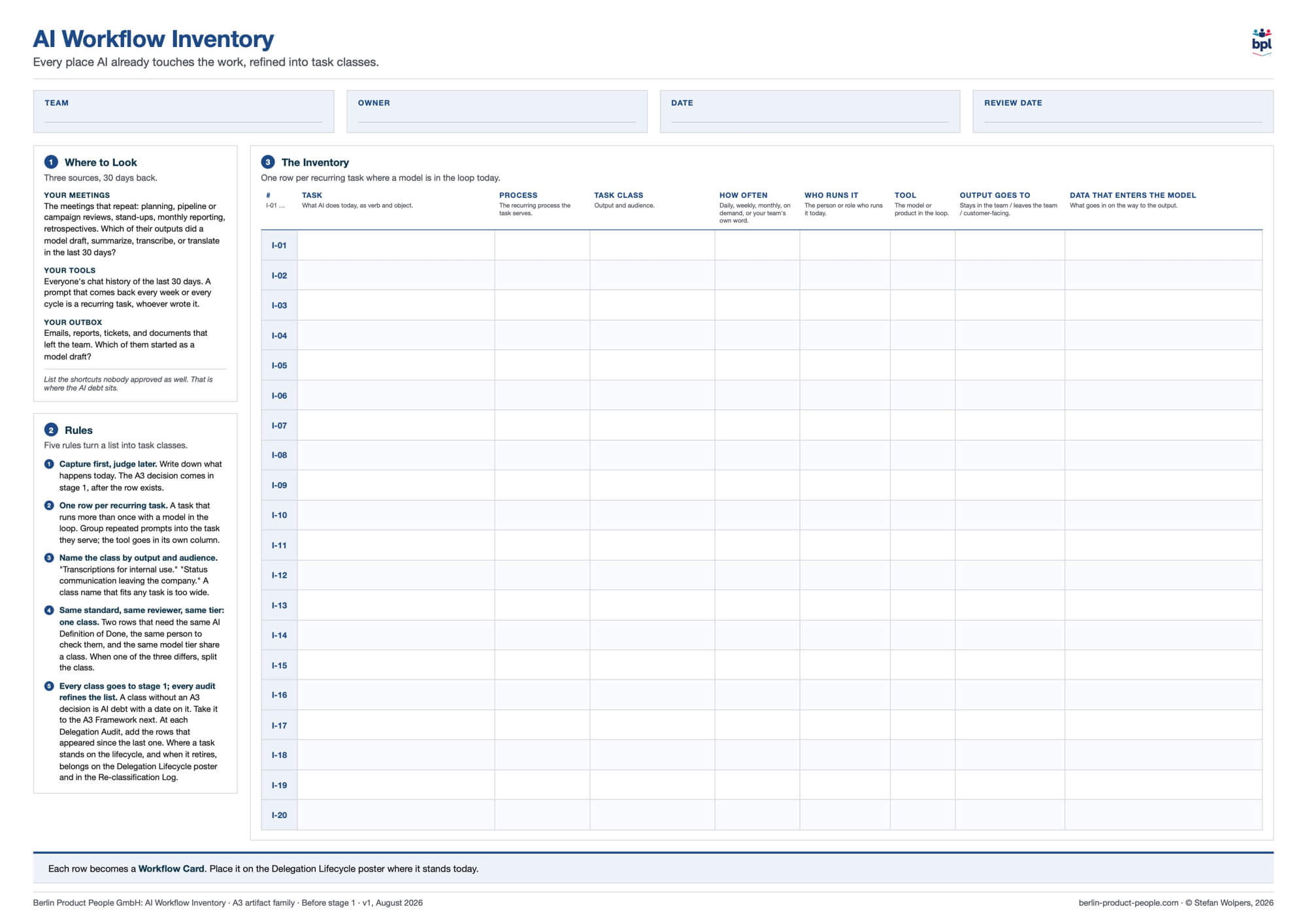
The AI Workflow Inventory is a one-page canvas with an identity strip (team, owner, date, review date), a panel on where to look, a panel with five refinement rules, and the inventory table itself. Let me show you an example from a Scrum team:
- Number: I-01
- Task: Transcribe photos of Retrospective sticky notes
- Process: Retrospective facilitation
- Task class: Transcriptions for internal use
- How often: Per Sprint
- Who runs it: Scrum Master
- Tool: GPT-5.6 Sol
- Output goes to: Stays in the team
- Data that enters the model: Photos of handwritten notes and names.
The task is written as verb and object, the class is named by output and audience, and “output goes to” has three values: stays in the team, leaves the team, or customer-facing. The number travels to the Workflow Card later, so the row and the respective decision can be matched months apart.
Two design choices carry most of the weight:
- The person and the tool sit in separate columns because people change and tools change while the task stays; a field that says “Anna, ChatGPT” makes it harder to update either one when Anna moves teams or the license changes.
- The last two fields ask different questions that teams routinely conflate: where the output goes tells you about the stakes on the way out, whereas what enters the model tells you about the exposure on the way in, and an output that “stays in the team” can still have been produced from photographs with names on them. The entry in the data field is a fact to review; it is not permission to keep uploading the names.
What the canvas does not have is a life cycle stage or status column, and the omission is deliberate. The inventory records what happens today; the poster and the Workflow Cards show where a workflow stands in the A3 Delegation Life Cycle, and a retired workflow is a row in the Re-classification Log, identified by the same inventory number. A stage column would turn the pre-decision list into a second, competing status board, and agile practitioners already know how that ends from the Product Backlog in Jira and the “real” one in a spreadsheet debate.
The AI Workflow Inventory takes work to maintain, but it reduces repeated documentation and decision-making:
- The team captures each recurring task once.
- Compatible tasks share one review standard and one routing decision instead of getting one each.
- The inventory number connects a task to every later decision about it.
- The life cycle status stays on the poster and in the records that already exist. Update the inventory when the work changes or when the team discovers, corrects, or refines what it has recorded.
(I know, it sounds like a database schema, and I started preliminary work on how to design an application for the A3 Delegation System.)
Where to Look
The canvas names three sources for AI workflows, and the 30-day window matters because memory is a poor inventory tool, while last month’s outputs are evidence:
- Your meetings come first: which outputs of the events that repeat (planning, pipeline or campaign reviews, stand-ups, monthly reporting, Retrospectives, etc.) did a model draft, summarize, transcribe, or translate?
- Then your tools: each colleague looks at their own chat history from the last 30 days and brings the prompts, applied Skills, or agent tasks that come back every week or every Sprint, who wrote them, and how often they were rewritten; this is a self-report, and it has to be, since nobody should be reading anyone else’s conversations.
- Then your outbox: the emails, reports, tickets, and documents that left the team, and the question of which of them started as a model draft.
Thirty days is the starting window. Once the obvious rows are on the page, ask about the work no chat history shows: the jobs that run unattended, the quarterly report, the thing that only happens at release time. A nightly test run, such as the one in the example below, may leave no trace in anyone’s recent chat history.
The line that decides the session is the last one in that panel: list the shortcuts nobody approved as well, because that is where the AI debt sits. If people read the inventory as a check on whether they followed the rules, those shortcuts stay invisible, and the team ends up with a list that looks tidy and describes a team that does not exist. Therefore, going first with a shortcut of your own helps, as does explaining, before the first row, that recording a task does not approve its use: the session starts with understanding what happens today, and concerns that need immediate attention under the team’s existing boundaries will still be addressed.
Provisional Task Classes and the Grouping Test
The grouping rule creates a puzzle that a careful reader will spot: it asks whether two tasks share the same AI Definition of Done, the same reviewer, and the same model tier, and those are decisions for later stages of the AI Delegation lifecycle, which the team has not reached. The resolution is that classes in the first session are provisional. Name them by output and audience, test the grouping against whatever review standards and routing decisions the team already has, and where those are missing, leave the grouping provisional and revisit it as the team works through the stages. An AI workflow inventory can carry uncertainty; what it must not carry is a settled-looking decision nobody made.
The five rules on the AI Workflow Inventory canvas are short:
- Capture first, judge later: The A3 decision comes in stage 1, after the row exists, and a row approves nothing.
- One row per recurring task: Four prompt revisions used for the same weekly update are one task, and the tool goes in its own column.
- Name the class by output and audience: “Transcriptions for internal use,” “status communication leaving the company.” A class name that fits any task (“AI support”) is too wide to tell anyone which standard applies. (That naming approach is not different from coding.)
- Same standard, same reviewer, same tier, one class: When one of the three differs, split the class.
- Every class goes to stage 1; every audit refines the list: A class without an A3 decision is AI debt with a date on it.
Three failure patterns are worth watching for: the sanctioned-use list, where only approved use gets written down, and your existing AI debt stays invisible; the prompt or Skill catalog, with a row per prompt/Skill instead of per task, so the classes never form; and the one-time census, filled once and never refined, so that six months later the audit walks a stale list and everyone nods at rows that no longer run.
Example: Four Rows From a Scrum Team
Here is a full first pass from a fictitious Scrum team of seven:
- Transcribe photos of Retrospective sticky notes (Scrum Master, GPT-5.6 Sol, stays in the team; input: handwritten notes with names): Internal output can still involve sensitive input.
- Rewrite customer feedback tickets into Product Backlog item drafts (class: requirement drafts for internal use): A concrete task inside a reusable class.
- Draft acceptance criteria for new items (same class): A second task that may share that class, as long as reviewer, standard, and tier stay the same.
- Rewrite interview notes into the hiring feedback template (on demand, Scrum Master, leaves the team; input: candidate names): Informal use that an approved-use-only list would have missed.
The last row is on the list only because capture came first; under a rule that lists only approved use, the person running it would have left it out, and the team would have gone into A3’s stage 1 without knowing candidate names were entering a model on demand.
From Row to Workflow Card
Each decided row of the AI Workflow Inventory becomes a Workflow Card within the A3 Delegation System: workflow, task class, the A3 category, and later the tier, the owner, and the audit dates; the card goes on the poster where the workflow stands today. The word “decided” matters: the row exists before the A3 “Assist-Automate-Avoid” decision; the card exists after it. A row without a card means one of two things, and the remedy differs: either nobody has decided, in which case the class goes to the A3 Framework next, or somebody decided and never recorded it, in which case the team confirms the decision and writes it down. Ask which it is before doing either.
For the transcription row, that means: the AI Workflow Inventory gives it a number, a task, and a provisional class; A3’s stage 1 decides whether it is Assist, Automate, or Avoid, and knowing that GPT-5.6 Sol runs it today settles nothing; stage 3 settles the owner, and the Scrum Master who runs it this Sprint does not become the owner by default. Both decisions go on the card.
Your First 60 Minutes with the AI Workflow Inventory
Book the session, aim for eight rows, and treat it as a first pass. One way to split the time:
- State the purpose and the boundary (capture, not approval): 10 minutes
- Walk the three sources, including unapproved shortcuts and unattended jobs: 20 minutes
- Form provisional task classes with the grouping test: 20 minutes
- Name the inventory owner and the review date, and agree on the next step: 10 minutes
The next step is A3’s stage 1: take every class to the A3 decision with the people who run the tasks in the room. If a row needs attention under the team’s existing boundaries before that (candidate names in a model, say), address it; “capture first” gives the decision its own step and does not postpone it.
At each Delegation Audit, the list gets two kinds of maintenance. Add the rows that appeared since the last audit, and reconcile the existing ones: does the task still run, does the same person run it, with the same tool, on the same inputs, for the same audience? When you retire a task, record that decision in the Re-classification Log under the same inventory number, and keep the link to its original inventory record.
Conclusion
Which recurring use would your team’s current list miss? If your team cannot describe where AI already contributes to recurring work, start with a 60-minute AI Workflow Inventory session. The list gives you a shared basis for A3 decisions and helps you find the workflows that individual recollection might miss; then choose where in the A3 Delegation System to apply the method first.
Published at DZone with permission of Stefan Wolpers. See the original article here.
Opinions expressed by DZone contributors are their own.