

Anti-Virus and 0-Day Threat Protection for Java Web Applications
With APIs predicted to become the focus for future cyberattacks, it's improtant to protect your Java applications from attacks from day one.
 CORE
·
CORE
·
Join the DZone community and get the full member experience.
Join For FreeWeb APIs and applications are increasingly becoming a target. Gartner predicts that by 2022, the #1 attack vector for enterprise applications will be the API. Not only can end-users upload viruses, but attackers can craft specialized attack malware and upload this content through your public web application. Once uploaded, these threats can move through your systems, being stored in cloud storage or databases, and eventually can get executed.
Consider an example: an insurance company allows its users to upload PDFs as part of the claims process. An attacker creates a custom executable and uploads that into the claims UI. Since it has the right file extension (.PDF), the system accepts it and stores it into its database. Because it is a new, 0-day threat it passes through the minimal virus scanning that the company has in place. Later, a claims manager downloads this file onto their computer and opens it — resulting in an endpoint infected with an Advanced Persistent Threat (APT). From the attacker's perspective, this was actually easier than phishing because they didn't even need to send any emails.
So how can we protect our Java web applications from threats like this? Basic anti-virus is not enough — we also need the ability to detect threats and invalid content uploads as well. A complete solution to protect our web application needs to be able to do the following:
- Scan for viruses and malware
- Detect executables
- Detect scripts
- Detect encrypted/password-protected files
- Validate the input file to ensure it is a real content file
- Restrict the upload to only specific file types that we wish to support (e.g. PDF)
Here, we'll look at a free solution for Java that can scan for viruses, but also protect against all of the spear threats and APTs described above.
First, we will install the library using Maven by adding this repository:
<repositories>
<repository>
<id>jitpack.io</id>
<url>https://jitpack.io</url>
</repository>
</repositories>
And the Maven package:
xxxxxxxxxx
<dependencies>
<dependency>
<groupId>com.github.Cloudmersive</groupId>
<artifactId>Cloudmersive.APIClient.Java</artifactId>
<version>v3.54</version>
</dependency>
</dependencies>
Now what we want to do is accept the file into memory in our Java application, but we don't want to store the file yet. First we need to scan the in-memory file to make sure it is safe. If it is not safe, we should release the memory, log all the details of the threat, and warn the user. If it is safe, we should proceed with our normal storage and processing logic. In this way, a potentially infected file is never stored until it has been first scanned for threats.
It is important that the scanning system be fast and optimized for this type of real-time user interaction scenario because we do not want to keep our users waiting.
First, at the top of our controller we should add these imports:
x
import com.cloudmersive.client.invoker.ApiClient;
import com.cloudmersive.client.invoker.ApiException;
import com.cloudmersive.client.invoker.Configuration;
import com.cloudmersive.client.invoker.auth.*;
import com.cloudmersive.client.ScanApi;
Next, we will add this code to our controller — after the file is uploaded and received into memory, but before it is actually processed or saved into our application:
x
ApiClient defaultClient = Configuration.getDefaultApiClient();
// Configure API key authorization: Apikey
ApiKeyAuth Apikey = (ApiKeyAuth) defaultClient.getAuthentication("Apikey");
Apikey.setApiKey("YOUR API KEY");
// Uncomment the following line to set a prefix for the API key, e.g. "Token" (defaults to null)
//Apikey.setApiKeyPrefix("Token");
ScanApi apiInstance = new ScanApi();
Boolean allowExecutables = false; // Boolean | Set to false to block executable files (program code) from being allowed in the input file. Default is false (recommended).
Boolean allowInvalidFiles = false; // Boolean | Set to false to block invalid files, such as a PDF file that is not really a valid PDF file, or a Word Document that is not a valid Word Document. Default is false (recommended).
Boolean allowScripts = false; // Boolean | Set to false to block script files, such as a PHP files, Pythong scripts, and other malicious content or security threats that can be embedded in the file. Set to true to allow these file types. Default is false (recommended).
Boolean allowPasswordProtectedFiles = false; // Boolean | Set to false to block password protected and encrypted files, such as encrypted zip and rar files, and other files that seek to circumvent scanning through passwords. Set to true to allow these file types. Default is false (recommended).
String restrictFileTypes = "pdf"; // String | Specify a restricted set of file formats to allow as clean as a comma-separated list of file formats, such as .pdf,.docx,.png would allow only PDF, PNG and Word document files. All files must pass content verification against this list of file formats, if they do not, then the result will be returned as CleanResult=false. Set restrictFileTypes parameter to null or empty string to disable; default is disabled.
try {
VirusScanAdvancedResult result = apiInstance.scanFileAdvanced(inputFile, allowExecutables, allowInvalidFiles, allowScripts, allowPasswordProtectedFiles, restrictFileTypes);
System.out.println(result);
} catch (ApiException e) {
System.err.println("Exception when calling ScanApi#scanFileAdvanced");
e.printStackTrace();
}
Note that here, we want to do the following:
- Set allowExecutable to false because we do not want our users to be able to upload executable files
- Set allowInvalidFiles to false because we do not want our users to be able to upload invalid PDF files since this could allow threats masquerading as real content to get through
- Set allowScripts to false because we do not want Python scripts, Shell scripts, etc. being uploaded
- Set allowPasswordProtectedFiles to false because we do not want any encrypted or password protected files
- Set restrictFileTypes to "PDF" because we only want PDF files to be uploadable; in this endpoint we will not accept other file formats. If we wished to, we could also list other file formats and types such as docx, png, jpg and so on. The system will understand and validate the contents of the file to make sure it complies with the formats listed. If we leave this field blank or null, no restrictions will apply.
- Set our API key — you can get a free forever API key from the Cloudmersive website that can scan 800 files/month
That's it! Now we can test our web application by uploading various types of invalid files, executables, and scripts. You can even try renaming the file extension to make sure the files are fully validated and blocked when they are not within our target parameters.
In conclusion, we can see that 360-degree content verification, not just virus scanning, is actually critical to practical endpoint protection.
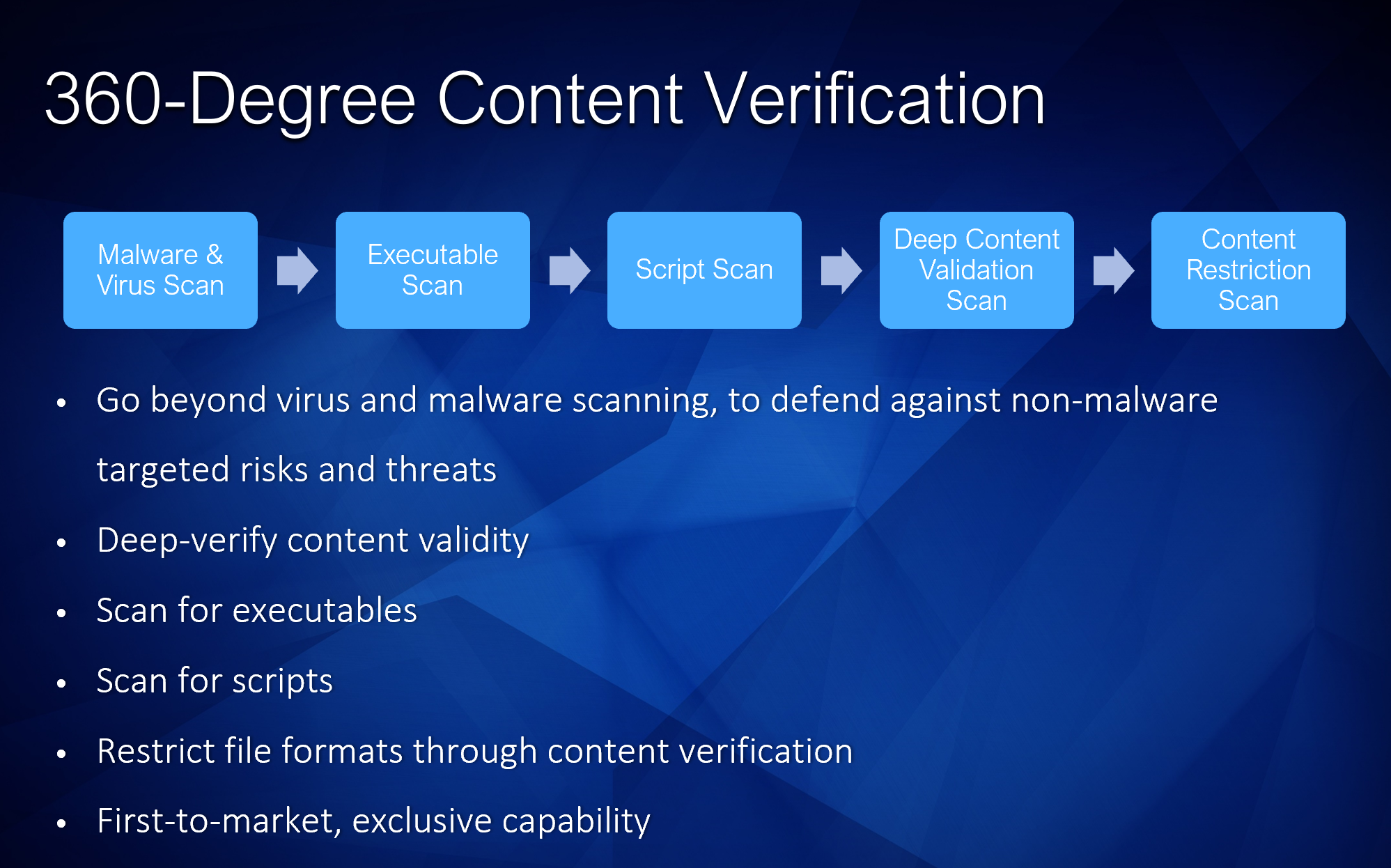
By fully configuring our scanning system to protect against the full range of possible 0-day and custom-made threats, we can fully protect our system.
Opinions expressed by DZone contributors are their own.
Comments