

API Throttling Strategies When Clients Exceed Their Limit
Here's how to handle clients exceeding API rate limits, as well as a few alternate strategies to explore and implement.
Join the DZone community and get the full member experience.
Join For FreeWhen a client reaches its API usage limits, API rejects the request by returning theHTTP 429 Too Many Requests error to the client. The client may retry after the retry period that is usually returned in a custom HTTP response header. This is an API throttling strategy commonly employed.
There are situations where API may depend on an external service provider that may have a fixed capacity. As this external dependency has a fixed capacity and cannot handle bursts in requests, we have to control the throughput of requests to meet the service level agreements of the dependency. In this article, we will explore two alternate strategies to throttle API usage to deal with this condition:
- Delayed execution. Queueing the request for a delayed execution by honoring the enforced rate.
- Fallback to alternate API. Allowing the request immediately but with different rate limits.
Delayed Execution
When the limit is reached, rather than rejecting a new request, the idea here is to put the request into a queue for delayed execution. The calling thread returns HTTP 202 Accepted to the client, but the request is held and delayed in a queue.
Implementation
Let us say there is a biometric identity SaaS provider that needs to perform fingerprint matching for biometric identification. It signs up with an external service provider that offers fingerprint matches. There is an agreed SLA of 5 fingerprint matches a second. The SaaS provider needs to control the rate of processing to meet the SLA.
We will use HTTP polling as it can be hard to provide call-back endpoints.
- The client makes a synchronous call to the API.
- API responds synchronously with HTTP 202 Accepted. The response holds a location reference pointing to an endpoint that the client can poll to check for the result.
The API enqueues the request into a queue, e.g., ActiveMQ.
- The Throttler component sends only a fixed number of requests to the throttled queue for processing to meet the SLA.
- Once the request from the throttled queue is completed, the status endpoint returns the result of processing.
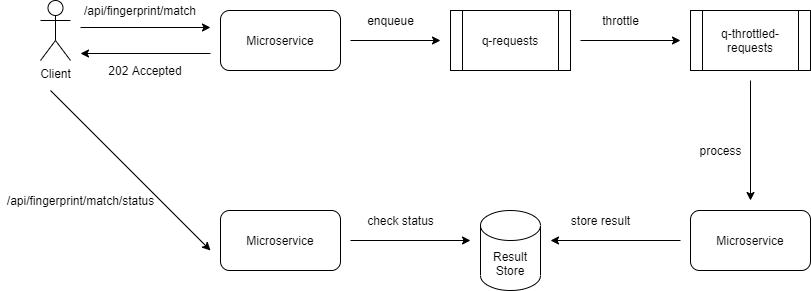
We will use Java Spring to implement the REST APIs, Apache ActiveMQ for the queue, Apache Camel for processing messages in the queue, and MySQL as the result store.
1. Publish request to the queue. The microservice after accepting the request uses FingerprintRequestPublisher to enqueue the incoming request to ActiveMQ.
@Component
@RequiredArgsConstructor
public class FingerprintRequestPublisher {

    final JmsTemplate jmsTemplate;

    public void sendMessage(final String queueName, final FingerprintRequest message) {
        jmsTemplate.convertAndSend(queueName, message);
    }
}
2. Throttle requests. We use Apache Camel activmq component to move requests from the incoming queue to the throttled queue at the specified throttling rate.
@Component
public class FingerprintRequestThrottler extends RouteBuilder {

    @Value("${fingerprint-requests.queue-name}")
    private String queueName;

    @Value("${fingerprint-requests.throttled-queue-name}")
    private String throttledQueueName;

    @Value("${fingerprint-requests.throttle-rate}")
    private String throttleRate;

    @Override
    public void configure() throws Exception {
        from("activemq:" + queueName)
                .throttle(Integer.parseInt(throttleRate))
                .to("activemq:" + throttledQueueName);
    }
}
3. Dequeue requests from the throttled queue. We use Apache Camel activemq component to dequeue requests and sent them to a processor.
@Component
@RequiredArgsConstructor
public class FingerprintMatchHandler extends RouteBuilder {

    @Value("${fingerprint-requests.throttled-queue-name}")
    private String throttledQueueName;

    private final FingerprintRequestProcessor fingerprintProcessor;

    @Override
    public void configure() throws Exception {

        from("activemq:" + throttledQueueName)
                .process(fingerprintProcessor);
    }
}
4. Process Fingerprint match requests. Finally, we create a Camel processor to process the request.
@Component
public class FaceMatchRequestProcessor implements Processor {

    @Override
    public void process(Exchange exchange) throws Exception {
      FingerprintRequest fingerprintRequest
        = exchange.getMessage().getBody(FingerprintRequest.class);
      // 1. Process the request by calling external service provider
      // 2. Persist the result in DB
    }
}
A transaction id is generated when the HTTP request is received. The transaction id can be returned to the client in the body or as a URL in the HTTP Location header. The FingerprintRequest the object also has the same transaction id. When the result of the match is stored, it is stored with the transaction id as the key.
Fallback to Alternate API
When the rate limit is reached, the SaaS provider can switch to another API implicitly that has a different SLA. This should happen seamlessly without requiring the client to call another API.
Implementation
Typically the API requests are routed to microservices via an API Gateway. It is then appropriate to implement the fallback at the API Gateway layer. An example solution would be to check the rate limits for the main API at the Gateway. If it is exhausted, then route the request to the fallback API if the quota for the fallback API is not exhausted yet. If the quota for the fallback API is exhausted as well, then the Gateway may choose to reject the HTTP request by returning HTTP 429 Too Many Requests error.

This can be implemented at the Spring Cloud Gateway with two Gateway filters - FingerprintFilter and FingerprintFallbackFilter, for the two APIs - main and the fallback respectively.
In the Gateway filter for checking API limits for the main API, FingerpringFilter,we check if the limits are exhausted. If not, the request is allowed, else the request is re-directed to the fallback API.
public class FingerprintFilter extends AbstractGatewayFilterFactory<FingerprintFilter.Config> {

    @Override
    public GatewayFilter apply(Config config) {
        return new OrderedGatewayFilter((exchange, chain) -> {

            Route route = exchange.getAttribute(ServerWebExchangeUtils.GATEWAY_ROUTE_ATTR);
            return keyResolver.resolve(exchange).flatMap(key -> {
                if (StringUtil.isNullOrEmpty(key)) {
                    return handleErrorResponse(chain, exchange, HttpStatus.UNPROCESSABLE_ENTITY);
                }

                Mono<RateLimiter.Response> result = rateLimiter.isAllowed(route.getId(), key);
                return result.flatMap(response -> {

                    response.getHeaders().forEach((k, v) -> exchange.getResponse().getHeaders().add(k, v));

                    if (response.isAllowed()) {
                        return chain.filter(exchange);
                    }
                    return handleErrorResponse(chain, exchange, HttpStatus.TOO_MANY_REQUESTS);
                });
            });
        }, RATELIMIT_ORDER);
    }

    private Mono<Void> handleErrorResponse(GatewayFilterChain chain, ServerWebExchange exchange, HttpStatus status) {
        exchange.getResponse().setStatusCode(status);

        RestErrorTo errorTo = new RestErrorTo(status.value(), INTERNAL_SERVER_ERROR, status.name());

        if (status.equals(HttpStatus.TOO_MANY_REQUESTS)) {
            // Quota exhausted for main API
            // Redirect to fallback
            ServerHttpRequest mutatedRequest = exchange.getRequest().mutate().path("/api/fingerprint/fallback").build();
            ServerWebExchange mutatedExchange = exchange.mutate().request(mutatedRequest).build();
            return chain.filter(mutatedExchange);

        } else if (status.equals(HttpStatus.UNPROCESSABLE_ENTITY)) {
            errorTo.setTitle(NOT_ALLOWED);
        }

        RestResponseTo response = new RestResponseTo(null, null, Collections.singletonList(errorTo));

        byte[] bytes = null;
        try {
            bytes = objectMapper.writeValueAsBytes(response);
        } catch (JsonProcessingException ignored) {
        }

        exchange.getResponse().getHeaders().add(HttpHeaders.CONTENT_TYPE, MediaType.APPLICATION_PROBLEM_JSON_VALUE);

        return exchange.getResponse()
                .writeWith(Mono.just(bytes).map(r -> exchange.getResponse().bufferFactory().wrap(r)));
    }
}
In the Gateway filter for the fallback API, we check the limits for the API. If it is not exhausted yet, the request is allowed, else rejected with HTTP 429 Too Many Requests error. The client is not aware of this redirect. The request may be processed synchronously or asynchronously as shown in the last section. If the call is processed asynchronously, SLA can be provided to the client in the HTTP response header, e.g., Location with an URL to check status.
Conclusion
In this follow-up to our previous article on API rate limits, we looked at some of the options to handle situations when the configured rate limits of an API are exceeded. The simplest option is to reject the request. We explored a couple of other options that may be suitable for other scenarios where rejecting a request may not be possible, including delayed execution and fallback to another API.
Opinions expressed by DZone contributors are their own.
Comments