

Automating the DFIR Triage Loop With Memory Forensics and LLMs
DFIR-Chain automates forensic triage by combining Volatility, YARA, and LLMs to turn artifacts into coherent incident narratives in minutes, not hours.
 ·
·
Join the DZone community and get the full member experience.
Join For FreeMost modern security operations centers (SOCs) face a problem of speed and volume of data collection. While collecting data is no longer the issue in many cases, analyzing it is — especially during high-priority incidents.
To collect forensic evidence in many cases, analysts manually run multiple tools: Volatility for memory dumps, YARA for malware signatures, and strings for basic text search. Each tool creates a different output. The combination of all of those outputs is required for meaningful analysis. Manual correlation of these outputs is time-consuming and error-prone. Manual correlation of forensic outputs also contributes to alert fatigue — when the number of alerts becomes so large that they cannot be reasonably processed by humans.
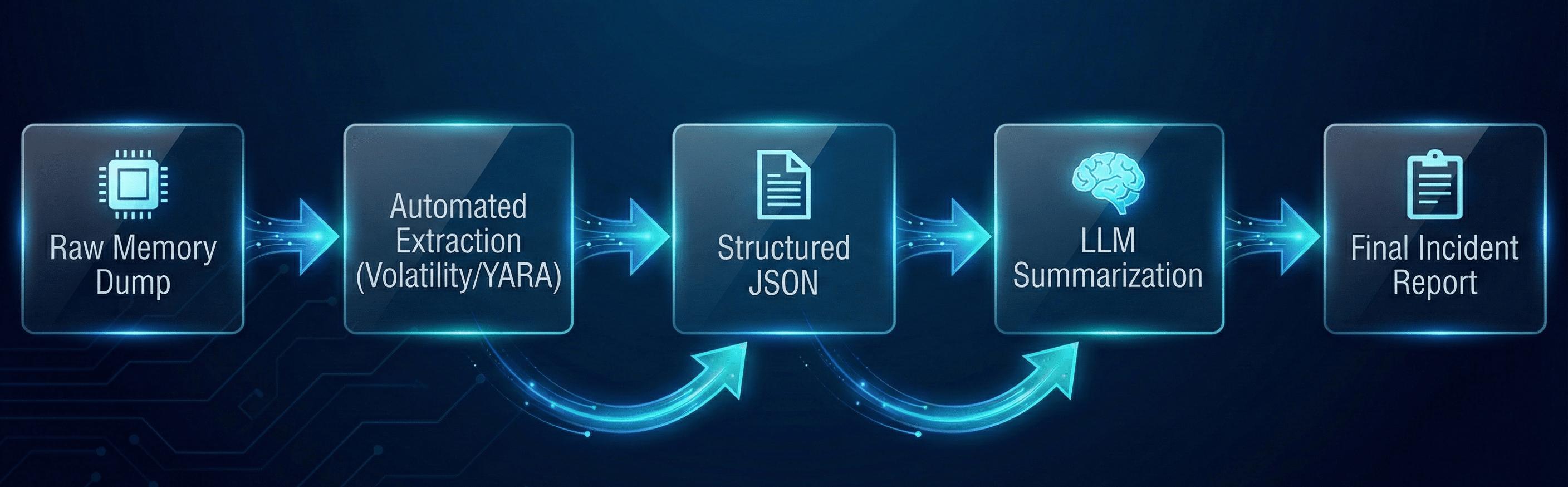
DFIR-Chain is an automated triage architecture that uses memory forensics, artifact extraction, and large language models (LLMs) to create a coherent incident narrative from forensic artifacts in minutes, not hours. Instead of viewing forensic artifacts as unstructured text, we view them as structured inputs to an LLM.
The Problem: “Stare At the Hex” Bottleneck
Many memory forensic workflows look something like this:
- Capture RAM: The analyst captures a memory image of size 16 GB+.
- Run plugins: The analyst executes windows.pslist, windows.netscan, and windows.filescan separately.
- Manual correlation: The analyst manually copies and pastes Process IDs (PIDs) to find out if the suspicious process svchost.exe (PID 442) opened a socket to a known bad IP.
- Reporting: The analyst writes a ticket describing their findings.
This type of “manual-middleware” approach has serious scalability limitations. To address this limitation, we must develop an engineering approach — a pipeline that extracts, structures, and narrates.
Phase 1: Automated Ingestion (“Hands”)
The first phase is to automate the extraction of “gold” artifacts — the high-value signals buried in the noise of a memory dump. We can utilize Python to wrap Volatility 3 and YARA into a single extraction program.
Rather than manually executing command-line interface (CLI) commands, we will create a “Triage Profile” that automatically executes key plugins and dumps the resulting output into JSON format.
The Extraction Program
This Python program uses the Volatility 3 library to programmatically extract process lists and network connections from a memory dump.
import volatility3.plugins.windows.pslist as pslist
import volatility3.plugins.windows.netscan as netscan
from volatility3.framework import contexts, automagic
from volatility3.framework import interfaces
import json

def automated_triage(memory_dump_path):
    # Set up the Volatility Context
    ctx = contexts.Context()
    ctx.config['automagic.LayerStacker.single_location'] = memory_dump_path
    automagic.choose_automagic(automagic.available(ctx), ctx)

    results = {}

    # 1. Execute Process List Plugin
    print("[*] Extracting Process List...")
    plugin = pslist.PsList(ctx, ctx.config)
    proc_list = plugin.run()

    # Prepare the output for the LLM
    results['processes'] = []
    for row in proc_list:
        results['processes'].append({
            "pid": row.UniqueProcessId,
            "name": row.ImageFileName.cast("string", encoding='utf-8', errors='replace'),
            "ppid": row.InheritedFromUniqueProcessId,
            "create_time": str(row.CreateTime)
        })

    # 2. Execute Network Scan Plugin
    print("[*] Extracting Network Connections...")
    net_plugin = netscan.NetScan(ctx, ctx.config)
    net_list = net_plugin.run()

    results['network'] = []
    for row in net_list:
        results['network'].append({
            "src_ip": row.LocalIpAddress,
            "dst_ip": row.ForeignIpAddress,
            "state": row.State,
            "pid": row.Owner
        })

    return results

# Save the extracted data to a JSON file for the next phase
triage_data = automated_triage("infected_dump.mem")

with open("triage_artifacts.json", "w") as f:
    json.dump(triage_data, f, indent=4)
Key engineering decision: We are not saving the entire raw output. We are filtering for fields that the LLM can use (PID, Name, Parent PID, IP Address). Sending 1 GB of raw text to an LLM context window is expensive, and it introduces noise (hallucinations).
Phase 2: The Logic Layer (“Brain”)
Raw JSON is still difficult to read. Prior to sending this to an LLM, we need a logic layer to enhance the data. This is where we apply deterministic rules — things we know are bad — so the LLM doesn’t have to guess.
For example, we could use YARA to scan the memory of the process identified in Phase 1 with a known malicious signature.
import yara

def scan_process_memory(pid, memory_dump_path, rule_path):
    rules = yara.compile(filepath=rule_path)

    # In a real-world implementation, you would carve the process memory space
    # using Volatility before passing it to YARA.
    # Here, we simulate scanning a dumped process memory file.
    matches = rules.match(pid_dump_file)

    return [match.rule for match in matches]
Data Normalization
The most important part is normalization. If Volatility states the PID is 4096, and the Network Scan states the owner is 4096, then we merge both into a single “Entity” object.
- Entity: svchost.exe (PID 4096)
- Behavior: Began execution at 02:00 AM
- Network: Established a connection to 192.168.1.55 (Port 443)
- YARA: Identified APT_Ghost_Rat
This pre-correlated object is the one we will pass to the LLM.
Phase 3: LLM Summary (“Voice”)
At this point, we have a structured, enhanced JSON object. The purpose of the LLM is not to “identify” the malware (YARA already did), but to provide the human analyst with a coherent incident timeline.
Context-Aware Prompt
The prompt should be designed to avoid “creative writing.” We desire a factual summary.
System role: You are a Tier 3 Digital Forensics Analyst. Your role is to provide a summary of forensic artifacts into a coherent incident timeline. Do not make any assumptions. Use only the data in the provided JSON.
Input:
{
  "suspect_process": "powershell.exe",
  "pid": 5521,
  "parent": "explorer.exe",
  "network": "10.0.0.5 -> 185.x.x.x:443 (ESTABLISHED)",
  "yara_matches": [
    "Suspicious_PowerShell_WebClient"
  ]
}
Task: Provide a 3-sentence summary of this activity.
Output:
Using this pipeline, the system provides the human analyst with a readable summary of the activity:
“At 02:14:55 UTC, a process named ‘powershell.exe’ (PID 5521) was launched by ‘explorer.exe’. Immediately after its launch, the new process created a network connection to the remote IP 185.x.x.x on port 443. LLM scans found the ‘Suspicious_PowerShell_WebClient’ signature, suggesting that the new process may be establishing a C2 communication channel.”
Architecture Limitations and Guardrails
While this automation significantly reduces the triage time, engineers must implement guardrails:
- Hallucination checks: Never allow the LLM to generate file hashes or IP addresses not present in the original JSON. Develop a post-processing script that regex-matches each IP in the LLM’s response against the original JSON. If the IP is not found in the original JSON, mark the summary as “Unreliable.”
- Privacy deidentification: Before sending logs to an outside LLM service (OpenAI or Anthropic), deidentify any PII in your logs. If you require data sovereignty, consider utilizing a local LLM (Llama-3-8b) trained on security logs.
- Context window management: Don’t send the full string output of strings.exe. It is too long, and too much is junk. Only send high-confidence indicators.
Conclusion
Automating DFIR is not about replacing the human analyst — it is about giving the analyst a head start. By chaining Volatility for extraction, YARA for identification, and LLMs for summary, we convert a 2-hour manual triage process into a 5-minute automated report. This enables the human analyst to concentrate on the “why” and “how” of the attack — rather than the “what”.
Opinions expressed by DZone contributors are their own.
Comments