

Automating Lift-and-Shift Migration at Scale
Moving 100+ servers to the cloud manually is a recipe for disaster. Here is an architectural pattern for building an automated Migration Factory.
Join the DZone community and get the full member experience.
Join For FreeFor many enterprises, the “lift-and-shift” (rehost) strategy remains the most pragmatic first step into the cloud. It offers speed and immediate data center exit capabilities without the complexity of refactoring applications. However, doing this manually for hundreds of workloads introduces human error, security gaps, and “migration fatigue.”
To solve this, we need to treat migration not as a series of manual tasks, but as a manufacturing process. We need a Migration Factory.
This article outlines an architectural blueprint for automating large-scale migrations using AWS Application Migration Service (MGN) orchestrated by Step Functions and CI/CD pipelines.
The Core Problem: The Semi-Automated Trap
AWS MGN is a powerful tool, but out of the box, it is only “semi-automated.” You still need to:
- Install agents manually on source servers
- Monitor replication progress in the console
- Manually launch test instances
- Switch traffic for cutover
When you multiply these steps by 500 servers, you get inconsistent configurations, missed security tags, and blown timelines. The solution is to wrap AWS MGN in an orchestration layer that handles lifecycle state management.
The Architecture: Event-Driven Orchestration
The architecture below relies on decoupling the definition of the migration (the runbook) from the execution (the pipeline).
High-Level Workflow
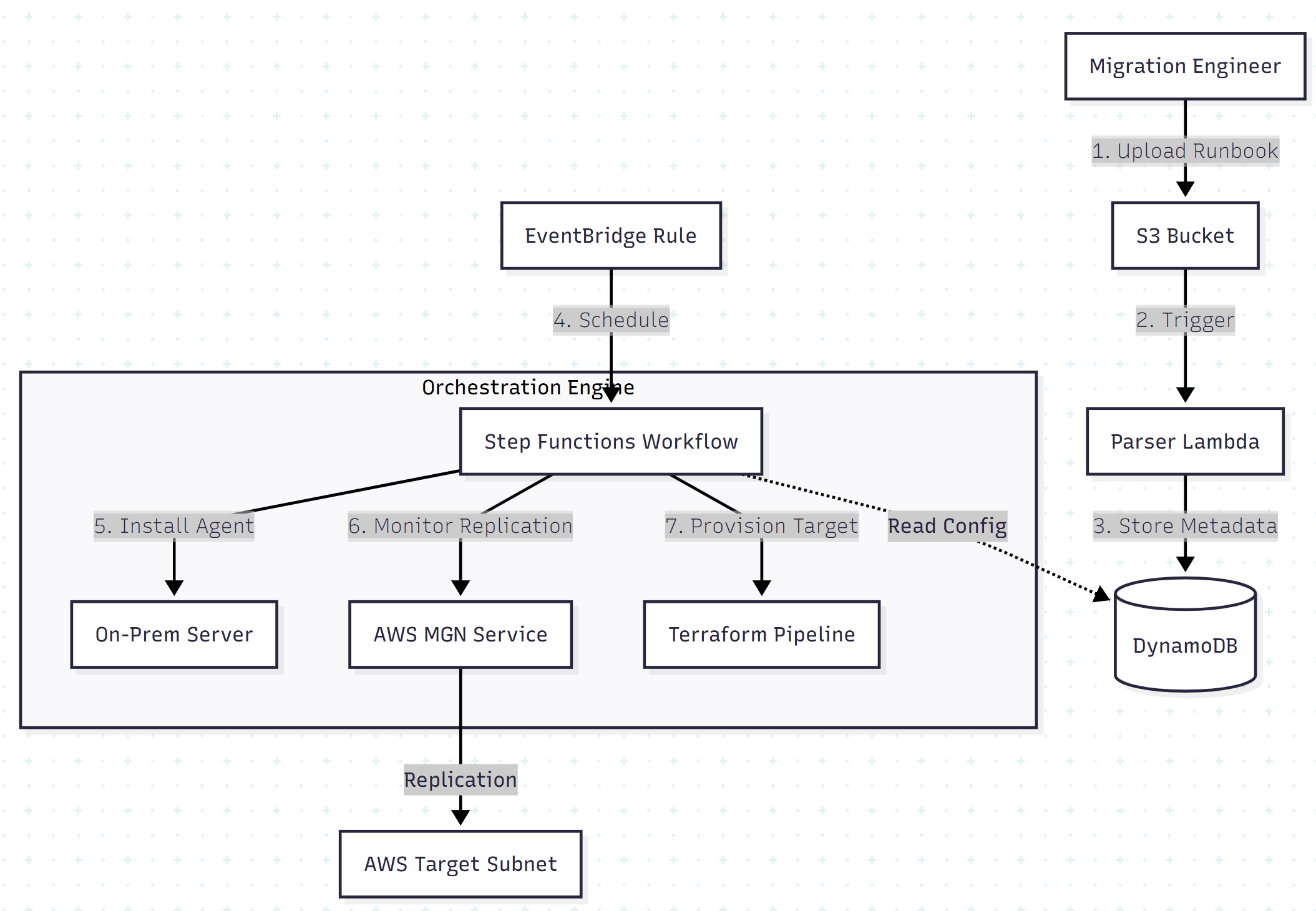
1. The Migration Runbook (Source of Truth)
Instead of disparate spreadsheets, we define the migration wave in a structured JSON or CSV runbook stored in S3. This file acts as the infrastructure contract.
Sample Runbook Structure:
[
  {
    "hostname": "db-server-01",
    "wave_id": "wave-2",
    "target_instance_type": "r5.large",
    "subnet_id": "subnet-0abc123",
    "security_groups": ["sg-web", "sg-db"],
    "cutover_time": "2025-12-20T02:00:00Z",
    "tags": { "CostCenter": "Finance", "Environment": "Prod" }
  }
]
2. State Management with Step Functions
AWS Step Functions acts as the factory floor manager. It handles long-running processes that Lambda cannot, such as waiting for initial data replication (which can take days) or polling for “Ready for Testing” states.
Key State Transitions:
- Agent Installation: Connects to the source via SSM or SSH and installs the MGN agent
- Replication Loop: Polling loop checking
dataReplicationInfo.state - Launch Configuration: Pushes runbook settings (instance type, security groups) to the MGN launch template via API
- Test/Cutover Trigger: Executes launch logic based on the schedule
Automation Deep Dive: The Infrastructure Pipeline
Once replication is complete and the server is launched, we shift from “migration” tools to “DevOps” tools.
The Terraform Handoff
A common mistake is leaving the migrated server as a “ClickOps” artifact. To ensure the new environment is manageable, the Migration Factory triggers a CodePipeline job immediately after cutover.
This pipeline reads the final state of the migrated instance (AMI ID, private IP) and commits it to a Terraform state file.
Python/Boto3 Logic to Update Launch Templates:
import boto3

mgn_client = boto3.client('mgn')

def update_launch_config(source_server_id, runbook_data):
    """
    Updates the AWS MGN Launch Configuration based on Runbook Metadata
    """
    response = mgn_client.update_launch_configuration(
        sourceServerID=source_server_id,
        targetInstanceTypeRightSizingMethod='NONE',
        targetInstanceType=runbook_data['instance_type'],
        copyPrivateIp=True,
        copyTags=True,
        launchDisposition='STARTED'
    )
    return response['ResponseMetadata']['HTTPStatusCode'] == 200
Post-Launch Automation (The “Day 1” Scripts)
A server isn’t “migrated” just because it boots. It must be integrated into the cloud ecosystem. Using AWS Systems Manager (SSM), we automate the following “Day 1” tasks immediately post-cutover:
- Agent Cleanup: Uninstall the MGN replication agent and legacy VMware tools
- Observability: Install CloudWatch Agent and Fluent Bit
- Security Hardening: Join the domain controller and apply Group Policies
- License Switching: For SQL Server, automate the switch from BYOL (Bring Your Own License) to AWS License Included (LI), if required, to optimize costs
Security and Governance Patterns
In a factory model, security must be baked in, not bolted on.
- Isolation: The factory operates in a dedicated “Migration VPC” with private subnets. Replication traffic flows over Site-to-Site VPN or Direct Connect — never the public internet.
- Encryption: All data in transit is encrypted via TLS 1.2. Data at rest (EBS volumes) is encrypted using AWS KMS keys managed by the factory.
- RBAC: The automation pipeline uses IAM roles with least-privilege access. Developers trigger migrations by uploading a file to S3, never by logging into the console.
Results: The Efficiency Gains
Implementing a factory model yields measurable improvements over manual migration:
- Speed: Provisioning time reduced by 50% compared to manual lift-and-shift
- Reliability: Migration success rates typically exceed 99% due to the elimination of manual configuration errors
- Cost: “Wait time” is eliminated. Servers are spun down immediately after testing, and cutovers are executed precisely on schedule, minimizing parallel run costs
Conclusion
Building a Migration Factory requires upfront investment in code and architecture, but for fleets larger than 50 servers, the ROI is immediate. By orchestrating AWS MGN with Step Functions and Terraform, you transform a chaotic data center exit into a predictable, boring, and successful engineering event.
The goal is simple: one click to start, zero touches to finish.
Opinions expressed by DZone contributors are their own.
Comments