

Automating Traceability with Generative AI
Here is an architectural pattern to automate traceability checks by combining batch configuration extraction with Generative AI validation.
In the world of software engineering, we have robust CI/CD pipelines that ensure code traceability. We know exactly which commit caused a build failure.
However, in Infrastructure Systems Engineering (Infrastructure SE), traceability is often broken. The documentation says one thing, the server configuration says another, and the test specification says a third. Verifying that the design intent matches the actual state is usually a manual process involving screenshots, spreadsheets, and human eyeballing.
This manual approach leads to configuration drift and knowledge silos. If only one senior engineer knows how to verify the network settings, your bus factor is dangerously low.
This article outlines a new approach to solving this problem: automated configuration extraction coupled with generative AI validation.
The Problem: The Triple Artifact Gap
In traditional V-Model development, three key artifacts must align:
- Design Documents: What we intended to build
- System Configuration: What we actually built
- Test Specifications: How we verified it
In infrastructure projects, verifying alignment across these artifacts is painful. OS parameters, registry keys, and GPO settings are buried deep in the system. Extracting them manually takes hours, and comparing them against Excel-based design documents is error-prone.
The Solution: A Two-Stage Automation Architecture
We propose a solution that removes humans from the data-collection loop and uses AI to close the analysis gap.
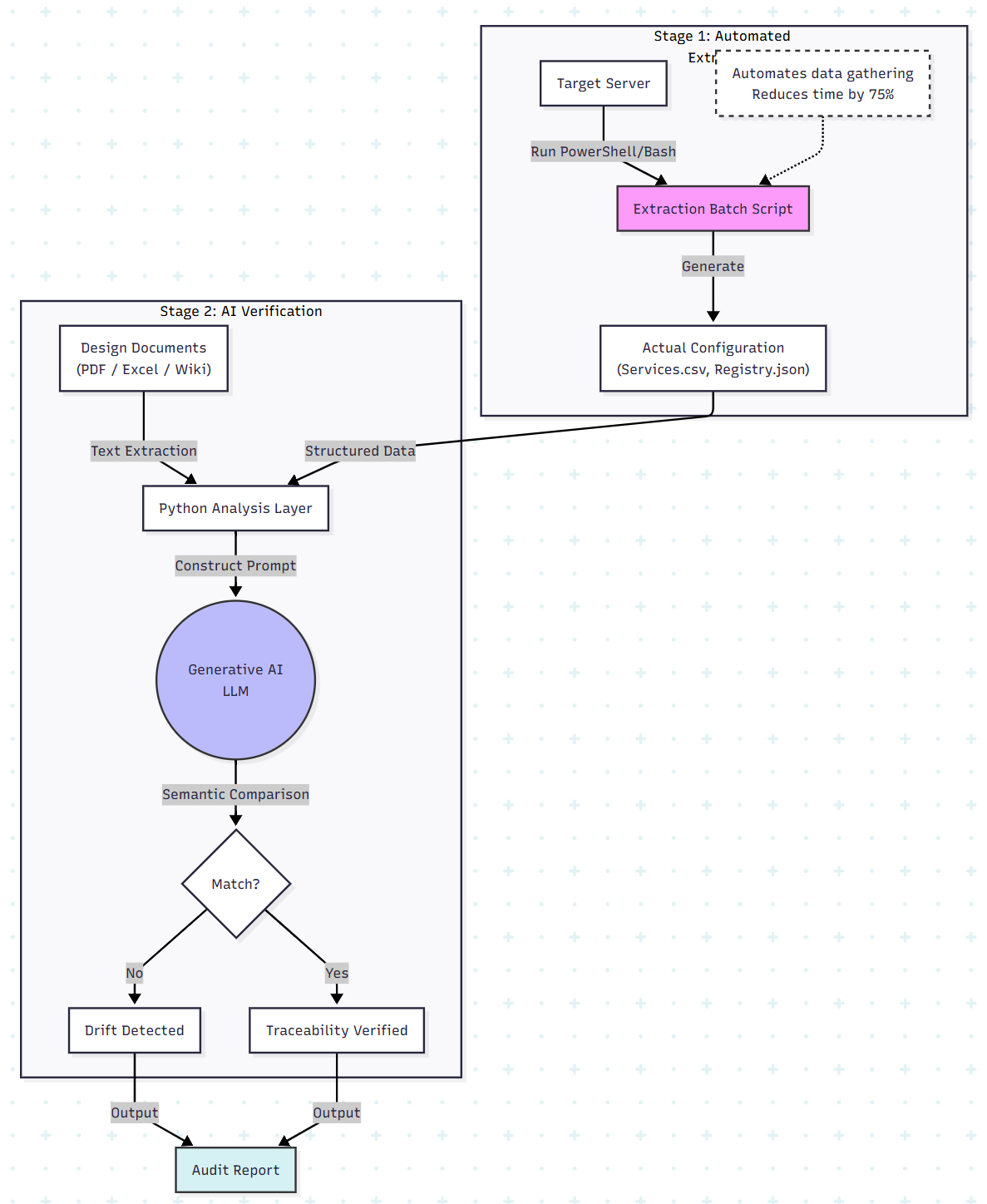
Stage 1: Automated Extraction
Instead of relying on screenshots (which are dead data), we implement a scripted extraction layer.
We developed batch scripts (PowerShell/Bash) that run on target servers to extract configuration items into structured formats (CSV/JSON).
Why This Matters
- Speed: Manual collection of services and registry keys can take 2+ hours per server. Scripted extraction takes minutes.
- Accuracy: Scripts don’t make typos.
- Traceability: The output files act as snapshots of system state at specific points in time.
Concept Code (PowerShell Extraction):
# Extract Service Configuration to CSV
Get-Service | Select-Object Name, Status, StartType, DisplayName | Export-Csv -Path "C:\Logs\Services.csv" -NoTypeInformation

# Extract Installed Apps
Get-ItemProperty HKLM:\Software\Wow6432Node\Microsoft\Windows\CurrentVersion\Uninstall\* | Select-Object DisplayName, DisplayVersion, InstallDate | Export-Csv -Path "C:\Logs\Apps.csv" -NoTypeInformation
Stage 2: The AI Verification Layer
Once we have structured data (CSVs) and unstructured data (design documents), we face a matching problem. A design document might say “Disable Print Spooler,” while the system service name is Spooler. Simple string matching or Excel VLOOKUP fails here because it lacks semantic understanding.
This is where generative AI excels. We can use Python to feed the extracted system state and the design requirements into an LLM for semantic verification.
Python Implementation: The Semantic Auditor
import pandas as pd
from openai import OpenAI

# Initialize Client (Assumes OPENAI_API_KEY env var is set)
client = OpenAI()

def verify_configuration(csv_path, design_requirements):
    # 1. Ingest the Actual State (Extracted CSV)
    # We convert the dataframe to a distinct string format for the LLM to read
    df = pd.read_csv(csv_path)
    actual_state_str = df.to_markdown(index=False)

    # 2. Construct the Semantic Prompt
    # We ask the AI to act as a compliance auditor
    system_prompt = """
    You are an Infrastructure Quality Assurance Engineer.
    Your task is to compare the ACTUAL SYSTEM CONFIGURATION (CSV) against the DESIGN REQUIREMENTS.

    Rules:
    1. Ignore minor naming differences (e.g., "Print Spooler" vs "Spooler").
    2. Focus on the 'Status' and 'StartType'.
    3. Output a JSON object with 'status' (PASS/FAIL) and a list of 'discrepancies'.
    """

    user_prompt = f"""
    --- DESIGN REQUIREMENTS ---
    {design_requirements}

    --- ACTUAL SYSTEM CONFIGURATION ---
    {actual_state_str}
    """

    # 3. Analyze with LLM
    response = client.chat.completions.create(
        model="gpt-4",
        messages=[
            {"role": "system", "content": system_prompt},
            {"role": "user", "content": user_prompt}
        ],
        temperature=0
    )

    return response.choices[0].message.content

# --- Example Usage ---

# Mock Design Spec (Unstructured text from a PDF/Wiki)
design_spec = """
Security Baseline v2.0:
- The 'Remote Registry' service must be Disabled.
- The 'Print Spooler' service must be Disabled.
- 'Windows Update' should be set to Manual.
"""

# Run the Verification
audit_result = verify_configuration("C:/Logs/Services.csv", design_spec)
print(audit_result)
Why This Works
The LLM understands that Spooler in the CSV and Print Spooler in the design text refer to the same entity. It can reason that if the requirement is Disabled but the CSV reports Running, the configuration is non-compliant — regardless of syntax or naming differences.
Future Pattern: Deep-Linking Configuration
A key innovation proposed in this approach is embedding command links directly into design documents.
Instead of writing:
Open Control Panel → Network → Adapters
We embed a hyperlink using a URI scheme such as:
ms-settings:network-ethernetBenefits
- Human Benefit: One click takes an engineer directly to the correct setting.
- Automation Benefit: Future agents can parse these URIs to identify exactly which configuration requires verification, bridging the gap between documentation and automation.
Results: Efficiency Metrics
Implementing this pattern produced significant improvements:
- 75% reduction in collection time: Manual screenshot-based collection dropped from ~2 hours to under 30 minutes.
- Drift detection: The system identified five critical configuration issues (including GPO password policies and AutoPlay settings) missed by human reviewers.
- Skill democratization: Junior engineers achieved the same verification accuracy as senior architects, eliminating hero dependency.
Conclusion
Traceability in infrastructure should not be a paper exercise. By treating configuration as data (via extraction scripts) and using generative AI as the validation engine, we can bring continuous quality to infrastructure engineering.
Next Steps
- Script it: Stop taking screenshots. Extract configurations to CSV or JSON.
- Verify it: Use diff tools or GenAI to compare extracted data against design specifications.
- Iterate: Feed results back into design documents to keep them accurate and living.
Opinions expressed by DZone contributors are their own.