

Automating Visual Brand Compliance: A Multimodal LLM Approach
Manual review of marketing assets for brand consistency is a bottleneck. Here is an architectural pattern for building a compliance tool using Multimodal LLMs and Python.
Join the DZone community and get the full member experience.
Join For FreeIn the domain of corporate marketing, “brand consistency” is the golden rule. However, enforcing that rule is often a manual, tedious nightmare. Marketing teams spend countless hours reviewing PDFs and slide decks to ensure the logo has enough padding, the fonts are correct, and the color gradients align with the style guide.
For developers, this looks like a solvable problem. With the advent of multimodal large language models (LLMs) capable of processing text and images simultaneously, we can now build pipelines that “see” a document and “read” a brand rulebook to perform automated audits.
Based on recent enterprise case studies, this article outlines a technical architecture for building a brand compliance tool. We will explore how to combine document parsing with LLMs to automate the design review process.
The Architecture: A Two-Stage Verification Pipeline
The core challenge in automating brand review is that a document is not just text; it is a spatial arrangement of visual elements. A standard OCR scan isn’t enough — we need to know where the logo is and what it looks like.
The successful pattern relies on a Detection → Verification pipeline.
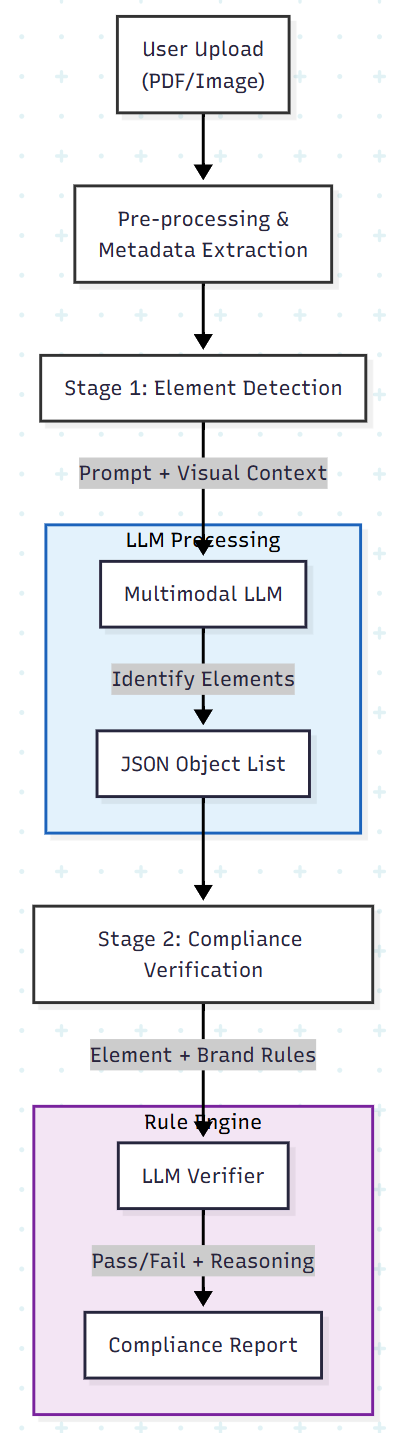
The Tech Stack
- Frontend: Streamlit (for rapid internal tool development)
- Backend: Python
- Model: A multimodal LLM (e.g., Gemini 1.5 Pro or GPT-4o) capable of large context windows and image inputs
- Data Format: Strict JSON enforcement for all LLM outputs
Stage 1: Design Element Detection
Before we can check whether a logo is correct, we have to find it. While object detection models (like YOLO) are fast, they require massive training datasets. An LLM with vision capabilities allows for zero-shot or few-shot detection using prompt engineering.
Pre-processing
If the input is a PDF, we don’t just snapshot it. We extract metadata to give the LLM “superpowers.”
- Rasterize the page into a high-resolution image (for the LLM’s eyes)
- Extract vector metadata (bounding boxes, text, color codes) using libraries like PyMuPDF or pdfplumber
The Detection Prompt
We feed the LLM the image of the page along with a prompt designed to categorize elements into specific buckets (e.g., logo, typography, photography).
Prompt strategy:
To prevent the LLM from hallucinating output formats, we must provide a strict schema.
detection_prompt = """
You are a design expert. Analyze the attached image of a marketing document.
Identify all design elements such as Logos, Text Blocks, and Images.

Return a JSON list where each item contains:
- "type": The category of the element (Logo, Typography, Iconography).
- "bounding_box": Approximate coordinates [x, y, w, h].
- "visual_description": A detailed description of the element's appearance.
- "content": (If text) The actual string content.

Constraint: Do not include markdown formatting. Return raw JSON only.
"""
By passing the pre-calculated bounding boxes from the PDF parser into the prompt context, we significantly increase the LLM’s spatial accuracy.
Stage 2: Compliance Verification
Once we have a JSON list of elements, the system allows the user to select specific elements for verification. This is where the retrieval-augmented generation (RAG) concept applies to visual rules.
We cannot simply ask, “Is this compliant?” without context. We must inject the specific rules from the brand guideline book.
The Verification Logic
If the system identifies a logo, it retrieves the relevant text from the brand guidelines (e.g., “Must have 20px padding,” “Do not use on red backgrounds”).
Verification prompt pattern:
verification_prompt = f"""
You are a Brand Compliance Officer.
Task: Verify if the following element adheres to the Brand Guidelines.

Input Element:
{selected_element_json}

Brand Rules:
{relevant_guideline_excerpt}

Instructions:
1. Compare the visual description and properties of the element against the rules.
2. Output a verdict: "Correct", "Warning", or "Error".
3. Provide a reasoning for your verdict.
4. If "Error", suggest a fix.
"""
Handling Ambiguity with Chain-of-Thought Reasoning
LLMs can struggle with subjective design rules. To mitigate this, the prompt should encourage chain-of-thought reasoning. Ask the model to list its observations before giving a verdict.
Example output:
{
  "element_id": "logo_01",
  "observation": "The logo is placed on a busy photographic background. The logo color is black.",
  "rule_reference": "Logos must use the 'Reversed White' version when placed on dark or busy images.",
  "status": "Error",
  "suggestion": "Replace the black logo with the white transparent version."
}
The Gotchas: Real-World Limitations
Building this system reveals important limitations in current AI capabilities.
1. The “Color Perception” Gap
While LLMs excel at reading text and understanding layout, they struggle with precise color analysis.
- The issue: An LLM might describe “navy blue” as “black” or misinterpret a gradient angle. In early testing, accuracy for color and gradient verification often lags behind text verification (e.g., 53% accuracy for color vs. 90%+ for typography).
- The fix: Don’t rely on the LLM’s eyes for color. Use Python (Pillow/OpenCV) to sample pixels programmatically and pass the HEX codes to the LLM as text metadata.
2. PDF vs. Image Inputs
Processing PDFs typically yields higher accuracy (92%+) compared to raw images (88%).
- Why: PDFs contain structural data (fonts, vector paths) that provide ground truth. Images rely entirely on the model’s visual inference.
- Best practice: Always prefer PDF uploads. If the user uploads a JPG, warn them that accuracy may degrade.
Conclusion
The brand compliance tool pattern demonstrates a shift in how we apply AI. We aren’t just using it to generate content — we’re using it to govern content.
By combining the reasoning capabilities of multimodal LLMs with the strict logic of code-based pre-processing, developers can build tools that reduce manual review time by 50% or more. The key is not to trust the model blindly, but to guide it with structured prompts, strict JSON schemas, and programmatic data extraction.
Next Steps for Developers
- Experiment with the Gemini 1.5 Pro or GPT-4o APIs for image analysis
- Build a simple Streamlit app that accepts a PDF
- Write a script to extract text and images from that PDF
- Feed the components to the LLM and ask: “Does this look professional?”
You might be surprised by how much design sense an algorithm can have.
Opinions expressed by DZone contributors are their own.
Comments