

Autoscale Azure Pipeline Agents With KEDA
KEDA is an event-driven autoscaler that horizontally scales a container by adding additional pods based on the number of events needing to be processed.
 ·
·
Join the DZone community and get the full member experience.
Join For FreeIf you are using Kubernetes solution as a platform to host containerized applications in any of the public clouds, Billing is one of those things that will hunt you sooner or later. Kubernetes billing largely depends on the number of nodes, and node count is decided by the number of workloads a cluster has. We know that autoscaling is one of the favorite features of Kubernetes. Hence, it would be wiser to scale down some of the workloads when there is no work at all and reduce the cloud cost.
When we talk about Kubernetes autoscaling features, Horizontal Pod Autoscaler (HPA) automatically comes to mind. By default, autoscaling can be achieved by HPA using basic metrics like CPU or RAM usage. However, in the event of complex and distributed applications which are integrating with different components outsides the Kubernetes cluster (Ex: Kafka topic lag, Redis Stream, Azure Pipeline Queue, Azure Service Bus, PubSub topic, etc.), HPA itself cannot scale the pods based on metrics from these components.
HPA can use custom metrics and scale based on that, but it requires you to set up a metrics adapter and an additional layer of configuration to map the data to Kubernetes properly.
That’s where KEDA makes my life easy.
To overcome this kind of problem, KEDA comes with extended functionality on top of the Horizontal Pod Autoscaler(HPA). KEDA is an event-driven autoscaler that horizontally scales a container by adding additional pods based on the number of events needing to be processed. It automatically scales different types of Kubernetes resources like deployments, Statefulsets, Jobs, and Custom Resources.
Architecture and Concepts
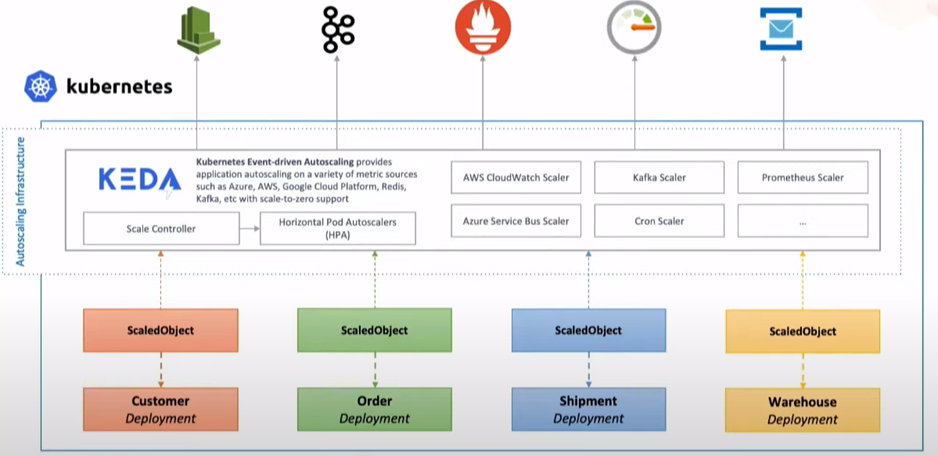
At a high level. KEDA consists of two components that it uses to control the autoscaling of pods/workloads.
- Agent: It is responsible for activating and deactivating Kubernetes deployments, statefulsets, or any other targets to scale to zero when there are no events or from zero when there are events.
- Metrics Server: It acts as a Kubernetes metrics server that exposes events (Azure pipeline queue, Kafka topic messages, etc.) gathered from event sources to the Horizontal Pod Autoscaler (HPA).
Scaler: The real power of KEDA lies within a large number of scalers. A scaler is a rich source of information because it provides external data/events and allows you to scale based on external data. Today it supports more than 50 “Scalers” with specific supported triggers like Azure Pipeline (trigger: azure-pipeline) and Kafka (trigger: Kafka Topics) and has many more to come.
ScaledObject: These are deployed as Kubernetes CRD, which brings the functionality of linking a deployment/statefulset with an event source and defines scaling metadata. ScaledObject uses triggers to respond to events that happen in event sources and scales workloads as needed.
KEDA uses another CRD named TriggerAuthentication(namespaced) or ClusterTriggerAutnetication (Cluster Scoped) to authenticate with event-sources.
Enough theory now; let’s go with some practical use cases and see how we can leverage KEDA to manage azure pipeline agents in an agent pool.
Use Case
Before we start, let’s take a moment to understand our scenario. We have an ADO (Azure DevOps) project, which uses a continuous integration and deployment (CICD) solution. Under that, build/release pipelines have been built. These pipelines use self-hosted containerized agents to execute all the tasks. These self-hosted containerized agents are deployed on a GKE cluster as a statefulset.
The below screenshot depicts that we have only one pod agent under statefulset, and one pipeline job is running on the same pod agent. If we create more releases, they(jobs) will be going in the queue and waiting for the single pod agent to be free. With KEDA in place, we expect to see the number of pods get scaled whenever a new job is in the queue.

Pre-requisites
- ADO project (with agent pool set up in place) being used as CICD solution.
- Necessary ADO project permission to create an azure pipeline agent under the agent pool. Refer here.
- Kubernetes cluster to deploy azure pipeline agents as statefulset.
- Required GCP network connectivity must be built for apps in the k8s cluster to be able to reach to internet.
Install Azure Pipeline Agent
Use the following YAML to install self-hosted containerized azure pipeline agents on the k8s cluster.


Now Let’s verify that agent is registered with the ADO agent pool successfully. We can see the agent appears on Azure Pipelines as well.

azp-gent.yaml

apiVersion: v1

kind: Secret

metadata:

  name: azp-agent-secret

type: Opaque

data:

  vstsToken: BASE64-OF-PAT-TOKEN

---

apiVersion: v1

kind: Service

metadata:

  name: azp-agent

  labels:

    app.kubernetes.io/instance: azp-agent

    app.kubernetes.io/name: azp-agent

spec:

  clusterIP: None

  selector:

    app.kubernetes.io/instance: azp-agent

    app.kubernetes.io/name: azp-agent

---

apiVersion: apps/v1

kind: StatefulSet

metadata:

  labels:

    app.kubernetes.io/instance: azp-agent

    app.kubernetes.io/name: azp-agent

  name: azp-agent

spec:

  replicas: 1

  selector:

    matchLabels:

      app.kubernetes.io/instance: azp-agent

      app.kubernetes.io/name: azp-agent

  serviceName: azp-agent

  template:

    metadata:

      labels:

        app.kubernetes.io/instance: azp-agent

        app.kubernetes.io/name: azp-agent

    spec:

      containers:

      - env:

        - name: POD_NAME

          valueFrom:

            fieldRef:

              apiVersion: v1

              fieldPath: metadata.name

        - name: AZP_TOKEN

          valueFrom:

            secretKeyRef:

              key: vstsToken

              name: azp-agent-secret

        - name: AZP_POOL

          value: POOL-NAME

        - name: AZP_URL

          value: https://dev.azure.com/YOUR-ORG-NAME/

        - name: AZP_WORK

          value: /var/vsts

        - name: AZP_AGENT_NAME

          value: $(POD_NAME)

        image: AZURE-PIPELINE-AGENT-IMAGE

        imagePullPolicy: Always

        name: azp-agent

        resources:

          limits:

            cpu: 500m

            memory: 1Gi

          requests:

            cpu: 100m

            memory: 500Mi

        volumeMounts:

        - mountPath: /var/vsts

          name: workspace

        - mountPath: /vsts/agent

          name: agent-dir

        - mountPath: /var/run/docker.sock

          name: docker-socket

      volumes:

      - hostPath:

          path: /var/run/docker.sock

          type: ""

        name: docker-socket

  volumeClaimTemplates:

  - apiVersion: v1

    kind: PersistentVolumeClaim

    metadata:

      name: workspace

    spec:

      accessModes:

      - ReadWriteOnce

      resources:

        requests:

          storage: 50Gi

      storageClassName: standard

      volumeMode: Filesystem

  - apiVersion: v1

    kind: PersistentVolumeClaim

    metadata:

      name: agent-dir

    spec:

      accessModes:

      - ReadWriteOnce

      resources:

        requests:

          storage: 5Gi

      storageClassName: standard

      volumeMode: Filesystem
Install KEDA on Kubernetes Cluster
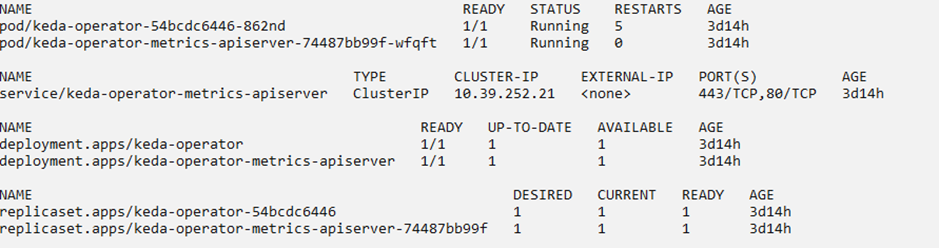
KEDA can be installed on a Kubernetes cluster in many ways. I have used the helm chart to install KEDA on the cluster. You can refer official Helm chart here.
KEDA in Action
As mentioned earlier, ScaledObject is the object which creates a mapping between event source and deployments. Now, we will create ScaledObject with azure-pipeline triggers and TriggerAuthentication to allow KEDA to scale the pods in statefulset.
Refer official page here to explore all parameters of a ScaledObject.
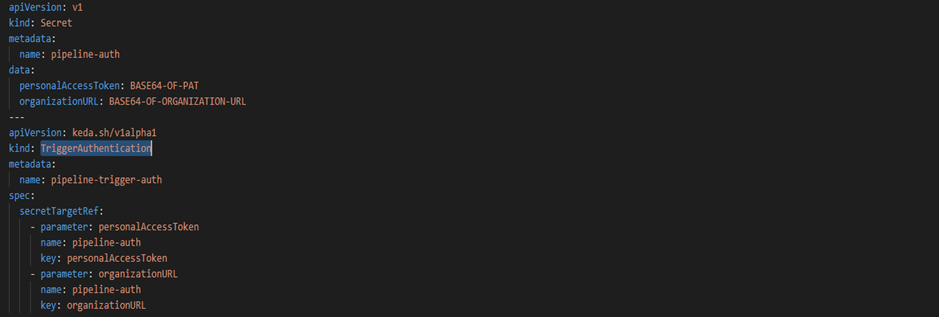
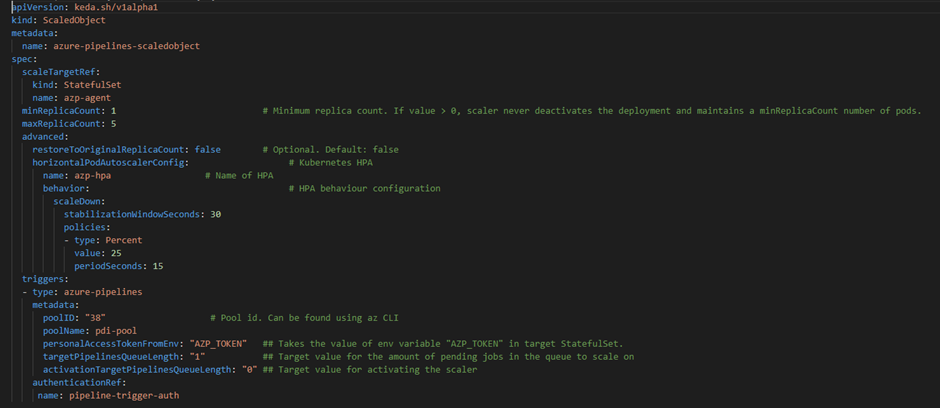
Once the ScaledObject is created, the KEDA automatically syncs the configuration and starts watching the azp-agent Statefulset created above. KEDA seamlessly creates an HPA (Horizontal Pod Autoscaler) object with the required configuration and scales out the replicas based on the trigger rule provided through ScaledObject (in this case, it is a queue length of ‘1’).


Now, I will make some commits to my repo to queue some builds.
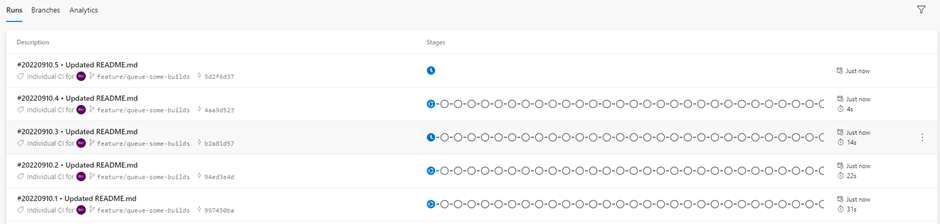
As a result, we can see KEDA scales the number of pods in azp-agent Statefulset, and those pods would be registered with the agent pool and take up the pending jobs on the queue.

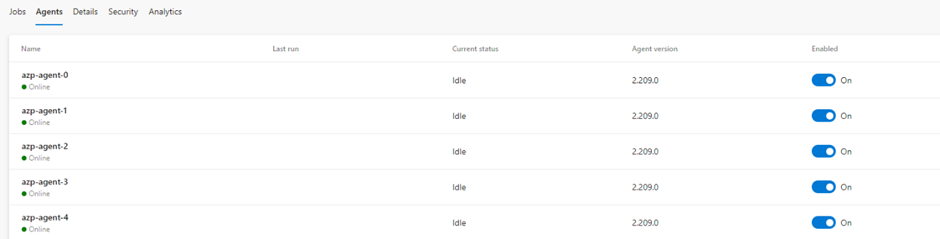

KEDA has more than 50 scalers to drive auto-scaling using different types of event source events, and it continues to add more. Hence it is definitely a production-grade application that can be leveraged for event-based auto-scaling.
Opinions expressed by DZone contributors are their own.
Comments