

Release Pipeline Using Azure DevOps
Extend the basic pipeline which was created in the previous blog by creating a release pipeline that will help us not only automate a deployment but complete the release.
Join the DZone community and get the full member experience.
Join For FreeIn our previous article (https://dzone.com/articles/deploying-mulesoft-using-azure-devops), we’ve seen the basics and how to create a pipeline. In this particular blog, we will see how to extend the basic pipeline which was created in the previous blog by creating a release pipeline that will help us not only automate a deployment but complete the release. But before creating a new release pipeline, let’s understand what it is and why we need to create it.
Release Pipeline
A release pipeline is a conceptual process by which we take committed code into production. As such, a release pipeline can be as ephemeral or as real as we want to make it. The fundamental release pipeline from code change to production software. A means of triggering the pipeline to run.
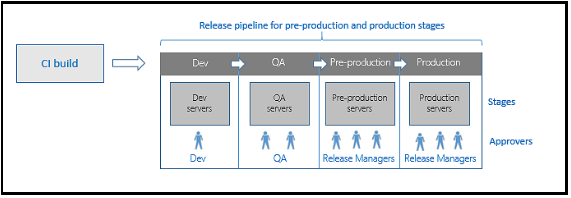
Creating an Azure Release Pipeline
Let’s create a release pipeline in Azure DevOps.
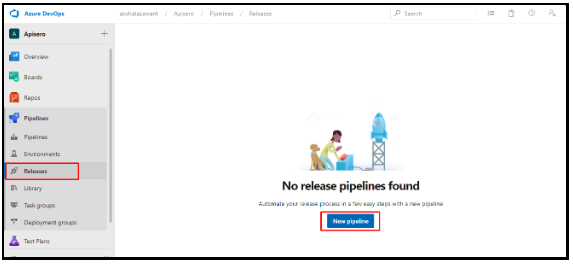
Login into Azure DevOps account and go to Releases → New pipeline
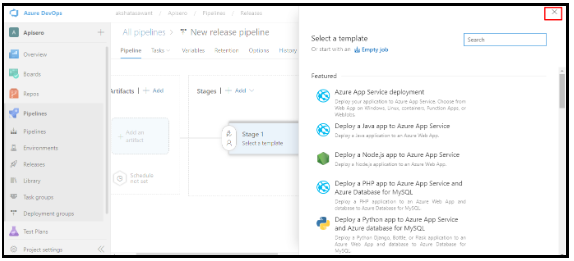
Once you click, you’ll get options to choose the template. Click on the cross button as we’ll be starting with a blank template.
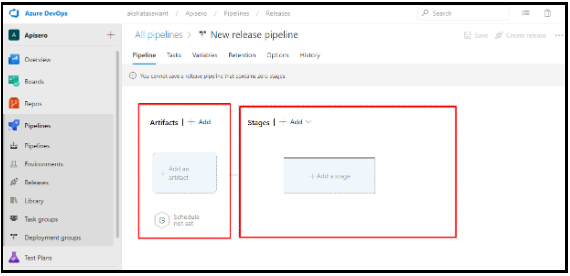
This is the default section which you’ll see.
It’s divided into 2 sections:
- Artifacts
- Stages
An artifact is a deployable component of your application. Azure Pipelines can deploy artifacts that are produced by a wide range of artifact sources, and stored in different types of artifact repositories.
And stages will include our deployment stages like - dev, test, and prod, etc.
Click on Add an artifact, you can select the source type of artifact as to where your build is currently stored.
In case, you’re using a pipeline wherein you’re storing the built artifact then you can select the first option or the 2nd option Azure Repo if you’re directly taking the code from the repo without the use of the pipeline.
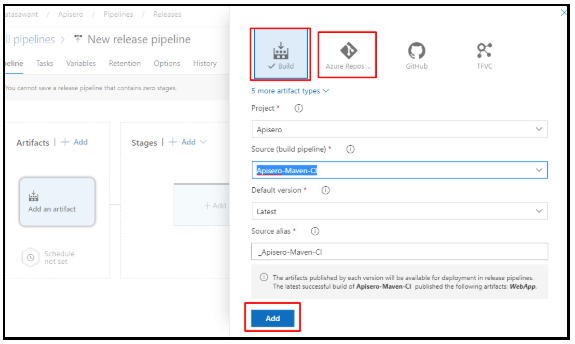
In my case, I’ve already created a pipeline and I’ll be using the first option.
There are more options from where you can select artifacts.
Once you’ve selected the suitable option click Add.
Now we’re going to phase 2, i.e., adding a new stage.
In the Stages section, click on add and select Empty job.

Rename your stage and close it. You can click the save option as it’s not automatically saved!
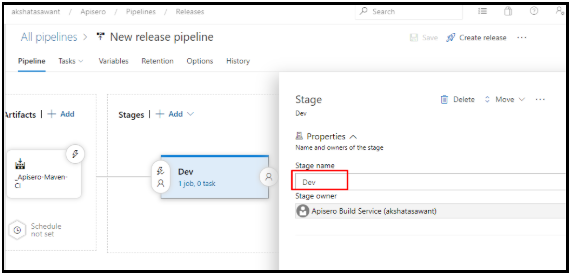
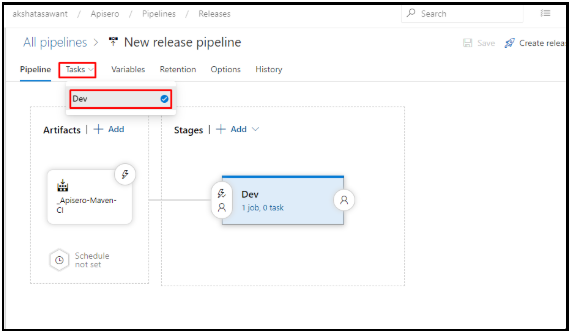
In order to add more functionalities to your stage, click on Task > Select your stage.
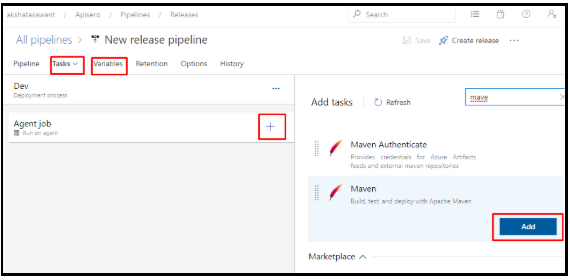
You can add functionalities as per your requirement. Also, add variables and variable groups if they apply to all the stages.
Once that you have your stage configured as per your requirement, you can clone the stage to create more similar stages. This way you’ll save time and don’t have to configure it again and again.
Click Clone Stage to have different stages as per your requirements.
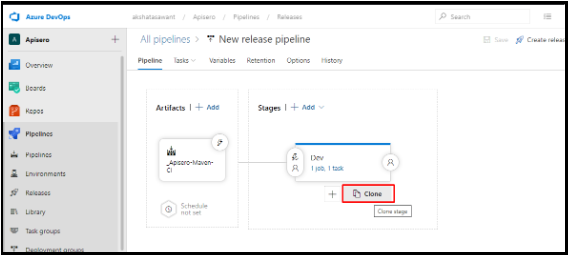
This is how it’ll look on cloning.
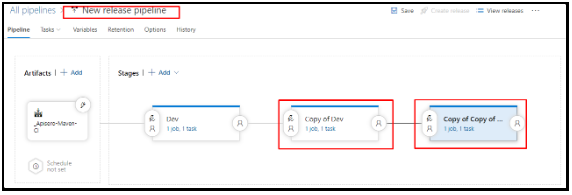
Now click on the individual stages to rename them and also the pipeline.

Once that you’ve renamed the stages, you might have to set pre-deployment conditions like user permissions, triggers, etc. for which you can click on pre-deploy.
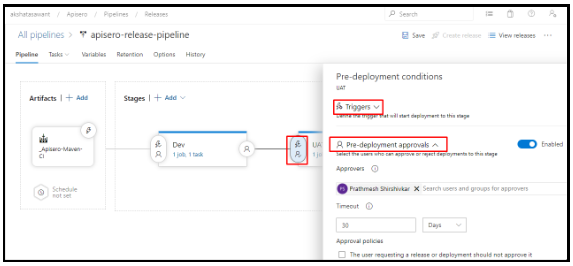
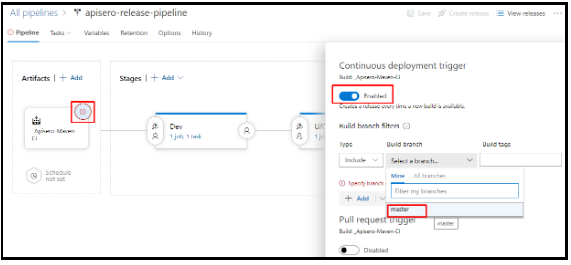
We have selected our build Artifact you can enable a continuous deployment trigger which helps you to create a new release every time the build is available.
Click on the Continuous Deployment Trigger.
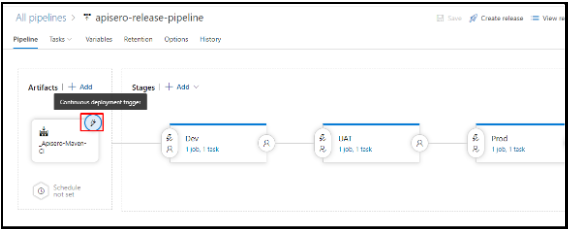
Now you can click Create Release.
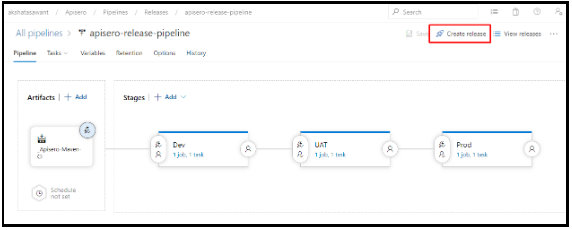
Once done a new release will be triggered once the CICD pipe completes successfully and generates an artifact.
Conclusion
We have seen how to create a release pipeline using Azure DevOps with the artifact source being the CICD pipeline.
Thanks for reading.
Opinions expressed by DZone contributors are their own.
Comments