

AWS Cognito User Pool Access Token Invalidation
Since the integrated tools in AWS Cognito aren't enough to invalidate a token once a sign out has been triggered, here's a helpful workaround.
Join the DZone community and get the full member experience.
Join For FreeAWS Cognito is one of the most comprehensive user and session management as a service in AWS cloud. As other services, it has a wide variety of integration with other AWS services. Cognito divided into two major sub-services:
User Pools: Where you manage your own users base (user management includes user sign-up, 2-factor auth, forgot password etc.)
Federated Identity: You integrate 3rd party identity providers to your user pool.
This article focuses on a specific problem in user pools, during sign out phase. First, let's simulate a basic user authentication flow.
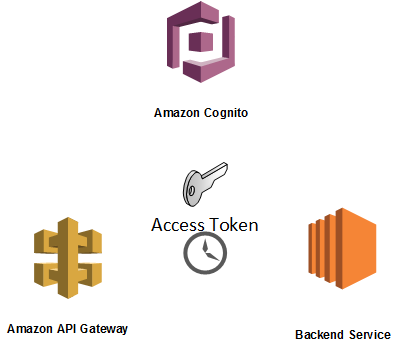
When an already existing user wants to login into the system to get some sort of session specific keys, he/she needs to make initiate-auth or admin-initiate-auth API calls to in order the get following tokens:
{
    "AuthenticationResult": {
        "ExpiresIn": 3600,
        "IdToken": "eyJraWQiOiJDTTZ2SGtqM3BHdnBNcnpac3o2ekxXXXXXXxXXC9MSGxwSnA3WT0iLCJhbGciOiJSUzI1NiJ9.eyJzdWIiOiIwMDA3ZWU4Ny03ZjhiLTQ4YzktYTVlZS1kN2U3ZDNiNGVhNDIiLCJhdWQiOiIxZTBlb2M3bmI0bnIzdGNjaGcwN2dqM2ZqYyIsImV2ZW50X2lkIjoiZmUzZDFiYjAtMGM0ZS0xMWU4LWIxNDUtNDk0YzkyYTVkMzdkIiwidG9rZW5fdXNlIjoiaWQiLCJhdXRoX3RpbWUiOjE1MTgwMzk0MDQsImlzcyI6Imh0dHBzOlwvXC9jb2duaXRvLWlkcC5ldS1jZW50cmFsLTEuYW1hem9uYXdzLmNvbVwvZXUtY2VudHJhbC0xX2JsN2tmTll4UyIsInBob25lX251bWJlcl92ZXJpZmllZCI6dHJ1ZSwiY29nbml0bzp1c2VybmFtZSI6IjAwMDdlZTg3LTdmOGItNDhjOS1hNWVlLWQ3ZTdkM2I0ZWE0MiIsInBob25lX251bWJlciI6IiszMTYxMTUzNDA0OCIsImV4cCI6MTUxODA0MzAwNCwiaWF0IjoxNTE4MDM5NDA0fQ.OTuZOOO0dBKiq-ubZYZGoUUK_x8Pcl6P90c9lQeL263b-JrDnS-jbx2yi6uhZnvNNDuGpkjTrWvggs9_UH5qm0oWxvl4VqDB94h1G027rdbg60S0vdG3pIil6W71a8s16qHJTmaSicE2-xc7YMw6kNUtBG4_sWR_UVvfGn7G2eFwEx0gxDjOCSVa1XIuONW4saBrOEw0AHEL67BSCbVEMUdIDQpOts_5_I4WA0n9sf0HbYU_brQ849JHAjrQuWDM9IPKv5NlB8Wmx4Ra4YdTrBoGrF_TPLmWrswutKj8BSt_mPLBEQ6ZqnZtYAMoJvyzT7KDRc3hnKIsLeWbFyP7Lg",
        "RefreshToken": "eyJjdHkiOiJKV1QiLCJlXXXXXXXXwiYWxnIjoiUlNBLU9BRVAifQ.2U-2MfLRPHriV5QsCdCOzYWvMht4qXQ-gcaJ-FmLS7yE1xwSErEuWST08IjZj2f3CwIzTVHgvQho_n1aaIkqDbuM_w5kJ7V5gy-4I5WGTlYjliZsBjLy9aRujhG4YfdIxI0OSD8APa74pUrV9WtLDRjXS2eyGBg3mhaEABEbHLYpEkuogbrNF37cO9UyfTWRtirWpJEeLYqS5psOSAQxOWNpEO8DxO_nbPg8cwMuSAGDeWsR5rvPi56Kq0fuhK3NzZDtSfQNZVdChGJfpwEFuufpiPoTDIRXLnbfGAnzQIk_69GV_wlIihS50bcIrPKwTl-WNzdE9XcF_RuwK2G-TQ.wmqSm0nmWCvvq4CI.6C45JzWJ6Nc2WAlinDgWgF5MznLCyT7wjMrDbHnU1EpMQtwTmBpjrZCxyAc967LqzRasHFKqBESlh3EeXv561ALJNdjOzeYXG4k06BPIlE7Aev9qnaRY1iQkt5oKLkCBlRsfHZH6Q3PWE_6QDTyBgaC5JdecHpYWk9FZrWyVAHvz8ngu15iuZ9v8hS3ErSN0_Fyzglpv38e7Kf9sYKF2kNcqy8637wrBVxyFQbQ3fsGgZaTMlJRUEzFc9DA0-XrUV7ty0XsRQxg3sY-heJrt40dP8bQwKBPtyGQf9keZ-Mu4SOIuD0ggfPfddYpv3EBhRz4JuOn7KKi_w96aitJlDCOfa0D9CjtSSfBDJ3igFFC1qlQbW8ZnqkcHOoVJPewTGYiN1MZHKIR0kbca0q9rcyLiqpfZe6B47AXArKE9Ok6PPLmKewbO5jjcu6j0BifdUa0E9iFfv8u8ZU5Jo68CL0izbXEj5czMKiRxiUJjYZrPTO25wD9grenkS1HjPQ63XOVumFGYb1Jn9ESl1wAkZxFiV1Iw5PaBy1HbzxT_hFrFgUXzAiTQynfXh79CK0FEGSb7B-uAmaXjCHPyERPJrG23VmdTmibhfjpUwNBwl-b42hxmyZvAzjzynob4NsvovBGNsq1db0OB2Qx80CrORrUygOfj5Ui7lQy2nfHGi4ek2-yiktpFTnpTnhvDGVXYGrNnpSnxLdSYa_QSGbdO98-JluZe6_A8uDgpCLCKM054bOwDk1RCsxQ_sSpqUZzHmLIWlJ3VO8NR0abGsIppzE6cLO-NOdxhwrtghuYZArt8r71pduc-cMyWLmsKAuYARi3sfRT7fLFaPKaoLBLSF1AVBjehlIbRdVoXVKbGQXtl59v110uYcDn4WG0qk1Xgbzbe_y7xH-2HOAL_YmvlL1Zx3LgQ_HOgCe4jTkGhQXNmsK3vhgJPlCR6WeJMyVmI9rekaKofv1fWhmQ_-bFpMATcnCTWz7bShyZoKz1-WakVMjxJrpCBKylYTYu0Mt1y6xkpR_vBVX3VGy2sUVGQxD4_XR2GxDkAaGTkbr1NGmJIXPr4A0ipZhXmrm-WW5gSB3vojGZFhBRlsZa4mzqQ0xmfI2K5bzHQzgeeHoDDRoY6MApZmQ_tNl08Cj2HH3sEfi0GSleLXTpqRmk1DgvFfHY5rwNjFhq4kW-JgE7kjuE8q2H_MlJjtWPiUdwat6PuIylWyI0Lf_vPcT8vDOqprEBaQO1yGQbagbRsvG1QHBEz3Dhw3QkxI99kFuW0FZt2V3PhiXRJZJIK8FdEqdXMJQ4WnfA0.LkGP2cQd9l-7ZXL5MV6Oog",
        "TokenType": "Bearer",
        "AccessToken": "XXXXXG1jaEhMY00yQ3NkVT0iLCJhbGciOiJSUzI1NiJ9.eyJzdWIiOiIwMDA3ZWU4Ny03ZjhiLTQ4YzktYTVlZS1kN2U3ZDNiNGVhNDIiLCJldmVudF9pZCI6ImZlM2QxYmIwLTBjNGUtMTFlOC1iMTQ1LTQ5NGM5MmE1ZDM3ZCIsInRva2VuX3VzZSI6ImFjY2VzcyIsInNjb3BlIjoiYXdzLmNvZ25pdG8uc2lnbmluLnVzZXIuYWRtaW4iLCJpc3MiOiJodHRwczpcL1wvY29nbml0by1pZHAuZXUtY2VudHJhbC0xLmFtYXpvbmF3cy5jb21cL2V1LWNlbnRyYWwtMV9ibDdrZk5ZeFMiLCJleHAiOjE1MTgwNDMwMDQsImlhdCI6MTUxODAzOTQwNCwianRpIjoiNTE5Yjk4OGUtNjA1YS00OTc1LWIwOTQtZTFiMWEzYjU1ZWY0IiwiY2xpZW50X2lkIjoiMWUwZW9jN25iNG5yM3RjY2hnMDdnajNmamMiLCJ1c2VybmFtZSI6IjAwMDdlZTg3LTdmOGItNDhjOS1hNWVlLWQ3ZTdkM2I0ZWE0MiJ9.V-c7cwa1qUUp0VPYpiKGDWtlVyTf9VDavn8CToxxjIcVLcSsCgzYsBiVIes52UQ0Qt_AulNjhkNi-reYS0IyepcveTs-t5aYNNBVIrpWD3kDEyIbwZVSkjHUwNvMCSZIT4avBhVSCQlHRumJ-mR_ZBwIpVDMfCScFRnjfOa6awnDkGgTDBRkMrUUBiZUGzixrS8J1z4e4qDPAohgSp1UzDm1z_Zm3_0gqeEjLJPkAXc-Naw7RQdD9hwa1RGaTo0JjUNVH7i0aL4VEo0k4hzVz8fUXnYz_RIQKtyHylHNEtLg7UO_ZdFV3CprAIp_LHJWYfXN-4EO0BaAB0X4LO2A5A"
    },
    "ChallengeParameters": {}
}
You can find the official meaning of these tokens here. After we issue these tokens, we can implement the related proper actions for the user in our implementations.
AWS API Gateway and AWS Cognito are a powerful match as a front door of any possible API backends. You can bind a user pool to API Gateway method definitions to validate user sessions transparently by using the platform only.
The problem arises when we think about how we invalidate these session keys. The session is supposed to be dropped when we make proper admin-user-global-sign-out or global-sign-out. After these API calls, we are not supposed to be able to use the tokens for any purpose. The access token is a JWT and defines what user can do in the context of Cognito user pool. Sign out operations do not invalidate session keys (at least the functionality is not yet implemented). This is mentioned several platforms like Github and StackOverflow on the Web (1, 2, 3).
Since we cannot use this direct integration, there is another alternative solution possible with Lambda Custom Authorizers. Simply, the session verification responsibility is owned by a lambda function. There is a good example of this implementation already. However, this solution is also not enough, because the node.js script does not check if the user signed out or not. Therefore when you only integrate this lambda function and use an invalidated key, authorizer still accepts the requests by supposing that the session is still valid. You have to wait exactly 1 hour for invalidation.
However, only adding a get-user check in the jwt-verify block seems solves the entire problem.
cognitoidentityserviceprovider.getUser(cognitoAuthTokenParams, function(err, data) {
          if (err) {
            console.log(err);
            context.fail("Unauthorized"); // an error occurred
            return;
          }
          else {
            console.log("Session not revoked"); // successful response
            console.log(data);
            context.succeed(policy.build());
          }
        });
By this update, the flow goes as follows:
User hits API Gateway with Authorization header (Access token - JWT)
Specific method authorizer is triggered and related lambda function invoked. API Gateway passes the authorization header to authorizer lambda function.
Lambda function validates the access token.
The code block located above checks if the user access key is revoked or not.
If all conditions are passed, a policy is generated and cached at API gateway level for specific TTL (not 1 hour, the whole purpose is to reduce this time interval. Therefore the preferred time is between 5-30 sec.)
During the cached time, the lambda is not invoked, the cached policy is used instead.
If the session key invalid, the whole cycle starts again.
The final state of the jwt.verify block as follows.
//Verify the signature of the JWT token to ensure it's really coming from your User Pool
    jwt.verify(token, pem, { issuer: iss }, function(err, payload) {
      if(err) {
        context.fail("Unauthorized");
      } else {
        //Valid token. Generate the API Gateway policy for the user
        //Always generate the policy on value of 'sub' claim and not for 'username' because username is reassignable
        //sub is UUID for a user which is never reassigned to another user.
        var principalId = payload.sub;

        //Get AWS AccountId and API Options
        var apiOptions = {};
        var tmp = event.methodArn.split(':');
        var apiGatewayArnTmp = tmp[5].split('/');
        var awsAccountId = tmp[4];
        apiOptions.region = tmp[3];
        apiOptions.restApiId = apiGatewayArnTmp[0];
        apiOptions.stage = apiGatewayArnTmp[1];
        var method = apiGatewayArnTmp[2];
        var resource = '/'; // root resource
        if (apiGatewayArnTmp[3]) {
            resource += apiGatewayArnTmp[3];
        }

        var policy = new AuthPolicy(principalId, awsAccountId, apiOptions);
        policy.allowAllMethods();

        cognitoidentityserviceprovider.getUser(cognitoAuthTokenParams, function(err, data) {
          if (err) {
            console.log(err);
            context.fail("Unauthorized"); // an error occurred
            return;
          }
          else {
            console.log("Session not revoked"); // successful response
            console.log(data);
            context.succeed(policy.build());
          }
        });

      }
    });
(Ps. This workaround is verified by AWS technical support team until they make the native implementation.)
Opinions expressed by DZone contributors are their own.
Comments