

AWS IP Address Management
Readers will learn about AWS IPAM, its advanced benefits, granular access controls, and how it can help improve security and optimize IP address utilization.
Join the DZone community and get the full member experience.
Join For FreeIn a recent project, I worked with a client who was managing over 100 accounts and recently adopted AWS Control Tower. Despite this, I noticed that the management of CIDR ranges was still a manual process and all IP ranges were being tracked through an Excel sheet in a centralized location. This approach proved to be a significant challenge, as it required a considerable amount of effort to maintain, calculate, and reclaim IP addresses every time. This was especially challenging for new IT team members who joined the IT operations team.
AWS provides a powerful solution for managing IP addresses in your cloud environment through its IPAM (Internet Protocol Address Management) service. AWS IPAM allows you to automate IP address allocation and management, track IP address usage, and detect potential IP address conflicts. In addition to these features, AWS IPAM can be used in conjunction with AWS Control Tower to manage IP addresses across multiple accounts and VPCs in a centralized, standardized way. In this article, we will explore the features and benefits of AWS IPAM with Control Tower and discuss some best practices for using these services effectively.
Benefits of AWS IPAM With Control Tower
AWS IPAM with Control Tower provides the following benefits:
- Centralized IP address management: AWS IPAM allows you to manage IP addresses across multiple AWS accounts and VPCs in a centralized way, reducing complexity and improving visibility into IP address usage.
- Standardized IP address allocation: AWS IPAM provides a standardized approach to IP address allocation and management, enabling you to enforce policies and best practices across your organization.
- Automatic IP address assignment: AWS IPAM can automatically assign IP addresses to resources based on your pre-defined allocation policies, reducing the risk of human error and improving efficiency.
- Granular access controls: AWS IPAM provides fine-grained access controls, allowing you to control who can allocate and manage IP addresses in your AWS environment.
- IP address tracking: AWS IPAM can track IP address usage across your resources and VPCs, giving you visibility into IP address utilization and enabling you to optimize IP address allocation.
- Detection of IP address conflicts: AWS IPAM can detect potential IP address conflicts across multiple accounts and VPCs, providing alerts and enabling you to take action to avoid network downtime.
How it Works
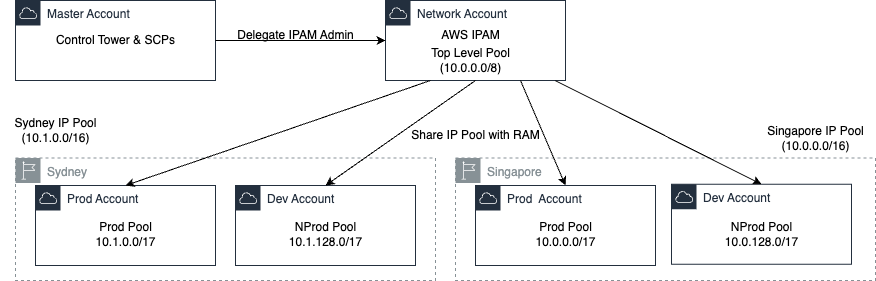
When you use AWS IPAM, you create IP address pools that contain ranges of IP addresses. These pools can be assigned to VPCs, subnets, and network interfaces. You can also create IPAM scopes to group your IP address pools and apply allocation rules across multiple AWS accounts and their VPCs.
The following diagram illustrates the overview of IPAM solution:
IPAM Best Practices
Scaling IP Address Management With VPC IPAM and AWS Organizations
Amazon VPC IPAM can be integrated with your organization’s structure. For IP address allocation, it’s recommended you enforce the separation of duties and permissions by creating an IPAM-administrator account for your organization.
You can use AWS Control Tower to set up and securely govern your organization structure and account vending. With Control Tower, you must provide the central network-admin account with the right AWS IAM permissions to create network infrastructure for your multi-account deployment.
IP Addressing and IPAM Pool Design Best Practices
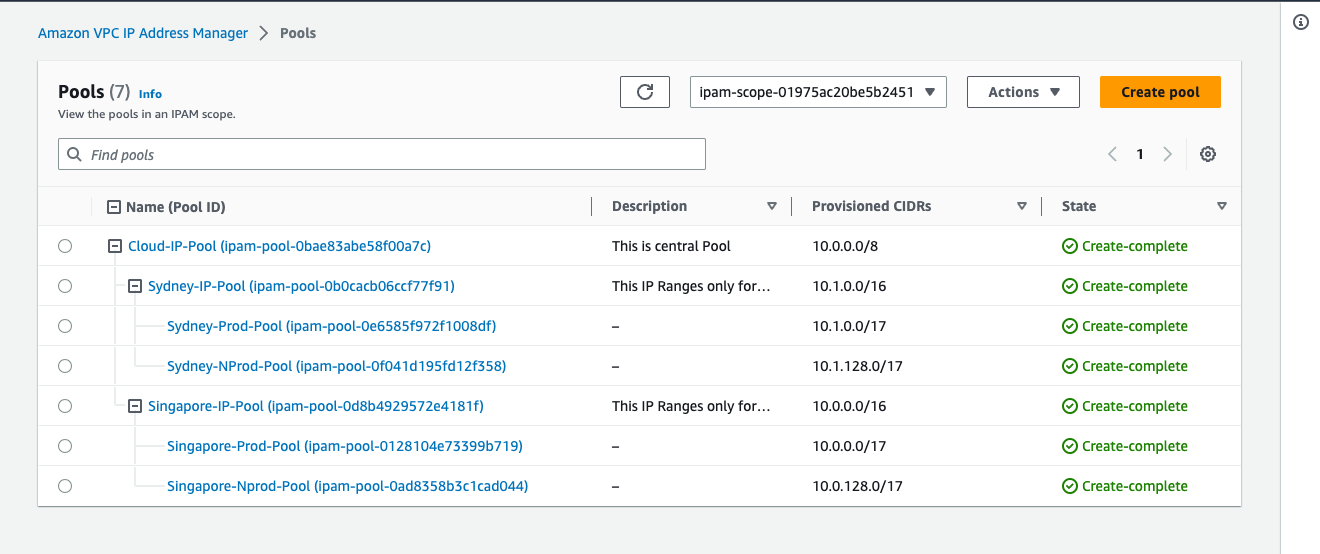
A hierarchical IP addressing scheme allows you to follow an IP allocation policy that best fits your needs. For example, creating regional IP CIDRs and then dividing each regional CIDR into department-specific CIDRs. Therefore, you can easily summarize your CIDRs regionally, simplifying network management and better managing your services’ quotas. Additionally, a hierarchical and contiguous IP addressing scheme allows you to easily configure network segmentation constructs. For example, security groups (SGs), Network Access Control Lists (NACLs), and firewall rules.
The following diagram illustrates the example of IP Pools:
Integrating VPC IPAM With Your Existing AWS Environment
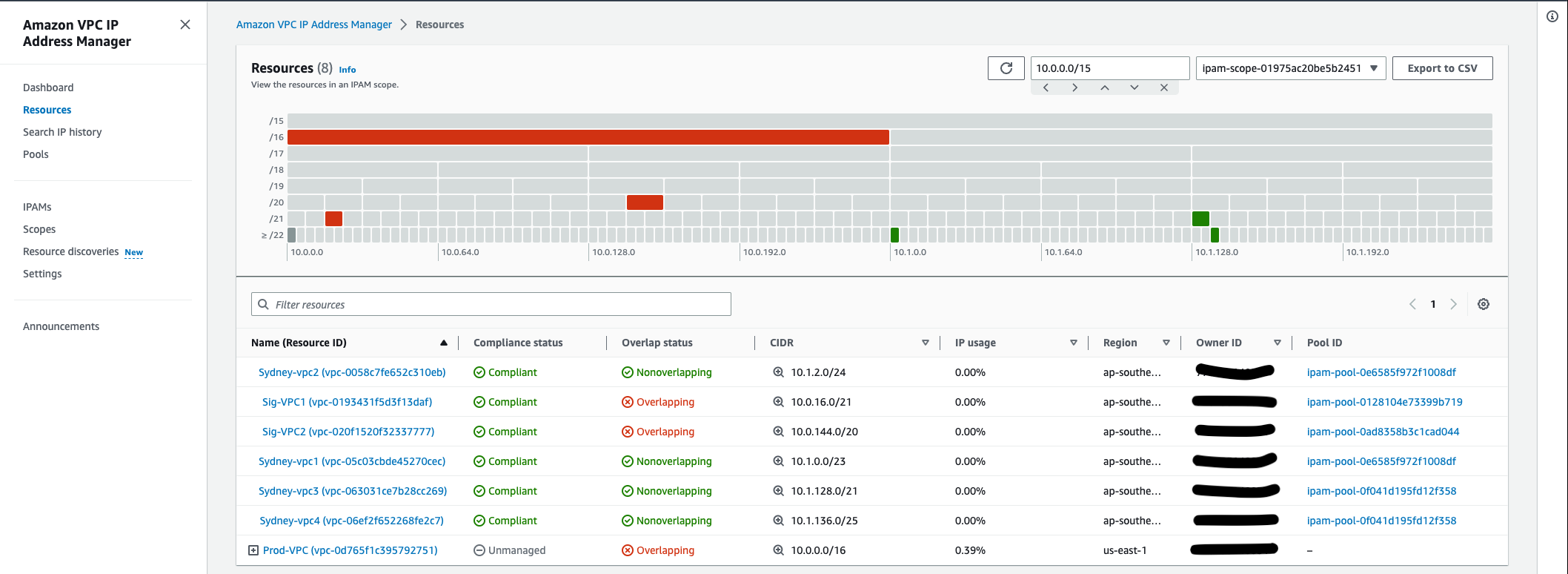
When you create your pools, it’s recommended that you allow IPAM to automatically import any pre-existing resources into the respective IPAM pools. Resources discovered by IPAM are marked as managed if they’re contained in a CIDR of an IPAM pool, and are being monitored by IPAM for potential CIDR overlap and compliance with pool allocation rules. Otherwise, they default to unmanaged, and still monitored and IPAM for IP address overlap.
The following diagram illustrates the view of IP resouce management:
Using IPAM With Multiple Un-Connected AWS Networks
It’s recommended that you create separate private scopes for each of your unconnected environments. This will let you monitor the IP addressing plan for the various un-connected environments from VPC IPAM, without generating overlap conflicts and alarms in IPAM. When IPAM discovers resources with private IPv4 CIDRs, they’re imported into the default private scope and don’t appear in any additional private scopes you create. You can move CIDRs from the default private scope to another private scope to map your environment to the targeted scope design.
Amazon VPC IPAM and Hybrid Network Design
To manage your hybrid network’s private IPv4 allocations, it’s recommended that you create custom IPAM allocations that can represent CIDRs present in your on-premises data centers. This makes sure the CIDRs reserved for your non-AWS workloads aren’t accidentally assigned to any AWS resources, and avoids the risk of running into overlapping IP issues.
Conclusion
AWS IPAM provides a powerful solution for managing IP addresses in your AWS environment. Its advanced benefits, such as custom IP address ranges, automatic IP address assignment, and granular access controls, can help you optimize IP address utilization, improve security, and reduce the risk of network downtime. By following the best practices outlined in this article, you can use AWS IPAM effectively and enjoy its benefits.
Opinions expressed by DZone contributors are their own.
Comments