

Azure Lightweight Generative AI Landing Zone
In this complete guide to building a landing zone based on Azure AI Services, discover AI products and look into the top 3 companies that benefit from using AI.
 CORE
·
CORE
·
Join the DZone community and get the full member experience.
Join For FreeAI is under the hype now, and some products overuse the AI topic a lot — however, many companies and products are automating their processes using this technology. In the article, we will discover AI products and build an AI landing zone. Let’s look into the top 3 companies that benefit from using AI.
Github Copilot
Github Copilot’s primary objective is to aid programmers by providing code suggestions and auto-completing lines or blocks of code while they write. By intelligently analyzing the context and existing code, it accelerates the coding process and enhances developer productivity. It becomes an invaluable companion for developers throughout their coding journey, capable of supporting various programming languages and comprehending code patterns.
Neuraltext
Neuraltext strives to encompass the entire content workflow, encompassing everything from generating ideas to executing them, all powered by AI. It is an AI-driven copywriter, SEO content, and keyword research tool. By leveraging AI copywriting capabilities, you can effortlessly produce compelling copy for your campaigns, generating numerous variations. With a vast collection of over 50 pre-designed templates for various purposes, such as Facebook ads, slogan ideas, blog sections, and more, Neuraltext simplifies the content creation process.
Motum
Motum is the intelligent operating system for operational fleet management. It has damage recognition that uses computer vision and machine learning algorithms to detect and assess damages to vehicles automatically. By analyzing images of vehicles, the AI system can accurately identify dents, scratches, cracks, and other types of damage. This technology streamlines the inspection process for insurance claims, auto body shops, and vehicle appraisals, saving time and improving accuracy in assessing the extent of damages.
What Is a Cloud Landing Zone?
AI Cloud landing zone is a framework that includes fundamental cloud services, tools, and infrastructure that form the basis for developing and deploying artificial intelligence (AI) solutions.
What AI Services Are Included in the Landing Zone?
Azure AI Landing zone includes the following AI services:
- Azure Open AI — Provides pre-built AI models and APIs for tasks like image recognition, natural language processing, and sentiment analysis, making it easier for developers to incorporate AI functionalities; Azure AI services also include machine learning tools and frameworks for building custom models and conducting data analysis.
- Azure AI Services — A service that enables organizations to create more immersive, personalized, and intelligent experiences for their users, driving innovation and efficiency in various industries; Developers can leverage these pre-built APIs to add intelligent features to their applications, such as face recognition, language understanding, and sentiment analysis, without extensive AI expertise.
- Azure Bot Services — This is a platform Microsoft Azure provides and is part of AI Services. It enables developers to create chatbots and conversational agents to interact with users across various channels, such as web chat, Microsoft Teams, Skype, Telegram, and other platforms.
Architecture
We started integrating and deploying the Azure AI Landing Zone into our environment. Three logical boxes separate the AI landing zone:
- Azure DevOps Pipelines
- Terraform Modules and Environments
- Resources that deployed to Azure Subscriptions
We can see it in the diagram below.
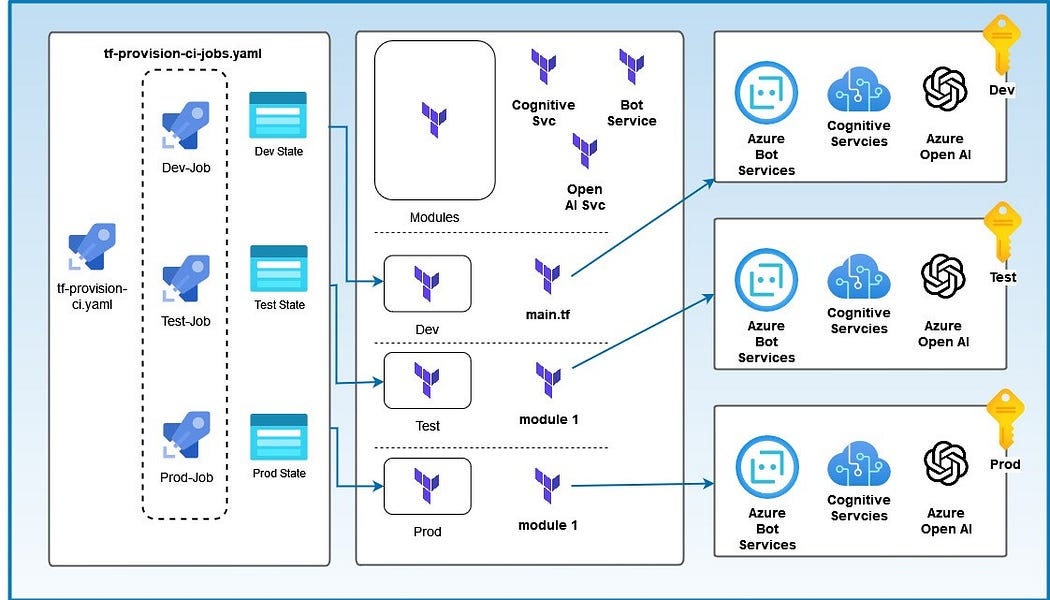
Figure 1: AI Landing Zone Architecture (author: Boris Zaikin)
The architecture contains CI/CD YAML pipelines and Terraform modules for each Azure subscription.
It contains two YAML files:
- tf-provision-ci.yaml is the main pipeline that is based on stages. It reuses tf-provision-ci.jobs.yaml pipeline for each environment.
- tf-provision-ci.jobs.yaml contains workflow to deploy terraform modules.
trigger:
- none

pool:
  vmImage: 'ubuntu-latest'

variables:
  devTerraformDirectory: "$(System.DefaultWorkingDirectory)/src/tf/dev"
  testTerraformDirectory: "$(System.DefaultWorkingDirectory)/src/tf/test"
  prodTerraformDirectory: "$(System.DefaultWorkingDirectory)/src/tf/prod"

stages:

- stage: Dev
  jobs:
  - template: tf-provision-ci-jobs.yaml
    parameters:
      environment: test
      subscription: 'terraform-spn'
      workingTerraformDirectory: $(devTerraformDirectory)
      backendAzureRmResourceGroupName: '<tfstate-rg>'
      backendAzureRmStorageAccountName: '<tfaccountname>'
      backendAzureRmContainerName: '<tf-container-name>'
      backendAzureRmKey: 'terraform.tfstate'

- stage: Test
  jobs:
  - template: tf-provision-ci-jobs.yaml
    parameters:
      environment: test
      subscription: 'terraform-spn'
      workingTerraformDirectory: $(testTerraformDirectory)
      backendAzureRmResourceGroupName: '<tfstate-rg>'
      backendAzureRmStorageAccountName: '<tfaccountname>'
      backendAzureRmContainerName: '<tf-container-name>'
      backendAzureRmKey: 'terraform.tfstate'

- stage: Prod
  jobs:
  - template: tf-provision-ci-jobs.yaml
    parameters:
      environment: prod
      subscription: 'terraform-spn'
      prodTerraformDirectory: $(prodTerraformDirectory)
      backendAzureRmResourceGroupName: '<tfstate-rg>'
      backendAzureRmStorageAccountName: '<tfaccountname>'
      backendAzureRmContainerName: '<tf-container-name>'
      backendAzureRmKey: 'terraform.tfstate'
tf-provision-ci.yaml — Contains the main configuration, variables, and stages: Dev, Test, and Prod; The pipeline re-uses the tf-provision-ci.jobs.yaml in each stage by providing different parameters.
After we’ve added and executed the pipeline to AzureDevOps, we can see the following staging structure.
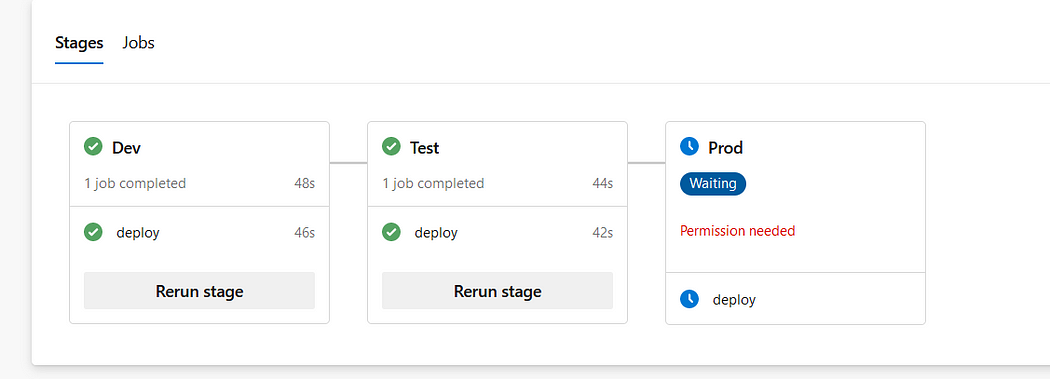
Figure 2: Azure DevOps Stages UI
Azure DevOps automatically recognizes stages in the main YAML pipeline and provides a proper UI.
Let’s look into tf-provision-ci.jobs.yaml.
jobs:
- deployment: deploy
  displayName: AI LZ Deployments
  pool:
    vmImage: 'ubuntu-latest'

  environment: ${{ parameters.environment }}
  strategy:
    runOnce:
      deploy:
        steps:

        - checkout: self

        # Prepare working directory for other commands
        - task: TerraformTaskV3@3
          displayName: Initialise Terraform Configuration
          inputs:
            provider: 'azurerm'
            command: 'init'
            workingDirectory: ${{ parameters.workingTerraformDirectory }}
            backendServiceArm: ${{ parameters.subscription }}
            backendAzureRmResourceGroupName: ${{ parameters.backendAzureRmResourceGroupName }}
            backendAzureRmStorageAccountName: ${{ parameters.backendAzureRmStorageAccountName }}
            backendAzureRmContainerName: ${{ parameters.backendAzureRmContainerName }}
            backendAzureRmKey: ${{ parameters.backendAzureRmKey }}

        # Show the current state or a saved plan
        - task: TerraformTaskV3@3
          displayName: Show the current state or a saved plan
          inputs:
            provider: 'azurerm'
            command: 'show'
            outputTo: 'console'
            outputFormat: 'default'
            workingDirectory: ${{ parameters.workingTerraformDirectory }}
            environmentServiceNameAzureRM: ${{ parameters.subscription }}

        # Validate Terraform Configuration
        - task: TerraformTaskV3@3
          displayName: Validate Terraform Configuration
          inputs:
              provider: 'azurerm'
              command: 'validate'
              workingDirectory: ${{ parameters.workingTerraformDirectory }}

        # Show changes required by the current configuration
        - task: TerraformTaskV3@3
          displayName: Build Terraform Plan
          inputs:
            provider: 'azurerm'
            command: 'plan'
            workingDirectory: ${{ parameters.workingTerraformDirectory }}
            environmentServiceNameAzureRM: ${{ parameters.subscription }}

        # Create or update infrastructure
        - task: TerraformTaskV3@3
          displayName: Apply Terraform Plan
          continueOnError: true
          inputs:
            provider: 'azurerm'
            command: 'apply'
            environmentServiceNameAzureRM: ${{ parameters.subscription }}
            workingDirectory: ${{ parameters.workingTerraformDirectory }}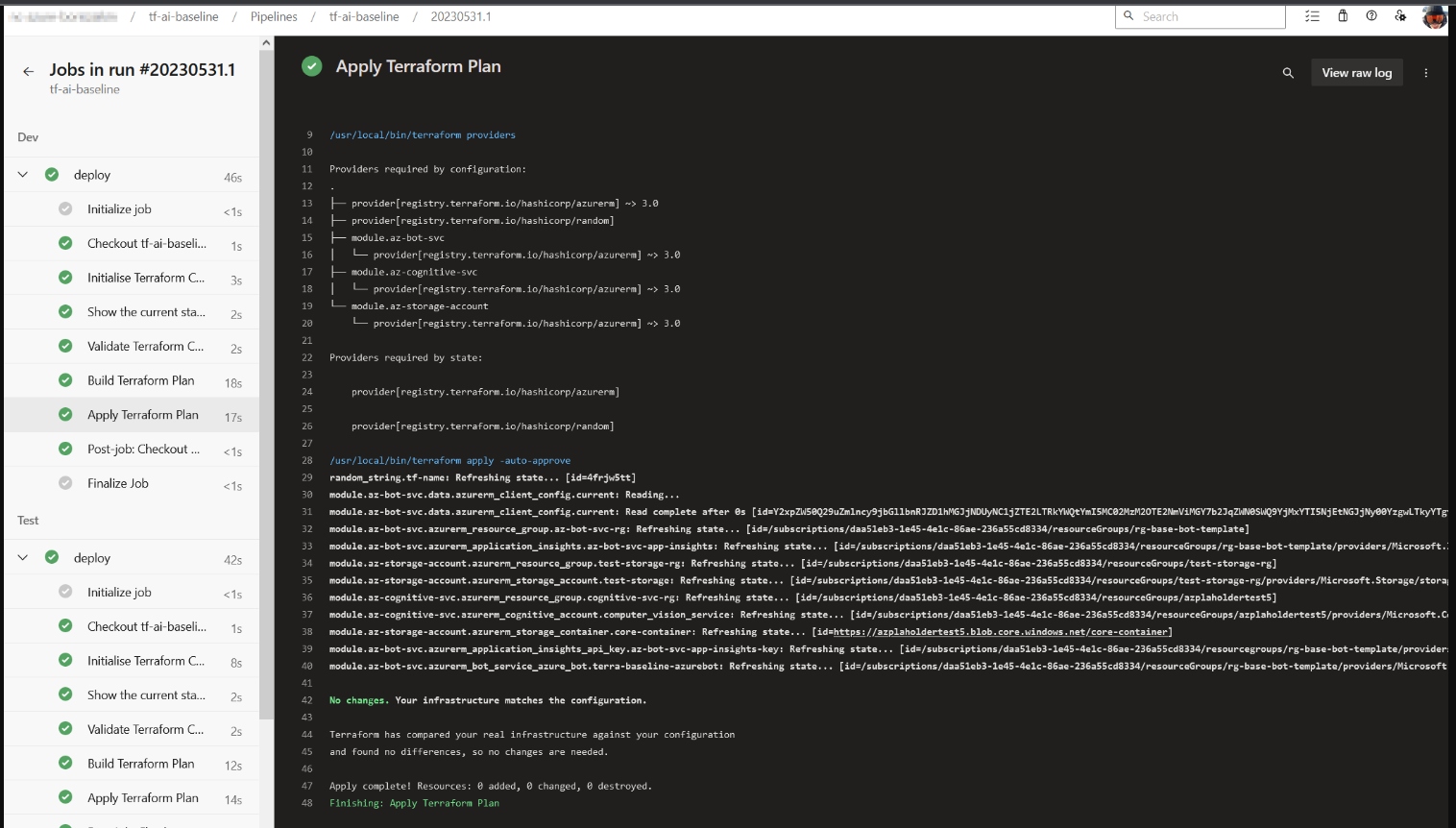
Figure 3: Azure DevOps Landing Zone Deployment UI
As we can see, the execution of all pipelines is done successfully, and each job provides detailed information about state, configuration, and validation errors.
Also, we must not forget to fill out the Request Access Form. It takes a couple of days to get a response back. Otherwise, the pipeline will fail with a quota error message.
Terraform Scripts and Modules
By utilizing Terraform, we can encapsulate the code within a Terraform module, allowing for its reuse across various sections of our codebase. This eliminates the need for duplicating and replicating the same code in multiple environments, such as staging and production. Instead, both environments can leverage code from a shared module, promoting code reusability and reducing redundancy.
A Terraform module can be defined as a collection of Terraform configuration files organized within a folder. Technically, all the configurations you have written thus far can be considered modules, although they may not be complex or reusable. When you directly deploy a module by running “apply” on it, it is called a root module. However, to truly explore the capabilities of modules, you need to create reusable modules intended for use within other modules. These reusable modules offer greater flexibility and can significantly enhance your Terraform infrastructure deployments. Let’s look at the project structure below.
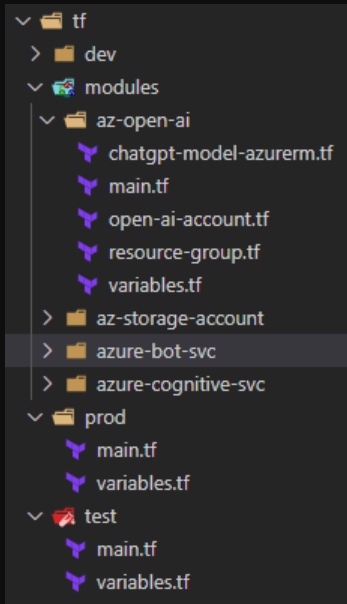
Figure 4: Terraform Project Structure Modules
The image above shows that all resources are placed in one Module directory. Each Environment has its directory, index terraform file, and variables where all resources are reused in an index.tf file with different parameters that are inside variable files.
We will place all resources in a separate file in the module, and all values will be put into Terraform variables. This allows managing the code quickly and reduces hardcoded values. Also, resource granularity allows organized teamwork with a GIT or other source control (fewer merge conflicts).
Let’s have a look into the open-ai tf module.
resource "azurerm_cognitive_account" "openai" {
  name                          = var.name
  location                      = var.location
  resource_group_name           = var.resource_group_name
  kind                          = "OpenAI"
  custom_subdomain_name         = var.custom_subdomain_name
  sku_name                      = var.sku_name
  public_network_access_enabled = var.public_network_access_enabled
  tags                          = var.tags

  identity {
    type = "SystemAssigned"
  }

  lifecycle {
    ignore_changes = [
      tags
    ]
  }
}
The Open AI essential parameters lists:
- prefix: Sets a prefix for all Azure resources
- domain: Specifies the domain part of the hostname used to expose the chatbot through the Ingress Controller
- subdomain: Defines the subdomain part of the hostname used for exposing the chatbot via the Ingress Controller
- namespace: Specifies the namespace of the workload application that accesses the Azure OpenAI Service
- service_account_name: Specifies the name of the service account used by the workload application to access the Azure OpenAI Service
- vm_enabled: A boolean value determining whether to deploy a virtual machine in the same virtual network as the AKS cluster
- location: Specifies the region (e.g., westeurope) for deploying the Azure resources
- admin_group_object_ids: The array parameter contains the list of Azure AD group object IDs with admin role access to the cluster.
We need to pay attention to the subdomain parameters. Azure Cognitive Services utilize custom subdomain names for each resource created through Azure tools such as the Azure portal, Azure Cloud Shell, Azure CLI, Bicep, Azure Resource Manager (ARM), or Terraform. These custom subdomain names are unique to each resource and differ from regional endpoints previously shared among customers in a specific Azure region. Custom subdomain names are necessary for enabling authentication features like Azure Active Directory (Azure AD). Specifying a custom subdomain for our Azure OpenAI Service is essential in some cases. Other parameters can be found in “Create a resource and deploy a model using Azure OpenAI.”
In the Next Article
- Add an Az private endpoint into the configuration: A significant aspect of Azure Open AI is its utilization of a private endpoint, enabling precise control over access to your Azure Open AI services. With private endpoint, you can limit access to your services to only the necessary resources within your virtual network. This ensures the safety and security of your services while still permitting authorized resources to access them as required.
- Integrate OpenAI with Aazure Kubernetes Services: Integrating OpenAI services with a Kubernetes cluster enables efficient management, scalability, and high availability of AI applications, making it an ideal choice for running AI workloads in a production environment.
- Describe and compare our lightweight landing zone and OpenAI landing zone from Microsoft.
Project Repository
Conclusion
This article explores AI products and creating an AI landing zone. We highlight three key players benefiting from AI: Reply.io for sales engagement, Github Copilot for coding help, and Neuraltext for AI-driven content. Moving to AI landing zones, we focus on Azure AI services, like Open AI, with pre-built models and APIs. We delve into architecture using Terraform and CI/CD pipelines. Terraform’s modular approach is vital, emphasizing reusability. We delve into Open AI module parameters, especially custom subdomains for Azure Cognitive Services. In this AI-driven era, automation and intelligent decisions are revolutionizing technology.
Published at DZone with permission of Boris Zaikin. See the original article here.
Opinions expressed by DZone contributors are their own.
Comments