

What Cloud Engineers Actually Need to Know About AI Infrastructure
AI infrastructure isn’t about GPUs. Most issues come from storage, networking, data pipelines. If GPU utilization is low, check the infrastructure first, not the model.
 ·
·
Join the DZone community and get the full member experience.
Join For FreeWhen I decided to move into AI infrastructure, nobody warned me that I had to relearn how to think about compute. I proceeded with the usual steps, such as spinning up VMs, configuring networking, and managing costs. But then a moment came, and I watched, slightly horrified. I misconfigured the inter-node networking. The result was that an eight-node GPU ran a training job at just 11% GPU utilization. It was a wake-up call for me. AI workloads aren’t just different in a marketing sense. They’re different where it counts, i.e., in the architecture — how you build and run things.
The ML engineers on that project immediately assumed the model was the problem. They decided to redesign the model and spent a couple of days tweaking the architecture, like chasing a ghost. The real issue resurfaced only when someone checked the network telemetry — the cluster nodes were using standard Ethernet, not InfiniBand. The model had no issues. The infrastructure configuration was incorrect.
After years of working with Azure and a period on AWS before that, I wish someone had given me a cheat sheet before starting that project.
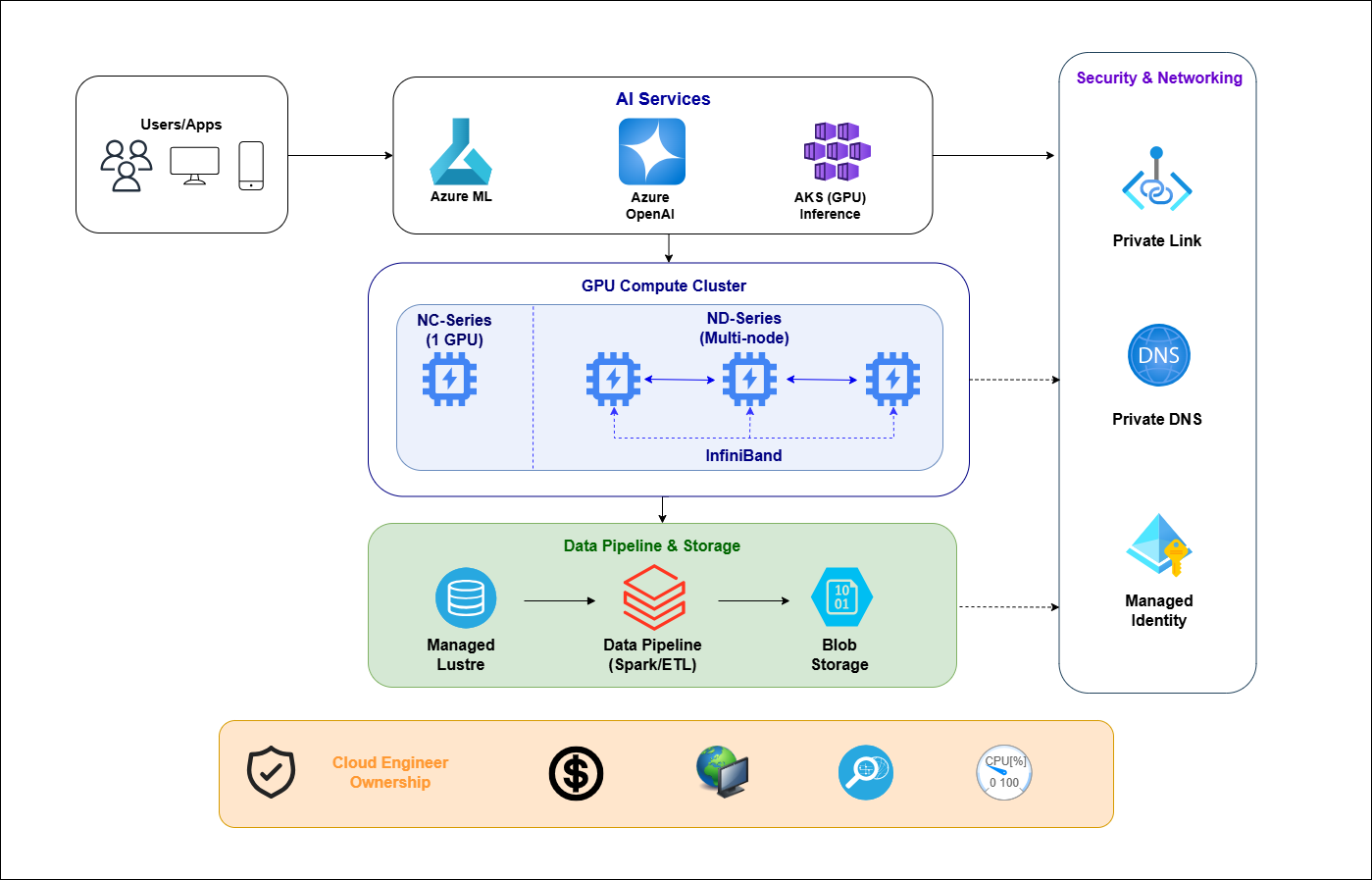
Compute: Breaking Down the Model
Many cloud engineers assume that AI infrastructure requires larger VMs: more cores and more memory, and the workload will run. This approach is insufficient. While right-sizing CPUs remains relevant, it now accounts for only about 20% of considerations. The remaining 80% is driven by GPUs, which operate fundamentally differently from CPUs and significantly impact the infrastructure.
A GPU isn’t just a faster CPU; it's a collection of thousands of smaller cores working together to handle large datasets. If any part of your system—such as storage speed, network bandwidth, or data preprocessing—can't keep up, the GPU remains idle, incurring huge unwanted costs. On Azure, idle GPUs cost as much as active ones. Usually, the main limitation in AI infrastructure isn't the GPU itself, but the upstream systems that supply data to it.
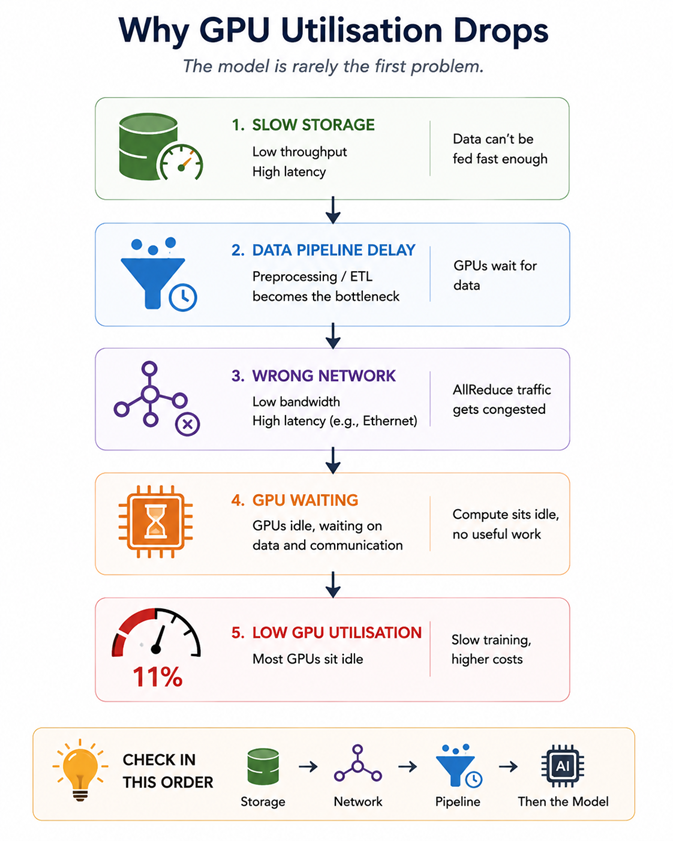
When working with Azure, you'll mostly use two main GPU families. The NC-series gives you a single A100 per VM at about $3.60 per hour on demand, making it the go-to choice for fine-tuning and inference tasks. The ND-series has eight A100S that are connected through NVLink and InfiniBand, which is perfect for distributed training. If your cluster uses regular Ethernet instead of InfiniBand between nodes, inter-GPU bandwidth can drop by 60 to 70 percent, and Azure may not warn you about this. It’s smart to double-check that your cluster is set up with InfiniBand before starting a multi-node run and to make sure your GPU quota is ready ahead of time.
Storage: Where Training Jobs Are Exhausted
When you’re training a language model, expect to chew through the dataset over and over — think of it as laps around a track, not a sprint. If you try to pipe 500GB of text straight from regular Azure Blob Storage, you’ll quickly find yourself staring at a progress bar that barely budges. Each blob tops out at about 60 megabytes per second, but an A100 GPU can eat data for breakfast at several gigabytes per second. There’s a massive mismatch. If you want to keep your GPUs busy (and not just waiting around), you’ll need something beefier — Azure Managed Lustre fits the bill, since it can dish out data to your training jobs at speeds regular storage can’t dream of. I’ll admit, the first time I ran into this, I wasted hours on model tweaks before realizing the bottleneck was staring me in the face the whole time.
Model checkpoints are a cost trap that is often overlooked. A single checkpoint for a 7B parameter model is around 28GB. Saving checkpoints every 30 minutes over 72 hours generates more than 4TB of data. Configure a Blob lifecycle policy before you start to avoid unexpected storage costs.
Networking: Two Problems, One Person Responsible
During training, each GPU shares gradient updates with the others in the cluster via AllReduce. The efficiency of the cluster is directly determined by the bandwidth and latency of this communication. If this communication is disrupted, GPU utilization drops. Machine Learning teams often attribute this to model architecture issues, such as an excessive number of parameters or an incorrect batch size, but the network is usually the cause. First, assess network performance and address any issues before the job runs to avoid unnecessary model design, as ML engineers may not consider this when monitoring loss curves.
The second networking problem is well known among cloud engineers. Many enterprise clients in financial services and healthcare require AI services that avoid the public internet. Azure AI services, such as Azure OpenAI, Azure ML, and Azure AI Search, all support Private Link, and the configuration process is identical to that of other PaaS services. The key consideration is to integrate private endpoint DNS zones with existing private DNS or manage them manually. ML engineers may interpret a generic “connection refused” error caused by an incorrect DNS configuration as an API issue. Both inter-GPU bandwidth and private network isolation — critical infrastructure concerns — typically fall under the same person’s responsibility.
The Azure AI Services Stack: Known Infrastructure, Unknown Branding
Recent Azure services such as OpenAI Service, Machine Learning, and AKS with GPU node pools might sound new, but for most infrastructure teams, the actual work remains familiar. The phrase “managed service” sometimes suggests that everything is taken care of, but in reality, only the AI model is managed. Everyday responsibilities like network security, permissions, cost tracking, and system monitoring still rest with your team, no matter how polished the portal looks.
Azure OpenAI Service works much like other managed API endpoints, supporting private connections, role-based access, managed identities, and API Management for controlling usage rates. The main distinction is its use of Provisioned Throughput Units (PTUs) — these reserve GPU resources to guarantee performance. If you see HTTP 429 errors, it’s almost always a sign of resource bottlenecks rather than issues in your code, although the latter is a common assumption.
Azure Machine Learning sits on top of other infrastructure stacks, such as Blob Storage, ACR, Key Vault, and compute, which you already manage. The failure mode is unique to Azure ML: the compute cluster lifecycle. Ensure clusters auto-scale to zero when idle. Unfortunately, this is not the default setting. When a bill arrives with huge costs due to a cluster running overnight because of an unset idle timeout, everyone looks to the cloud engineer first.
While it’s tempting to go with Azure Container Apps for their apparent simplicity, most real-world inference workloads ultimately end up on AKS with GPU node pools. The reason? Container Apps are easy—that is, until you’re hit with cold start lag during actual user traffic and realize spinning up a GPU container on the fly just isn’t fast enough to meet your SLA. With AKS, you get far more say over things like keeping node pools warm, tuning autoscaling, and controlling scheduling—options that simply aren’t available with Container Apps.
Costs: Higher Stakes, Faster Exposure
Eight GPUs on an ND-series cluster aren’t cheap — about $27 an hour adds up quickly. A few long training runs and you’re already close to $2,000, and if you’re running a batch of experiments, $20,000 can disappear before anything launches. The price tag often slips by until accounting points it out. When models underperform, it’s easy to blame the architecture, but I’ve learned to glance at GPU usage first. If you’re seeing less than 60% during distributed runs, chances are the bottleneck is in the infrastructure, not the model itself.
If you want to slash costs, spot VMs can drop your bill by as much as 90%. The catch? Your training jobs must be able to handle abrupt interruptions—so regular checkpointing and clean restarts are a must. If that’s not in place, spot isn’t the way to go—sort it out with your ML team before finance starts asking questions. Reserving GPU resources is a whole different equation than CPUs: GPU supply changes from region to region, and with how quickly AI hardware evolves, locking in a three-year reservation on today’s gear is a real gamble.
Security: Same Toolkit, New Attack Surface
For AI projects, you still need the basics like private networks, Managed Identity, strong RBAC, and encryption. But now there’s a twist: prompt injection. It’s like the old trick with SQL injection, but for language models. Someone might simply ask a chatbot to show its system prompt. If you haven’t set up protections, it could actually answer. Firewalls won’t help here. Azure Content Safety can block some of these risky requests, but most teams don’t use it until after trouble starts.
If you’re in a regulated industry, logging every inference is a must. In finance or healthcare, you need to record inputs, outputs, who did what, and when, so auditors have all the details they need. Decide on your schema and retention policy before going live, because adding it later, after compliance comes calling, is always a headache.
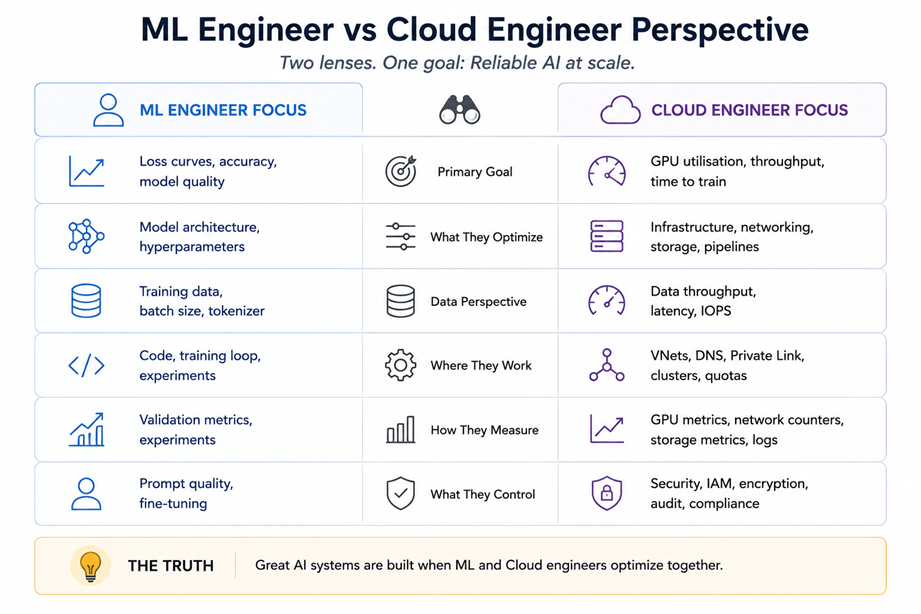
The ML engineers on these teams know the models well. But when infrastructure acts up, causing higher costs, slowdowns, or new risks, they're often the last to spot the cause. Closing that gap is the real challenge. For cloud engineers, "architecturally different" isn’t a red flag; it’s a chance to improve.
Opinions expressed by DZone contributors are their own.
Comments