

Azure Service Bus Dead-letter Queues
Queues are a very common piece of infrastructure. It offers First In, First Out (FIFO) message delivery to one or more competing consumers.
 ·
·
Join the DZone community and get the full member experience.
Join For FreeWhat is the Azure Service Bus Queue?
Queues are a very common piece of infrastructure. It offers First In, First Out (FIFO) message delivery to one or more competing consumers. As the queue grows the last item added to the queue typically must wait longer to be processed. Just like someone waiting in line to order food, the first one in line gets to order first. Microsoft Azure Service Bus (ASB) is Microsoft’s premier enterprise-level messaging technology that uses this principle of FIFO.
Types of Queues:
- Primary queue called main queue or active queue.
- Secondary sub-queue called a dead-letter queue (DLQ).
Main Queue
ASB queues always have two parties involved-a producer and a consumer. The producer pushes the messages into the queue, while the consumer periodically polls for messages and consumes them. The main queue holds the messages until it is consumed or moved to the dead-letter queue.
Azure Service Bus Dead-letter Queues
The purpose of the dead-letter queue is to hold messages that cannot be delivered to any receiver, or messages that could not be processed.
The DLQ is mostly like any other queue, except that messages can only be submitted via the dead-letter operation of the parent entity. In addition, time-to-live is not observed, and you can’t dead-letter a message from a DLQ. The dead-letter queue fully supports peek-lock delivery and transactional operations. There is no automatic clean-up of the DLQ. Messages remain in the DLQ until you explicitly retrieve them from the DLQ.
Dead-letter queues are the safest bet when we are using Azure Service Bus. If for whatever reason message could not be processed by a receiver, we could move such a message to a dead letter queue.
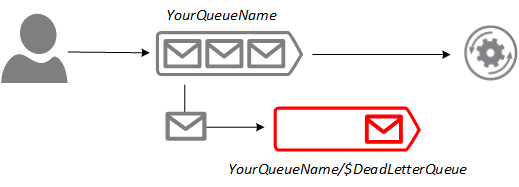
Dead-letter Queue Reasons
Queued messages can fail delivery. These failed messages are recorded in a dead-letter queue. The failed delivery can be caused by reasons such as network failures, a deleted queue, a full queue, authentication failure, or a failure to deliver on time.
As the messages are moved from the active queue to the dead-letter, two properties DeadLetterReason and DeadLetterErrorDescription are added to the message.
HeaderSizeExceeded
Maximum header size: 64 KB. Incoming messages that exceed these quotas are moved to DeadLetter Queue, with DeadLetter reason code as 'HeaderSizeExceeded.'
Errors on Processing Subscription Rules
When the SubscriptionDescription.EnableDeadLetteringOnFilterEvaluationExceptions property is enabled for a subscription, any errors that occur while a subscription’s SQL filter rule executes are captured in the DLQ along with the offending message.
Exceeding TimeToLive
When the QueueDescription.EnableDeadLetteringOnMessageExpiration or SubscriptionDescription.EnableDeadLetteringOnMessageExpiration property is set to true (the default is false), all expiring messages are moved to the DLQ with the ‘TTLExpiredException’ reason code.so the messages have to be picked by the receiver before its expiry time in order to avoid entering into DLQ with TTLExpiredException.
Session-Id
When the QueueDescription.RequiresSession or SubscriptionDescription.RequiresSession property is set to true (the default is false), all messages without session ID are moved to the DLQ with the ‘Session id null’ reason code.
Application-level Dead-lettering
In addition to the system-provided dead-lettering features, applications can use the DLQ to explicitly reject unacceptable messages. This can include:
- Messages that cannot be properly processed due to any sort of system issue.
- Messages that hold malformed payloads.
- Messages that fail authentication when some message-level security scheme is used.
Exceeding MaxDeliveryCount
Queues and subscriptions each have a QueueDescription.MaxDeliveryCount and SubscriptionDescription.MaxDeliveryCount property respectively; the default value is 10. Whenever a message has been delivered under a lock (ReceiveMode.PeekLock) but has been either explicitly abandoned or the lock has expired, the message BrokeredMessage.DeliveryCount is incremented. When DeliveryCount exceeds MaxDeliveryCount, the message is moved to the DLQ, specifying the ‘MaxDeliveryCountExceeded’ reason code. This behavior cannot be disabled, but you can set MaxDeliveryCount to a very large number. You could specify the Maximum Delivery Count between 1 and 2147483647.
Real-time Scenario
Consider an E-Commerce website where a customer will place an order. The order message will contain data like Order ID, Product Name, User ID, Address, etc. This order message will be sent to the Azure Service Bus Queue for a client application to process. Here Logic App acts as a client that picks up the message from the Service Bus Queue for validation. There might be a case that the Logic App would go down or there might be any failure that makes the Logic App disabled. The messages inside the service bus queue will be moved to the dead letter queue when it reaches the 'Time to Live' threshold value of the queue.
Resubmitting the Dead-lettered Messages Using Serverless360
Serverless360 has made this very simple, after associating the Queue within the Serverless360 Composite Application, follow the below steps to retrieve and resubmit the messages.
- Click the queue whose dead letter messages must be processed, this will lead to a message retrieval dashboard.
- Select the dead-letter tab and click get a specified count of messages:
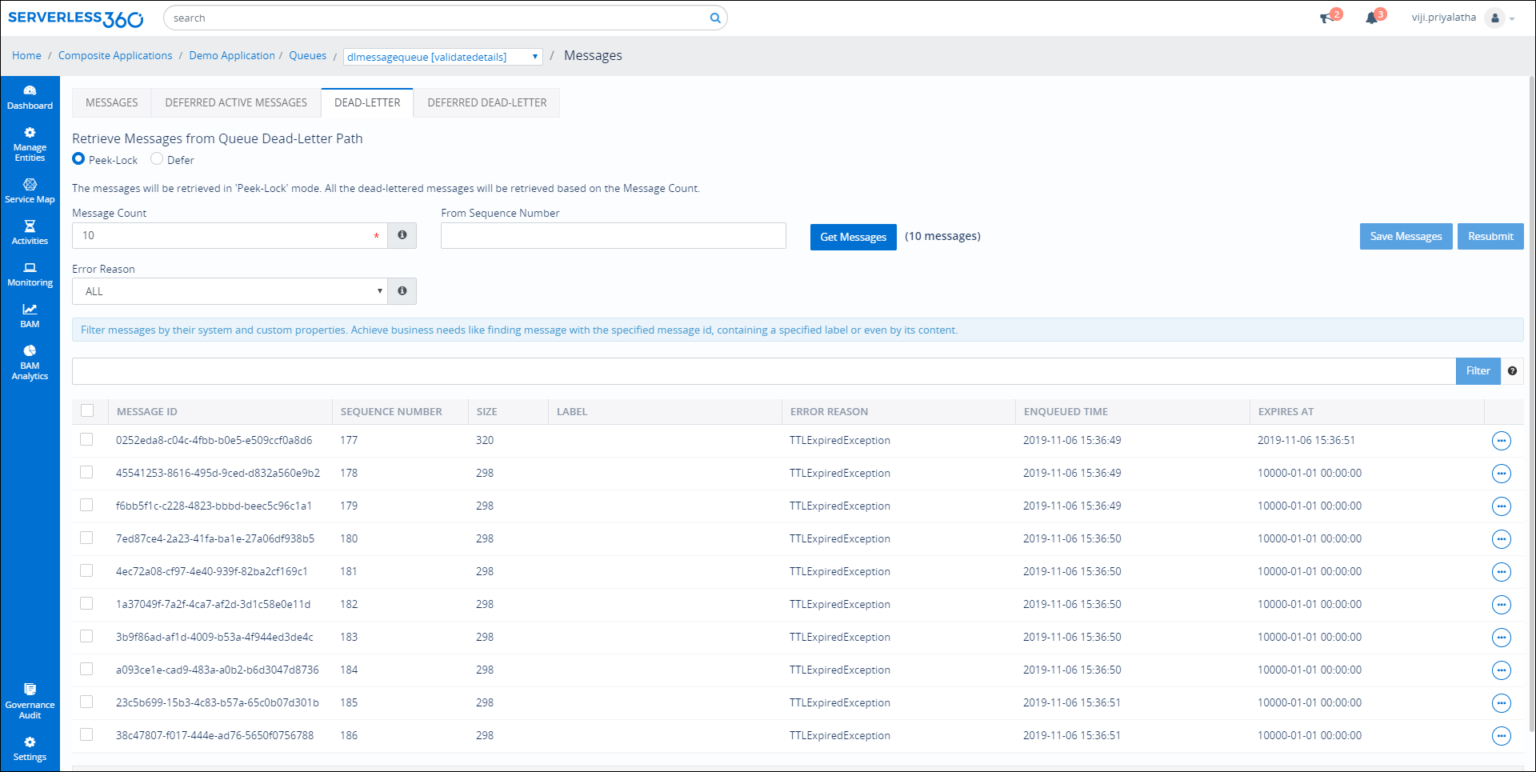
- Select those messages to be resubmitted and click resubmit:
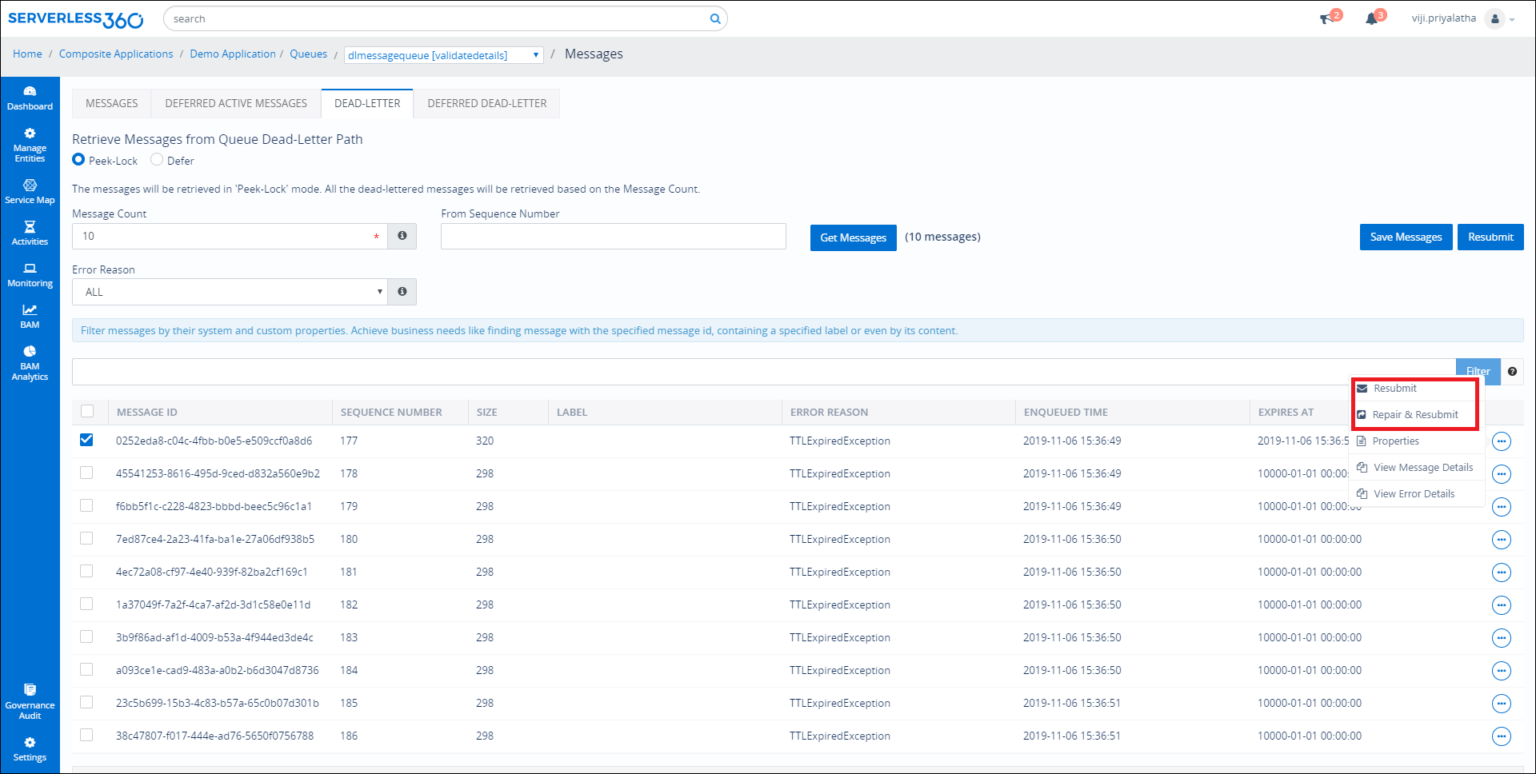
- Select the destination Queue and proceed to resubmit:
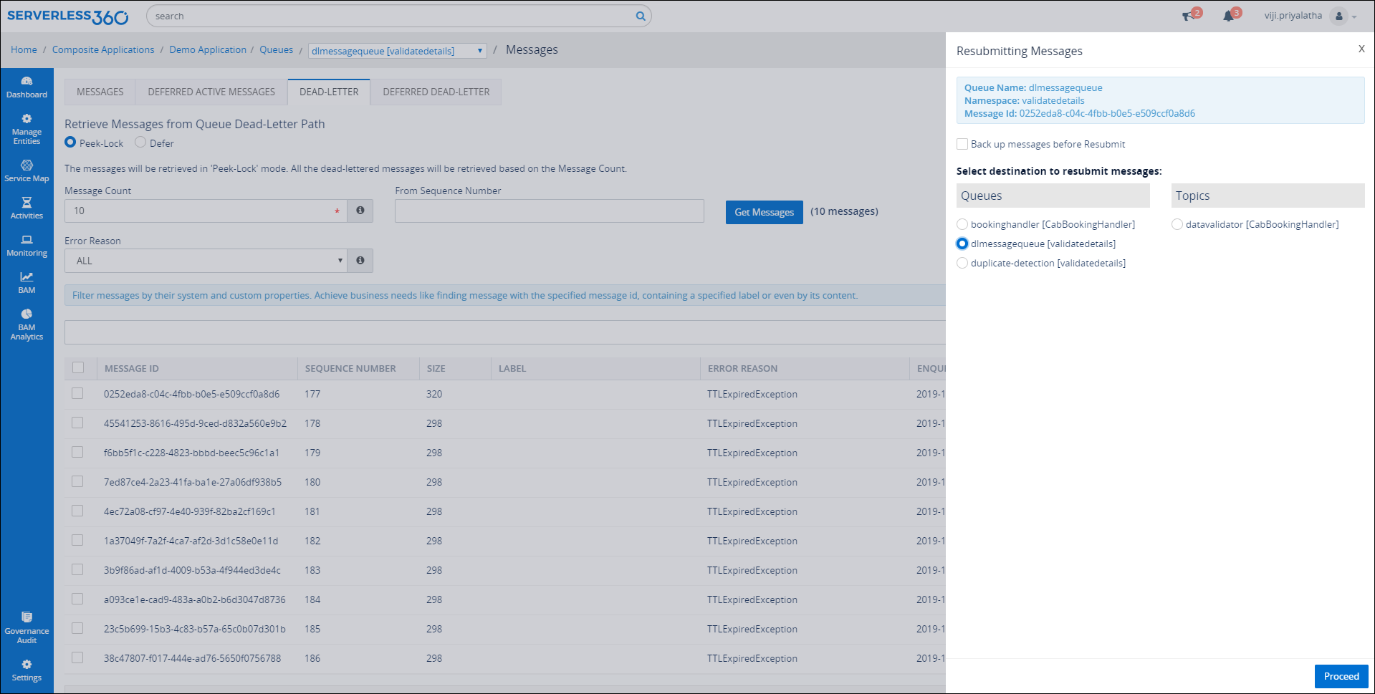
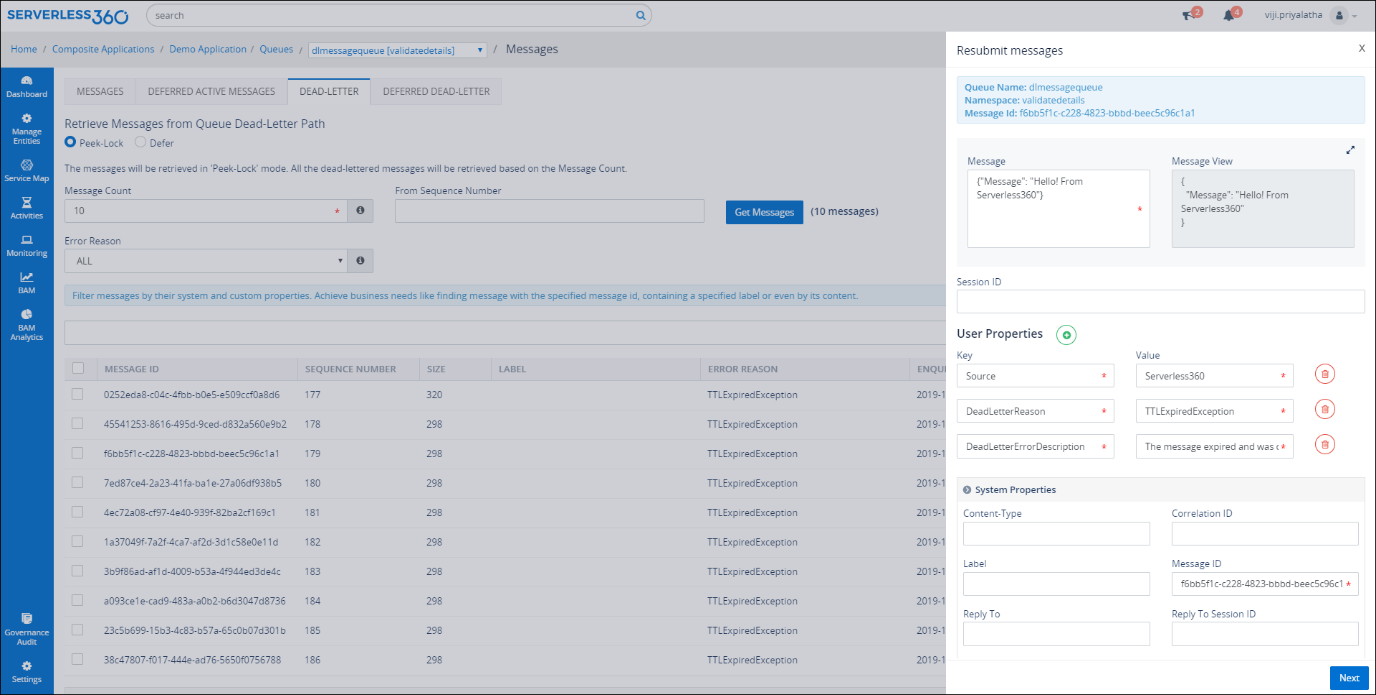
- The messages can also be repaired and resubmitted:
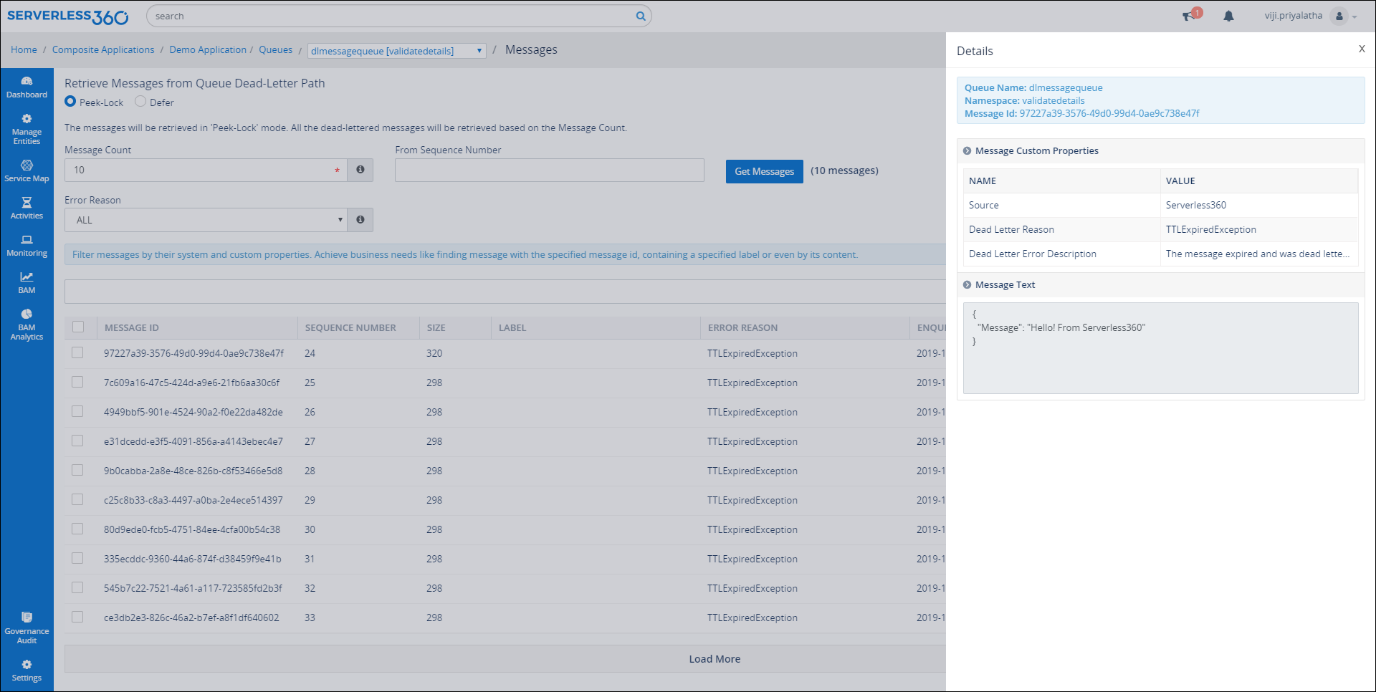
- The user can also view the properties, content, and dead-letter reason of a message:
Conclusion
I hope this blog gave a better understanding of Azure Service Bus Dead-letter Queue, the reason behind a message getting dead-lettered. We also discussed how Serverless360 can help to process dead-letter messages.
Published at DZone with permission of priya latha. See the original article here.
Opinions expressed by DZone contributors are their own.
Comments