

Our Path to Better Certificate Management With Vault and FreeIPA
Learn how to turn HashiCorp Vault into a subordinate CA under FreeIPA to streamline and automate PKI in cloud-native environments.
Join the DZone community and get the full member experience.
Join For FreeManaging public key infrastructure (PKI) is challenging, especially in dynamic, cloud-native environments. In the “good old days,” you could create a virtual machine, place a certificate on it, and forget about it for a couple of years (or at least until the certificate expired). But as modern infrastructure has evolved, a more automated and scalable approach is needed.
In this article, we’ll explore how to configure HashiCorp Vault as a subordinate Certificate Authority (CA) under FreeIPA, how to request certificates, and build a certificate chain trusted by any host in your infrastructure.
Problem in the Wild
Many organizations rely on FreeIPA not only for identity but also for certificate issuance. FreeIPA is a well-established tool, and remains a solid choice in many infrastructures.
However, it wasn't originally designed to integrate with Kubernetes, and due to the ephemeral and dynamic nature of pods, the process of issuing certificates can be a difficult task. That's where HashiCorp Vault comes in.
We implement a two-tier certificate authority system, where FreeIPA CA is used as a root CA and Vault is configured as an intermediate CA, signed by FreeIPA. This architecture not only enables our transition to cloud-native infrastructure but also enhances security and maintainability.
The following is an architecture diagram:
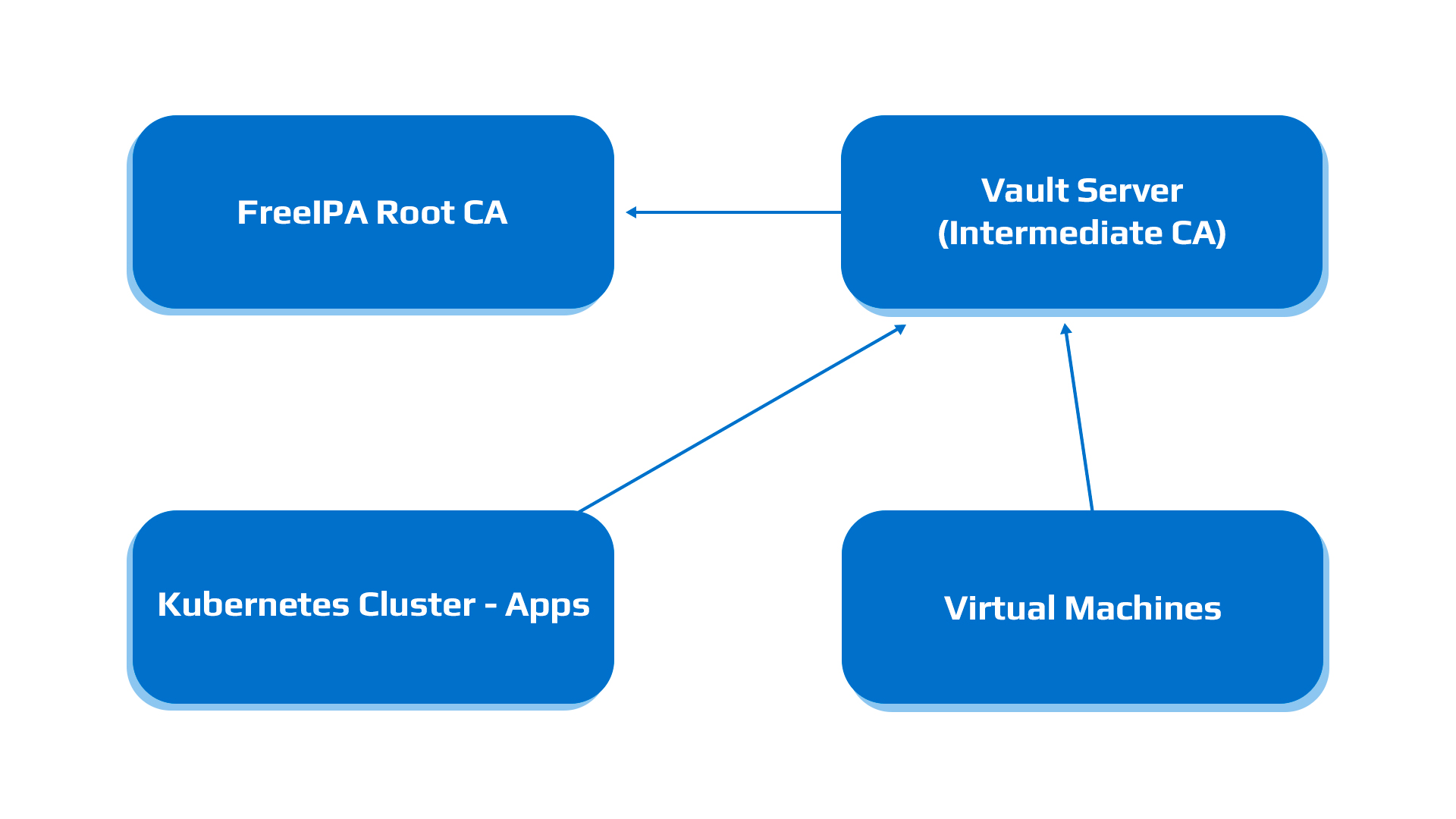
- A FreeIPA server is used as the Root CA of the environment.
- A HashiCorp Vault instance. It can be run in the Kubernetes cluster, as well as in a virtual machine.
- Applications hosted in the Kubernetes cluster.
- Any Virtual Machines with applications that need to have their own certificates.
Prerequisites. In this article, we will assume that we have a fully working and configured HashiCorp Vault and FreeIPA, and that we have administrator access to both of them.
FreeIPA configuration
First of all, we need to configure the certificate profile. Let's use this template. I will highlight what we need to update after the listing:
desc=This certificate profile is for enrolling Subordinate Certificate Authority certificates.
visible=true
enable=true
auth.instance_id=raCertAuth
classId=caEnrollImpl
enableBy=ipara
name=Subordinate CA Certificate Profile
input.list=i1,i2
input.i1.class_id=certReqInputImpl
input.i2.class_id=submitterInfoInputImpl
output.list=o1
output.o1.class_id=certOutputImpl
policyset.list=caSubCertSet
policyset.caSubCertSet.list=1,2,3,4,5,6,8,9,10
policyset.caSubCertSet.1.constraint.class_id=subjectNameConstraintImpl
policyset.caSubCertSet.1.constraint.name=Subject Name Constraint
policyset.caSubCertSet.1.constraint.params.pattern=.*CN=.+
policyset.caSubCertSet.1.constraint.params.accept=true
policyset.caSubCertSet.1.default.class_id=userSubjectNameDefaultImpl
policyset.caSubCertSet.1.default.name=Subject Name Default
policyset.caSubCertSet.1.default.params.name=
policyset.caSubCertSet.2.constraint.class_id=validityConstraintImpl
policyset.caSubCertSet.2.constraint.name=Validity Constraint
policyset.caSubCertSet.2.constraint.params.range=7305
policyset.caSubCertSet.2.constraint.params.notBeforeCheck=false
policyset.caSubCertSet.2.constraint.params.notAfterCheck=false
policyset.caSubCertSet.2.default.class_id=caValidityDefaultImpl
policyset.caSubCertSet.2.default.name=CA Certificate Validity Default
policyset.caSubCertSet.2.default.params.range=7305
policyset.caSubCertSet.2.default.params.startTime=0
policyset.caSubCertSet.3.constraint.class_id=keyConstraintImpl
policyset.caSubCertSet.3.constraint.name=Key Constraint
policyset.caSubCertSet.3.constraint.params.keyType=-
policyset.caSubCertSet.3.constraint.params.keyParameters=1024,2048,3072,4096,nistp256,nistp384,nistp521
policyset.caSubCertSet.3.default.class_id=userKeyDefaultImpl
policyset.caSubCertSet.3.default.name=Key Default
policyset.caSubCertSet.4.constraint.class_id=noConstraintImpl
policyset.caSubCertSet.4.constraint.name=No Constraint
policyset.caSubCertSet.4.default.class_id=authorityKeyIdentifierExtDefaultImpl
policyset.caSubCertSet.4.default.name=Authority Key Identifier Default
policyset.caSubCertSet.5.constraint.class_id=basicConstraintsExtConstraintImpl
policyset.caSubCertSet.5.constraint.name=Basic Constraint Extension Constraint
policyset.caSubCertSet.5.constraint.params.basicConstraintsCritical=true
policyset.caSubCertSet.5.constraint.params.basicConstraintsIsCA=true
policyset.caSubCertSet.5.constraint.params.basicConstraintsMinPathLen=0
policyset.caSubCertSet.5.constraint.params.basicConstraintsMaxPathLen=0
policyset.caSubCertSet.5.default.class_id=basicConstraintsExtDefaultImpl
policyset.caSubCertSet.5.default.name=Basic Constraints Extension Default
policyset.caSubCertSet.5.default.params.basicConstraintsCritical=true
policyset.caSubCertSet.5.default.params.basicConstraintsIsCA=true
policyset.caSubCertSet.5.default.params.basicConstraintsPathLen=0
policyset.caSubCertSet.6.constraint.class_id=keyUsageExtConstraintImpl
policyset.caSubCertSet.6.constraint.name=Key Usage Extension Constraint
policyset.caSubCertSet.6.constraint.params.keyUsageCritical=true
policyset.caSubCertSet.6.constraint.params.keyUsageDigitalSignature=true
policyset.caSubCertSet.6.constraint.params.keyUsageNonRepudiation=true
policyset.caSubCertSet.6.constraint.params.keyUsageDataEncipherment=false
policyset.caSubCertSet.6.constraint.params.keyUsageKeyEncipherment=false
policyset.caSubCertSet.6.constraint.params.keyUsageKeyAgreement=false
policyset.caSubCertSet.6.constraint.params.keyUsageKeyCertSign=true
policyset.caSubCertSet.6.constraint.params.keyUsageCrlSign=true
policyset.caSubCertSet.6.constraint.params.keyUsageEncipherOnly=false
policyset.caSubCertSet.6.constraint.params.keyUsageDecipherOnly=false
policyset.caSubCertSet.6.default.class_id=keyUsageExtDefaultImpl
policyset.caSubCertSet.6.default.name=Key Usage Default
policyset.caSubCertSet.6.default.params.keyUsageCritical=true
policyset.caSubCertSet.6.default.params.keyUsageDigitalSignature=true
policyset.caSubCertSet.6.default.params.keyUsageNonRepudiation=true
policyset.caSubCertSet.6.default.params.keyUsageDataEncipherment=false
policyset.caSubCertSet.6.default.params.keyUsageKeyEncipherment=false
policyset.caSubCertSet.6.default.params.keyUsageKeyAgreement=false
policyset.caSubCertSet.6.default.params.keyUsageKeyCertSign=true
policyset.caSubCertSet.6.default.params.keyUsageCrlSign=true
policyset.caSubCertSet.6.default.params.keyUsageEncipherOnly=false
policyset.caSubCertSet.6.default.params.keyUsageDecipherOnly=false
policyset.caSubCertSet.8.constraint.class_id=noConstraintImpl
policyset.caSubCertSet.8.constraint.name=No Constraint
policyset.caSubCertSet.8.default.class_id=subjectKeyIdentifierExtDefaultImpl
policyset.caSubCertSet.8.default.name=Subject Key Identifier Extension Default
policyset.caSubCertSet.8.default.params.critical=false
policyset.caSubCertSet.9.constraint.class_id=signingAlgConstraintImpl
policyset.caSubCertSet.9.constraint.name=No Constraint
policyset.caSubCertSet.9.constraint.params.signingAlgsAllowed=SHA1withRSA,SHA256withRSA,SHA512withRSA,SHA1withDSA,SHA1withEC,SHA256withEC,SHA384withEC,SHA512withEC
policyset.caSubCertSet.9.default.class_id=signingAlgDefaultImpl
policyset.caSubCertSet.9.default.name=Signing Alg
policyset.caSubCertSet.9.default.params.signingAlg=-
policyset.caSubCertSet.9.constraint.class_id=noConstraintImpl
policyset.caSubCertSet.9.constraint.name=No Constraint
policyset.caSubCertSet.9.default.class_id=crlDistributionPointsExtDefaultImpl
policyset.caSubCertSet.9.default.name=CRL Distribution Points Extension Default
policyset.caSubCertSet.9.default.params.crlDistPointsCritical=false
policyset.caSubCertSet.9.default.params.crlDistPointsEnable_0=true
policyset.caSubCertSet.9.default.params.crlDistPointsIssuerName_0=CN=Certificate Authority,o=ipaca
policyset.caSubCertSet.9.default.params.crlDistPointsIssuerType_0=DirectoryName
policyset.caSubCertSet.9.default.params.crlDistPointsNum=1
policyset.caSubCertSet.9.default.params.crlDistPointsPointName_0=http://<your IPA's CRL revocation list>
policyset.caSubCertSet.9.default.params.crlDistPointsPointType_0=URIName
policyset.caSubCertSet.9.default.params.crlDistPointsReasons_0=
policyset.caSubCertSet.10.constraint.class_id=noConstraintImpl
policyset.caSubCertSet.10.constraint.name=No Constraint
policyset.caSubCertSet.10.default.class_id=authInfoAccessExtDefaultImpl
policyset.caSubCertSet.10.default.name=AIA Extension Default
policyset.caSubCertSet.10.default.params.authInfoAccessADEnable_0=true
policyset.caSubCertSet.10.default.params.authInfoAccessADLocationType_0=URIName
policyset.caSubCertSet.10.default.params.authInfoAccessADLocation_0=
policyset.caSubCertSet.10.default.params.authInfoAccessADMethod_0=1.3.6.1.5.5.7.48.1
policyset.caSubCertSet.10.default.params.authInfoAccessCritical=false
policyset.caSubCertSet.10.default.params.authInfoAccessNumADs=1
profileId=caSubCertAuth2
Here, we need to update this line with the correct address of your FreeIPA:
policyset.caSubCertSet.9.default.params.crlDistPointsPointName_0=http://ldap.example.com/ipa/crl/MasterCRL.binThe line:
policyset.caSubCertSet.1.constraint.params.pattern=.*CN=.+imposes the broadest possible rule on CS. In this line, it means that we need to have a “CN=” string somewhere.
These parameters (path len =0) mean that our intermediate CA can issue certificates, but these certificates must be end-entity certificates, which is exactly what we want to achieve here.policyset.caSubCertSet.5.constraint.params.basicConstraintsIsCA=true
policyset.caSubCertSet.5.constraint.params.basicConstraintsMinPathLen=0
policyset.caSubCertSet.5.constraint.params.basicConstraintsMaxPathLen=0
policyset.caSubCertSet.5.default.params.basicConstraintsIsCA=true
policyset.caSubCertSet.5.default.params.basicConstraintsPathLen=0After updating, save this template to the file caSubCertAuth2.cfg.
And we can import it to the IPA (don’t forget to log in to the IPA via kinit your_username):
ipa certprofile-import caSubCertAuth2 --store=true --file=caSubCACert2.cfgNow we need to create a Certificate ACL. For that, we need to log in to the FreeIPA UI, navigate to the authentication, certificates, and CA ACLs:
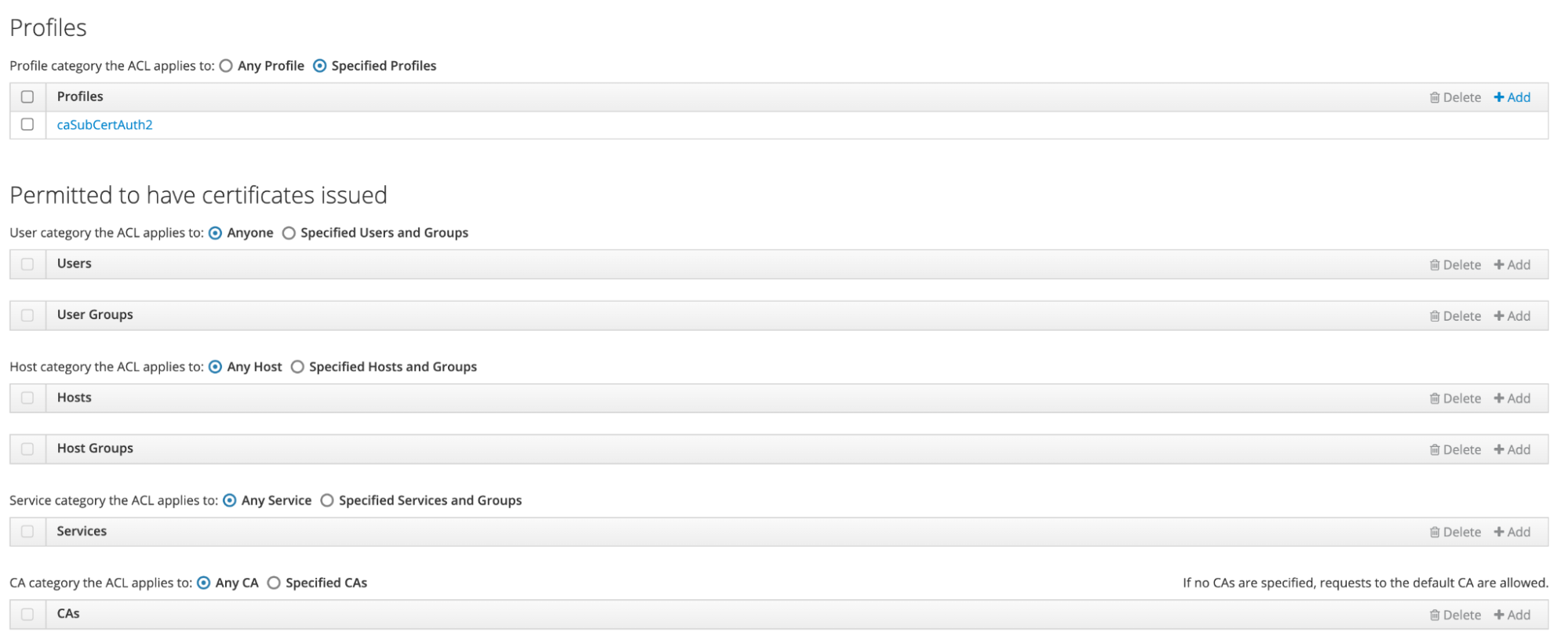
This can also be done via IPA CLI, with commands “ipa caacl-add” and “ipa caacl-add-profile.”
For signing CSR, we need to have the principal (HashiCorp Vault) already registered in FreeIPA. It can be done via the host-add command:
ipa host-add --force vault.example.comFor now, we are ready to sign the CSR from the Vault.
How to Configure an Intermediate CA in the Vault
The first step is mounting a PKI backend:
$ vault secrets enable -path=pki_int pkiNext, we need to set the default maximum time-to-live (TTL) for the issued certificates:
$ vault secrets tune -max-lease-ttl=43800h pki_intTTL should be equal to or less than the root certificate authority.
Now we can generate an intermediate certificate signing request (CSR):
$ vault write -format=json pki_int/intermediate/generate/internal common_name="example.com Intermediate Authority" ttl=43800h | jq -r '.data.csr' > request.csrWe need to copy this CSR to the IPA host and sign it with profile-id created in the previous steps:
$ ipa cert-request ./request.csr --principal host/[email protected] --profile-id caSubCertAuth2This command will issue the certificate.
Now, configure the intermediate certificate authority's signing certificate to use the root-signed certificate:
$ vault write pki_int/intermediate/set-signed certificate=@signed_certificate.pemConfigure CRL location:
$ vault write pki_int/config/urls issuing_certificates="$VAULT_ADDR/v1/pki/ca" crl_distribution_points="$VAULT_ADDR/v1/pki/crl"And last but not least, we need to configure a role:
$ vault write pki_int/roles/example.com \
    allowed_domains=example.com \
    allow_subdomains=true max_ttl=72h
Check out the PKI HTTP API reference for other attributes that you can configure.
After that, we can request certificates from the Vault like this:
$ vault write pki_int/issue/example.com common_name=consul02.dev.any.infra.example.comIn the output, we will have:
Key             	Value
---             	-----
ca_chain        	[-----BEGIN CERTIFICATE-----
<truncated>
-----END CERTIFICATE-----]
certificate     	-----BEGIN CERTIFICATE-----
<truncated>
-----END CERTIFICATE-----
expiration          2033992954
issuing_ca      	-----BEGIN CERTIFICATE-----
<truncated>
-----END CERTIFICATE-----
private_key     	-----BEGIN RSA PRIVATE KEY-----
<truncated>
-----END RSA PRIVATE KEY-----
private_key_type	rsa
serial_number       38:0b:df:ec:be:ad:ca:5f:4e:a4:cd:0a:19:c5:12:29:20:f1:35:a
To create a proper certificate chain, you need to create a file containing the certificate and the certificate chain, let's call it consul02.dev.any.infra.example.com.crt.
The first one — you need to copy the issued certificate itself from the certificate field, and the second one should be certificates from the ca_chain.
After that, your certificate will be marked as valid.
Conclusion
In this article, we explored how to integrate HashiCorp Vault with FreeIPA for certificate issuance. Establishing trust between the two systems allows us to maintain a unified trust framework across our infrastructure. By using Vault as an intermediate CA, we not only simplify certificate management but also gain integration capabilities with a wide range of applications — functionality that FreeIPA alone does not natively support.
Opinions expressed by DZone contributors are their own.
Comments