

Beyond Ingestion: Teaching Your NiFi Flows to Think
Stop just moving data with NiFi — make it smarter. Here's how to embed an AI model right into your flow using a Java Custom Processor.
Join the DZone community and get the full member experience.
Join For FreeIf you are working with data pipelines, chances are you have crossed paths with Apache NiFi. For years, it's been the go-to way for getting data from point A to point B (and often C, D, and E). Its visual interface makes building complex routing, transformation, and delivery flows surprisingly easy, handling everything from simple log collection to intricate IoT data streams across countless organizations. It's powerful, it's flexible, and honestly, it just works really well for shuffling bits around reliably. We set up our sources, connect our processors, define our destinations, and watch the data flow — job done, right?
AI Opportunity
Well, mostly. While Apache NiFi is fantastic at the logistics of data movement, I started wondering: what if we could make the data smarter while it's still in motion? We hear about AI everywhere, crunching massive datasets after they've landed in a data lake or warehouse. But what about adding that intelligence during ingestion? Imagine enriching events, making routing decisions based on predictions, or flagging anomalies before the data even hits its final storage.
That got me thinking about integrating AI directly within a NiFi flow. Sure, we can use processors InvokeHTTP to call out to external AI APIs, and that definitely has its place. But I couldn't find many hands-on examples showing how to embed and run an AI or machine learning model inside a custom NiFi processor using Java, while leveraging NiFi's scalability and data handling capabilities for the AI component as well. It felt like a gap, a missed opportunity to truly combine the strengths of both worlds right there in the pipeline. So, I decided to roll up my sleeves and figure out how to do it.
Code
In this article, I want to share what I learned. We will walk through building a custom NiFi processor in Java that loads and runs a real machine learning model (using the Deep Java Library, or DJL) to perform analysis directly on the FlowFile data as it passes through. No external calls needed for the core AI task! Let's dive into the code. You can refer to the full working code ( which generates NAR for NiFi) in my GitHub here.
Below is the Java code, which is the main function where I have shown how to call PyTorch and DJL. This is a very simple use case where input is classified as positive, negative, or neutral based on incoming text.
Example text:
I am very happy with the results, it exceeded my expectations  --> positive
This film was terribly boring and poorly acted.                --> negative
This also shows the score from the given model.
public void loadModel(final ProcessContext context) {
        getLogger().info("Loading command line classification model...");
        try {
            // Define criteria to load a text classification model.
            // *** IMPORTANT: Replace with a model fine-tuned if possible. ***
            // Using a generic BERT for sequence classification as a placeholder.
            Criteria<String, Classifications> criteria = Criteria.builder()
                    //.optApplication(Application.NLP.TEXT_CLASSIFICATION)
                    .setTypes(String.class, Classifications.class) // Input text, Output classification
                    .optEngine("PyTorch")
                    .optModelUrls("djl://ai.djl.huggingface.pytorch/distilbert-base-uncased-finetuned-sst-2-english")
                    // If using a local model: .optModelPath(Paths.get("/path/to/your/model"))
                    .optProgress(new ProgressBar())
                    .build();

            this.model = criteria.loadModel();
            this.predictor = model.newPredictor();
            getLogger().info("Command line classification model loaded successfully.");

        } catch (Exception e) {
            getLogger().error("Failed to load command line classification model.", e);
            this.predictor = null; // Ensure predictor is null on failure
            // Throwing here will prevent the processor from starting if the model fails to load
            throw new RuntimeException("Failed to initialize AI model", e);
        }
}Results:
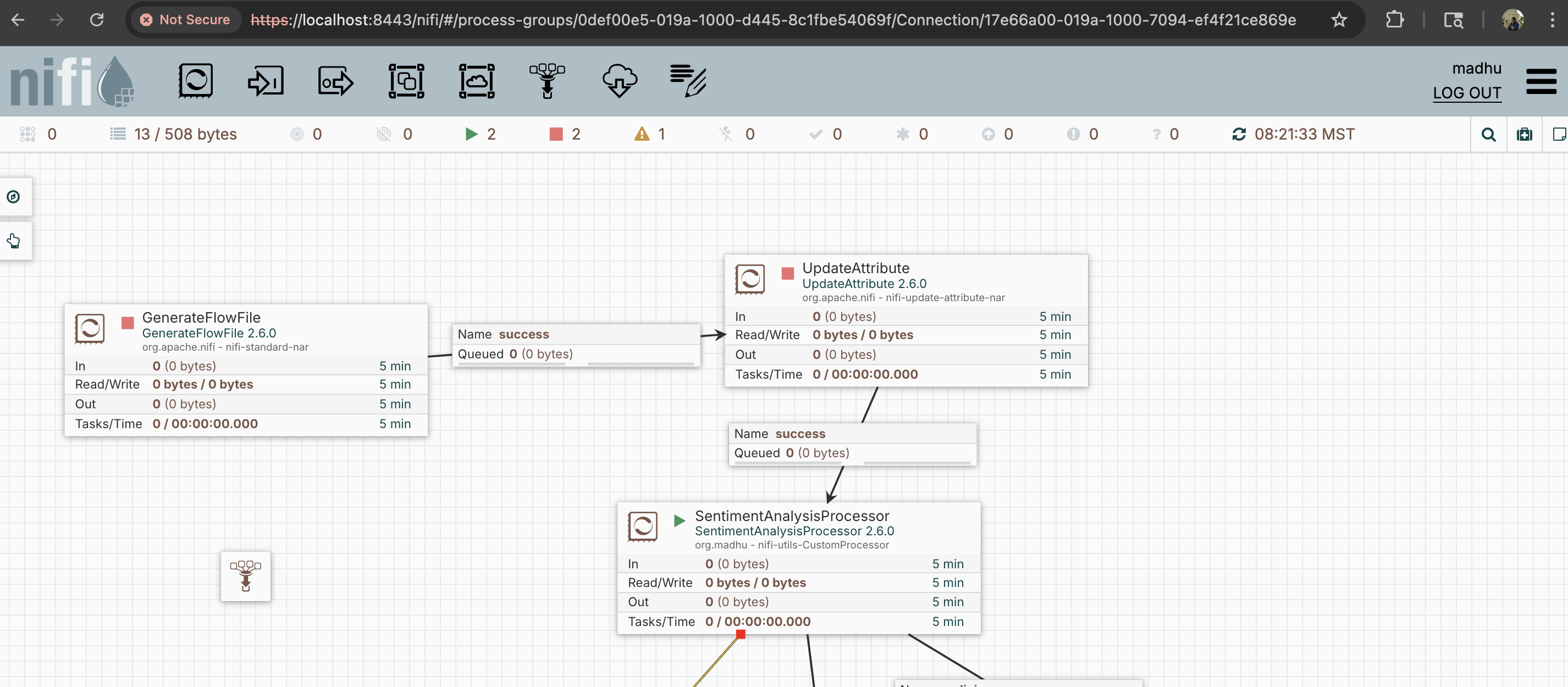
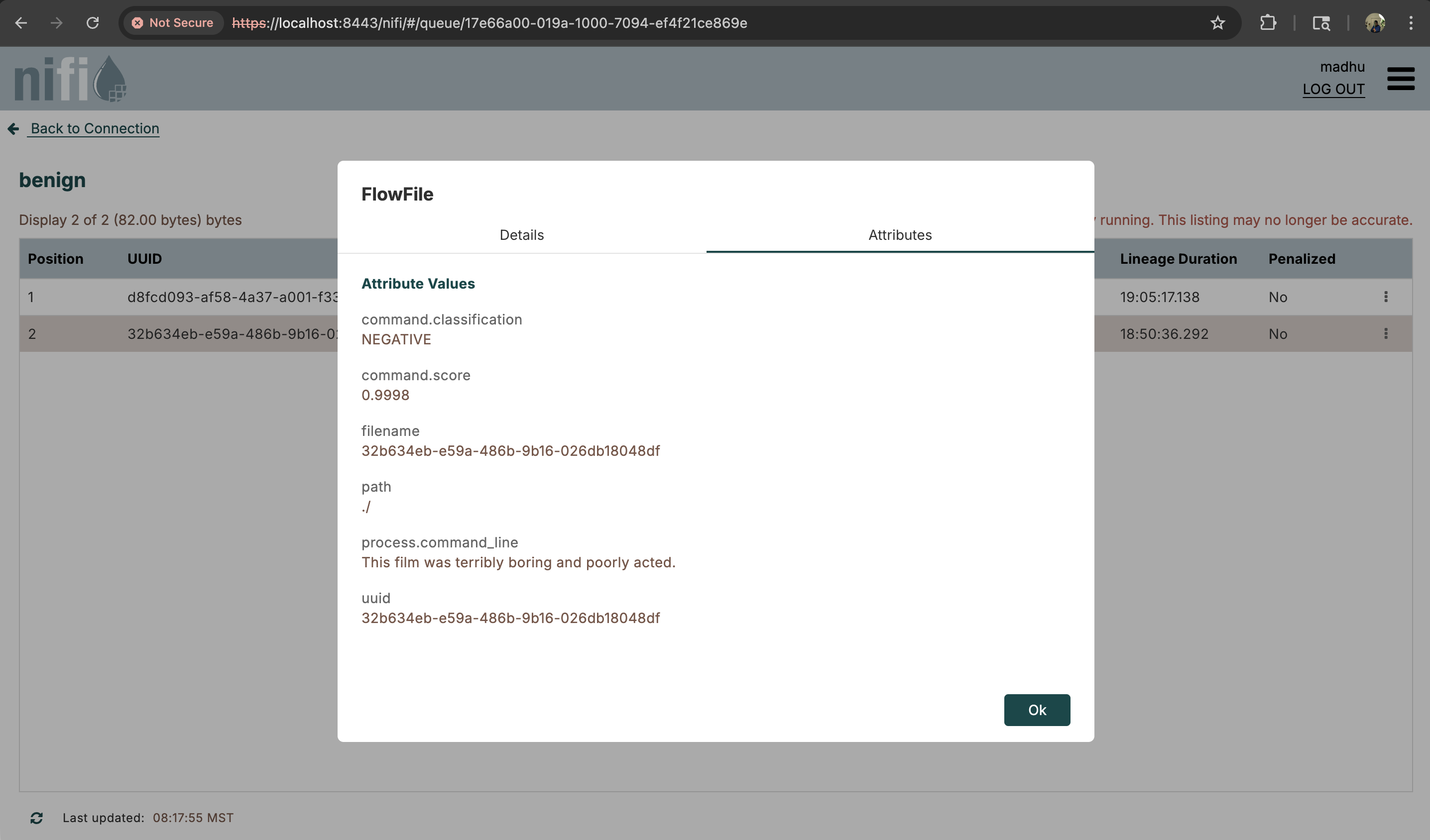
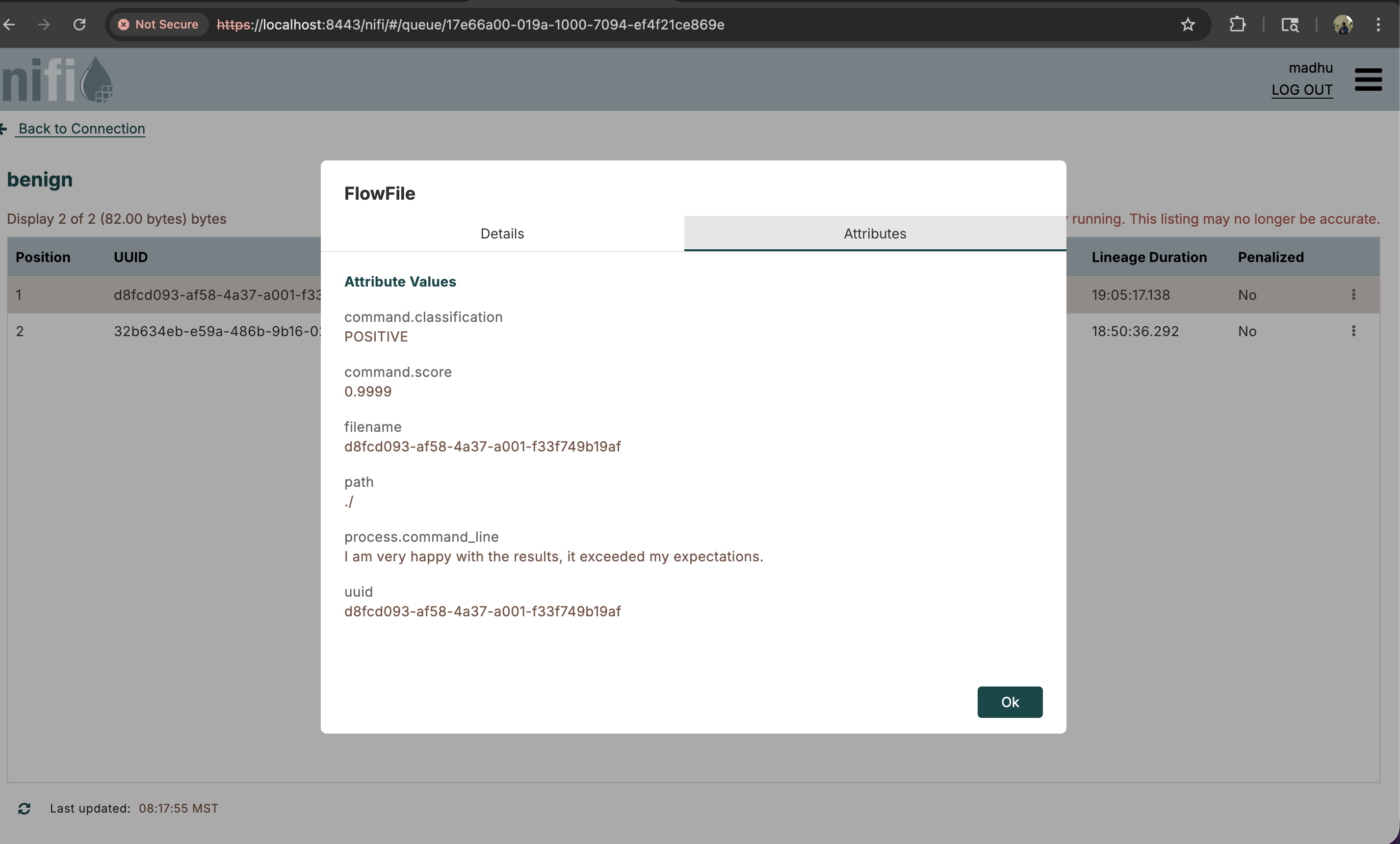
For simplicity, I have used the results as attributes of the flow file itself. Java code can be changed to add these enrichments to the flow file content, and at the end, the flow file can be routed to final outputs such as a data lakehouse or warehouse.
Key Considerations
- Consider making our own models based on requirements. For example, if we want to find out whether the incoming URL is malicious or benign, it would be better to prepare our own model based on the organization's needs.
- Generally, the NiFi memory/CPU spikes won't be high if we code the NiFi customer processors in the right way, even when an AI/ML model is incorporated in them. But when we prepare our own AI model, it's better to consider these aspects of how it behaves for larger incoming flowfiles.
- I have used the PyTorch AI engine here, but there are other libraries to explore as well, such as TensorFlow, Apache MXNet, and ONNX Runtime.
- URLs can also be passed directly by the NiFi processor rather than embedded in the code. But we have to make sure all dependencies in pom.xml are already in place, else it will throw an error.
Conclusion
Adding AI smarts directly into NiFi with a custom processor isn't just theory; as we have seen, it's practically achievable using tools like DJL within Java. This approach lets you leverage NiFi's robust data handling while performing sophisticated analysis right in the flow. It moves AI processing closer to the data source, enabling immediate enrichment and smarter routing decisions. Give it a try — you might be surprised how much intelligence you can pack directly into your data pipelines.
References
Opinions expressed by DZone contributors are their own.
Comments