

Speeding Up BigQuery Reads in Apache Beam/Dataflow
Export BigQuery query results to GCS and read them in parallel with Beam; it’s dramatically faster and cheaper than reading directly from BigQuery.
Join the DZone community and get the full member experience.
Join For FreeReal‑time and overnight data pipelines often succeed or fail on one thing: Can you move enough data through BigQuery and Dataflow within your SLA window?
In a production Apache Beam/Dataflow environment, several large jobs started to miss their daily deadlines after a Beam upgrade. All of them shared a pattern:
- Run a BigQuery query
- Read the result into Dataflow
- Apply heavy transforms
- Write back to BigQuery
Cranking up worker counts (into the hundreds) didn’t solve the problem. The root cause turned out to be how BigQuery data was being read.
This article walks through four strategies to read BigQuery data into Dataflow, and why exporting to GCS and reading files in parallel ended up being:
- ~7x faster than BigQueryIO
- ~13x faster than the BigQuery query API
while using 10x fewer workers.
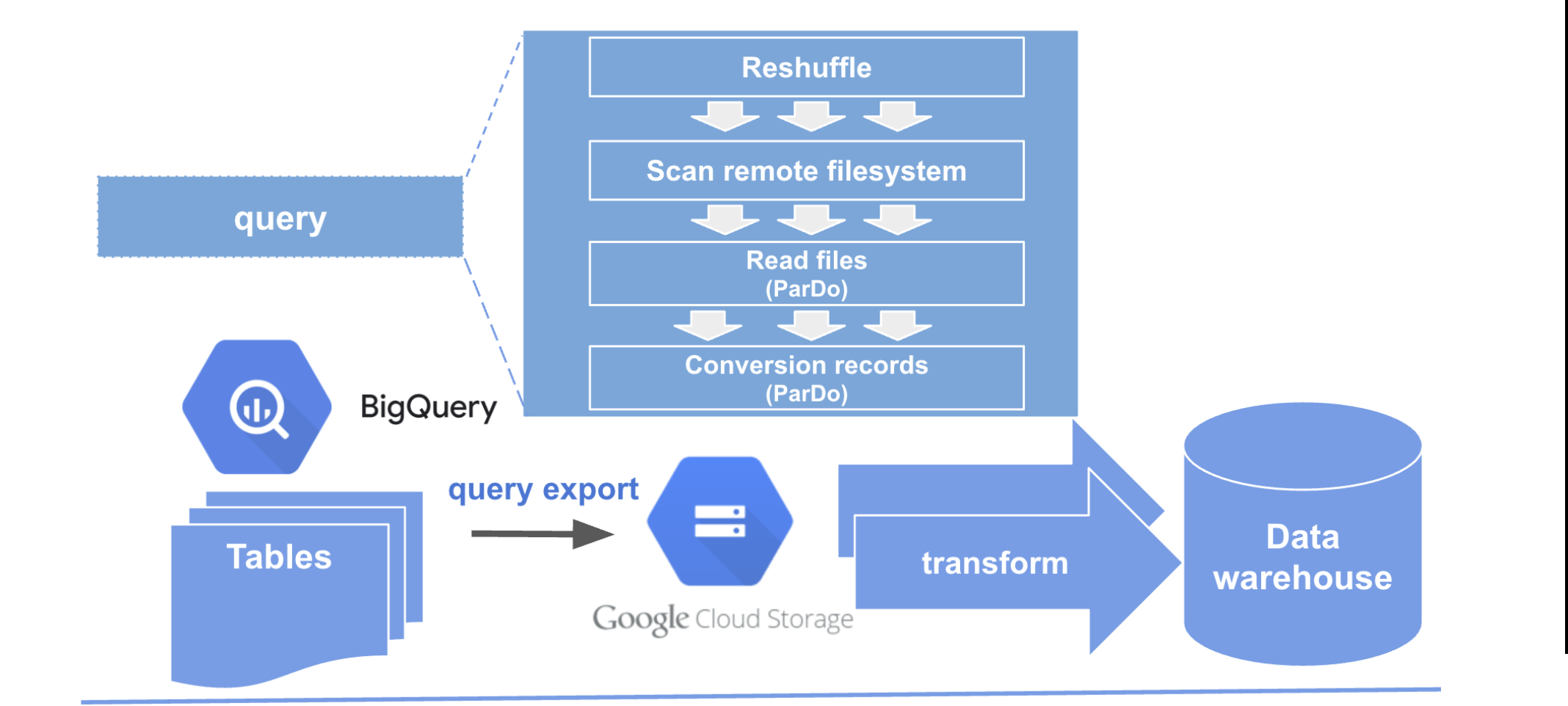
Four Ways to Read BigQuery Results in Beam/Dataflow
The use case is simple: Execute a BigQuery query and process its result set in a Dataflow pipeline. In practice, there are several ways to do this.
1. BigQuery Query API (Legacy Pattern)
- Submit a query via the BigQuery REST API.
- Stream rows to Dataflow one by one.
- Beam’s throughput‑based autoscaler sees a single slow reader and shrinks worker count to 1.
Effectively, the entire pipeline is bottlenecked by a single upstream reader, no matter how many workers are configured.
2. BigQueryIO
- Use Beam’s built‑in
BigQueryIO.read()to run the query and read results. - Provides more parallelism than the raw query API.
- For complex queries and large results, users often compensate by running with very high worker counts (e.g., 200+) to maintain throughput.
- This improves performance but can be expensive and sensitive to slot contention.
3. BigQuery Storage API
- Run the query and materialize results into a temporary BigQuery table.
- Read that table using the BigQuery Storage API, which:
- Uses a binary format optimized for throughput,
- Supports multiple parallel streams.
This is generally faster than the legacy query API, and often more efficient than BigQueryIO, with fewer workers.
4. BigQuery Export to GCS (File‑Based)
- Run the query and export the result to GCS (Avro/Parquet recommended).
- Launch a Dataflow pipeline that:
- Lists files in GCS,
- Reads them in parallel across workers,
- Runs downstream transforms and writes outputs.
Because GCS and file‑based IO in Beam are designed for high parallelism, this approach can unlock much higher throughput with significantly fewer workers.
Benchmark: 10M Rows, Four Strategies
To compare the options, consider a representative workload:
- A BigQuery query that produces a large result set (tens of millions of rows),
- A Dataflow pipeline that reads, transforms, and writes 10M of those rows.
Measured performance (10M rows processed):
| Algorithm | Time / 10M rows | Autoscale Algorithm | Parallelism Behavior | Worker Count |
|---|---|---|---|---|
| BigQuery Query API | 22.43 min | Throughput | No effective parallelism (single read) | 1 (forced) |
| BigQueryIO | 11.83 min | None | Fixed parallelism | 200 (manual) |
| BigQuery Storage API | 17.00 min | Throughput | Stream‑based; auto‑parallelism | ~20 at peak |
| BigQuery Export to GCS | 1.67 min | Throughput | High parallelism via file reads | ~20 at peak |
Key points:
- The BigQuery Query API severely limits parallelism. The autoscaler converges to a single worker because the reader is the bottleneck.
- BigQueryIO can be much faster, but only when massively over‑provisioned with workers; costly and still fragile under heavy BigQuery load.
- The BigQuery Storage API helps, but still doesn’t fully match file‑based parallelism.
- Exporting to GCS and reading files in parallel is:
- ~7x faster than BigQueryIO in this benchmark,
- ~13x faster than the raw query API,
- Achieved with ~20 workers instead of 200.
Pattern: BigQuery Export + Parallel GCS Reads
The winning pattern is:
-
Run BigQuery and export to GCS.
- Use BigQuery exports to write query results to
gs://bucket/prefix/*. - Prefer Avro or Parquet for schema‑aware, efficient reads.
- Use BigQuery exports to write query results to
-
Read files in parallel with Beam.
- Use a Beam IO (e.g., AvroIO, ParquetIO, or TextIO for simple cases) to read all exported files.
- Let Dataflow autoscaling and the runner’s file splitting capabilities distribute work across workers.
-
Optionally break fusion with Reshuffle.
- Insert a
Reshuffle(or similar repartition step) to ensure downstream stages also run in parallel.
- Insert a
A simplified Java example using text files looks like this (swap for Avro/Parquet in practice):
Pipeline p = Pipeline.create(options);

// 1. Read exported files from GCS
PCollection<String> lines = p.apply("ReadExportedFiles",
    TextIO.read().from("gs://my-bucket/my-prefix/*.csv")); // Or AvroIO/ParquetIO

// 2. Optional reshuffle to enforce parallelism
PCollection<String> reshuffled =
    lines.apply("Reshuffle", Reshuffle.viaRandomKey());

// 3. Transform and parse
PCollection<MyRecord> records =
    reshuffled.apply("ParseToRecord", ParDo.of(new ParseFn()));

// 4. Business logic
PCollection<MyOutput> output =
    records.apply("BusinessLogic", ParDo.of(new BusinessLogicFn()));

// 5. Write to BigQuery or another sink
output.apply("WriteToBQ", /* BigQuery write logic */);

p.run();
In production, this pattern typically uses:
- Avro/Parquet exports from BigQuery,
- Strongly typed PCollections,
- Additional validation and aggregation steps.
Why the BigQuery Query API Breaks Autoscaling
With the raw Query API, the pipeline has effectively one source feeding all data from BigQuery. From the autoscaler’s perspective:
- Adding more workers doesn’t increase source throughput (only one reader),
- So it optimizes for cost and scales down to a single worker.
That’s reasonable for small datasets, but disastrous for large ones. All downstream transformations are throttled behind a single upstream reader, and the job runtime explodes.
By contrast, the GCS export pattern presents many files that can be split and processed independently. The autoscaler can add workers and see immediate throughput gains, so it tends to converge to the right amount of parallelism for the workload.
Forcing Parallelism With Reshuffle
Even with parallel reads, some pipelines suffer from:
- Skewed keys,
- Large elements,
- Or fusion of multiple heavy transforms into a single stage.
A strategically placed Reshuffle can:
- Break fusion between stages,
- Redistribute elements across workers,
- Ensure that heavy downstream transforms also run in parallel.
Used sparingly and intentionally, it’s a practical tool to recover parallelism when Beam’s default fusion optimizations are too aggressive.
Key Takeaways
- For large result sets, how you read from BigQuery matters as much as the query itself.
- The BigQuery Query API can accidentally force your job into a single‑worker configuration via autoscaling.
BigQueryIOimproves throughput but may require very high worker counts and can be sensitive to slot contention.- Exporting BigQuery results to GCS and reading with Beam’s file‑based IO:
- Delivers order‑of‑magnitude performance improvements,
- Reduces worker counts and cost,
- Plays nicely with autoscaling.
- Combining file‑based parallelism with occasional
Reshufflesteps gives you predictable, scalable behavior in Apache Beam/Dataflow.
If your pipelines are drifting past their SLAs and you see BigQuery reads near the top of the critical path, it’s worth asking: Can this query be turned into an export, and can Beam be allowed to do what it does best: process many files in parallel?
Opinions expressed by DZone contributors are their own.
Comments