

Build a Celebrity Twitter Chatbot With GPT-4!
This is what you will be building: a custom chatbot who will reply with the appropriate context and personality to any tweets which mention him.
Join the DZone community and get the full member experience.
Join For FreeThis is what you will be building: A custom chatbot using MindsDB’s connectors to Twitter, OpenAI’s GPT-4, and custom prompts.
A simple example is this Twitter bot — @Snoop_Stein — who will reply with the appropriate context and personality to any tweets that mention him. If you haven’t tried tweeting to SnoopStein yet, check it out and tweet at your new friend and rapping physicist! See what it comes up with.
Make Your Own SnoopStein
To get started:
- Create an account on MindsDB cloud (if you don’t have one yet).
- Go to your MindsDB SQL Editor
Now, let us show you how we built the Snoop_Stein GPT-4 bot and how you can build your own.
1. Create a GPT-4 Model!
Let’s first see how simple it is to create a machine learning model represented as a virtual ‘AI table’ in MindsDB. In this example, we will call our GPT4 model gptbot_model.
(Bear in mind that GPT-4 API is in HIGH demand and is rate-limited, so it can be slow. The following steps might each take a few seconds)
CREATE MODEL mindsdb.gpt_model
PREDICT response
USING
engine = 'openai',
-- api_key = 'your openai key', in MindsDB cloud accounts we provide a default key
model_name = 'gpt-4', -- you can also use 'text-davinci-003', 'gpt-3.5-turbo'
prompt_template = 'respond to {{text}} by {{author_username}}';
Note: Optionally, If you are using MindsDB on docker or if you want to use your own OpenAI API key, simply pass the api_key argument in the USING.
One important attribute here is prompt_template. This is where we tell GPT how to write answers; it is a template because you can pass values from columns. In this case, the template contains {{author_username}} and {{text}}, which will be replaced by the WHERE variables in the query. Let’s see in action:
SELECT response from mindsdb.gpt_model WHERE author_username = "mindsdb" AND text="why is gravity so different on the sun?";2. Create an ML Model With Personality
As you can see, the previous model gave responses that weren’t that exciting. But we can use some prompt template magic to shape how we want the model to respond. Essentially we use prompt_template to explain in plain English how we want GPT to formulate its responses.
Let's create a model mindsdb.snoopstein_model with a prompt template that gives GPT a hybrid personality: he is half-Einstein, half-Snoop Dogg. A brilliant physicist who owns the rap game. His name is Snoop Stein:
CREATE MODEL mindsdb.snoopstein_model
PREDICT response
USING
engine = 'openai',
max_tokens = 300,
-- api_key = 'your openai key, in cloud accounts we provide one',
model_name = 'gpt-4', -- you can also use 'text-davinci-003' or 'gpt-3.5-turbo'
prompt_template = 'From input message: {{text}}\
by from_user: {{author_username}}\
In less than 550 characters, write a Twitter response to {{author_username}} in the following format:\
Dear @<from_user>, <respond a rhyme as if you were Snoop Dogg but you also were as smart as Albert Einstein, still explain things like Snoop Dogg would, do not mention that you are part Einstein. If possible include references to publications for further reading. If you make a reference quoting some personality, add OG, for example;, if you are referencing Alan Turing, say OG Alan Turing and very briefly explain why you think they would be dope reads. If the question makes no sense, explain that you are a bit lost, and make something up that is both hilarious and relevant. sign with -- mdb.ai/bot by @mindsdb.';
Now, let’s test this model:
SELECT response from mindsdb.snoopstein_model
WHERE
author_username = "someuser"
AND text="@snoop_stein, why is gravity so different on the sun?.";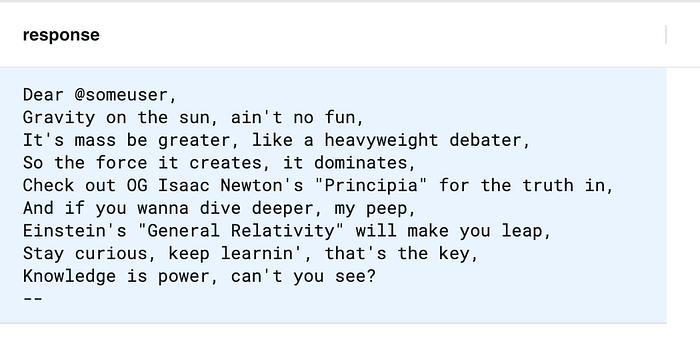
Let’s try another one:
SELECT response from mindsdb.snoopstein_model
WHERE
author_username = "someuser"
AND text="@snoop_stein, Apart from yourself, which rappers would make the best physicists and why?!";
3. Connect Your GPT-4 Model to Twitter!
You need a paid Twitter developer account to be able to read and write tweets via MindsDB. Follow this instruction to establish a connection between your Twitter account and MindsDB.
4. Reading and Writing Tweets Using SQL
You can use the Twitter API to get a list of tweets with a particular text or hashtag, in the case below mindsdb or #mindsdb.
SELECT id, created_at, author_username, text FROM my_twitter.tweets WHERE query = '(@snoopstein OR @snoop_stein OR #snoopstein OR #snoop_stein) -is:retweet' AND created_at > '2023-03-20' LIMIT 20;Note that the parameter query supports anything that the Twitter API supports as query. For more reference, read this. Let’s test that this model can generate outputs based on the Snoop Stein personality on many tweets by joining the model with the default tweets table:
SELECT t.id AS in_reply_to_tweet_id, t.text AS input_text, t.author_username, t.created_at, r.response AS text FROM my_twitter.tweets t JOIN mindsdb.snoopstein_model r WHERE t.query = '(@snoopstein OR @snoop_stein OR #snoopstein OR #snoop_stein) -is:retweet -from:snoop_stein' AND t.created_at > '2023-03-20' LIMIT 4;Let's test by tweeting a few things into the MindsDB Twitter account:
INSERT INTO my_twitter_v2.tweets (in_reply_to_tweet_id, text) VALUES (1633439839491092482, 'MindsDB is great! now its super simple to build ML powered apps using JOBS https://docs.mindsdb.com/sql/tutorials/twitter-chatbot'), (1634126825377996800, 'Holy!! MindsDB is such a useful tool for developers doing ML https://docs.mindsdb.com/sql/tutorials/twitter-chatbot');Like magic, right? Those tweets should be live now on Twitter. You can check your tweet responses here and here.
Note: you can insert any of the values of the tweepy function create_tweet.
5. At Last: Let’s Create the Job
The CREATE JOB statement is great because you can use it to automate work. The idea is simple; you give it a query you want to execute and how often. Let’s set up a job for Snoop Stein!
Let’s write a JOB called gpt4_twitter_job:
- Checks for new tweets
- Generates a response using the OpenAI model
- Writes the responses back into Twitter
All of this can be written in one SQL command:
CREATE JOB mindsdb.gpt4_twitter_job AS (
-- insert into tweets the output of joining model and new tweets
INSERT INTO my_twitter_v2.tweets (in_reply_to_tweet_id, text)
SELECT
  t.id AS in_reply_to_tweet_id,
  r.response AS text
FROM my_twitter.tweets t
JOIN mindsdb.snoopstein_model r
     WHERE
     t.query = '(@snoopstein OR @snoop_stein OR #snoopstein OR #snoop_stein) -is:retweet -from:snoop_stein'
     AND t.created_at > "{{PREVIOUS_START_DATETIME}}"
 limit 10
)
EVERY hour
And there it is! Every hour, we will be checking for new tweets that mention MindsDB and replying with responses generated by OpenAI GPT-4 using the template from step 2 that will respond in a style that combines Albert Einstein and Snoop Dogg.
You can check if your JOB is running effectively:
SELECT * FROM jobs WHERE name="gpt4_twitter_job";
SELECT * FROM jobs_history WHERE name="gpt4_twitter_job";
You can stop the job as follows:
DROP JOB gpt4_twitter_jobConclusion
MindsDB is a powerful software platform that enables developers to easily build machine learning features into their applications. With MindsDB, developers can train machine learning models from different data sources and integration platforms and output the generated ML results or predictions directly into the DB, queryable as tables, or output via the connected application, in this case, Twitter. This example of building a Twitter chatbot with GPT-4 integration is not the only quick solution that developers can implement in just a few minutes: MindsDB has many examples, including integration with many other models, including Hugging Face, to build applications that can summarize text, translate, analyze customer sentiment (product reviews) and perform all kinds of business forecasting.
In pt. 2 of this series on Twitter and GPT integration, out next week, we will walk you through some new features that will allow the quick creation of a conversational chatbot that is able to maintain the state of historical messages and provide appropriate responses in context.
Published at DZone with permission of Jorge Torres. See the original article here.
Opinions expressed by DZone contributors are their own.
Comments