

How to Build a RAG-Powered Chatbot With Google Gemini and MyScaleDB
Learn to construct a RAG-powered chatbot using Google Gemini models and MyScaleDB, including installing dependencies, preparing data, generating embeddings,etc.
 ·
·
Join the DZone community and get the full member experience.
Join For FreeIn the ever-evolving landscape of artificial intelligence, the quest for more intelligent, responsive, and context-aware chatbots has led us to the doorstep of a new era. Welcome to the world of RAG —Retrieval-Augmented Generation (RAG)(opens a new window, a groundbreaking approach that combines the vast knowledge of retrieval systems with the creative prowess of generative models. RAG technology allows chatbots to handle any type of user query effectively by accessing a knowledge base. But to harness this power effectively, we need a storage solution that can match its speed and efficiency. This is where vector databases shine, offering a quantum leap in how we manage and retrieve vast amounts of data.
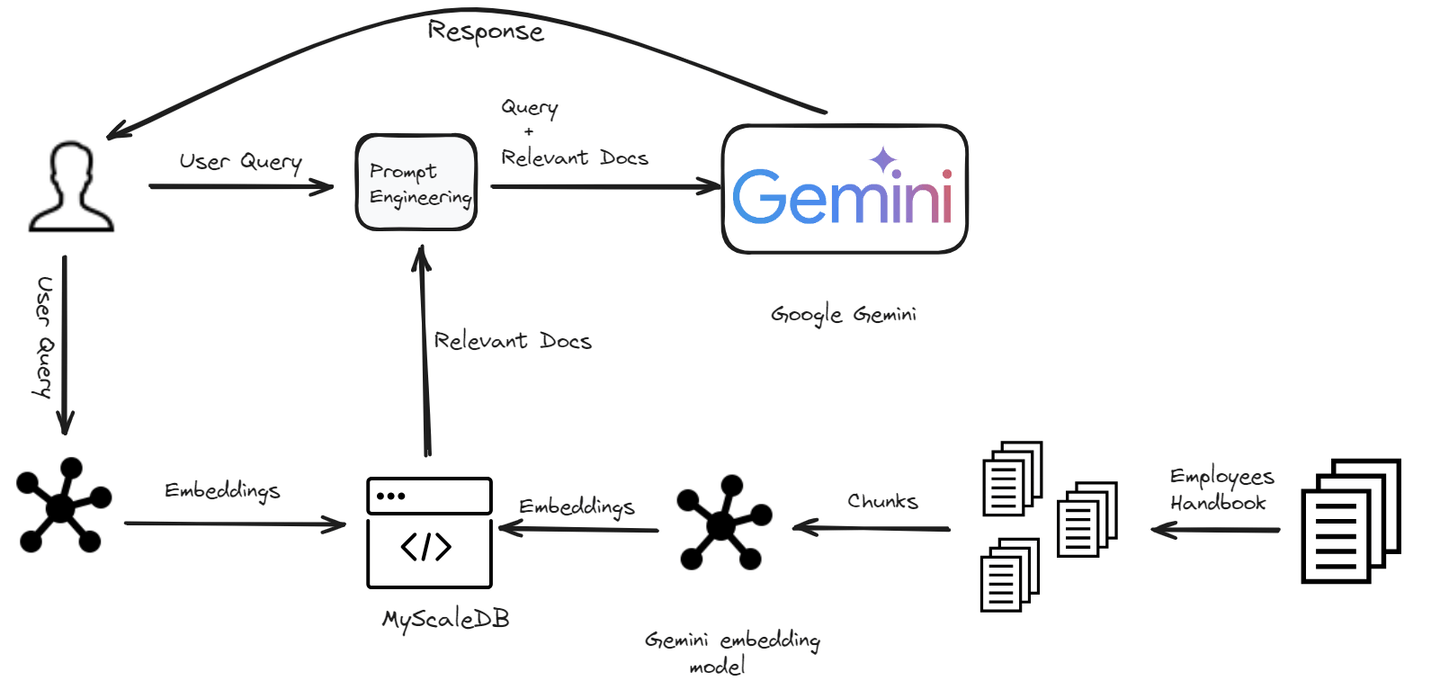
In this blog, we will show you how to build a RAG-powered chatbot using Google Gemini models and MyScaleDB (opens new window)within minutes.
Setting Up the Environment
Installing Necessary Software
To begin our chatbot development journey, we need to ensure the required dependencies are installed. Here's a breakdown of the tools required:
- Python(opens new window: We will use Python as a programming language to build this chatbot.
- Gemini API(opens new window): We will use Gemini API to access the Gemini LLM and use it in our chatbot.
- LangChain(opens new window): It's a framework that allows developers to integrate Large Language Models and Vector databases to build scalable RAG applications.
- MyScaleDB(opens new window): It's a SQL vector database specially designed to build AI applications.
Installing Python
If Python is already installed on your system, you can skip this step. Otherwise, follow the steps below.
- Download Python: Go to the official Python website (opens new window)and download the latest version.
- Install Python: Run the downloaded installer and follow the on-screen instructions. Make sure to check the box to add Python to your system path.
Installing Gemini, LangChain, and MyScaleDB
To install all these dependencies, enter the following command in your terminal:
pip install gemini-api langchain clickhouse-clientThe above command should install all the required packages to develop a chatbot. Now, let's start the development process.
Building the Chatbot
We are building a chatbot specifically designed for company employees. This chatbot will help employees with any questions they have related to company policies. From understanding the dress code to clarifying leave policies, the chatbot will provide quick and accurate answers.
Loading and Splitting Documents
The first step is to load the data and split it using PyPDFLoader module of the LangChain.
from langchain_community.document_loaders import PyPDFLoader
loader = PyPDFLoader("Employee_Handbook.pdf")
pages = loader.load_and_split()
pages = pages[4:]  # Skip the first few pages as they are not required
text = "\n".join([doc.page_content for doc in pages])
We load the document and split it into pages, skipping the first few pages. The text from all the pages is then concatenated into a single string.
- Note: We are using this handbook from a kaggle repository. (opens new window)
Next, we split this text into smaller chunks to make it easier to handle in the chatbot.
from langchain_text_splitters import RecursiveCharacterTextSplitter
text_splitter = RecursiveCharacterTextSplitter(
    chunk_size=500,
    chunk_overlap=150,
    length_function=len,
    is_separator_regex=False,
)
docs = text_splitter.create_documents([text])
for i, d in enumerate(docs):
    d.metadata = {"doc_id": i}
Here, we use RecursiveCharacterTextSplitter to split the text into chunks of 500 characters each, with an overlap of 150 characters to ensure continuity.
Generating Embeddings
To make our chatbot capable of understanding and retrieving relevant information, we need to generate embeddings for each chunk of text. These embeddings are numerical representations of the text that capture the semantic meanings of the text.
import os
import google.generativeai as genai
import pandas as pd

os.environ["GEMINI_API_KEY"] = "your_key_here"

# This function takes a a sentence as an arugument and return it's embeddings
def get_embeddings(text):
    # Define the embedding model
    model = 'models/embedding-001'
    # Get the embeddings
    embedding = genai.embed_content(model=model,
                                    content=text,
                                    task_type="retrieval_document")
    return embedding['embedding']

# Get the page_content from the documents and create a new list
content_list = [doc.page_content for doc in docs]
# Send one page_content at a time
embeddings = [get_embeddings(content) for content in content_list]

# Create a dataframe to ingest it to the database
dataframe = pd.DataFrame({
    'page_content': content_list,
    'embeddings': embeddings
})
We define a function get_embeddings that uses Google Gemini to generate embeddings for each chunk of text. These embeddings are stored in a DataFrame for further processing.
Note: We are using the embedding-001 model from the Gemini models and you can get the Gemini API here(opens new windo.
Storing Data in MyScaleDB
With our text chunks and their corresponding embeddings ready, the next step is to store this data in MyScaleDB. This will allow us to perform efficient retrieval operations later. Let's first create a connection with MyScaleDB.
import clickhouse_connect

client = clickhouse_connect.get_client(
    host='your_host_name',
    port="port_number,
    username='your_username',
    password='yiur_password_hhere'
)
To get the credentials of your MyScaleDB account, follow the quickstart guide(opens new window).
Create a Table and Insert the Data
After creating a connection with the DB, the next step is to create a table (because MyScaleDB is an SQL vectorDB) and insert data to it.
# Create a table with the name 'handbook'
client.command("""
    CREATE TABLE default.handbook (
        id Int64,
        page_content String,
        embeddings Array(Float32),
        CONSTRAINT check_data_length CHECK length(embeddings) = 768
    ) ENGINE = MergeTree()
    ORDER BY id
""")

# The CONSTRAINT will ensure that the length of each embedding vector is 768

# Insert the data in batches
batch_size = 10
num_batches = len(dataframe) // batch_size

for i in range(num_batches):
    start_idx = i * batch_size
    end_idx = start_idx + batch_size
    batch_data = dataframe[start_idx:end_idx]
    # Insert the data
    client.insert("default.handbook", batch_data.to_records(index=False).tolist(), column_names=batch_data.columns.tolist())
    print(f"Batch {i+1}/{num_batches} inserted.")

# Create a vector index for a quick retrieval of data
client.command("""
ALTER TABLE default.handbook
    ADD VECTOR INDEX vector_index embeddings
    TYPE MSTG
""")
The data is inserted in batches for efficiency, and a vector index is added to enable fast similarity searches.
Retrieving Relevant Documents
Once the data is stored, the next step is to retrieve the most relevant documents for a given user query using the embeddings.
def get_relevant_docs(user_query):
    # Call the get_embeddings function again to convert user query into vector embeddngs
    query_embeddings = get_embeddings(user_query)
    # Make the query
    results = client.query(f"""
        SELECT page_content,
        distance(embeddings, {query_embeddings}) as dist FROM default.handbook ORDER BY dist LIMIT 3
    """)
    relevant_docs = []
    for row in results.named_results():
        relevant_docs.append(row['page_content'])
    return relevant_docs
This function first generates embeddings for the user query and then, retrieves the top 3 most relevant text chunks from the database based on the similarity of their embeddings.
Generating a Response
Finally, we use the retrieved documents to generate a response to the user's query.
def make_rag_prompt(query, relevant_passage):
    relevant_passage = ' '.join(relevant_passage)
    prompt = (
        f"You are a helpful and informative chatbot that answers questions using text from the reference passage included below. "
        f"Respond in a complete sentence and make sure that your response is easy to understand for everyone. "
        f"Maintain a friendly and conversational tone. If the passage is irrelevant, feel free to ignore it.\n\n"
        f"QUESTION: '{query}'\n"
        f"PASSAGE: '{relevant_passage}'\n\n"
        f"ANSWER:"
    )
    return prompt

import google.generativeai as genai

def generate_response(user_prompt):
    model = genai.GenerativeModel('gemini-pro')
    answer = model.generate_content(user_prompt)
    return answer.text

def generate_answer(query):
    relevant_text = get_relevant_docs(query)
    text = " ".join(relevant_text)
    prompt = make_rag_prompt(query, relevant_passage=relevant_text)
    answer = generate_response(prompt)
    return answer

answer = generate_answer(query="what is the Work Dress Code?")
print(answer)
The function make_rag_prompt creates a prompt for the chatbot using the relevant documents. The generate_response function uses Google Gemini to generate a response based on the prompt and the generate_answer function ties everything together, retrieving relevant documents and generating a response to the user's query.
Note: In this blog, we are using Gemini Pro 1.0 (opens new window)because it allows more requests per minute in the free tier. Although Gemini offers advanced models like Gemini 1.5 Pro (opens new window)and Gemini 1.5 Flash(opens new window), these models have more restrictive free tiers and higher costs for extensive usage.
A few of the outputs of the chatbot look like this:

When the chatbot was asked about the lunchtime of the office:

By integrating these steps into your chatbot development process, you can capitalize on the power of Google Gemini and MyScaleDB to build a sophisticated, AI-powered chatbot. Experimentation is key; tweak your chatbot to enhance its performance continually. Stay curious, stay innovative, and watch your chatbot evolve into a conversational marvel!
Conclusion
The advent of RAG has revolutionized the chatbot development process by integrating large language models such as Gemini or GPT. These advanced LLMs enhance chatbot performance by retrieving relevant information from a vector database, generating more accurate, factually correct, and contextually appropriate responses. This shift not only reduces development time and costs but also significantly improves the user experience with more intelligent and responsive chatbots.
The performance of a RAG model heavily relies on the efficiency of its vector database. A vector database's ability to quickly retrieve relevant documents is crucial for providing users with rapid responses. When scaling a RAG system, maintaining this high level of performance becomes even more critical.
Published at DZone with permission of Usama Jamil. See the original article here.
Opinions expressed by DZone contributors are their own.
Comments