

Building a Customer Intelligence AI Agent With OpenSearch and LLMs
Imagine being able to ask a question about a customer and receive a grounded, natural language answer combining all that data.
Join the DZone community and get the full member experience.
Join For FreeThe Problem
You have three types of customer data:
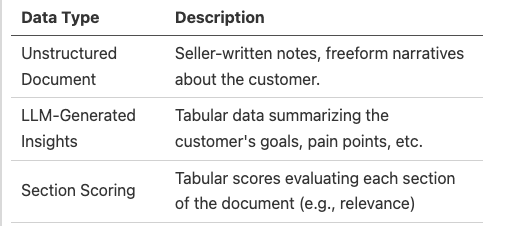
You want to support questions like:
- “What are the top business goals for Acme Corp?”
- “How well did we capture their current pain points?”
- “What are the growth strategies for Globex?”
- “What is the ratio of business we have from a customers compared to comptetitors?”
Architecture Overview
Here’s the high-level structure of our AI agent:
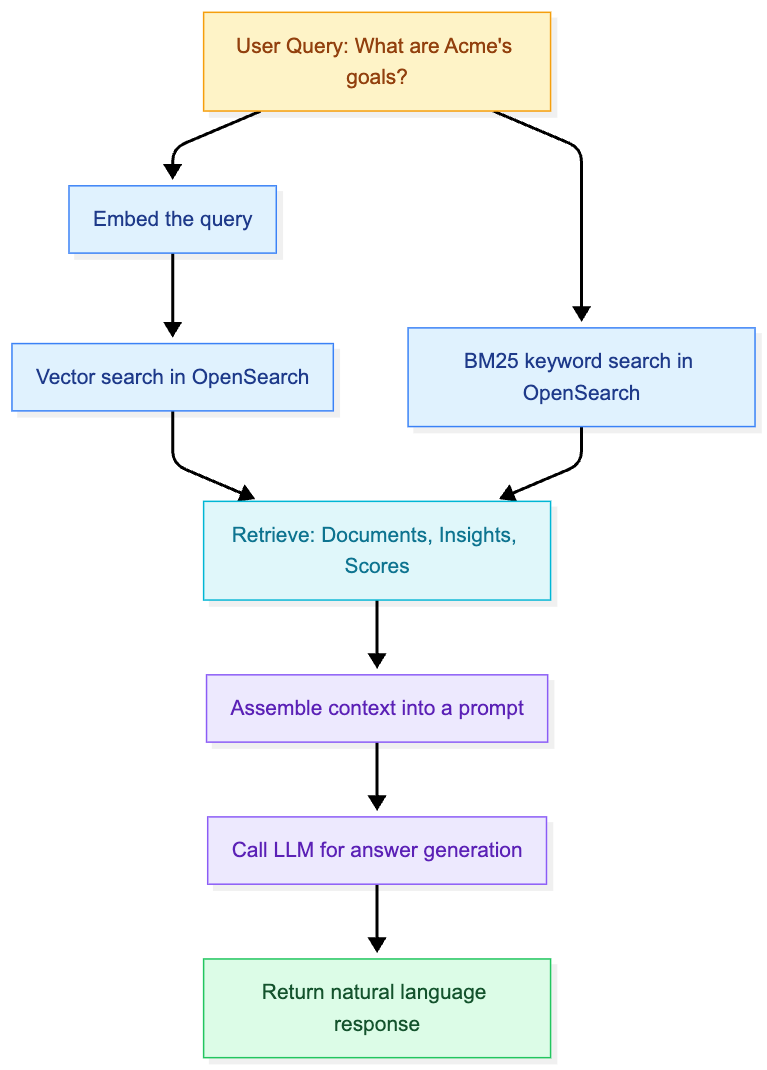
Understanding the Building Blocks
1. What Is BM25?
A ranking function used by traditional search engines like OpenSearch to score documents based on:
- Term frequency: How often a query term appears in the document.
- Inverse document frequency: How rare that term is across all documents.
- Document length normalization.
Think of it as a smarter version of keyword matching — not as smart as AI, but very fast and useful for exact matches.
2. What Is Vector Search?
Vector seach enables semantic retrieval — instead of matching exact words, it matches based on meaning.
You:
- Convert text into vectors (a list of floats) using an embedding model.
- Store those vectors in OpenSearch.
- At query time, embed the user’s query and find nearest vectors (most similar meanings)
Example embedding with sentence-transformers:
from sentence_transformers import SentenceTransformer

model = SentenceTransformer("all-MiniLM-L6-v2")
vector = model.encode("Acme Corp wants predictive maintenance")
print(len(vector))  # e.g. 384 dimensions
Popular models for embedding: all-MiniLM-L6-v2, bge-small-en, or OpenAI’s text-embedding-3-small.
Step-by-Step: Indexing the Data
Before you can search, you need to index your data into OpenSearch.
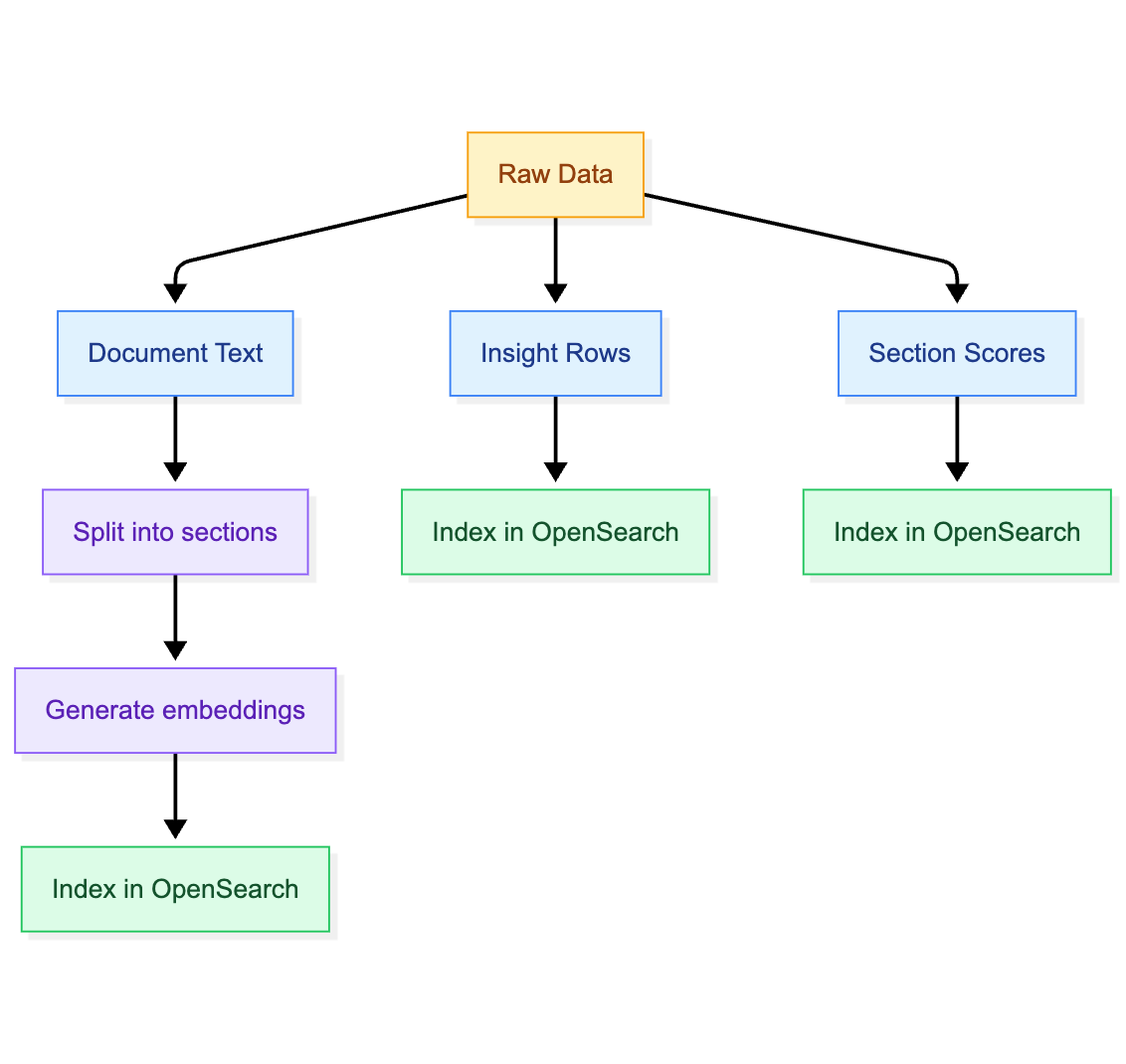
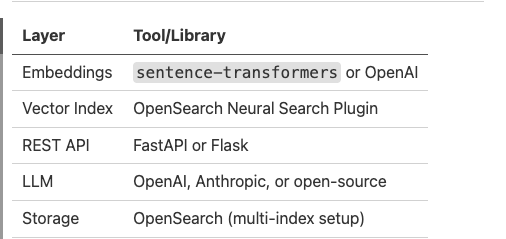
What Each Component Does
Create an Index With BM25 + Vector
We define both text and embedding fields in OpenSearch. If the k-NN plugin is enabled, we use kmm_vector; otherwise fall back to dense_vector.
from opensearchpy import OpenSearch

client = OpenSearch("https://localhost:9200", http_auth=("admin","admin"), verify_certs=False)
mapping = {
    "settings": {"index": {"knn": True}},
    "mappings": {
        "properties": {
            "customer_id": {"type": "keyword"},
            "section_text": {"type": "text"},
            "section_score": {"type": "float"},
            "insights": {"type": "nested"},
            "embedding": {"type": "knn_vector", "dimension": 384}  # match your embedding model
        }
    }
}
client.indices.create(index="customers", body=mapping)
Chunking and Indexing Customer Docs
We split documents into sections, embed them, and store insights + quality scores.
from sentence_transformers import SentenceTransformer
from opensearchpy import helpers
import uuid

model = SentenceTransformer("all-MiniLM-L6-v2")
def chunk_text(text, max_words=300, overlap=50):
    words = text.split()
    for i in range(0, len(words), max_words - overlap):
        yield " ".join(words[i:i+max_words])
def index_customer_doc(customer_id, doc_text, insights, section_scores):
    chunks = list(chunk_text(doc_text))
    embeddings = model.encode(chunks, convert_to_numpy=True)
    actions = []
    for i, (chunk, emb) in enumerate(zip(chunks, embeddings)):
        section_id = str(uuid.uuid4())
        actions.append({
            "_index": "customers",
            "_id": f"{customer_id}_{section_id}",
            "_source": {
                "customer_id": customer_id,
                "section_id": section_id,
                "section_text": chunk,
                "insights": insights,
                "section_score": section_scores.get(i, 0.5),
                "embedding": emb.tolist(),
            }
        })
    helpers.bulk(client, actions)
Hybrid Retrieval
At the query time, we combine:
- BM25 -> exact matches
- Vector similarity -> semantic matches
- Section score -> quality signal
def bm25_search(customer_id, query, size=5):
    body = {
        "query": {
            "bool": {
                "must": [{"term": {"customer_id": customer_id}}],
                "should": [{"match": {"section_text": query}}]
            }
        },
        "size": size
    }
    return client.search(index="customers", body=body)["hits"]["hits"]

def vector_search(customer_id, query_vector, k=5):
    body = {
        "size": k,
        "query": {
            "knn": {"embedding": {"vector": query_vector, "k": k}}
        }
    }
    return client.search(index="customers", body=body)["hits"]["hits"]
def combined_retrieval(customer_id, query):
    q_vec = model.encode([query])[0].tolist()
    bm25_hits = bm25_search(customer_id, query)
    vec_hits = vector_search(customer_id, q_vec)
    # Merge + rank
    results = {}
    for hit in bm25_hits + vec_hits:
        sid = hit["_source"]["section_id"]
        results[sid] = hit["_source"]
    return list(results.values())
Prompting the LLM
Once we have retrieved insights and snippets, we pass them into an LLM with a grounded prompt.
import openai
openai.api_key = "sk-..."

def build_prompt(customer_id, insights, snippets, question):
    return f"""
Customer: {customer_id}
Key Insights:
{chr(10).join([f"- {i['key']}: {i['value']}" for i in insights])}
Document Snippets:
{chr(10).join([s['section_text'][:200] for s in snippets])}
User Question: {question}
Answer using only the information above.
"""
def answer_question(prompt):
    resp = openai.ChatCompletion.create(
        model="gpt-4o-mini",
        messages=[
            {"role": "system", "content": "Answer strictly using the provided context."},
            {"role": "user", "content": prompt}
        ]
    )
    return resp["choices"][0]["message"]["content"]
Example Prompt Sent to the LLM
Customer: Acme Corp

Key Insights:
- Goal: Reduce manufacturing downtime by 20%
- Initiative: Implement AI-based predictive maintenance

Document Snippets:
- "Acme Corp is exploring AI to improve their manufacturing lines..."
Section Scoring:

- Business Goals section: Score 0.87
- Implementation Plan: Score 0.65

User Question: What are Acme Corp's business goals?
Answer using only the information above.
REST API With FastAPI
Finally, we expose this pipeline as a REST API.
from fastapi import FastAPI
from pydantic import BaseModel

app = FastAPI()
class AskRequest(BaseModel):
    customer_id: str
    question: str
@app.post("/ask")
def ask(req: AskRequest):
    snippets = combined_retrieval(req.customer_id, req.question)
    insights = snippets[0].get("insights", [])
    prompt = build_prompt(req.customer_id, insights, snippets, req.question)
    answer = answer_question(prompt)
return {"answer": answer, "snippets": snippets}-- Run it with:
uvicorn app:app --reload --port 8000Real-World Use Case: Enterprise Sales
Sales teams often have:
- Long narrative notes about a client.
- Insights from market research.
- Internal QA scoring of document completeness.
With this setup, you can:
- Ask, “What are the growth opportunities, and expansion strategies for a customer?”
- Spot where the documentation is weak.
- Provide auto-generated summaries before meetings.
It turns a messy database into a searchable intelligence layer.
Final Thoughts
This hybrid retrieval-augmented generation (RAG) setup is one of the most powerful design patterns for enterprise AI:
- Combines old-school search (BM25) with modern embeddings.
- Leverages tabular + text data (unstructured text).
- Gives explainable, LLM-powered answers.
- Built entirely on open tooling.
Want to Try It?
I’m happy to share starter code or help you build your own version. Drop a comment below.
Coming Next
- Multi-turn conversational agents: Build a dialogue layer on top of this pipeline so users can ask follow-up questions without losing context. This means storing conversation state, retrieving past snippets, and incrementally updating the prompt.
- Auto-summarization pipelines: Use OpenSearch ingest pipelines (or async workers) to automatically chunk, embed, and summarize new customer documents as soon as they’re ingested. Think of it as a “continuous ETL” flow for customer intelligence.
- Feedback-driven ranking: Instead of full ML fine-tuning, start with a feedback loop: log which answers users accept/reject, and adjust retrieval weights (bm25, vector, section_score) accordingly. Over time this gives you a simple but effective learning-to-rank system without diving into model training.
Opinions expressed by DZone contributors are their own.
Comments