

Building a Platform Abstraction for AWS Networks Using Crossplane
Build Crossplane abstractions that let your devs request AWS networks without writing infrastructure code. Create XRD and composition to hide details.
Join the DZone community and get the full member experience.
Join For FreeCrossplane helps platform engineers develop abstractions for developers. It is an open-source, multicloud control plane that handles interactions with cloud providers’ APIs for you.
In this post, I’ll show how developers can create an AWS network (VPC, Subnet, etc.) with just a single YAML request to the Kubernetes API.
Crossplane leverages Kubernetes CRD (Custom Resource Definition), which extends Kubernetes APIs with new custom objects. Along with that, Crossplane creates controllers for these objects, implementing the reconciliation loop to ensure the system’s actual state always matches the declared state.
For example, if you define a Table custom resource with spec.legs = 3, Kubernetes continuously checks:
“Does this table have three legs?”
- If it finds only two, it builds another.
- If someone manually adds a 4th, it removes the extra one.
This ensures the resource has exactly three legs—no more, no less.
Prerequisites
- Docker and Kubernetes setup
- AWS account with user or IAM role credentials (Below, I provided steps to set up a user in AWS.)
Docker Kubernetes Setup
I am assuming you already have a local Kubernetes setup. If not, you can install Docker Desktop from https://docs.docker.com/desktop/setup/install/mac-install/ and enable Kubernetes.
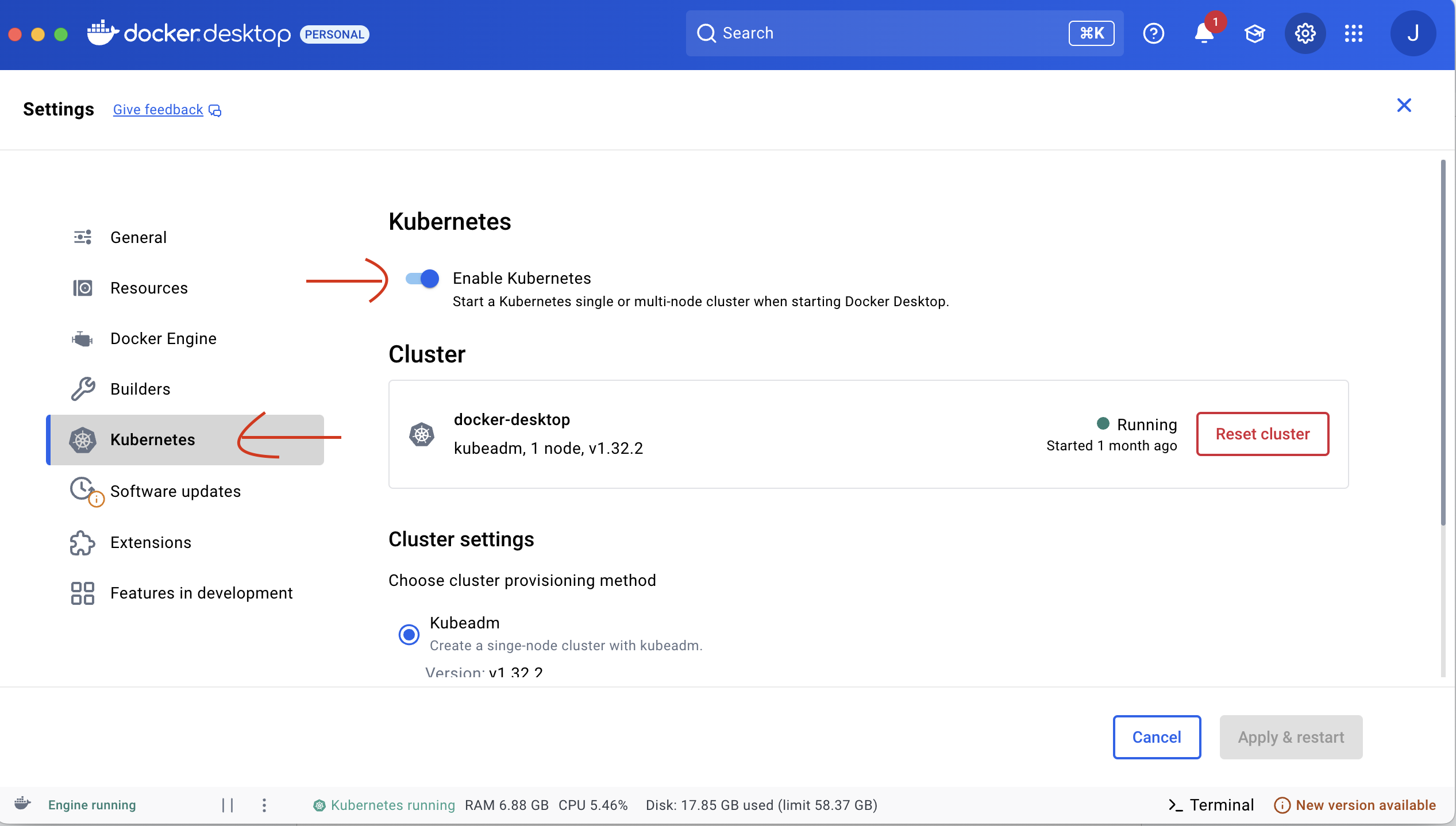
Confirm the setup by checking the Kubernetes version.
kubectl versionCrossplane Installation
Now, we will install Crossplane using Helm. Helm is a packaging tool for Kubernetes resources.
Install Helm using:
brew install helmConfirm, using version check.
helm versionLet's add Helm repo for Crossplane using the commands:
helm repo add crossplane-stable https://charts.crossplane.io/stable

helm repo update
And then, the command below will install Crossplane.
helm install crossplane --namespace crossplane-system --create-namespace crossplane-stable/crossplaneYou can change the namespace to one of your choice, and then check the installation status using:
helm list -n crossplane-systemProvider
In Crossplane, a provider acts like a software package or driver that enables functionality. It bundles the necessary custom resource definitions (CRDs) and controllers to interact with external systems, most often, cloud provider APIs. In our case, we’ll use provider-aws-ec2, which allows us to manage AWS EC2 instances and networking resources.
To install Provider, save the lines below as .yaml file:
apiVersion: pkg.crossplane.io/v1
kind: Provider
metadata:
 name: provider-aws-ec2
spec:
 package: xpkg.upbound.io/upbound/provider-aws-ec2:v1
And apply using:
kubectl apply -f <your-file-name>.yamlAWS Authentication
Now that the provider is installed, we need to authenticate it with our AWS account. This requires AWS credentials, which can come from either an IAM user or an IAM role, depending on how your AWS account is configured. In this guide, I’ll use an IAM user, and the steps are as follows:
- Go to AWS IAM Console.
- Create an IAM user, use a name of your choice, e.g., crossplane-user.
- Attach policies (Administrator Access).
- Save
aws_access_key_idandaws_secret_access_keyin a file called "aws-creds" like:
[default]
aws_access_key_id = <Your value>
aws_secret_access_key = <your value>
Now, using this file, we will create a Kubernetes secret using the command below. This secret is going to be used by Crossplane controllers to interact with AWS APIs.
kubectl create secret generic aws-creds \
  --from-file=creds=./aws-creds
To link this secret with Crossplane, we need something called a ProviderConfig. Create the provider config by saving the YAML content below into a .yaml file:
apiVersion: aws.upbound.io/v1beta1
kind: ProviderConfig
metadata:
  name: default
spec:
  credentials:
    source: Secret
    secretRef:
      namespace: crossplane-system
      name: aws-creds
      key: creds
Using kubectl apply -f <your-file-name>.yaml. Note that we used the name of the secret aws-creds as a reference to this provider.
Crossplane Composite Resource Definition (XRD)
This is where Crossplane leverages Kubernetes custom resource definitions (CRDs) to define custom resources that represent infrastructure abstractions, essentially the interface. A composite resource (XR) bundles and abstracts the underlying cloud resources, so instead of worrying about configuring VPCs, subnets, and routing, developers can simply declare that they need an AWS network.
Think of it like ordering a dish: You care about the outcome, not the individual ingredients. To create an XRD, save the following content into a .yaml file:
apiVersion: apiextensions.crossplane.io/v1
kind: CompositeResourceDefinition
metadata:
  name: xnetworks.aws.platformref.crossplane.io
spec:
  group: aws.platformref.crossplane.io
  names:
    kind: XNetwork
    plural: xnetworks
  claimNames:
    kind: Network
    plural: networks
  connectionSecretKeys:
    - vpcId
    - subnetIds
  versions:
    - name: v1alpha1
      served: true
      referenceable: true
      schema:
        openAPIV3Schema:
          type: object
          properties:
            spec:
              type: object
              properties:
                parameters:
                  type: object
                  properties:
                    vpcCidr:
                      type: string
                  required: [vpcCidr]
              required: [parameters]
            status:
              type: object
              properties:
                vpcId:
                  type: string
                subnetIds:
                  type: array
                  items:
                    type: string
And apply:
kubectl apply -f <your-file-name>.yamlCrossplane Composition
If the XRD is the dish you want to cook, the Composition is the recipe (the implementation). It specifies all the raw materials needed. For an XNetwork resource, the Composition ensures that the subnet and VPC are created. To create a composition, save the below content into a YAML file and apply:
apiVersion: apiextensions.crossplane.io/v1
kind: Composition
metadata:
  name: network.aws.platformref.crossplane.io
  labels:
    crossplane.io/xrd: xnetworks.aws.platformref.crossplane.io
spec:
  compositeTypeRef:
    apiVersion: aws.platformref.crossplane.io/v1alpha1
    kind: XNetwork
  resources:
    - name: vpc
      base:
        apiVersion: ec2.aws.upbound.io/v1beta1
        kind: VPC
        spec:
          forProvider:
            cidrBlock: 10.0.0.0/16
            enableDnsSupport: true
            enableDnsHostNames: true
            region: us-east-1
          providerConfigRef:
            name: default
      patches:
        - fromFieldPath: spec.parameters.vpcCidr
          toFieldPath: spec.forProvider.cidrBlock
          type: FromCompositeFieldPath
        - fromFieldPath: spec.claimRef.name
          toFieldPath: spec.forProvider.tags.Name
          type: FromCompositeFieldPath
          transforms:
            - type: string
              string:
                fmt: "%s-vpc"
        - fromFieldPath: status.atProvider.id
          toFieldPath: status.vpcId
          type: ToCompositeFieldPath
    - name: subnet
      base:
        apiVersion: ec2.aws.upbound.io/v1beta1
        kind: Subnet
        spec:
          forProvider:
            cidrBlock: 10.0.1.0/24
            availabilityZone: us-east-1a
            mapPublicIpOnLaunch: true
            region: us-east-1
          providerConfigRef:
            name: default
      patches:
        - fromFieldPath: status.vpcId
          toFieldPath: spec.forProvider.vpcId
          type: FromCompositeFieldPath
        - fromFieldPath: spec.claimRef.name
          toFieldPath: spec.forProvider.tags.Name
          type: FromCompositeFieldPath
          transforms:
            - type: string
              string:
                fmt: "%s-subnet"
        - fromFieldPath: status.atProvider.id
          toFieldPath: status.subnetIds[0]
          type: ToCompositeFieldPath
Kubectl apply -f <your-composition-filename>.yamlThe API Call For Developers
Now we are ready to make the API call that a developer will do to create an AWS network. All a developer needs to do is make the following claim to Kubernetes, and the network will magically appear. To do so, save the below content into a YAML file.
apiVersion: aws.platformref.crossplane.io/v1alpha1
kind: Network
metadata:
  name: crossplane-demo-network
  namespace: default
spec:
  parameters:
    vpcCidr: "10.0.0.0/16"
  compositionRef:
    name: network.aws.platformref.crossplane.io
And apply:
kubectl apply -f <your-file-name>.yamlBy using XRD and Composition, you can give developers the flexibility to choose which features to enable and which parameters to provide.
Conclusion
Crossplane is a powerful tool for platform engineers. Without it, organizations would need to rely on tools like Terraform or CloudFormation to manually create resources and manage complexities such as state files and cloud services. With Crossplane, much of that burden is eliminated. There’s much more to explore, which I’ll cover in upcoming articles.
Opinions expressed by DZone contributors are their own.
Comments