

DZone
Thanks for visiting DZone today,
Edit Profile
  • Manage Email Subscriptions
  • How to Post to DZone
  • Article Submission Guidelines
Sign Out View Profile
  • Post an Article
  • Manage My Drafts
Over 2 million developers have joined DZone.
Log In / Join
Refcards Trend Reports
Events Video Library
Refcards
Trend Reports

Events

View Events Video Library

Related

  • How To Validate HTTP Post Request Body - Restful Web Services With Spring Framework | Spring Boot
  • Choosing a Library to Build a REST API in Java
  • RESTful Web Services With Spring Boot: Reading HTTP POST Request Body
  • GraphQL vs REST API: Which Is Better for Your Project in 2025?

Trending

  • Build a GitHub Slack Bot With AWS Bedrock and MCP, Part 2
  • OpenAPI From Code With Spring and Java: A Recipe for Your CI
  • Why Round-Robin Won't Save You: Load Balancing Challenges in Data Streaming Services With Heterogeneous Traffic
  • Stateless JWT Auth Microservice Architecture With Spring Boot 3 and Redis Sentinel
  1. DZone
  2. Data Engineering
  3. AI/ML
  4. Building a Mock HVAC for Smart Thermostat Demos

Building a Mock HVAC for Smart Thermostat Demos

Here's a handy tutorial that shows you step-by-step how to set up and wire a mock HVAC system for shows on the road.

By 
James Ward user avatar
James Ward
·
Aug. 04, 16 · Tutorial
Likes (2)
Comment
Save
Tweet
Share
4.6K Views

Join the DZone community and get the full member experience.

Join For Free

Recently, I needed to create a mock HVAC system so that I could have a portable smart thermostat for various demos. I searched around but couldn't find any such thing. So, with some sleuthing and the help of my friend Bruce Eckel, I was able to build a simple system that powers a smart thermostat and simulates a heating system. This post will document how to do this in case anyone else ever needs such a thing.

Modern HVAC systems typically provide 24-volt AC power to thermostats, so the first thing you will need is a 120-VAC-(wall power)-to-24-VAC transformer. I used this one.

Then, you'll need something that can simulate a single-stage heating system. A smart thermostat uses 24-volt AC to flip on and off a relay (the electronic component that uses one power current to toggle another, usually stronger, current). I could have used an actual relay for this, but decided to go with something easier, a red LED light that runs on 24-volt AC.

For my smart thermostat, I used an ecobee3 (due to their REST APIs), but a Nest should work as well.

Now, to wire it together, pick a terminal on the transformer to be the "common" and run two wires, one to the LED and one to the "C" terminal on the smart thermostat. Then, run a wire from the other side of the LED to the "W1" terminal on the smart thermostat. And finally, connect the other terminal on the transformer to the "Rh" terminal on the smart thermostat. Like this:
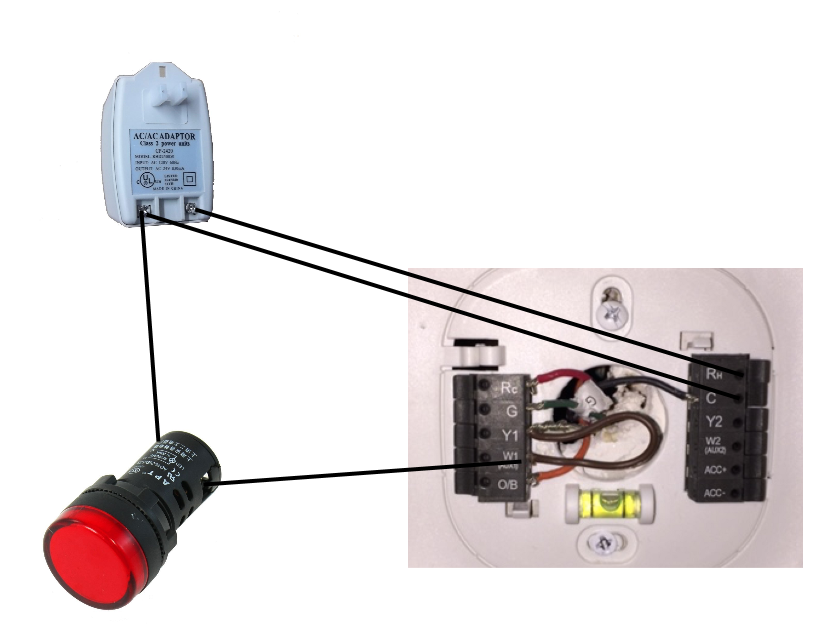
Ecobee3_Demo_Wiring


Here is what it looks like wired together:
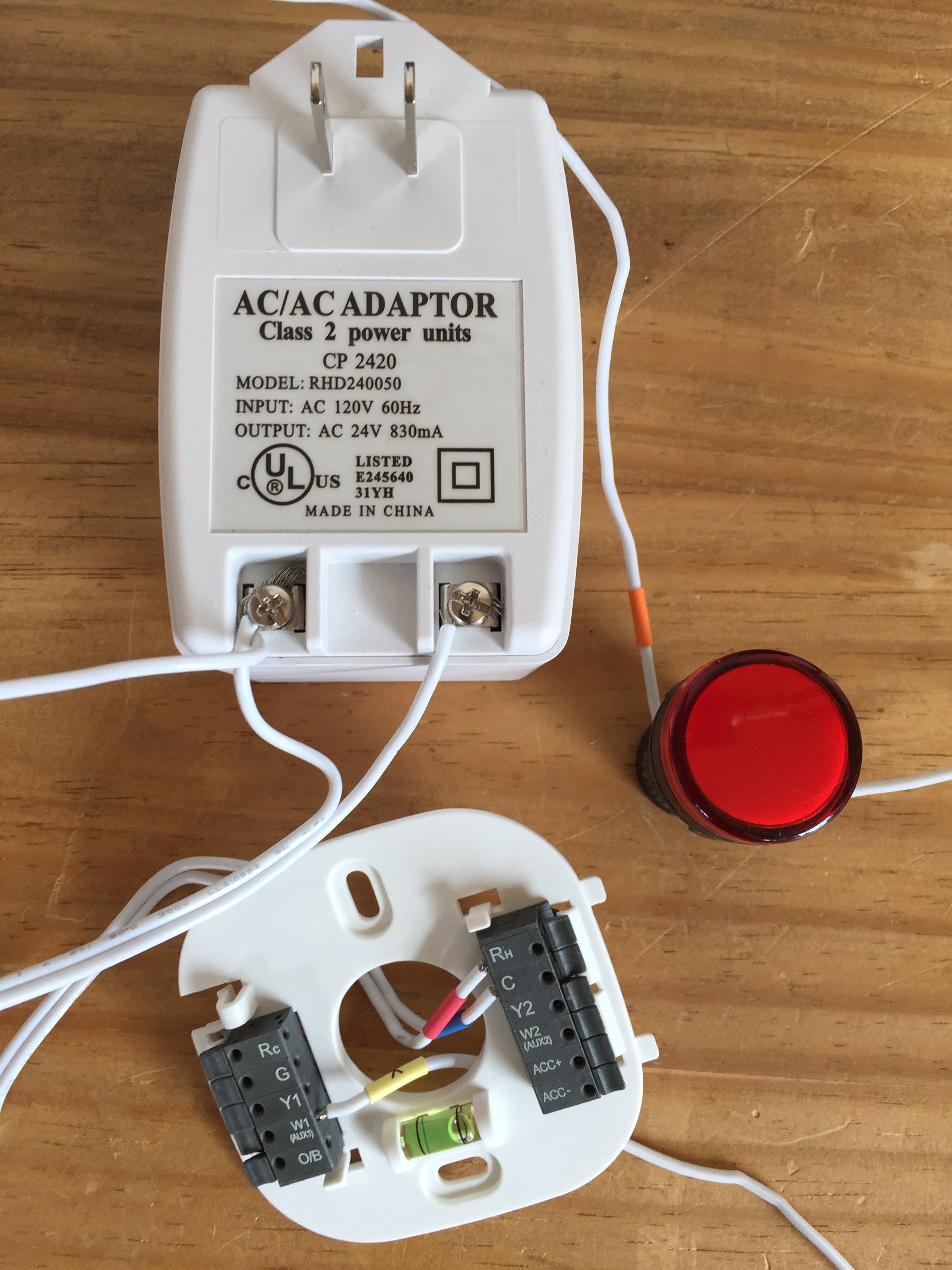
wiring


Once the smart thermostat is powered on and set up, the LED should turn on when the "heater" is on:
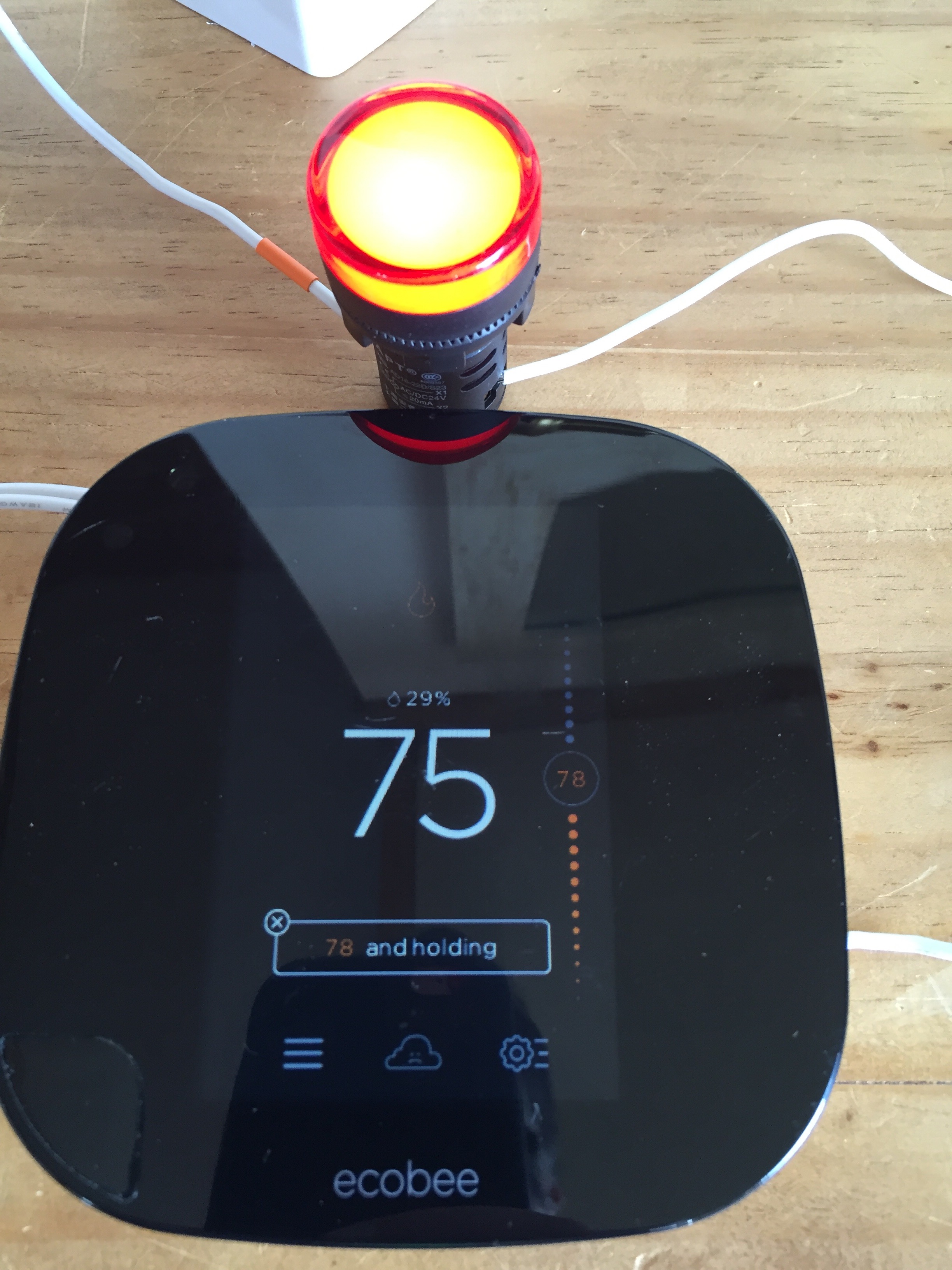
on


And turn off when the heater is off:
off


I hope that helps someone out. Let me know if you have any questions!

terminal LEd Autonomic computing NEST (software) Document REST POST (HTTP) Build (game engine) Web Protocols

Published at DZone with permission of James Ward. See the original article here.

Opinions expressed by DZone contributors are their own.

Related

  • How To Validate HTTP Post Request Body - Restful Web Services With Spring Framework | Spring Boot
  • Choosing a Library to Build a REST API in Java
  • RESTful Web Services With Spring Boot: Reading HTTP POST Request Body
  • GraphQL vs REST API: Which Is Better for Your Project in 2025?

Partner Resources

×

Comments

The likes didn't load as expected. Please refresh the page and try again.

  • RSS
  • X
  • Facebook

ABOUT US

  • About DZone
  • Support and feedback
  • Community research

ADVERTISE

  • Advertise with DZone

CONTRIBUTE ON DZONE

  • Article Submission Guidelines
  • Become a Contributor
  • Core Program
  • Visit the Writers' Zone

LEGAL

  • Terms of Service
  • Privacy Policy

CONTACT US

  • 3343 Perimeter Hill Drive
  • Suite 215
  • Nashville, TN 37211
  • [email protected]

Let's be friends:

  • RSS
  • X
  • Facebook