

Building a Unified API Documentation Portal with React, Redoc, and Automatic RAML-to-OpenAPI Conversion
Learn how to build a modern static API documentation portal that supports both OpenAPI 3.x and RAML 1.0 specifications with automatic conversion.
 ·
·
Join the DZone community and get the full member experience.
Join For FreeIn today’s microservices-driven world (even with the evolution of AI), organizations often maintain dozens or even hundreds of APIs that are critical to building many software applications. These APIs may use different specification formats: some teams prefer OpenAPI 3.x for its widespread tooling support, whereas others maintain legacy RAML specifications that still power critical services.
The challenge? Providing a unified, professional documentation experience without requiring teams to manually convert their specifications or maintain multiple documentation systems.
In this article, I will walk you through building an API Documentation Portal that:
- Renders both OpenAPI 3.x and RAML 1.0 specifications
- Automatically converts RAML to OpenAPI at build time
- Provides beautiful, interactive documentation using Redoc
- Deploys as a static site to any CDN or cloud storage
Let’s dive in.
The Technology Stack
Before we start coding, here is what we are working with:
|
Technology |
Purpose |
|---|---|
|
React 18 |
UI framework |
|
TypeScript |
Type safety |
|
Vite |
Lightning-fast build tool |
|
Redoc |
API documentation rendering |
|
Tailwind CSS |
Styling |
|
webapi-parser |
RAML-to-OpenAPI conversion |
Why this stack? React and Vite provide a modern development experience with hot module replacement. Redoc provides a polished three-panel documentation layout that developers love. The webapi-parser handles the heavy lifting of format conversion.
Project Architecture
The portal follows a simple but effective architecture.
|
Browser |
|||
|
|
The key insight is that RAML files are converted to the OpenAPI format at build time rather than at runtime. This means:
- No server-side processing is required
- Faster page loads
- Simpler deployment (pure static files)
Setting Up the Project
Step 1: Initialize the Project
npm create vite@latest apidoc -- --template react-ts
cd apidoc
npm install
Step 2: Install Dependencies
Core dependencies:
npm install react-router-dom redoc mobx styled-components Dev dependencies:
npm install -D tailwindcss postcss autoprefixer webapi-parser
npx tailwindcss init -p
Step 3: Define the API Configuration Type
Create a type definition for the API registry:
// src/types/api.ts
export interface ApiSpec {
  id: string;
  name: string;
  version: string;
  category: string;
  specPath: string;
  type: 'openapi' | 'raml';
  description?: string;
}

export interface ApisConfig {
  apis: ApiSpec[];
}
This interface enforces consistency across all API entries and enables TypeScript to detect configuration errors at compile time.
Building the Core Components
The API Configuration
Store your API registry in a JSON file that is easy to update:
// src/config/apis.json
{
  "apis": [
    {
      "id": "petstore-api",
      "name": "Petstore API",
      "version": "1.0.0",
      "category": "Sample APIs",
      "specPath": "/specs/petstore.yaml",
      "type": "openapi",
      "description": "Sample OpenAPI 3.0 specification"
    },
    {
      "id": "users-api",
      "name": "Users API",
      "version": "1.0.0",
      "category": "Sample APIs",
      "specPath": "/specs/users.raml",
      "type": "raml",
      "description": "Sample RAML 1.0 specification"
    }
  ]
}
The Redoc Wrapper Component
Here is where the magic happens. The ApiDoc component wraps Redoc and handles the RAML-to-OpenAPI path transformation.
// src/components/ApiDoc.tsx
import { RedocStandalone } from 'redoc';
import { ApiSpec } from '../types/api';

interface ApiDocProps {
  api: ApiSpec;
}

export function ApiDoc({ api }: ApiDocProps) {
  // For RAML files, use the converted OpenAPI version
  const specUrl = api.type === 'raml'
    ? api.specPath.replace(/\.raml$/, '.converted.yaml')
    : api.specPath;

  return (
    <div className="h-full overflow-auto">
      <RedocStandalone
        specUrl={specUrl}
        options={{
          scrollYOffset: 0,
          hideDownloadButton: false,
          pathInMiddlePanel: true,
          theme: {
            colors: {
              primary: { main: '#3b82f6' },
            },
            sidebar: {
              backgroundColor: '#1f2937',
              textColor: '#f3f4f6',
            },
          },
        }}
      />
    </div>
  );
}
The key line is the specUrl calculation: if the API type is raml, we swap the .raml extension for .converted.yaml. This assumes that our build process has already generated the converted file.
The Navigation Sidebar
A categorized sidebar makes it easy to navigate between APIs:
// src/components/Sidebar.tsx
import { NavLink } from 'react-router-dom';
import { ApiSpec } from '../types/api';

interface SidebarProps {
  apis: ApiSpec[];
  collapsed: boolean;
  onToggle: () => void;
}

export function Sidebar({ apis, collapsed, onToggle }: SidebarProps) {
  // Group APIs by category
  const groupedApis = apis.reduce((acc, api) => {
    if (!acc[api.category]) {
      acc[api.category] = [];
    }
    acc[api.category].push(api);
    return acc;
  }, {} as Record<string, ApiSpec[]>);

  return (
    <aside className={`bg-gray-900 text-white ${collapsed ? 'w-16' : 'w-64'}`}>
      <div className="p-4 border-b border-gray-700">
        {!collapsed && <h1 className="text-xl font-bold">API Docs</h1>}
      </div>
      <nav className="p-2">
        {Object.entries(groupedApis).map(([category, categoryApis]) => (
          <div key={category} className="mb-4">
            {!collapsed && (
              <h2 className="px-3 py-2 text-xs font-semibold text-gray-400 uppercase">
                {category}
              </h2>
            )}
            <ul>
              {categoryApis.map((api) => (
                <li key={api.id}>
                  <NavLink
                    to={`/docs/${api.id}`}
                    className={({ isActive }) =>
                      `block px-3 py-2 rounded-md text-sm ${
                        isActive ? 'bg-blue-600' : 'hover:bg-gray-800'
                      }`
                    }
                  >
                    <div className="font-medium">{api.name}</div>
                    <div className="text-xs text-gray-400">
                      v{api.version} • {api.type.toUpperCase()}
                    </div>
                  </NavLink>
                </li>
              ))}
            </ul>
          </div>
        ))}
      </nav>
    </aside>
  );
}
The RAML Conversion Script
This is the secret sauce that enables RAML support. The script runs at build time and converts all RAML files to OpenAPI 3.0.
// scripts/convert-raml.js
import { readFileSync, writeFileSync, existsSync } from 'fs';
import { join, dirname } from 'path';
import { fileURLToPath } from 'url';
import wap from 'webapi-parser';

const __dirname = dirname(fileURLToPath(import.meta.url));
const rootDir = join(__dirname, '..');

// Read the APIs config
const configPath = join(rootDir, 'src/config/apis.json');
const config = JSON.parse(readFileSync(configPath, 'utf-8'));

// Find RAML APIs
const ramlApis = config.apis.filter(api => api.type === 'raml');

async function convertRamlFiles() {
  const { WebApiParser } = wap;

  for (const api of ramlApis) {
    const ramlPath = join(rootDir, 'public', api.specPath);
    const outputPath = ramlPath.replace(/\.raml$/, '.converted.yaml');

    if (!existsSync(ramlPath)) {
      console.warn(`RAML file not found: ${ramlPath}`);
      continue;
    }

    console.log(`Converting ${api.name}...`);

    try {
      const ramlContent = readFileSync(ramlPath, 'utf-8');

      // Parse RAML 1.0
      const model = await WebApiParser.raml10.parse(ramlContent);

      // Resolve all references
      const resolved = await WebApiParser.raml10.resolve(model);

      // Generate OpenAPI 3.0
      const oas30 = await WebApiParser.oas30.generateString(resolved);

      writeFileSync(outputPath, oas30);
      console.log(`  ✓ Converted to ${outputPath}`);
    } catch (error) {
      console.error(`  ✗ Error: ${error.message}`);
    }
  }
}

convertRamlFiles();
Wire it into your build process:
// package.json
{
  "scripts": {
    "convert-raml": "node scripts/convert-raml.js",
    "dev": "npm run convert-raml && vite",
    "build": "npm run convert-raml && tsc -b && vite build"
  }
}
Now, every time you run npm run dev or npm run build, the RAML files are converted automatically.
Deployment with GitHub Actions
To automate deployment to AWS S3, a GitHub Actions workflow can be created as follows (optional):
# .github/workflows/deploy.yml
name: Build and Deploy

on:
  push:
    branches: [main, master]
  pull_request:
    branches: [main, master]

jobs:
  build:
    runs-on: ubuntu-latest
    steps:
      - uses: actions/checkout@v4

      - name: Setup Node.js
        uses: actions/setup-node@v4
        with:
          node-version: '20'
          cache: 'npm'

      - name: Install dependencies
        run: npm ci

      - name: Build project
        run: npm run build

      - name: Upload artifacts
        uses: actions/upload-artifact@v4
        with:
          name: dist
          path: dist/

  deploy:
    needs: build
    runs-on: ubuntu-latest
    if: github.ref == 'refs/heads/main' || github.ref == 'refs/heads/master'
    steps:
      - name: Download artifacts
        uses: actions/download-artifact@v4
        with:
          name: dist
          path: dist/

      - name: Configure AWS credentials
        uses: aws-actions/configure-aws-credentials@v4
        with:
          aws-access-key-id: ${{ secrets.AWS_ACCESS_KEY_ID }}
          aws-secret-access-key: ${{ secrets.AWS_SECRET_ACCESS_KEY }}
          aws-region: ${{ vars.AWS_REGION }}

      - name: Deploy to S3
        run: aws s3 sync dist/ s3://${{ vars.S3_BUCKET }} --delete
Adding a New API
Once the portal is set up, adding a new API is straightforward:
- Drop your spec file into
public/specs/ - Add an entry to
src/config/apis.json - Commit and push — the CI/CD pipeline handles everything else
{
  "id": "my-new-api",
  "name": "My New API",
  "version": "2.0.0",
  "category": "Production",
  "specPath": "/specs/my-new-api.yaml",
  "type": "openapi",
  "description": "My awesome new API"
}
Final Outcome
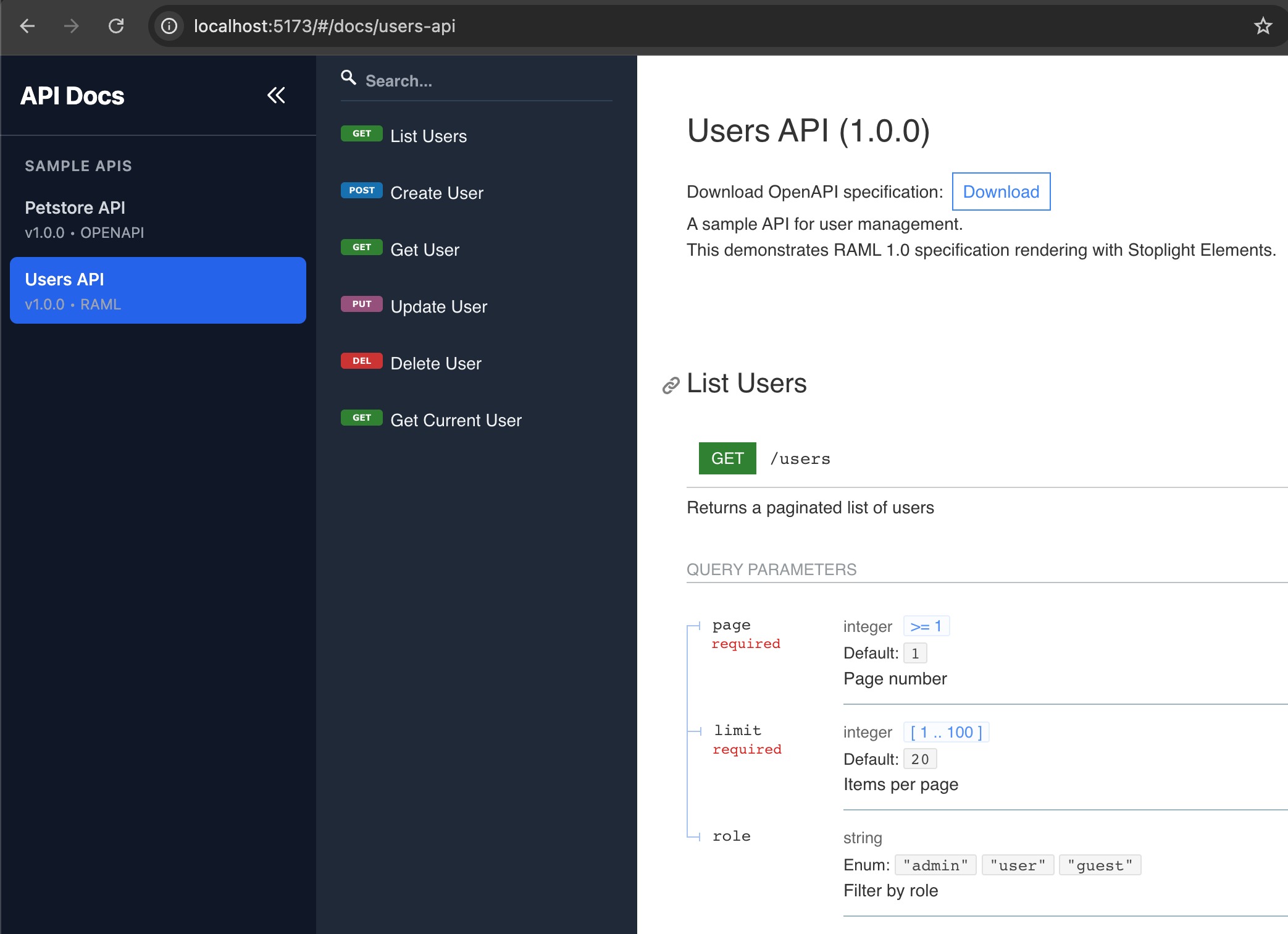
Once the application is deployed and hosted as a static site, the final outcome looks as shown below.
Key Takeaways
- Unified Experience: Users see a consistent documentation interface regardless of whether the underlying specification is OpenAPI or RAML.
- Build-Time Conversion: Converting RAML to OpenAPI at build time eliminates runtime complexity and enables static hosting.
- Configuration-Driven: Adding new APIs requires only a JSON entry and a spec file — no code changes.
- Static Deployment: The entire portal is static HTML/JS/CSS, making it perfect for S3, CloudFront, Netlify, or any other static host.
- Developer Experience: Vite’s hot module replacement and TypeScript’s type checking make development fast and safe.
Conclusion
Building a unified API documentation portal does not have to be complicated. By combining React, Redoc, and automatic RAML conversion, you can deliver a professional documentation experience that scales with your organization’s API ecosystem.
The complete source code is available under the MIT License. You can fork it, customize the theme, and make it your own.
What challenges have you faced regarding API documentation? Feel free to share your thoughts in the comments section.
References
Official Documentation & Specifications
- OpenAPI Specification v3.2.0
https://spec.openapis.org/oas/v3.2.0.html - OpenAPI Initiative
https://www.openapis.org/ - OpenAPI Specification GitHub Repository
https://github.com/OAI/OpenAPI-Specification - RAML Official Website
https://raml.org/ - RAML 1.0 Specification
https://github.com/raml-org/raml-spec/blob/master/versions/raml-10/raml-10.md - Redoc GitHub Repository
https://github.com/Redocly/redoc - Redoc Official Documentation
https://redocly.com/docs/redoc - React Official Documentation
https://react.dev/ - Vite Official Documentation
https://vite.dev/ - Tailwind CSS Documentation
https://tailwindcss.com/docs - GitHub Actions Documentation
https://docs.github.com/en/actions - webapi-parser (npm)
https://www.npmjs.com/package/webapi-parser
Academic & Research Papers
- Meng, M., Steinhardt, S., & Schubert, A. (2019). "How Developers Use API Documentation: An Observation Study." Communication Design Quarterly, Vol 7, No. 2. ACM SIGDOC.
https://dl.acm.org/doi/10.1145/3358931.3358937 - Henkel, M., & Keshishzadeh, S. (2020). "Optimizing API Documentation." ACM SIGDOC Annual International Conference on Design of Communication.
https://dl.acm.org/doi/fullHtml/10.1145/3380851.3416759 - IEEE/ACM ICSE (2024). "Managing API Evolution in Microservice Architecture." 46th International Conference on Software Engineering.
https://dl.acm.org/doi/10.1145/3639478.3639800 - Journal of Systems and Software (2024). "Microservice API Evolution in Practice: A Study on Strategies and Challenges." Elsevier.
https://www.sciencedirect.com/science/article/pii/S0164121224001559 - Di Francesco, P., Malavolta, I., & Lago, P. (2021). "On Microservice Analysis and Architecture Evolution: A Systematic Mapping Study." MDPI Applied Sciences.
https://www.mdpi.com/2076-3417/11/17/7856 - Heinrich, R., et al. (2017). "Performance Engineering for Microservices: Research Challenges and Directions." ACM/SPEC International Conference on Performance Engineering.
https://dl.acm.org/doi/10.1145/3053600.3053653
Industry Reports & Best Practices
- SmartBear. "State of Software Quality - API Report 2023."
https://smartbear.com/state-of-software-quality/api/ - Postman. "API Documentation: How to Write, Examples & Best Practices."
https://www.postman.com/api-platform/api-documentation/ - Swagger/SmartBear. "API Documentation: The Secret to a Great API Developer Experience."
https://swagger.io/resources/ebooks/api-documentation-the-secret-to-a-great-api-developer-experience/ - Pronovix. "Developer Experience Best Practices - API The Docs 2023."
https://pronovix.com/articles/developer-experience-best-practices-api-docs-2023
Key Statistics
- 64% of developers express frustration when faced with poor API documentation resources
- Documentation with interactive components reduces support queries by up to 30%
- Developers experienced a 40% decrease in onboarding time following documentation improvements
- Support requests fell by an average of 35% with improved documentation
- Satisfaction scores improved from 60% to over 85% after documentation enhancements
Opinions expressed by DZone contributors are their own.
Comments