

Building MCP Hub for DevOps and CI/CD Pipelines
Model Context Protocol links AI with DevOps tools, automating code reviews, deployments, and security to speed up workflows and reduce manual work.
 ·
·
Join the DZone community and get the full member experience.
Join For FreeModern DevOps uses a wide range of tools, including Git repositories, CI/CD pipelines, monitoring platforms, cloud services, and security systems. These tools often work separately and are not fully connected. Because of this, engineers have to switch between multiple systems, repeat similar tasks, and rely on personal experience or undocumented knowledge to complete their work. This lack of integration creates inefficiencies, slows down deployments, and increases mental effort for engineering teams.
The Model Context Protocol (MCP) solves the above challenges by providing a standardized communication layer between AI agents or assistants and development tools. This works as a universal embedding system that allows AI tools and systems to process the data from and execute actions across the ecosystem through a consistent interface.
MCP Hub acts like the central nervous system for AI-powered DevOps automation. It integrates multiple tool-specific MCP servers that handle authentication and authorization, manage caching to improve performance, and provide detailed audit logging. This design provides an innovation in workflows, such as automated code reviews that maintain historical patterns, intelligent deployment decisions based on real-time system health, proactive security scanning, and smart incident handling.
Understanding Model Context Protocol
Model Context Protocol is an open-standard protocol that defines how AI assistants communicate with external systems. Unlike traditional APIs designed for direct application-to-application communication, MCP is optimized for AI-mediated interactions where context, reasoning, and semantic interpretation are critical.
Core MCP Concepts
Resources provide read-only access to data through unique addresses (URIs). For example, git://commits/recent retrieves the latest 50 commits with their changes, while git://branches/all lists all repository branches. Resources simply expose data — the AI decides how to use it based on the task at hand.
Tools are executable actions with defined parameters. Examples include analyze_commit for code quality checks, trigger_deployment for releases, or create_ticket for issue tracking. Each tool uses JSON Schema to validate inputs.
Prompts are reusable templates for AI tasks. A code review prompt might check for security issues, performance problems, and code maintainability, combining multiple resources and tools into one workflow.
All the servers run as standalone programs that expose resources and tools for specific domains (Git, CI/CD, monitoring). They run independently and communicate via JSON-RPC over standard input/output, ensuring isolation and platform independence.
Clients are AI assistants (like Claude or GPT-4) that discover and orchestrate MCP servers to complete complex tasks through natural language requests.
MCP vs. Traditional APIs
Developers must write specific code with traditional REST or GraphQL APIs to call services , read responses, and manage errors. MCP works differently. The AI assistant automatically finds available tools, decides which ones to use, and connects multiple steps together based on what the user asks in plain language.
With MCP, the AI automatically collects deployment history, checks current system health, analyzes potential risks, and gives a clear recommendation using standard protocol calls.
MCP Hub Architecture
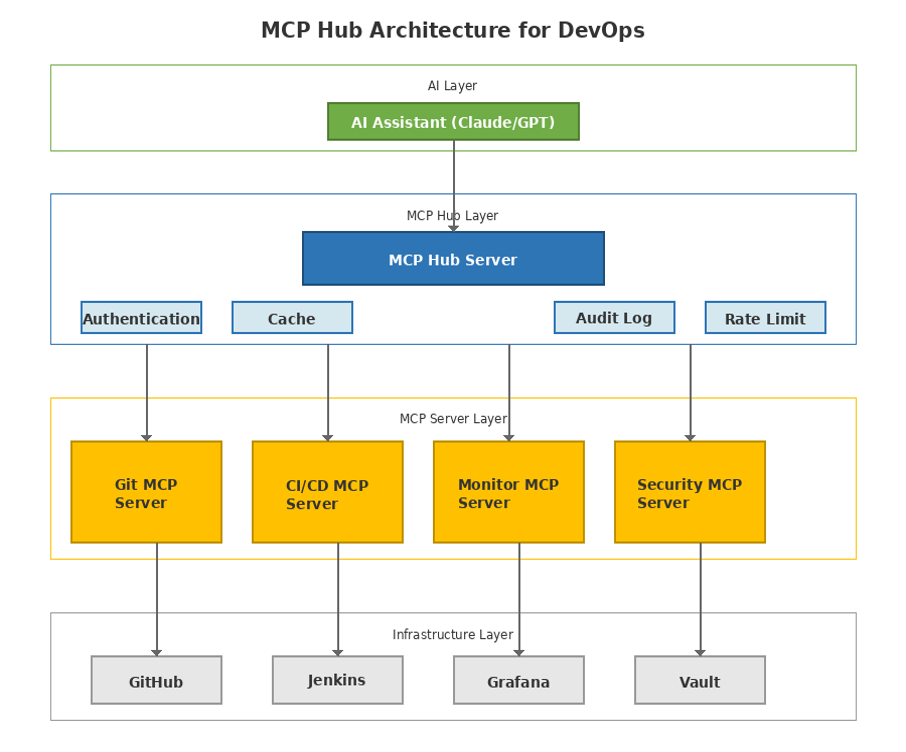
The MCP Hub architecture consists of four distinct layers, each serving a specific purpose in the AI-powered DevOps ecosystem.
Layer 1: AI Assistant Layer
The top layer contains different AI models (such as Claude, GPT-4, or custom large language models) that act as the decision-making engine. The AI assistant connects to the MCP Hub using the standard MCP protocol based on JSON-RPC 2.0 over standard input/output. This layer takes user requests written in plain language, breaks them into smaller tasks, and coordinates calls to multiple MCP servers to complete the required actions.
At this layer, the system manages conversation context so it can remember previous steps between multiple tool calls. It takes the call for which tools and resources are needed for the required task. If any operation fails, it provides technical outputs in clear, user-friendly responses.
Layer 2: MCP Hub Orchestration Layer
The Hub serves as the central coordination point, managing connections to multiple downstream MCP servers while providing cross-cutting concerns:
Authentication and authorization: The Hub provides role-based access control (RBAC) to ensure users can only access the tools and resources they are permitted to use. It integrates with enterprise different identity providers to enable single sign-on (SSO) and enforce access policies based on user roles and group memberships.
Caching layer: This Hub keeps frequently used data (recent commits, build status, system metrics, etc.) in a cache with configurable time-to-live (TTL) settings. This helps to improve response time when the AI makes multiple related requests. This also reduces pressure on backend systems. The cache is refreshed using different strategies, including automatic expiration after a set time, event-based updates through webhooks, and manual clearing for sensitive or critical data.
Audit logging: This system records the details about when a resource is accessed or a tool is used, such as timestamp, user identity, action performed, input parameters, and whether the operation succeeded or failed. These logs are sent to the security monitoring and compliance tracking system. In regulated industries like financial services, this ensures a secure and traceable audit record for all AI-assisted activities.
Rate limiting: The Hub applies per-user and per-operation rate limits to prevent misuse and ensure fair resource usage. It uses a token bucket algorithm, which allows short bursts of traffic while maintaining defined steady-state limits.
Connection pooling: The Hub maintains persistent connections with downstream MCP servers to prevent repeated process startup, initialization delays, and potential deadlocks.
If any server startup fails, it is automatically brought up by using a backoff strategy to ensure stable and controlled recovery.
Layer 3: MCP Server Layer
Individual MCP servers encapsulate domain-specific logic for different tool categories:
Git MCP Server connects to version control platforms such as GitHub, GitLab, and Bitbucket. It provides access to commit history, branch details, pull requests, and code differences (diffs), etc. It also offers tools to analyze code changes for common security threats like hardcoded secrets, leftover debug statements, or unused commented code. It also checks compliance with company coding standards and integrates with static analysis tools such as SonarQube and CodeQL for deeper code quality and security scanning.
CI/CD MCP Server connects to build and deployment tools such as Jenkins, CircleCI, GitLab CI, and Argo CD. It helps to access the pipeline status, build logs, deployment history, and artifact details. It also allows users to start builds with specific parameters, move artifacts between environments, and check test results. In addition, it works with deployment approval gates to enforce rules such as mandatory code reviews, successful test execution, and completed security scans before releasing software.
The Monitoring MCP Server collects data from tools like Prometheus, Grafana, and Datadog for observability metrics. This provides realtime metrics, searchable logs, and active alerts. Users can query specific time ranges, correlate events across services, and create on-demand dashboards.
Security MCP Server integrates with different vulnerability scanner tools such as Snyk, Aqua Security, and HashiCorp Vault. This system provides other security-related information, such as known vulnerabilities in dependencies, secret scanning results, and compliance status against frameworks such as PCI-DSS, SOC 2, and HIPAA. On-demand security scans, secret rotation workflows, and policy enforcement checks can me impletemted on this tool by leveraging these frameworks.
Layer 4: Infrastructure Layer
This foundation layer includes core DevOps tools such as GitHub for source control, Jenkins for CI/CD, Grafana for monitoring, Kubernetes for container orchestration, and HashiCorp Vault for secrets management. MCP servers connect to these tools using their standard APIs, including REST, GraphQL, or other vendor-specific interfaces.
This is a flexible layered architecture design. To add a new tool, we just need to build a new MCP Server. Other existing design such as The Hub, AI layer, and existing servers, do not need any changes. Similarly, if we need to upgrade/ replace a new tool, only that tool-related MCP server needs to be replaced or upgraded (Like moving Jenkins GitLab CI). The rest remains the same.
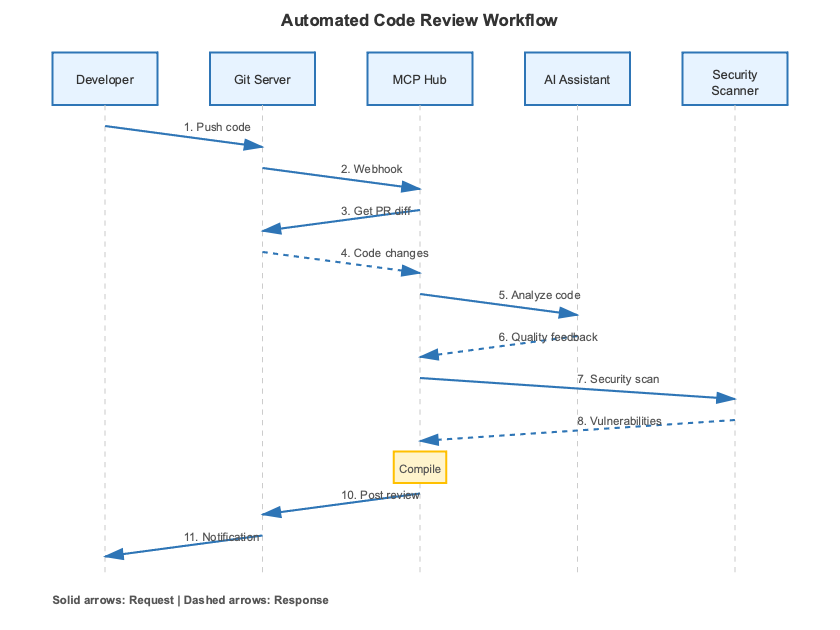
The automated code review workflow demonstrates how MCP enables sophisticated, multi-tool automation with AI-driven analysis. When a developer pushes code and creates a pull request, the following sequence executes:
Step 1: Webhook Trigger
When a developer creates a new pull request, the Git platform (such as GitHub or GitLab) sends a webhook notification to the MCP Hub. The webhook message contains details like the pull request number, branch name, and author information.
Step 2: Context Gathering
The Hub invokes the Git MCP Server to retrieve the pull request diff, showing all changed files with additions and deletions. Simultaneously, it fetches the commit history to understand the change context and related issues or tickets.
Step 3: AI Code Analysis
Once the diff is received by the AI assistant, it starts performing multi-dimensional Analysis as follows:
- Code quality: Identify the code quality, complex logics/ functions, and the gaps in the SOLID algorithms/ principles.
- Security review: It detects hardcoded credentials, SQL injection vulnerabilities, insecure cryptographic practices, and exposure of any sensitive data.
- Performance implications: It looks for any potential bottleneck, like N+1 queries, missing indexes in the database
- Maintainability assessment: Evaluates code readability, documentation quality, naming conventions, and adherence to team standards
Step 4: Test Coverage Analysis
The Hubs makes a call to the CI/CD MCP server to execute code coverage checks of the PR branch. Server returns line coverage percentage, uncovered critical paths, and comparison against branch protection requirements (e.g., minimum 80% coverage).
Step 5: Security Scanning
The Security MCP Server runs automated scans using tools like SonarQube. It performs the Static Code Analysis, Security Checks, Code Quality Metrics, vulnerable dependencies, used in code, and potential security hotspots in the changed code.
Step 6: Compliance Validation
For regulated environments, the AI checks whether changes comply with internal policies. For example, it verifies if database migrations were properly reviewed and whether API changes include updated OpenAPI specifications and required documentation.
Step 7: Review Compilation
The AI combines all analysis results into a clear and structured review. It ranks issues based on severity (blocking issues vs. suggestions), provides specific code improvement recommendations, links to relevant documentation or best practices, and also notes positive aspects of the changes.
Step 8: Review Posting
The Hub publishes the final review as comments on the pull request using the Git MCP Server interface. Each comment is attached to the specific lines of code it refers to, making the feedback clear and easy to understand.
Step 9: Developer Notification
The developer receives notifications and can address feedback, request clarification from the AI, or discuss findings with human reviewers.
This workflow reduces code review time from hours or days to just minutes. It maintains the quality standards are applied consistently, identifies common issues before human review, and enables reviewers to focus on architecture and business logic instead of minor syntax problems.
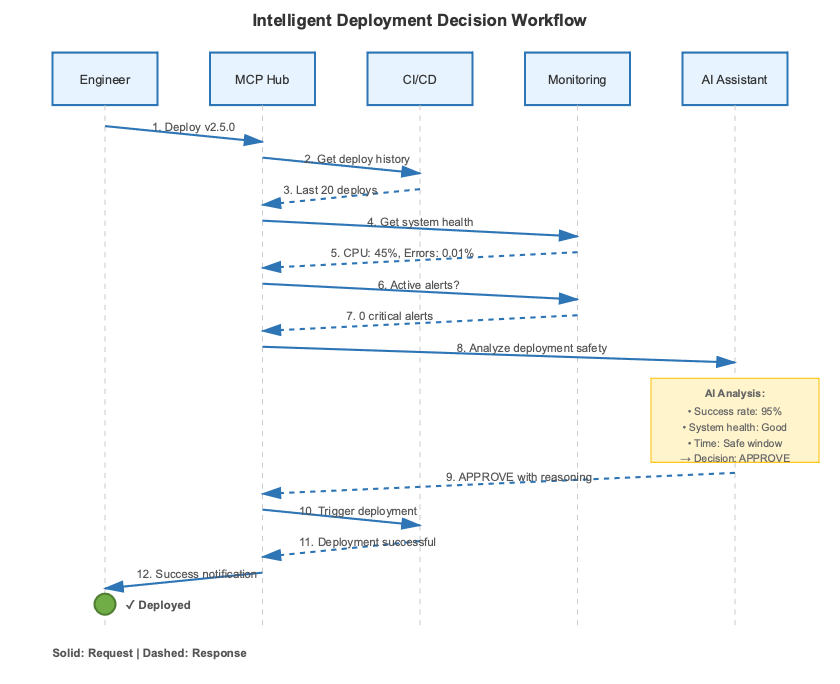
Traditional deployment decisions rely on incomplete data and verbal communication. The MCP Hub provides AI-driven recommendations through comprehensive system analysis for deployments.
Step 1: Deployment request. The engineer initiates deployment via chat, Slack, or CI/CD trigger.
Step 2: Historical analysis. Hub continuously analyzes the data in the CI/CD MCP Server for recent deployment history: success rates, rollback frequency, stabilization time, and incident correlation.
Step 3: System health check. Monitoring the MCP Server provides current metrics: resource utilization, error rates against SLO thresholds, latency percentiles (p50/p99), and dependency status.
Step 4: Alert status. The system continuously keeps track of active alerts, trending warnings, and recent incidents .
Step 5: Change analysis. Git MCP Server reports change scope: modified files, code delta, and affected subsystems. Larger changes indicate higher risk.
Step 6: Temporal risk assessment. By collecting all the different categories of data, AI evaluates deployment timing like peak traffic windows, day-of-week coverage, and holiday proximity.
Step 7: AI recommendation. AI analyzes and processes all data into an actionable decision with a confidence score and detailed reasoning covering historical success rates, current system state, timing optimization, change magnitude, and rollback readiness.
Step 8: Conditional approval. If approved, the Hub starts the deployment.
If not approved, it clearly lists the required conditions (such as metric limits or timing rules) that must be satisfied before moving forward.
Step 9: Deployment execution. The CI/CD server performs a progressive rollout, such as phased or canary deployment, validating system health at each stage and automatically rolling back if issues are detected.
Step 10: Post-deployment monitoring. After the deployment, AI monitors system metrics for a defined interval after deployment.
If any unusual behavior is observed, it recommends a rollback.
Impact: This approach reduces deployment incidents by 60–70%, speeds up release cycles, and provides clear, auditable records for compliance.
Security and Compliance
Security is paramount when integrating AI into DevOps workflows, especially in regulated industries like financial services, healthcare, and government.
Authentication and Authorization
The MCP Hub uses OAuth 2.0 and OpenID Connect for authentication, integrating with enterprise identity providers (Okta, Azure AD, Google Workspace). Authorization follows least privilege principles with three permission levels:
- Server access: Which MCP servers the user can reach
- Resource access: Which repositories or environments they can query
- Tool access: Which operations they can execute
Service accounts use short-lived tokens with automatic rotation. All authentication events are logged with source IP, user agent, and session ID for security analysis.
Secrets Management
The MCP Hub never stores secrets directly. Instead, it integrates with HashiCorp Vault, AWS Secrets Manager, or Azure Key Vault. When an MCP server requires credentials (e.g., Jenkins API token, database password), the Hub retrieves them just-in-time, injects them into the server’s environment, and ensures they’re not logged or exposed to the AI assistant.
Dynamic secrets with TTLs ensure that compromised credentials have limited windows of exposure. Secrets are rotated according to policy (e.g., every 30 days for production database credentials).
Audit Logging
Every MCP Hub interaction generates an audit log with: precise timestamp, authenticated user/service account, operation type (resource read or tool call), parameters (PII redacted), result status, and execution time.
Logs are stored in immutable WORM (Write Once Read Many) storage to prevent tampering. Retention periods meet regulatory requirements (e.g., 7 years for financial services). Automated analysis detects anomalies, including unusual access patterns, privilege escalation, and data exfiltration attempts.
Data Privacy
The MCP Hub enforces data classification policies. PII, PHI, and PCI data are automatically detected and masked before reaching AI assistants, preventing exposure in training or logs.
For data residency compliance (e.g., GDPR), the Hub supports regional deployment with strict geographic boundary enforcement.
Performance and Scalability
Caching Strategy
The Hub uses multi-tier caching for performance optimization:
- L1 Cache: In-memory with short TTL for frequently accessed resources (commits, build status)
- L2 Cache: Redis-based with longer TTL for moderate-frequency resources (deployment history, metrics)
Event-driven webhooks trigger cache invalidation (e.g., a new commit invalidates the recent commits cache). This reduces latency from hundreds of milliseconds to single digits.
Horizontal Scaling
The Hub is designed to be stateless, which allows it to scale horizontally by adding more instances as demand increases. Multiple instances run behind load balancers using round-robin or least-connections distribution. All state resides in external stores (Redis, PostgreSQL), eliminating session affinity requirements.
Individual MCP servers scale independently based on workload—high-traffic servers receive more resources, while parallelizable servers run multiple instances.
Connection Pooling
The Hub maintains persistent connection pools to MCP servers, distributing process startup overhead across requests. Failed connections auto-recycle, and servers restart gracefully during maintenance.
Monitoring and Observability
The Hub exposes Prometheus metrics:
- Request counts by server and operation
- Latency histograms (p50, p95, p99)
- Error rates and types
- Cache hit/miss ratios
- Active connections
Grafana dashboards provide real-time health visibility with configurable alerts (error rate thresholds, latency limits, cache performance).
Distributed tracing via OpenTelemetry correlates requests across all layers for root cause analysis.
Conclusion
Building an MCP Hub changes DevOps from manual, tool-by-tool work into AI-driven automation.
Organizations see clear benefits, including shorter code review times, fewer deployment issues, faster incident resolution, and reduced repetitive tasks for engineers.
Implementation strategy: We should start small by introducing a single MCP server, which will focus on our most time-consuming tasks, such as code review or deployment validation. Measure the results, collect feedback, and refine the setup. Then expand step by step to gradually build a complete AI-powered automation platform.
The MCP ecosystem evolves rapidly with new servers and integrations. Early adopters gain competitive advantages through faster delivery, higher quality, and optimized resource utilization.
Opinions expressed by DZone contributors are their own.
Comments