

Building Production-Ready AI Vector Search in Databricks: Chunking, Embeddings, ML Pipelines, and RAG
Build production-ready Databricks vector search with chunking, embeddings, Delta sync, index freshness, version control, and governance.
The demo always works. You paste a PDF into a notebook, split it into chunks, embed them with a hosted model, push the vectors into an index, and ask a question. The answer comes back, everyone nods, and the prototype gets a thumbs-up in the team channel. Then someone asks the question that ends most RAG projects: what happens when the document changes?
I've watched teams ship a vector search prototype in an afternoon and then spend three months turning it into something they could actually run. The hard part was never the similarity math. It was the boring operational reality underneath it: documents that get edited nightly, an index that quietly goes stale, an embedding model that gets a new version, and a governance team that wants to know exactly which rows fed which answer.
This article is about what is underneath. We'll walk the full pipeline — ingestion, chunking, embedding, landing vectors in Delta, building a Vector Search index, querying it, and wiring a minimal RAG loop — but the whole time the question we're really answering is: how does this survive contact with production?
The Pipeline, End to End
Before any code, it helps to see the two halves of a vector search system as genuinely separate concerns. There's an ingestion pipeline that runs on a schedule and keeps an index fresh, and there's a serving path that runs per query and has to be fast. They share a Delta table and an index, and almost nothing else. Conflating them is the single most common reason a prototype doesn't generalize.
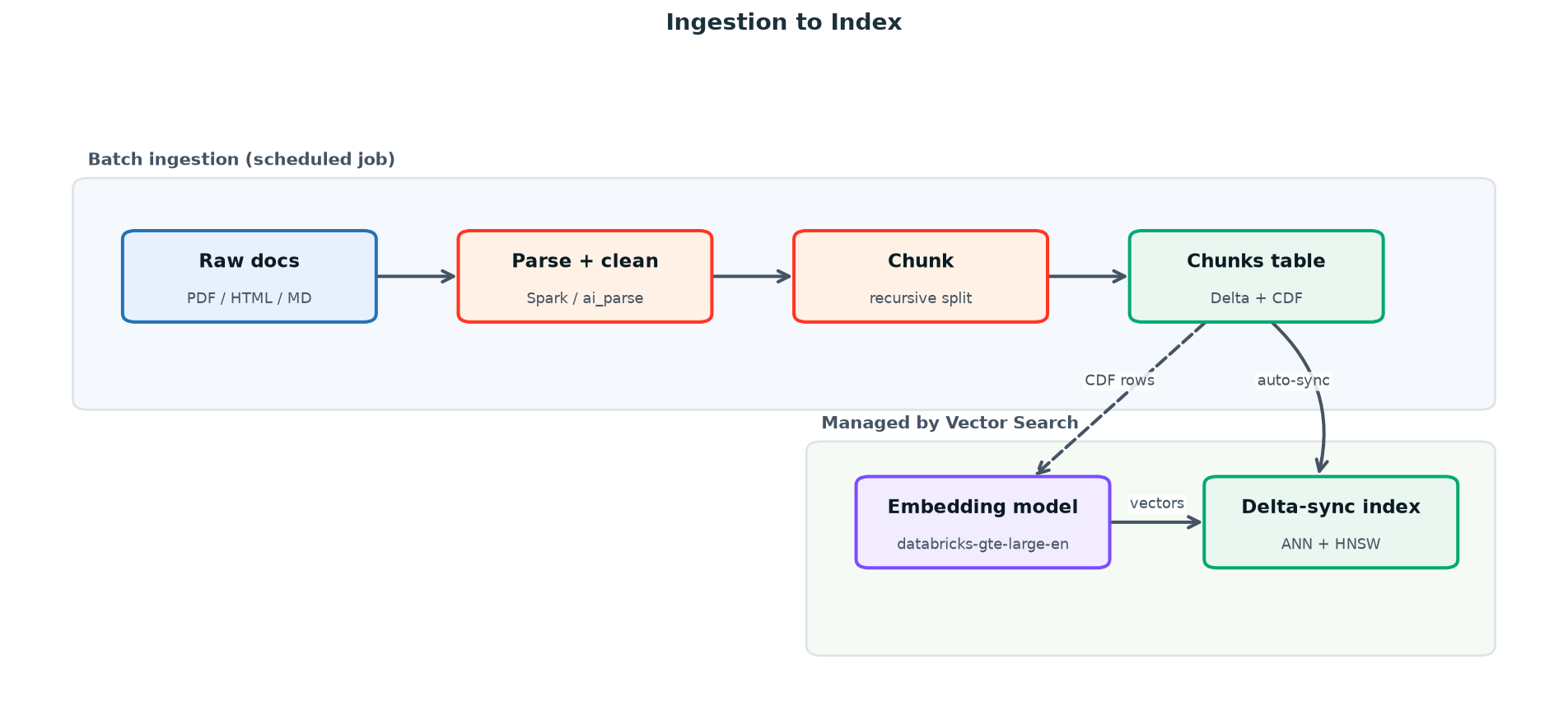
Figure 1. Ingestion pipeline: raw documents become a continuously synced Vector Search index, with Unity Catalog governing every hop.
Read that diagram left-to-right on top, then down: documents land, get parsed and chunked into a Delta table with Change Data Feed turned on, and from there Databricks Vector Search does the work you'd otherwise hand-roll — it watches the table's change feed, calls the embedding endpoint, and keeps the index in step. The job you own ends at the Delta table. That boundary is what makes the thing maintainable.
Chunking: The Decision That Quietly Sets Your Ceiling
Chunking gets treated as a preprocessing detail, which is backwards. Your chunk boundaries decide what a single retrieval can ever return. If you split a procedure across two chunks, no amount of embedding quality or reranking will reunite them at query time. Retrieval can only hand the model what chunking decided to keep together.
There are three strategies worth knowing, and they're a progression in how much they respect the document's structure.
- Fixed-size — split every N characters or tokens with a fixed overlap. Dead simple, predictable cost, and it will happily cut a sentence — or a JSON object — in half.
- Recursive — split on a priority list of separators (paragraph, then line, then sentence, then word), backing off only when a piece is still too big. This is the sensible default for prose, and the one most teams should start with.
- Semantic — embed sentences and cut where adjacent embeddings diverge, so a chunk is a coherent idea rather than a coherent character count. Higher quality, meaningfully higher preprocessing cost, and worth it for dense reference material.
|
Strategy |
Boundary logic |
Chunk size/overlap |
Cost |
Best for |
|
Fixed-size |
Every N tokens |
256–512 tok / 10–15% |
Lowest |
Uniform logs, transcripts |
|
Recursive |
Separator hierarchy |
300–800 tok / ~15% |
Low |
Docs, wikis, prose (default) |
|
Semantic |
Embedding distance |
Variable |
High (embeds twice) |
Dense technical/legal text |
On size and overlap, the tradeoff is concrete. Small chunks (around 256 tokens) give sharp, precise retrieval but fragment context, so the model gets puzzle pieces. Large chunks (1,000+ tokens) preserve context but dilute the embedding — a 1,000-token chunk about five topics has a vector that's the average of five topics and matches none of them well. Overlap of 10–20% is insurance against a key sentence landing exactly on a boundary. Start at ~500 tokens with 15% overlap, then tune against real queries rather than intuition.
A practical wrinkle the strategy table hides: metadata travels with the chunk, not just the text. Carry the document title, section heading, and source URL onto every chunk row, because at serving time those fields are what let you filter retrieval ('only docs in this product area') and cite a source the user can click. A fintech team I worked with cut their hallucination complaints almost in half, not by changing models but by prepending the section heading to each chunk before embedding — the heading gave an otherwise context-free paragraph just enough anchoring to retrieve for the right questions. Chunking isn't only where you cut; it's what you attach.
|
Watch out: Watch your embedding model's context window. databricks-bge-large-en truncates at 512 tokens, so an 800-token chunk loses its tail before it's ever embedded. databricks-gte-large-en handles 8,192 tokens. Match chunk size to the model, not the other way around. |
Here's a recursive chunker running as a Spark UDF, so chunking scales across the cluster instead of looping on the driver. The output is one row per chunk, ready to land in Delta.
from pyspark.sql import functions as F
from pyspark.sql.types import ArrayType, StringType
from langchain_text_splitters import RecursiveCharacterTextSplitter

splitter = RecursiveCharacterTextSplitter(
chunk_size=2000, # ~500 tokens of English
chunk_overlap=300, # ~15% overlap
separators=["\n\n", "\n", ". ", " ", ""],
)

@F.udf(returnType=ArrayType(StringType()))
def chunk_text(text):
if not text:
return []
return splitter.split_text(text)

# raw_docs: doc_id, title, content, source_url, updated_at
chunks = (
spark.table("main.rag.raw_docs")
.withColumn("chunk", F.explode(chunk_text("content")))
.withColumn("chunk_index", F.row_number().over(
Window.partitionBy("doc_id").orderBy(F.monotonically_increasing_id())))
# Stable, deterministic primary key per chunk
.withColumn("chunk_id", F.concat_ws(":", "doc_id", "chunk_index"))
.select("chunk_id", "doc_id", "title", "chunk", "source_url", "updated_at")
)|
TIP Make chunk_id deterministic — derived from doc_id and the chunk's position — not a random UUID. When a document is re-ingested, a deterministic key lets the index update the chunks that changed and delete the ones that vanished, instead of duplicating every chunk on every run. |
Embeddings: Hosted Endpoint vs. Self-Hosted
An embedding model turns each chunk into a vector — a list of floats whose geometry encodes meaning, so that semantically similar chunks land near each other. On Databricks, you have two roads. The Foundation Model APIs give you pay-per-token endpoints like databricks-gte-large-en (1,024 dimensions, 8K context) and databricks-bge-large-en (1,024 dimensions, 512 context) with nothing to provision. Or you register your own model to Unity Catalog and stand up a provisioned-throughput Model Serving endpoint when you need a domain-tuned model or fixed, predictable cost at high volume.
|
Concern |
Foundation Model API (pay-per-token) |
Self-hosted (provisioned throughput) |
|
Setup |
None — endpoint already exists |
Register model + create endpoint |
|
Cost model |
Per token, scales to zero |
Per provisioned GPU-hour |
|
Best at |
Spiky/unknown volume |
Sustained high throughput |
|
Custom / fine-tuned models |
No |
Yes |
|
Version control |
Databricks manages |
You pin the UC model version |
For most teams, the honest answer is: start with databricks-gte-large-en and don't self-host until billing or a domain-accuracy gap forces your hand. The pay-per-token endpoint scales to zero between bursts, which matches the spiky load of a knowledge base that's quiet overnight and busy at 9:00 AM, and it spares you the GPU-allocation wait that provisioned endpoints carry. You graduate to self-hosting for two reasons and two only: sustained volume where per-token billing overtakes a reserved GPU, or a fine-tuned model whose domain vocabulary a general model fumbles.
If you do compute embeddings yourself — for a self-managed index, or to inspect vectors before they hit an index — call the endpoint in batches with mlflow.deployments, which keeps you off raw REST plumbing and gives you one client whether the model is a Foundation Model API or your own served endpoint.
import mlflow.deployments
import pandas as pd
from pyspark.sql import functions as F
from pyspark.sql.types import ArrayType, FloatType

client = mlflow.deployments.get_deploy_client("databricks")

@F.pandas_udf(ArrayType(FloatType()))
def embed_batch(texts: pd.Series) -> pd.Series:
out = []
# Batch to amortize endpoint round-trips; tune to your rate limits
for i in range(0, len(texts), 64):
batch = texts.iloc[i:i + 64].tolist()
resp = client.predict(
endpoint="databricks-gte-large-en",
inputs={"input": batch},
)
out.extend([d["embedding"] for d in resp["data"]])
return pd.Series(out)

embedded = chunks.withColumn("embedding", embed_batch("chunk"))|
Note: If you use a Delta-sync index with managed embeddings (shown next), you don't write this code at all — Vector Search calls the endpoint for you. Hand-rolled embedding is for self-managed or direct-access indexes, or for offline evaluation. |
Landing Vectors in Delta — and Why Change Data Feed Is Mandatory
The chunks table is the contract between your ingestion job and the index. A Delta-sync index keeps itself current by reading the source table's Change Data Feed — the row-level log of inserts, updates, and deletes. Without CDF, the index has no way to know what changed and would have to rebuild from scratch on every sync. So this isn't a nice-to-have; the index will refuse to attach to a source table that doesn't have it enabled.
CREATE TABLE IF NOT EXISTS main.rag.doc_chunks (
chunk_id STRING NOT NULL,
doc_id STRING,
title STRING,
chunk STRING,
source_url STRING,
updated_at TIMESTAMP
)
USING DELTA
TBLPROPERTIES (delta.enableChangeDataFeed = true);

-- Primary key the index will dedupe and upsert on
ALTER TABLE main.rag.doc_chunks
ADD CONSTRAINT chunk_pk PRIMARY KEY (chunk_id);from delta.tables import DeltaTable
tgt = DeltaTable.forName(spark, "main.rag.doc_chunks")
(
tgt.alias("t")
.merge(chunks.alias("s"), "t.chunk_id = s.chunk_id")
.whenMatchedUpdateAll()
.whenNotMatchedInsertAll()
# Remove chunks that no longer exist for a re-ingested doc
.whenNotMatchedBySourceDelete()
.execute()
)Creating the Endpoint and the Index
An endpoint is the compute that hosts one or more indexes; an index is the searchable structure built over your table. Two endpoint types matter. Standard gives you 20–50 ms latency for real-time, interactive search. Storage-Optimized runs roughly 7x cheaper and scales past a billion vectors at the cost of higher per-query latency — the right call for large corpora or cost-sensitive batch retrieval. The index choice is the more consequential one.
|
Dimension |
Delta-Sync Index |
Direct-Access Index |
|
Source of truth |
A Delta table (+CDF) |
Your application code |
|
Updates |
Automatic from CDF |
Manual upsert / delete API calls |
|
Embeddings |
Managed or self-provided |
You provide vectors |
|
Freshness control |
TRIGGERED or CONTINUOUS |
Immediate on write |
|
Best for |
Batch / scheduled corpora |
Real-time, per-record writes |
|
Operational load |
Low — pipeline owns the table |
High — you own consistency |
If your data lives in a table and refreshes on a schedule — which describes most knowledge bases — use Delta-sync. Reach for direct-access only when records must be searchable the instant they're written, and you're prepared to own write consistency yourself. With Delta-sync, you also pick a pipeline type: TRIGGERED syncs on demand (cheaper, you control timing), while CONTINUOUS keeps the index within seconds of the table at a higher steady cost. Creating both with the Databricks-VectorSearch client looks like this.
from databricks.vector_search.client import VectorSearchClient

vsc = VectorSearchClient()

# 1. Endpoint (async; poll get_endpoint until ONLINE)
vsc.create_endpoint(
name="rag-endpoint",
endpoint_type="STANDARD", # or STORAGE_OPTIMIZED for >100M vectors
)

# 2. Delta-sync index with MANAGED embeddings
index = vsc.create_delta_sync_index(
endpoint_name="rag-endpoint",
index_name="main.rag.doc_chunks_index",
source_table_name="main.rag.doc_chunks",
primary_key="chunk_id",
pipeline_type="TRIGGERED",
embedding_source_column="chunk",
embedding_model_endpoint_name="databricks-gte-large-en",
columns_to_sync=["chunk_id", "doc_id", "title", "chunk", "source_url"],
)
columns_to_sync is the field people regret skipping. Only synced columns come back in query results — leave out source_url here and you can't cite your sources at serving time without a second lookup. Include every column the answer or its citation needs. For a self-managed index you'd swap embedding_source_column / embedding_model_endpoint_name for embedding_vector_column and embedding_dimension=1024, pointing at the vectors you computed earlier.
With a TRIGGERED pipeline, your ingestion job ends by kicking a sync, and the index catches up from the change feed.
# Last step of the scheduled ingestion job
idx = vsc.get_index("rag-endpoint", "main.rag.doc_chunks_index")
idx.sync() # reads CDF, embeds only changed rows, updates the index
Querying and the RAG Loop at Serving Time
Now the fast path. At serving time, a user question becomes a vector, the index returns the nearest chunks, and those chunks become grounding context for a chat model. The retrieval call is one method.
results = idx.similarity_search(
query_text="How do I rotate service principal credentials?",
columns=["chunk_id", "title", "chunk", "source_url"],
num_results=5,
# query_type="HYBRID" adds BM25 keyword scoring — use it when queries
# contain exact terms: error codes, SKUs, API names.
filters={"doc_id": ["kb-1042", "kb-1043"]}, # optional metadata scoping
)

for row in results["result"]["data_array"]:
score = row[-1] # similarity score is always the last column
print(f"{score:.3f} {row[1]}")
Figure 2. Serving-time query flow: a question is embedded, retrieved against, and grounded before the chat model ever sees it.
The embed-query step is implicit when you pass query_text to a managed-embedding index — Vector Search embeds the question with the same model that built the index, which is exactly why query and index embeddings must come from the same model version. Stitch retrieval and generation together, and you have the loop.
import mlflow.deployments

chat = mlflow.deployments.get_deploy_client("databricks")

def answer(question: str) -> str:
hits = idx.similarity_search(
query_text=question,
columns=["title", "chunk", "source_url"],
num_results=5,
)["result"]["data_array"]

context = "\n\n".join(f"[{h[0]}] {h[1]}\nSource: {h[2]}" for h in hits)
resp = chat.predict(
endpoint="databricks-meta-llama-3-3-70b-instruct",
inputs={"messages": [
{"role": "system", "content":
"Answer ONLY from the context. If it's not there, say so. Cite sources."},
{"role": "user", "content": f"Context:\n{context}\n\nQuestion: {question}"},
]},
)
return resp["choices"][0]["message"]["content"]
That system prompt — answer only from context, admit when the answer isn't there, cite sources — is doing real work. It's the difference between a system that grounds its answers and one that confidently invents them, which is the whole reason you built retrieval in the first place.
The Production Concerns That Actually Decide Success
Everything above is the happy path. What separates a system you can run from a demo is how you handle the four things that change underneath you.
- Index freshness. Decide your staleness budget explicitly. A nightly policy KB is fine on a TRIGGERED sync at the end of the ingestion job. A support queue that must reflect new tickets within seconds needs CONTINUOUS — and you pay for that. Don't default to CONTINUOUS because it sounds safer; it has a standing cost.
- Embedding model versioning. The vectors in your index are only comparable to query vectors from the same model. You cannot swap
bgeforgte, or upgrade a self-hosted model version without re-embedding the entire corpus — the geometries don't line up. Treat the embedding model as a pinned dependency of the index and re-index deliberately, never in place. - Governance via Unity Catalog. Because the source table and index are UC objects, access control, lineage, and audit are inherited, not rebuilt. You can answer 'who can query this index' and 'which table rows produced this answer' with the same tools you use for any UC asset — which is what your security review will ask for.
- Cost and throughput. Match the endpoint to the access pattern: Standard for interactive latency, Storage-Optimized for scale and ~7x lower cost. Use TRIGGERED syncs to control embedding spend, and num_results plus metadata filters to keep payloads — and the tokens you stuff into the LLM — small.
|
Tip: Re-indexing for a new embedding model is a blue-green operation, not an edit. Build a new index against the same table on the new model, evaluate retrieval quality on a held-out query set, then cut serving traffic over. Keep the old index until you've confirmed the new one is at least as good. |
Where to take it
Vector search isn't hard to start and isn't trivial to run, and the gap between those two is almost entirely the operational discipline we've walked through: deterministic chunk IDs, Change Data Feed on the source table, an embedding model treated as a pinned dependency, the same Unity Catalog governance you already trust, and an endpoint type chosen for the access pattern rather than the demo. Get those right, and the similarity math takes care of itself.
If you're starting today, the smallest useful loop is one notebook: a chunks table with CDF on, a Delta-sync index on databricks-gte-large-en, and the eight-line answer() function above. Build that, ask it ten real questions, and watch where retrieval misses — that's where your chunking and freshness decisions will actually get made. From there, graduate retrieval into a tool on a served agent with VectorSearchRetrieverTool and let Model Serving host the whole thing. The Databricks Vector Search docs and the databricks-vectorsearch client reference are the next stops; the foundations here will hold up under all of it.
Opinions expressed by DZone contributors are their own.