

Designing Data Pipelines for Real-World Systems: A Guide to Cleaning and Validating Messy Data
Learn how to build a data sanitization pipeline to clean, validate, and monitor unstructured data to improve downstream reliability.
 ·
·
Many software systems involve processing a large volume of customer data every day. Access to customer data demands careful handling and responsibility. Maintaining data integrity is of utmost importance, particularly in highly regulated spaces where accurate data is necessary to deliver the highest standard of output. Additionally, since any data-driven decision is only as accurate as the data it’s based on, clean data is key to making well-informed business decisions.
This guide dives into how we can sanitize raw data so it remains consistent, clean, and accurate within our own organizations.
Overview of the Pipeline
To architect a sanitization pipeline that processes incoming, unstructured data, we can break the process down step by step. We want to clean this data incrementally, in order from the simplest (and least costly to implement) to the complex. This ensures we are optimizing our use of third-party tools for when we actually need them, in the final stages of data validation.
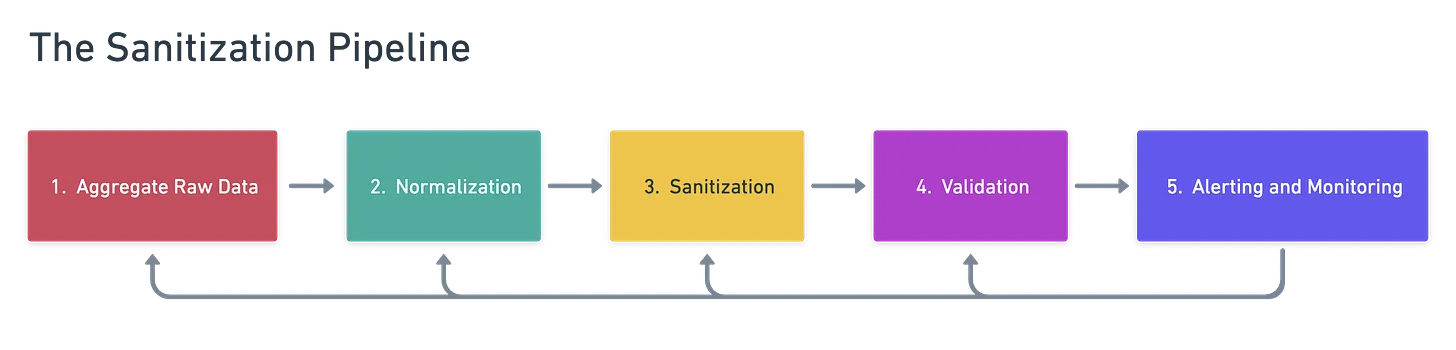
We examine each step individually below.
Example: Pharmacy Prescriptions
Imagine you are a pharmacy technician responsible for fulfilling medication orders from two different clinics. The two clinics you partner with each use a proprietary prescription management system, and each sends you a uniquely formatted CSV of patient data.
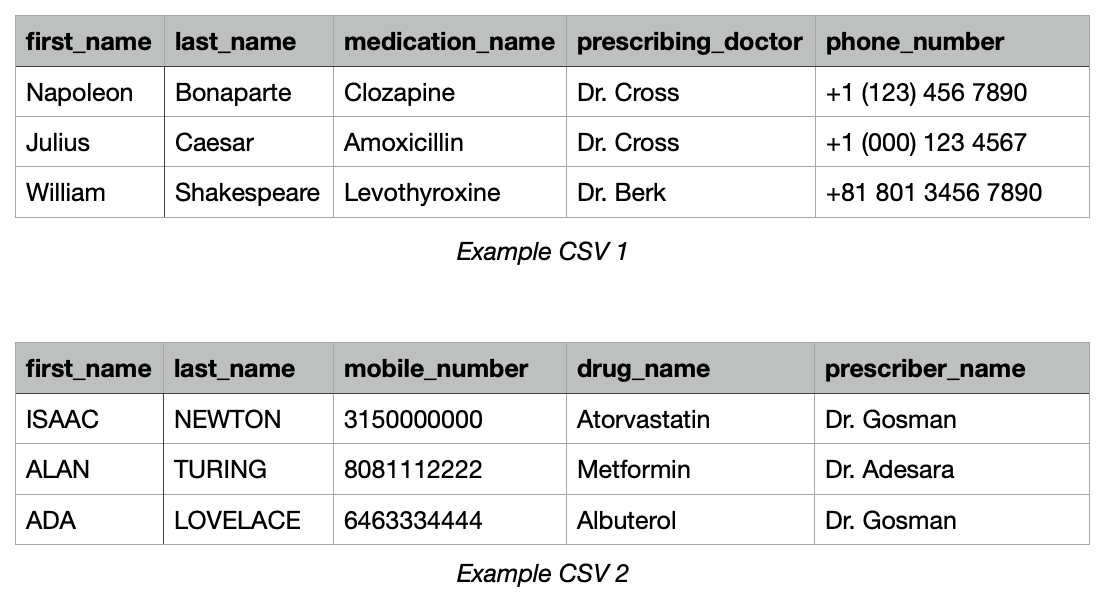
We can see clear differences between these data sources. Casing, spacing, phone number formats, doctor naming conventions, and drug names.
Step 1: Gather Initial, Unfiltered Data Inputs
Oftentimes, such as in healthcare, data is first entered into a system by a human via an ‘EHR’ or Electronic Health Records system. Examples of inputted raw data include freeform memos internal to a hospital system and intra-organization communications between a clinic and pharmacy. Different organizations and individuals have different standards for how to input data, which leaves plenty of room for ambiguity.
For instance, one doctor may accept international phone numbers for patients while another may not — the point here being that international phone numbers often have more than the ten digits that are characteristic of U.S. phone numbers.
One thing we can do here is pull all relevant CSVs (if you are working with data entered into a spreadsheet by a human) into one mega database, such as a PostgreSQL relational database. Then create a table called patient_raw_input, for example. We can then parse these entries and apply further sanitization logic to this data.
Step 2: Normalize the Data
By normalization, we mean the most basic transformations we can make to a piece of information to bring it to a standard format: removing hyphens, title-casing, and removing extraneous whitespace. These modifications are often feasible using built-in methods like Python’s strip(), upper(), lower(), and replace().
In our example, we would:
- Strip whitespace from all entries
- Title-case all names
- Remove hyphens, parentheses, plus signs, and all other non-numeric values from the phone numbers
- Upper case all medication names
The outcome looks something like this:
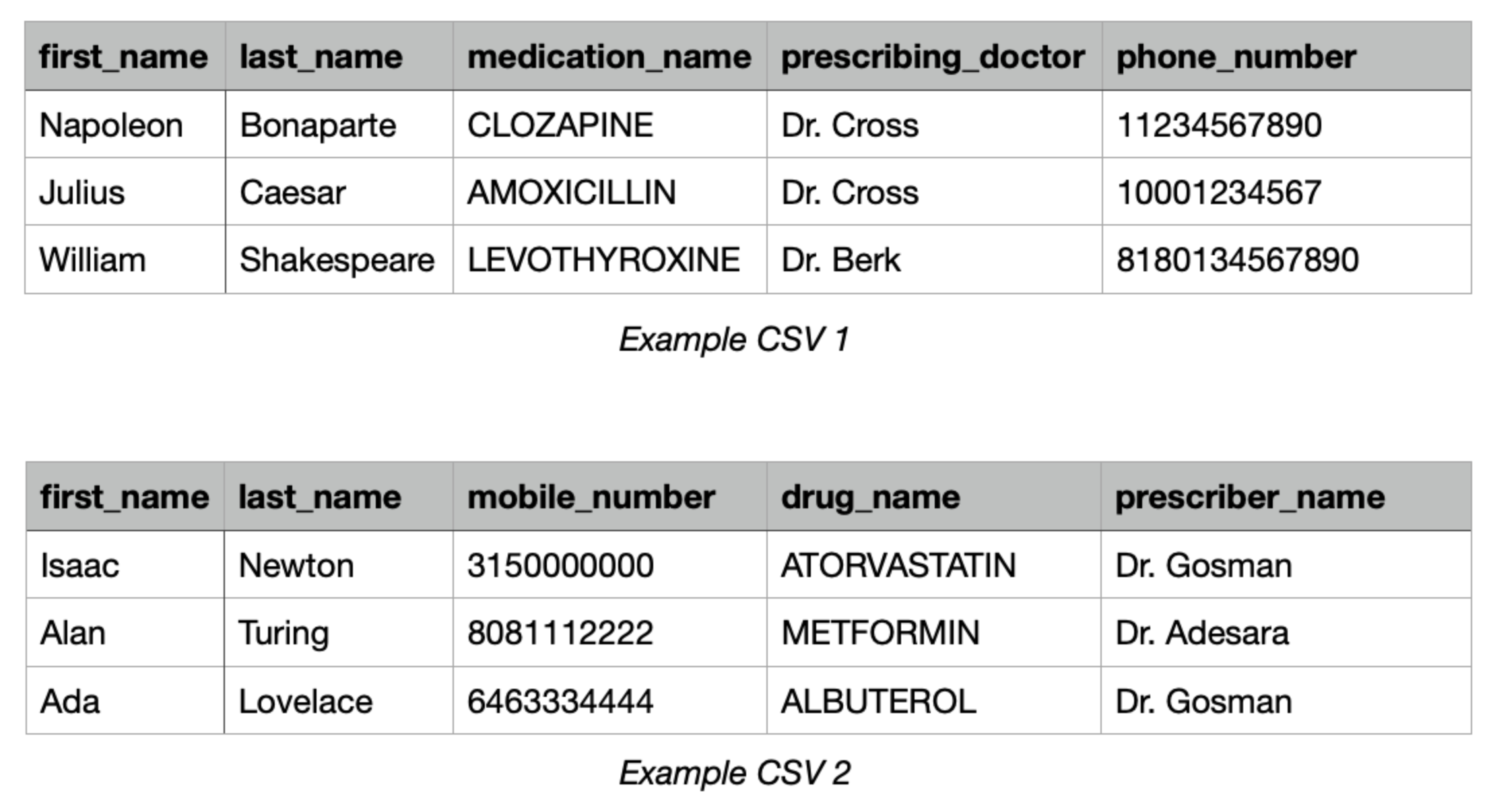
This step is a prerequisite for downstream sanitization. For example, later steps may rely on heuristics like length. For example, when looking at phone numbers, our next step may expect a 10-digit number, which is the case for U.S. phone numbers, as a proxy for determining if a phone number is valid. While it's a relatively minor change, standardizing formats at this stage significantly improves data integrity in the following step.
Step 3: Sanitize the Entries
We now want to sanitize the entries. This is the second and more involved pass at validating data against common mistakes. Here, we enforce stricter formatting guidelines and rules for data attributes. This step requires more work, which can seem pointless when we have third-party tools available to us that can do this easily for us. It remains important, however, because it increases cost effectiveness by minimizing the number of API calls needed in the next step.
For example, in the healthcare space, relevant sanitizations might entail ICD-10 code, National Drug Code, and CPT code lookups. Names of medications, conditions, and medical procedures can also be validated inside your codebase by comparing them against a running list of valid entries maintained internally.
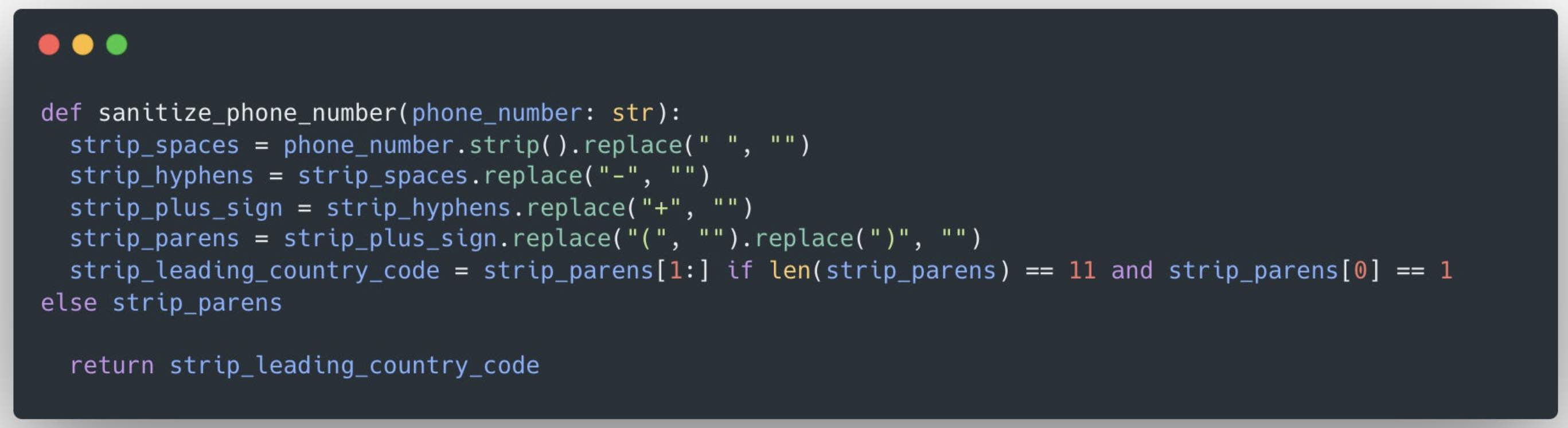
We continue with our pharmacy example, and specifically, the phone number column. At this stage, this entails removing the one-digit country code, then checking to see if the remainder of the phone number has a length of 10. We then store a list of valid U.S. area codes in our program and compare the first three digits against this list. All entries that passed these checks are candidates for the next step, and the ones we’ve rendered invalid are blocked from advancing into our master table.
Step 4: Data Validation
We’ve arrived at the most involved data processing step: rigorous validation. Here, we most likely want to employ an external, third-party API to verify the legitimacy of the data at hand. This is because third-party APIs present a wide range of offerings that would be incredibly time and resource-intensive to build in-house. In our example, this means using Twilio for phone number validation and the National Provider Identifier (NPI) API to verify prescribers.
For instance, if we wanted to validate a patient’s address, we could use the Google Maps API. Using this API, we could also fetch the elevation of a location, time zone, and nearby roads, among other things, to improve the quality of our product offerings.
Step 5: Instrument Monitoring and Alerting
The final step in this pipeline is monitoring and alerting. While this step may seem unrelated to the work of actual data sanitization, it is just as important. This is because the pipeline is not a singular, static concept. Rather, it’s cyclical and iterative — the goal is to create a tight feedback loop so that we ensure the data guidelines we’re enforcing are the most appropriate for the task at hand, and that any necessary improvements to this pipeline are immediately apparent so we can make improvements quickly.
In our pharmacy example, we would want to build alerting infrastructure to track what percent of prescriptions are fulfilled accurately. Our monitoring system should display the number of API requests made, corresponding patient information, and the overall distribution of HTTP response codes to identify any issues. Let’s say that each patient demands its own API request, and that we’re making on the order of thousands of requests daily, each costing $1. You can easily see how malformed data with little monitoring can become very costly.
Some tools we could use in this example for constant monitoring and alerting include Slack bots, email notifications, dashboards built quickly in Retool, and PagerDuty for time-sensitive/high-priority alerts. These are all tools that can be used to drive down costs, intervene early when issues arise, and ensure maximal data integrity.
Conclusion
Enforcing data integrity across all levels within an organization is an important step in avoiding costly decisions down the road due to unnecessary third-party tool usage. A staged pipeline, starting from normalization to sanitization, validation, and monitoring, offers a sustainable way to process large volumes of ambiguous input while minimizing overhead downstream.
Opinions expressed by DZone contributors are their own.
Comments