

Centralized Job Execution Strategy in Cloud Data Warehouses
A scalable control architecture for cloud data pipelines using Query Vault, controller procedures, and triggers to enable smart restarts, logging, and automation.
Join the DZone community and get the full member experience.
Join For FreeControl Diagram
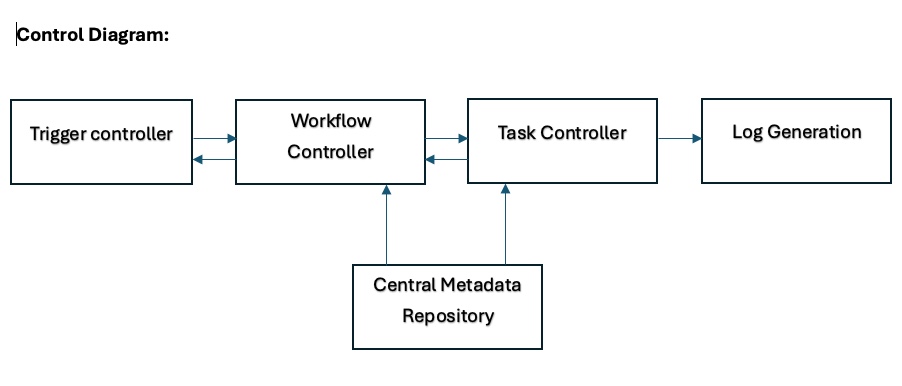
The Architecture: Core Components
- Query vault table
- Controller procedures
- Trigger point (can be an external or internal trigger)
Details of Core Components
1. Query Vault Table
This table serves as the heart of this strategy. We can securely store all the queries that load data into the cloud data warehouse in this Vault table. This table contains the following fields:
Job_Group: This is a logical segregation of queries between jobs. For example, if the Employee table gets its data from different sources and has multiple queries, then all these queries come under one ‘Job Group.’ Similarly, for the other tables, if there are multiple queries, they come under a separate ‘Job Group.’ We are distinguishing one set of queries from the others to help the controlling section identify the jobs effectively.Destination: This field represents the final table where we load the data into. For example, there could be multiple staging tables before we load into the final target table (Employee table example). We need to mention the final Target table (Employee in this case), which provides visibility on the final table (be it a fact or dimension) and helps the controlling section to further segregate things one level down, in case there is more than one table, if we intend to load.Job_Group_Order_Number: This field helps in constraint-based loading in a particular job group. If we have multiple target tables, under the same job group, and they need to be loaded in a certain order, then while making entries in the Query vault table, we need to insert the entries in the order that we want them to be executed. Sorting on this field will help in executing the jobs in the correct and desired order during orchestration.Action_Tag: This is a descriptive field predominantly for the summarized understanding of the entry in the Vault table. This doesn’t hold any significance, but it enhances the understanding of the users. This can be removed if needed.Query_Mode: This field specifies the action executed by the query. For example, if we are inserting data into a table, then this field contains ‘Insert.’ Certain Logics in the controlling sections are based on the Action Tag field.Query_Text: This field contains the actual query that needs to be executed. Please refer to the ‘Rules for Query Text field’ sub-section under the ‘Important Notes of Usage’ section for important details.Run_Order: When we have multiple queries that load into one final table, there must be some order of query execution that we should follow to load the data correctly. This field will provide the controlling section with the order in which the queries need to be executed. Start with 1 and increment by 1. Please refer to the ‘rules for Run Order field’ sub-section under the ‘Important Notes of Usage’ section for important details.Log_Data_Lifespan_in_Days: The log table holds the statistics for both current and history executions. If we mentioned 10 in this field, it means we are directing the log table to hold only 10 days of execution history. This field helps with backtracking of executions and failures. This becomes extremely important when we try to build an operational dashboard to monitor the health metrics of jobs.Run_Plan: This field can contain only two values. One is ‘Normal,’ which indicates the ‘Job Group’ will execute in a Normal schedule, like once a day, week, or month; the other is ‘Out of Sequence,’ which indicates that the job needs special runs. Its main purpose is to serve as a descriptive field that informs the user whether a job runs on a normal schedule or OOS.Execution_Switch: We often encounter situations where we want to skip execution of a query (or set of queries) during execution due to restarts or incremental loads, etc. This switch gives the user control to select which query needs to be executed in not-so-regular situations. If this field says ‘Yes’, it means that the entry in the vault table must be considered for execution. If this field says ‘No,’ then the execution of the query that belongs to this record will be skipped.Job_Status: The default value for this would be ‘Not Started.’ Once the job group is submitted for execution, the ‘job status’ will change to ‘In Progress,’ and if the query is successfully executed, ‘Job status’ will be changed to ‘Success.’ If the job fails for any reason, this field will serve as a marker for the controlling section to restart from the failed point/query, instead of restarting from the first query.
2. Controller Procedures
Workflow Controller
The workflow controller is a stored procedure written in JavaScript (Can be written using PLSQL too) to control the execution, especially in a situation where we are targeting to load more than one target table or want to coordinate the dependencies between two data models.
Execution statement:
call schema_name. workflow_controller_stored_proc_name (Job_Group, Schedule)
‘Job Group’ and Schedule are the parameters that a user needs to pass manually, based on which either the query selection for the execution will be done, or parameters will be created for an iterative stored proc to execute multiple job groups.
Task Controller
The task controller is a stored procedure intended to control the execution of queries within a Job group and Destination. This will be helpful, especially when we have dependencies between different modules or models, and the loads must be performed in a specific sequence. All such modules or models must be clubbed under one job group. We do not have to explicitly specify or make a call to the task controller, as the call happens automatically, internally, and iteratively until all the combinations of Job Group and Destination are exhausted.
Execution statement:
call schema_name.task_controller_stored_proc_name (Job_Group, destination)
3. Trigger Controller
Trigger controller refers to a tool from which we invoke the workflow controller. This can be an ETL tool (Informatica PowerCenter, IDMC) or a feature like Snowflake task in Snowflake database, or any other tool that can invoke a stored procedure in a database. Let’s consider both Informatica Intelligent Data Management Cloud (IDMC) and Snowflake for explanation purposes.
Informatica IDMC
- Create a simple mapping with a dummy source and target.
- Create a mapping task on top of the mapping.
- Define a parameter (say
$$Workflow_Controller) and use that parameter in the pre-SQL section. - Mention the parameter file name and location in the mapping task.
- Prepare the parameter file by assigning a procedure call statement to a pre-SQL parameter.
- The purpose of creating parameters is to reuse a single mapping for multiple jobs.
Snowflake Tasks
- Create a task with the desired name. The definition of this task contains the call statement to the stored proc.
- Enable the task as it's suspended by default.
- Ensure the role with which you are executing the task has permissions for warehouse, task, and stored proc.
How This Orchestration Works
- A call will be made to the workflow controller from the trigger controller based on the schedule of the job or a manual trigger.
- This call contains two important parameters: Job Group and Schedule. This step creates multiple call statements, or a single call statement, based on the number of values in the ‘destination’ field for a job group.
- These call statements generated in step 2 will be passed to the Task controller in the order they are generated. ‘Job_Group_Order_Number’ will help in generating the call statements in the desired order.
- For each call statement passed to the task controller, Query selection for execution will be done based on the parameters provided and the ‘execution switch’ field. The ‘Run Order’ field will help in executing the queries in the right order inside a ‘job group’ and destination.
- Workflow controller ensures that the task controller is iterating through all the queries under a ‘job group’ and destination. It also ensures that the task controller loops through all the call statements generated.
- During the execution of queries for a ‘Job group’ and destination, the log information is stored in a temporary table, which is then pushed to the log table.
Log Table
The audit logging feature is completely automated and does not require any manual intervention. The log table comes in handy to identify the reason for query failures, the number of records got inserted/updated / deleted, the Amount of time a job has taken to complete the run, etc. The structure of the log table is as follows.
- Start time: Indicates the query kick-off time.
- End time: indicates the query execution completion time.
- Run time: The time taken for the query to complete.
- Status: Run status of the query – completed or failed
- Records inserted: Number of records inserted by the query
- Records updated: Number of records updated by the query
- Records deleted: Number of records deleted by the query
- Error: The reason why the query has failed
Features
Smart Restart
If a query fails during execution due to some issue, and when you restart the job after fixing the issue, the job will restart from the query that failed last time instead of restarting from query 1. The intermittent table, which is used to store the audit logs temporarily, helps in identifying the failure point. This is the default functionality.
There would be cases where we do not want to restart from the failure point, instead run from the first query of that job group and destination. In this case, the entries in the intermittent table, which stores the audit logs temporarily, need to be flushed to override the default functionality.
Manual Control
We might come across cases where we do not want to execute all the queries under a ‘Job Group’ and Destination fields all the time. We sometimes might want to skip queries in between. In such cases, flipping the execution switch to ‘No’ would skip that query execution.
Query Change Detection
If a query is changed in between executions, the strategy detects the change and restarts the execution from query 1 for a particular ‘job group’ and destination values. This feature will be helpful when a query fails due to duplicates/data issues (due to code) or syntax issues. In these cases, a query update is mandatory, and we don’t need to worry about flushing the intermittent table to restart the job.
Automatic Log History Deletion
Log data will get accumulated over a period and will slow down the process. This strategy will auto-clean the log data based on the number given under the ‘Log_Data_Lifespan_in_Days’ field. If the value is 30, then the log clean-up happens every 30 days, keeping the log table lighter.
Important Notes for Usage
Rules for Query Text field:
- Double hyphens, which we generally use to comment out a piece of code in the query, must be avoided, as there is a chance those hyphens might comment out the rest of the code in addition to the piece of code.
- If we are against formatting the query into a single line, we can use a backslash (\) at the end of each line.
- Enclose the query in double dollar signs to avoid any misreads when encountering special characters.
- Make sure the objects on which the queries operate must have access to the user running this execution strategy. These are called the caller’s rights.
Rules for ‘Run Order’ Field:
- Do not provide the same number for a particular ‘Job Group’ and Destination value. If we provide the same number for this combination, the order in which the query is executed is not guaranteed.
Rules for Parallel Execution:
- Multiple individual ‘Job Groups’ can be run in parallel by creating separate jobs in the trigger controller section.
- This strategy does not support parallel execution by default, but that can be achieved by assigning a different job group to the queries.
- Inter Job Group dependency can be set while making entries by using the ‘job_group_order_num’ field.
Final Notes
This approach comes in handy, especially in the ELT ecosystem, where we replicate the data into our data platform first and then process it. If This Strategy helps us to make use of the full potential of the cloud platform, as the complete execution happens within the cloud native data warehouse.
Enhancements:
- We can add a field in the Vault table to provide the size of the cluster if we are expecting to handle huge amounts of data.
- A dashboard can be created on top of the Log table to capture job-level stats.
Opinions expressed by DZone contributors are their own.
Comments