

Spring AI Advisors: Chat Memory, Token Tracking, and Message Logging
Part 3 of a step-by-step tutorial that decorates the implementation with Spring AI advisors to demonstrate how certain production concerns may be addressed.
 CORE
·
CORE
·
Join the DZone community and get the full member experience.
Join For FreeAbstract
The previous two articles in this series — Building a Spring AI Assistant with MCP Servers: A Step-by-Step Tutorial and Securing the AI Host and Spring AI MCP Server Communication with API Keys — laid the groundwork for moving from prototype to production when building business-driven Spring AI applications. In this last one, the tutorial is concluded.
Why Advisors?
When you build something with Spring AI's ChatClient, sooner or later you want behavior that crosses every request — keep conversation history so the next prompt has context, count tokens so you know what each call costs, log the raw request and response payloads when something goes wrong. Threading that logic through your service code, one method at a time, is exactly the kind of cross-cutting concern Aspect-Oriented Programming was invented for, and Spring AI's advisors are essentially that: AOP for the AI call path.
This article walks through three advisors working together on a Spring AI chat client running on Java 25 with Spring AI 1.1.4: the built-in MessageChatMemoryAdvisor, plus two custom ones — a TokenUsageAdvisor that tracks token consumption and a MessageLoggerAdvisor that records the full request/response payloads. The example assumes the chat client is already wired up to one or more MCP servers exposing tools, but the advisor mechanism applies identically to a chat client with no tools at all.
The Advisor Contract
The central interface to implement is CallAdvisor and its default behavior is as follows:
public interface CallAdvisor extends Advisor {

  @Override
  default ChatClientResponse adviseCall(ChatClientRequest chatClientRequest, CallAdvisorChain callAdvisorChain) {
    ChatClientRequest processedChatClientRequest = before(chatClientRequest, callAdvisorChain);
    ChatClientResponse chatClientResponse = callAdvisorChain.nextCall(processedChatClientRequest);
    return after(chatClientResponse, callAdvisorChain);
  }
}
There are three clear steps outlined: logic is executed before the rest of the advisor chain, the rest of the advisors are called, and logic is executed after. Depending on the advisor type, the before, the after, or both parts are addressed; nevertheless, the advisor chain is invoked, and the response is returned.
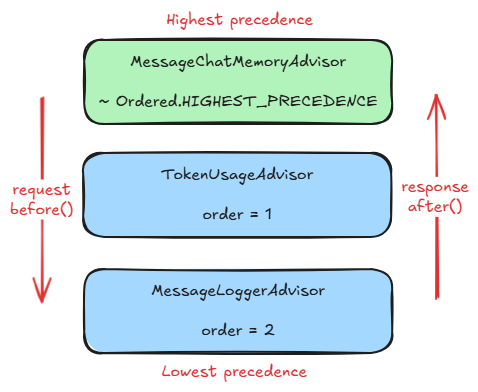
One last consideration is regarding the advisors’ order of execution, given by the Ordered#getOrder() method. The ones with higher precedence (lower order value) are executed before the ones with lower precedence (higher order value) when the before() method processes the request and vice-versa when after() processes the response, the ones with lower before those with higher precedence. The picture below visually summarizes this detail.
Just as in the previous two parts, to be able to follow along, switch to 3-main branch of the designated GitHub repository and address the existing TODOs and complete the implementation.
Memory: Making the Conversation Stateful
The simplest useful advisor ships with Spring AI. By default a ChatClient is stateless - each call sees only the system prompt and the current user message. MessageChatMemoryAdvisor fixes that by maintaining a windowed history and injecting it into each prompt.
Configure the memory bean first — here, a sliding window of 50 messages:
@Bean
public ChatMemory chatMemory() {
  return MessageWindowChatMemory.builder()
      .maxMessages(50)
      .build();
}
Then register the advisor on the ChatClient:
chatClient = builder
    .defaultSystem("You are a helpful Telecom AI assistant. Provide short, meaningful answers.")
    .defaultAdvisors(MessageChatMemoryAdvisor.builder(chatMemory).build())
    .build();
That's it. The advisor stores each USER and ASSISTANT message in the underlying ChatMemory and prepends the relevant slice to each outgoing prompt. To erase a conversation, clear the memory store:
public void clearConversation() {
  chatMemory.clear(DEFAULT_CONVERSATION_ID);
}
A Token Usage Advisor
Every call to an LLM has a cost — money, latency, or both. Knowing what each interaction consumes is something you want from day one, not something you bolt on after the bill. Spring AI provides ChatResponseMetadata#getUsage() with the actual numbers reported by the provider; we just need an advisor to read it, accumulate and (optionally) estimate the prompt-side cost before the call.
TODO 1. Add a new advisor that tracks the token usage.
public class TokenUsageAdvisor implements BaseAdvisor {

  private static final Logger log = LoggerFactory.getLogger(TokenUsageAdvisor.class);

  private final AtomicInteger promptTokenCount = new AtomicInteger(0);
  private final AtomicInteger completionTokenCount = new AtomicInteger(0);
  private final AtomicInteger totalTokenCount = new AtomicInteger(0);

  private final int order;
  private final TokenCountEstimator tokenCountEstimator;

  public TokenUsageAdvisor(int order) {
    this.order = order;
    tokenCountEstimator = new JTokkitTokenCountEstimator();
  }

  @Override
  public ChatClientRequest before(ChatClientRequest chatClientRequest, AdvisorChain advisorChain) {
    List<Message> messages = chatClientRequest.prompt().getInstructions();

    int tokenCount = messages.stream()
        .mapToInt(msg -> {
          var text = switch (msg) {
            case UserMessage userMsg -> userMsg.getText();
            case AssistantMessage assistantMsg -> assistantMsg.getText();
            case SystemMessage systemMsg -> systemMsg.getText();
            default -> "";
          };
          return tokenCountEstimator.estimate(text);
        })
      .sum();
    log.debug("Request: {} messages ~ {} estimated tokens.", messages.size(), tokenCount);

    return chatClientRequest;
  }

  @Override
  public ChatClientResponse after(ChatClientResponse chatClientResponse, AdvisorChain advisorChain) {
    Optional.ofNullable(chatClientResponse.chatResponse())
        .map(ChatResponse::getMetadata)
        .map(ChatResponseMetadata::getUsage)
        .ifPresent(usage -> {
          int currentPrompt = usage.getPromptTokens();
          int currentCompletion = usage.getCompletionTokens();
          int currentTotal = usage.getTotalTokens();
          log.info("Current tokens - \nPrompt: {} Completion: {} Total: {}",
                   currentPrompt, currentCompletion, currentTotal);

          int accPrompt = promptTokenCount.addAndGet(currentPrompt);
          int accCompletion = completionTokenCount.addAndGet(currentCompletion);
          int accTotal = totalTokenCount.addAndGet(currentTotal);

          log.info("Accumulated tokens - \nPrompt: {} Completion: {} Total: {}",
                   accPrompt, accCompletion, accTotal);
        });

    return chatClientResponse;
  }

  @Override
  public int getOrder() {
    return order;
  }

  public int totalTokens() {
    return totalTokenCount.get();
  }

  public void clearUsage() {
    promptTokenCount.set(0);
    completionTokenCount.set(0);
    totalTokenCount.set(0);
  }
}
In the before() stage, a JTokkitTokenCountEstimator instance is used to estimate how many tokens the user, assistant and system messages represent. During after(), the actual prompt, completion and total token consumption are accumulated for an objective view on this matter.
The exposed totalTokens() and clearUsage() methods make it trivial to display the running total in a UI and reset it when the user clears the chat.
A Message Logger Advisor
When the LLM does something unexpected, you want the raw payloads. This advisor logs both halves of each exchange in JSON and, on the request side, also dumps the list of tools the model has been told about - useful when tool calls aren't happening for reasons that aren't obvious.
TODO 2. A second additional advisor is added, one that logs the messages in a particular manner. The main ultimate goal is to have a few (3 in the case of this tutorial) and to observe how the execution chain is executed.
public class MessageLoggerAdvisor implements BaseAdvisor {

  private static final Logger log = LoggerFactory.getLogger(MessageLoggerAdvisor.class);

  private final int order;

  public MessageLoggerAdvisor(int order) {
    this.order = order;
  }

  @Override
  public ChatClientRequest before(ChatClientRequest chatClientRequest, AdvisorChain advisorChain) {
    Prompt prompt = chatClientRequest.prompt();

    Object tools = "N/A";
    if (prompt.getOptions() instanceof ToolCallingChatOptions toolOptions) {
      tools = toolOptions.getToolCallbacks().stream()
                  .map(callback -> callback.getToolDefinition().name())
                  .toList();
    }
    log.info("Tools: {}", tools);

    String messages = prompt.getInstructions().stream()
            .map(ModelOptionsUtils::toJsonString)
            .collect(Collectors.joining("\n"));
    log.info("Request:\n{}", messages);

    return chatClientRequest;
  }

  @Override
  public ChatClientResponse after(ChatClientResponse chatClientResponse, AdvisorChain advisorChain) {
    String messages = Optional.ofNullable(chatClientResponse.chatResponse())
          .map(ChatResponse::getResults)
          .orElseGet(Collections::emptyList)
          .stream()
          .map(gen -> ModelOptionsUtils.toJsonString(gen.getOutput()))
          .collect(Collectors.joining("\n"));

    log.info("Response:\n{}", messages);

    return chatClientResponse;
  }

  @Override
  public int getOrder() {
    return order;
  }
}
Both before() and after() methods log the messages in JSON format and while additionally, before() displays the available tools, obviously exposed by the connected MCP servers.
Both halves serialize messages with ModelOptionsUtils#toJsonString, which produces stable, parseable output. Production-bound code would want sampling, redaction, and an async log appender, but the structure stays the same.
Wiring Them All Together
TODO 3. As the custom advisors are ready, they can be used when the ChatClient is built, in the ChatAssistant constructor.
public ChatAssistant(ChatClient.Builder builder,
                     ToolCallbackProvider toolCallbackProvider,
					 ChatMemory chatMemory) {
  this.chatMemory = chatMemory;

  tokenUsageAdvisor = new TokenUsageAdvisor(1);

  chatClient = builder
      .defaultSystem("You are a helpful Telecom AI assistant. Provide short, meaningful answers.")
      .defaultToolCallbacks(toolCallbackProvider)
      .defaultAdvisors(MessageChatMemoryAdvisor.builder(chatMemory).build(),
                       tokenUsageAdvisor,
                       new MessageLoggerAdvisor(2))
      .build();
}
With the chat memory advisor highest precedence, history is added to the prompt before the token advisor measures it and before the logger captures the actual outgoing messages — which is what you want, since otherwise you'd be counting and logging a prompt that doesn't reflect what the model actually sees.
The token advisor exposes its accumulator so the surrounding service can surface it and clear it alongside the memory:
public void clearConversation() {
  chatMemory.clear(DEFAULT_CONVERSATION_ID);
  tokenUsageAdvisor.clearUsage();
}
public int totalTokens() {
  return tokenUsageAdvisor.totalTokens();
}
TODO 4. The last two methods are called from by the controller as the user interacts with the telecom-assistant UI.
@GetMapping("/")
public String home(Model model) {
  model.addAttribute("messages", assistant.conversationMessages());
  model.addAttribute("tokens", assistant.totalTokens());
  return "chat";
}
Last but not least, the total tokens consumption is added in the top bar of the chat.html.
<div class="text-secondary small" th:text="|Messages: ${#lists.size(messages)}, Tokens: ${tokens}|"></div>With all three applications up and running, let’s issue the following prompt — ‘What’s the vendor of the invoices having ‘vdf’ in their number?’ and then ‘Provide a short info for this vendor.’ The responses are to the point, as in the image below. Obviously, both MCP servers contributed, and the chat memory had an important role as well.
One last aspect can be depicted from the logs. The snippet below was captured after the latter prompt was sent.
INFO  c.h.t.controller.ChatController - USER:
	Provide a short info for this vendor.
DEBUG c.h.t.advisor.TokenUsageAdvisor - Request: 4 messages ~ 41 estimated tokens.
INFO  c.h.t.advisor.MessageLoggerAdvisor - Tools: [get_vendor_information, get_paid_invoices_count, get_invoices_by_pattern_on_number, get_paid_invoices_total_amount]
INFO  c.h.t.advisor.MessageLoggerAdvisor - Request:
{"messageType":"SYSTEM","metadata":{"messageType":"SYSTEM"},"text":"You are a helpful Telecom AI assistant. Provide short, meaningful answers."}
{"messageType":"USER","metadata":{"messageType":"USER"},"media":[],"text":"What's the vendor of the invoices having 'vdf' in their number?"}
{"messageType":"ASSISTANT","metadata":{"role":"ASSISTANT","messageType":"ASSISTANT","refusal":"","finishReason":"STOP","index":0,"annotations":[],"id":"chatcmpl-DVHi80AIaMxjiCaIFkr5hk4IUBGL5"},"toolCalls":[],"media":[],"text":"Vodafone."}
{"messageType":"USER","metadata":{"messageType":"USER"},"media":[],"text":"Provide a short info for this vendor."}
DEBUG i.m.client.LifecycleInitializer - Joining previous initialization
DEBUG i.m.spec.McpClientSession - Sending message for method tools/call
Four messages — the chat memory advisor has already injected the prior turns by the time the logger sees the prompt. That's exactly the contract: the message history is in the prompt before later advisors run.
When the response comes back, the order reverses:
DEBUG i.m.spec.McpClientSession - Received response: JSONRPCResponse[jsonrpc=2.0, id=ab8da66b-2, result={content=[{type=text, text=Specializes in cloud services.}], isError=false}, error=null]
DEBUG i.m.c.t.HttpClientStreamableHttpTransport - SendMessage finally: onComplete
DEBUG i.m.c.t.HttpClientStreamableHttpTransport - SSE connection established successfully
INFO  c.h.t.advisor.MessageLoggerAdvisor - Response:
{"messageType":"ASSISTANT","metadata":{"role":"ASSISTANT","messageType":"ASSISTANT","refusal":"","finishReason":"STOP","index":0,"annotations":[],"id":"chatcmpl-DVHj4OdhPIYHi6yrAYkhSp8uqFQMO"},"toolCalls":[],"media":[],"text":"Vodafone — specializes in cloud services."}
INFO  c.h.t.advisor.TokenUsageAdvisor - Current tokens -
Prompt: 542 Completion: 298 Total: 840
INFO  c.h.t.advisor.TokenUsageAdvisor - Accumulated tokens -
Prompt: 1235 Completion: 659 Total: 1894
INFO  c.h.t.controller.ChatController - ASSISTANT:
	Vodafone — specializes in cloud services.
The logger gets first crack at the response, then the token advisor accumulates the usage.
The UI of the conversation looks as follows, where the total tokens are displayed as well.
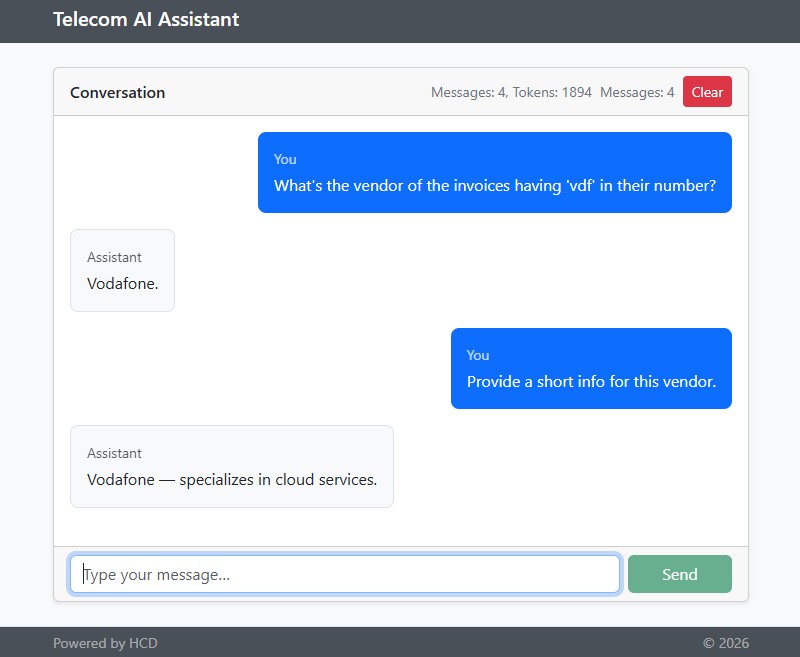
If the user presses the Clear button, the tokens’ counter is reset and the chat memory for the current conversation erased (see the above clearConversation() method).
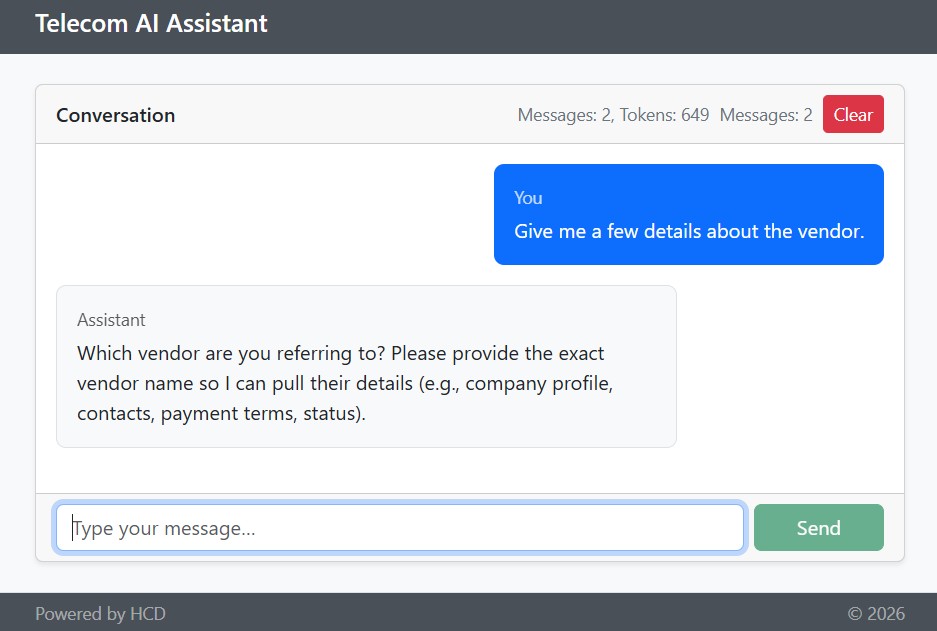
If sending the prompt ‘Give me a few details about the vendor,’ obviously the LLM is unable to respond.
To wrap up — three advisors, three concerns kept out of the business code. Memory turns a stateless chat into a stateful one. Token tracking exposes real and estimated cost. Message logging gives you a tape recorder for the times when the model surprises you. The interface is the same in all three cases — before, advance the chain, after — and Spring AI does the orchestration. The same pattern naturally extends: prompt rewriting, content moderation, retry-with-backoff, output validation. Anywhere you'd reach for an aspect in a regular Spring service, an advisor is the right shape on the AI side.
Going to Production
The POC developed so far is a good start for understanding the concepts behind such an integration, so that real production applications can be further created and deployed. To be able to think of such a scenario, several recommendations are worth taking into account. First, one shall be aware of at least a few production-wise ‘-ilities’ such as security, scalability, observability, and also consider the performance aspect. Secondly, when integrating ready-to-use MCP servers, one should not show blind trust so that no new supply chain risks are created.
Security aspects were already discussed in this tutorial. The communication was secured with API keys, although the desired approach in a production environment is OAuth 2.0. Either way, Spring Security is very helpful when both web applications and MCP client-server communication need to be secured, and it’s a handful to integrate it into a product that’s already using Spring. Additionally, concerning the data stored in the databases and the conversations held, data encryption shall be leveraged, as most vendors offer it transparently.
Regarding scalability, every time an LLM or an SQL database is called via an HTTP request, IO is blocked by the calling thread. Beginning with Java 21, virtual threads are available, and the scalability of IO-bound services is significantly improved.
When it comes to observability, keeping an eye on the system resources is always recommended. Without any doubt, all requests to an LLM have a cost — either in money or in complexity. Spring Boot provides the actuator metrics endpoint out of the box — http://localhost:8080/actuator/metrics — which offers a great deal of insights, including those related to the token consumption. These metrics can then be forwarded via Micrometer to a time-series database to further monitor the systems via dashboards; hence, the visibility is significantly increased.
As for the enhanced performance in general, GraalVM is a great option. Once the SDK is set up and available, applications can be turned into GraalVM native images, then transformed into Docker images, then run in the cloud (Kubernetes, CloudFoundry, etc.) or in a virtual machine emulating Linux, and great improvements are definitely observed.
Final Thoughts
AI is reshaping software development — stay informed and up-to-date, and adapt and use it.
Regarding MCP, it acts as a universal adapter and allows AI assistants to securely access and interact with external systems while maintaining a consistent interface. With MCP, AI development is not fragmented anymore; LLM strengths are applied to real data, and great insights are outlined.
This tutorial is a good starting point that showcases how one can start helping users benefit from a cohesive system where individual components integrate seamlessly to deliver meaningful results. Then, imagination can fly freely, as many ideas are now just a few “words” away from being put into practice by wisely using AI as a tool that magnifies our existing skills.
In the end, I would like to conclude with my brief takeaways. No Python switch is needed; continue using Java and Spring, as they have already proven they are good candidates when building production-ready software. Moreover, Spring AI is production-ready as well if we design responsively. Last but not least, embrace the Embabel Agent Framework that allows implementing agentic flows on the JVM that seamlessly mix LLM-prompt interactions with code and sketches the path towards developing agents as part of an enterprise ecosystem.
Resources
[1] – The source code for the Spring AI Telecom Assistant
[2] – asentinel-orm project
[3] – MCP Inspector
Published at DZone with permission of Horatiu Dan. See the original article here.
Opinions expressed by DZone contributors are their own.
Comments