

Securing the AI Host: Spring AI MCP Server Communication With API Keys
Part 2 of a step-by-step tutorial that integrates an AI assistant with two dedicated MCP servers and secures the communication.
 CORE
·
CORE
·
Join the DZone community and get the full member experience.
Join For FreeAbstract
This is a continuation of the first article in this series, Building a Spring AI Assistant with MCP Servers: A Step-by-Step Tutorial, and describes how one may address a serious concern when thinking of going from prototype to production — security.
The Problem
The MCP specification recommends that MCP servers using HTTP as their transport layer be secured with OAuth 2.0 access tokens. In practice, plenty of teams don't have the surrounding infrastructure — an authorization server, token introspection, and operational maturity — ready when they start exposing internal tools to an AI assistant. But the traffic still needs to be authenticated.
This article walks through a simpler scheme that fits that gap: per-server API keys carried in a custom HTTP header. The MCP server only authorizes requests that present a valid key; the MCP client analyzes each outbound request at runtime and attaches the right header for the right destination. We'll use Spring AI 1.1.4, MCP Spring Security 0.1.5, and Spring Security on Java 25.
The setup involves three applications:
telecom-assistant– the AI host and MCP client (port 8080)invoice-mcp-server– exposes invoice tools, keeps API keys in PostgreSQL (port 8081)vendor-mcp-server– exposes vendor tools, keeps a single API key in memory (port 8082)
Two servers, two different storage strategies, on purpose - to show both ends of the spectrum. Every MCP server has its own API key id and secret.
The picture below sketches the flow and the requirements to accomplish that.
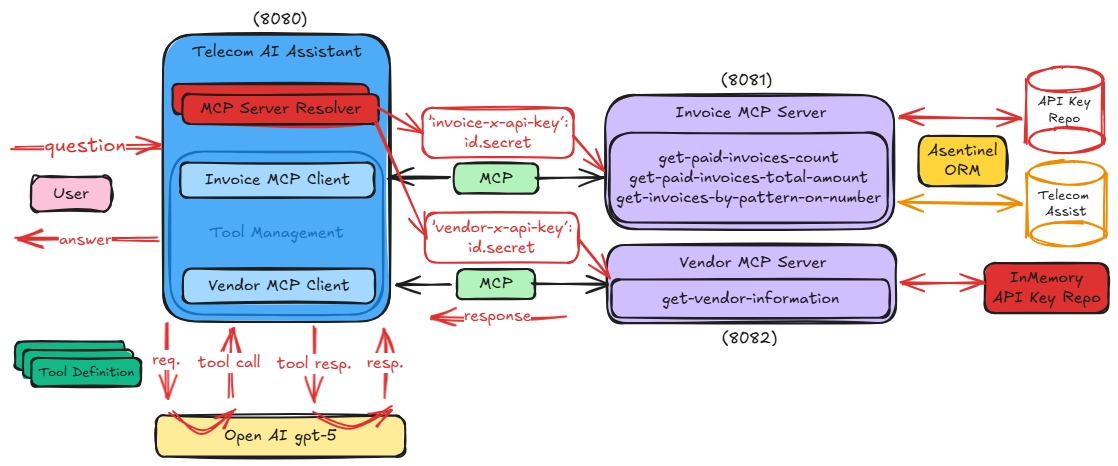
To be able to follow along, switch to the 2-main branch of the designated GitHub repository. Upon resolving the TODOs in there, this goal will have been fulfilled.
Securing the Vendor Service (In-Memory Keys)
TODO 1. This is the simpler case. Start by adding the security dependencies in pom.xml:
<dependency>
  <groupId>org.springframework.boot</groupId>
  <artifactId>spring-boot-starter-security</artifactId>
</dependency>
<dependency>
  <groupId>org.springaicommunity</groupId>
  <artifactId>mcp-server-security</artifactId>
  <version>0.1.5</version>
</dependency>
TODO 2. Since the API keys are stored in memory in this case, they are declared in the application.properties file, still as environmental variables.
api.key.id = ${API_KEY_ID}
api.key.secret = ${API_KEY_SECRET}
TODO 3. The main aspect regarding this enhancement is the security configuration. In this regard, the below @Configuration class is added.
@EnableWebSecurity
@Configuration
public class SecurityConfig {

  @Value("${api.key.id}")
  private String apiKeyId;

  @Value("${api.key.secret}")
  private String apiKeySecret;

  @Bean
  ApiKeyEntityRepository<ApiKeyEntity> apiKeyRepository() {
    return new InMemoryApiKeyEntityRepository<>(
        List.of(ApiKeyEntityImpl.builder()
                    .name("API key")
                    .id(apiKeyId)
                    .secret(apiKeySecret)
                    .build()));
  }

  @Bean
  SecurityFilterChain securityFilterChain(HttpSecurity http) throws Exception {
    return http.authorizeHttpRequests(auth -> auth.anyRequest().authenticated())
          .with(McpApiKeyConfigurer.mcpServerApiKey(),
                apiKeyConfig -> apiKeyConfig.apiKeyRepository(apiKeyRepository())
                                      .headerName("vendor-x-api-key"))
          .build();
  }
}
A single ApiKeyEntity instance is constructed and stored as part of an InMemoryApiKeyEntityRepository. Then, when the SecurityFilterChain is built, a SecurityConfigurerAdapter is applied and an McpApiKeyConfigurer is used via which two concerns are addressed. On one hand, the expected security header name is set — vendor-x-api-key, while on the other, the repository that stores the server API key.
At this point, the MCP server is secured. In order to be able to successfully communicate, an MCP client shall send HTTP requests that contain the required header that has the following form:
"vendor-x-api-key": [api-key-id].[api-key-secret]where api-key-id and api-key-secret are replaced with the values configured above.
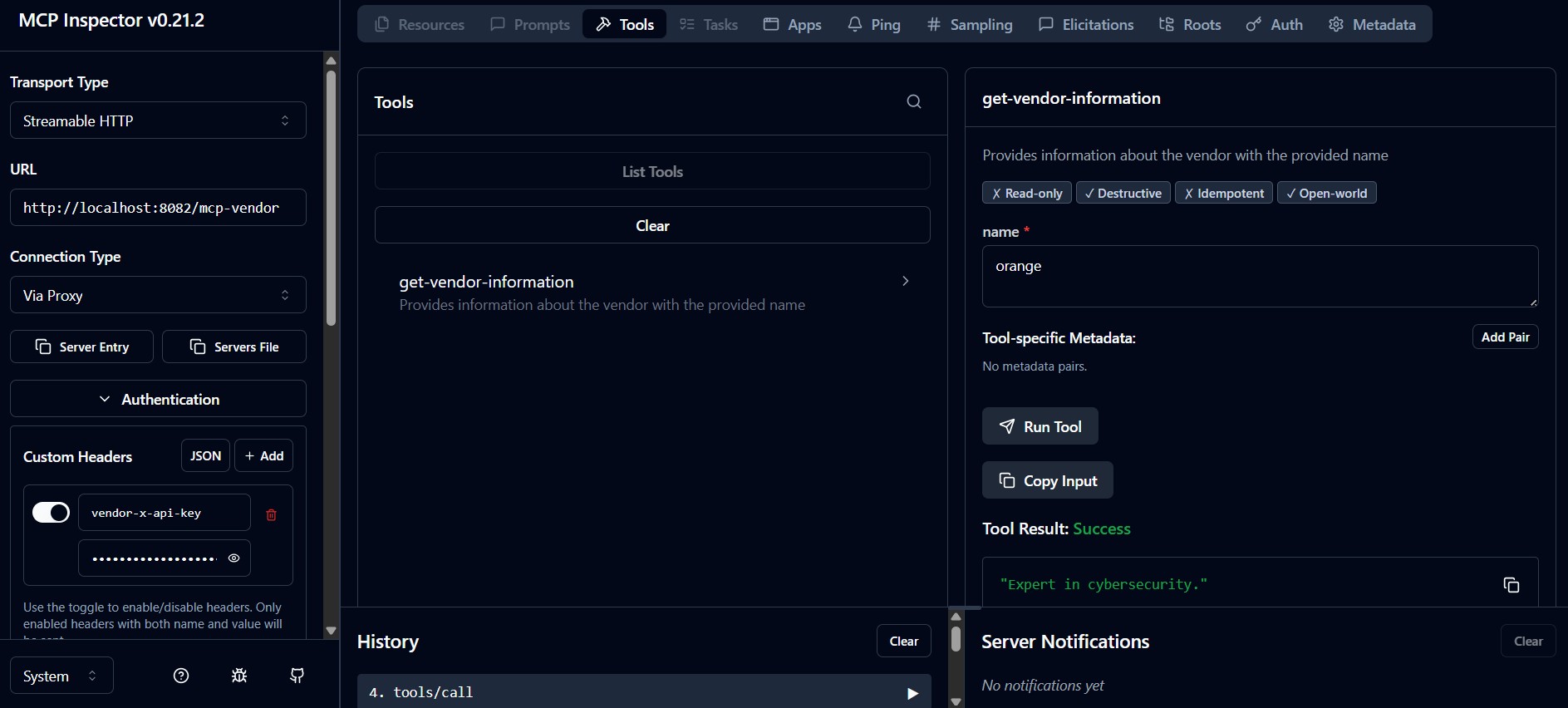
To test this functionality, the MCP Inspector [Resource 3] is used again, and additionally, before connecting to the running server, the authentication data is configured — vendor-x-api-key header is set to the known id.secret value.
Securing the Invoice Service (Keys in PostgreSQL)
Switching to the invoice-mcp-server, the enhancements here are a bit more complex as the API keys are stored in an external repository.
TODO 4. Again the security dependencies are added in the pom.xml file, as before.
TODO 5. As API keys are stored in the database, more exactly in the ServerApiKeys table, an mapping entity is created.
@Table("ServerApiKeys")
public class ServerApiKey {

  public static final String COL_SERVER = "Server";
  public static final String COL_KEY_ID = "KeyId";

  public static final String ON_CONFLICT_CLAUSE = String.format("(%s,%s)", COL_SERVER, COL_KEY_ID);

  @PkColumn("Id")
  private int id;

  @Column(COL_SERVER)
  private String server;

  @Column(COL_KEY_ID)
  private String keyId;

  @Column("KeySecret")
  private String keySecret;

  ...
}
As the Asentinel ORM library is already present in this module’s class-path, it is used to manage these entities; thus, the class is decorated with specific annotations.
TODO 6. Just as previously done for the vendor server, the security configuration needs an ApiKeyEntityRepository. The approach here is more general, the interface is implemented, and the specific manner is suited.
public class DbApiKeyEntityRepository implements ApiKeyEntityRepository<DbApiKeyEntityRepository.InvoiceApiKeyEntity> {

  private final OrmOperations orm;

  public DbApiKeyEntityRepository(OrmOperations orm) {
    this.orm = orm;
  }

  @Override
  public InvoiceApiKeyEntity findByKeyId(@NonNull String keyId) {
    return orm.newSqlBuilder(ServerApiKey.class)
        .select()
        .where()
          .column(ServerApiKey.COL_SERVER).eq("invoice-mcp").and()
          .column(ServerApiKey.COL_KEY_ID).eq(keyId)
      .execForOptional()
        .map(serverApiKey ->
               new InvoiceApiKeyEntity(keyId, serverApiKey.getKeySecret()))
        .orElse(null);
    }
}
As every record (API key) in the table is uniquely identified by Server and KeyId, whenever a request is received, the repository checks it and returns an implementation of the ApiKeyEntity interface, in our case
public static final class InvoiceApiKeyEntity implements ApiKeyEntity {

  private final String id;

  @Nullable
  private String secret;

  private InvoiceApiKeyEntity(String id, @Nullable String secret) {
    this.id = id;
    this.secret = secret;
  }

  @Override
  public String getId() {
    return id;
  }

  @Override
  public @Nullable String getSecret() {
    return secret;
  }

  @Override
  public void eraseCredentials() {
    this.secret = null;
  }

  @Override
  public InvoiceApiKeyEntity copy() {
    return new InvoiceApiKeyEntity(id, secret);
  }
}
built from the database entity upon retrieval.
It is a good practice to keep the secret of a ServerApiKey entity encoded in the database. In this tutorial, the default one — bcrypt — is used. To check the repository, the following simple integration test is used.
@SpringBootTest
@Transactional
class DbApiKeyEntityRepositoryTest {

  private DbApiKeyEntityRepository apiKeyRepository;

  @Autowired
  private OrmOperations orm;

  private final PasswordEncoder passwordEncoder = PasswordEncoderFactories.createDelegatingPasswordEncoder();

  @BeforeEach
  public void setUp() {
    apiKeyRepository = new DbApiKeyEntityRepository(orm);
  }

  @Test
  void provisionServerApiKey() {
    ServerApiKey serverApiKey = new ServerApiKey();
    serverApiKey.setServer("invoice-mcp");
    serverApiKey.setKeyId("api-key-id");
    serverApiKey.setKeySecret(passwordEncoder.encode("api-key-secret"));

    orm.upsert(serverApiKey,
               PostgresJdbcFlavor.UPSERT_CONFLICT_PLACEHOLDER, ServerApiKey.ON_CONFLICT_CLAUSE);

    DbApiKeyEntityRepository.InvoiceApiKeyEntity apiKey = apiKeyRepository.findByKeyId(serverApiKey.getKeyId());
    Assertions.assertNotNull(apiKey);
    Assertions.assertEquals(serverApiKey.getKeyId(), apiKey.getId());
    Assertions.assertEquals(serverApiKey.getKeySecret(), apiKey.getSecret());
  }
}
TODO 7. Once this is completed, the security configuration is set up, just as before. The only difference is that the previously created ApiKeyEntityRepository repository implementation is used and not an in-memory one this time.
@Configuration
@EnableWebSecurity
public class SecurityConfig {

  private OrmOperations orm;

  @Autowired
  public void setOrm(OrmOperations orm) {
    this.orm = orm;
  }

  @Bean
  ApiKeyEntityRepository<DbApiKeyEntityRepository.InvoiceApiKeyEntity> apiKeyRepository() {
    return new DbApiKeyEntityRepository(orm);
  }

  @Bean
  SecurityFilterChain securityFilterChain(HttpSecurity http) throws Exception {
    return http.authorizeHttpRequests(auth -> auth.anyRequest().authenticated())
        .with(McpApiKeyConfigurer.mcpServerApiKey(),
              apiKeyConfig -> apiKeyConfig.apiKeyRepository(apiKeyRepository())
                                .headerName("invoice-x-api-key"))
        .build();
  }
}
At this point, the invoice-mcp server is secured as well, it can be checked with the MCP Inspector.
Making the Client Send the Right Header to the Right Server
Both servers are locked down. Now the client needs to know that requests to http://localhost:8081/mcp-invoice should carry the invoice-x-api-key header and requests to http://localhost:8082/mcp-vendor should carry vendor-x-api-key. A clean way to encode this is a chain of responsibility of resolvers.
TODO 8. The expected API keys’ ids and secrets for the two servers are configured in the application.properties and for convenience, read from environment values. For simplicity, here both read from the same, although in a real implementation would not.
mcp.server.api-key.parameters.invoice.id = ${API_KEY_ID}
mcp.server.api-key.parameters.invoice.secret = ${API_KEY_SECRET}
mcp.server.api-key.parameters.vendor.id = ${API_KEY_ID}
mcp.server.api-key.parameters.vendor.secret = ${API_KEY_SECRET}
Then, mapped into a @ConfigurationProperties annotated class.
@ConfigurationProperties(McpServerApiKeyProperties.CONFIG_PREFIX)
public class McpServerApiKeyProperties {

  public static final String CONFIG_PREFIX = "mcp.server.api-key";

  private final Map<String, ApiKeyParams> parameters = new HashMap<>();

  public Map<String, ApiKeyParams> getParameters() {
    return parameters;
  }

  public record ApiKeyParams(String id, String secret) {}
}
TODO 9. As there are two MCP servers involved, whenever the LLM instructs the AI host that it needs to query one of them, a destination-resolving strategy applied at runtime is introduced. It’s implemented as a chain of MCP server resolvers.
The common interface of this chain of responsibility is McpServerResolver. It’s generic and declares two methods as part of the contract it proposes.
public interface McpServerResolver<T> {

  Optional<T> resolve(URI uri);

  default String id() {
    return getClass().getSimpleName();
  }
}
The central method that each implementer shall define receives the destination uri and attempts to resolve one of the available servers. If successful, the result is further used.
The second optional method has the particular scope of identifying the current resolver; it has a default implementation and might help down the line during the resolving process (logging, etc.).
As the items in the chain here have a similar approach, the next part is an abstract common implementation of the above interface.
abstract class AbstractMcpServerResolver<T> implements McpServerResolver<T> {

  private static final Logger log = LoggerFactory.getLogger(AbstractMcpServerResolver.class);

  private final McpServerResolver<T> next;

  protected AbstractMcpServerResolver(McpServerResolver<T> next) {
    this.next = next;
  }

  @Override
  public Optional<T> resolve(URI uri) {
    if (uri == null) {
      return Optional.empty();
    }

    log.debug("[{}]: Checking request towards {}.", id(), uri);
    Optional<T> result = resolveSpecific(uri);
    if (result.isPresent()) {
      log.debug("[{}]: Resolved target endpoint {}.", id(), uri);
      return result;
    }

    if (next == null) {
      log.debug("[{}]: No next resolver configured.", id());
      return Optional.empty();
    }

    log.debug("[{}]: Target endpoint {} not resolved. Delegating to [{}].", id(), uri, next.id());
    return next.resolve(uri);
  }

  protected abstract Optional<T> resolveSpecific(URI endpoint);
}
The particular action is to be defined by each link in the chain as part of the Optional resolveSpecific(URI endpoint) method. Here, the functionality is similar; thus, the next common implementation is enough.
public class UrlMcpServerResolver extends AbstractMcpServerResolver<ApiKeyHeader> {

  private static final Logger log = LoggerFactory.getLogger(UrlMcpServerResolver.class);

  private final URI serverUri;
  private final ApiKeyHeader header;

  public UrlMcpServerResolver(McpServerResolver<ApiKeyHeader> nextResolver,
                              String serverUrl,
                              ApiKeyHeader header) {
    super(nextResolver);
    this.serverUri = URI.create(serverUrl);
    this.header = header;
  }

  @Override
  protected Optional<ApiKeyHeader> resolveSpecific(URI endpoint) {
    if (serverUri.equals(endpoint)) {
      log.debug("[{}]: Target endpoint {} and config URL {} match.", id(), endpoint, serverUri);
      return Optional.of(header);
    }
    log.debug("[{}]: Target endpoint {} and config URL {} don't match.", id(), endpoint, serverUri);
    return Optional.empty();
  }
}
TODO 10. The above resolveSpecific() method decides whether the current request is towards a particular server. If successful, an ApiKeyHeader object is returned so that it can be further used.
public record ApiKeyHeader(String name, String value) {}TODO 11. The last step is the security @Configuration class that glues together the above-created pieces.
@Configuration
@EnableConfigurationProperties({McpServerApiKeyProperties.class})
public class SecurityConfig {

  private static final Logger log = LoggerFactory.getLogger(SecurityConfig.class);

  public McpStreamableHttpClientProperties mcpClientProps;
  public McpServerApiKeyProperties mcpServerApiKeys;

  @Autowired
  public void setMcpClientProps(McpStreamableHttpClientProperties mcpClientProps) {
    this.mcpClientProps = mcpClientProps;
  }

  @Autowired
  public void setMcpServerApiKeys(McpServerApiKeyProperties mcpServerApiKeys) {
    this.mcpServerApiKeys = mcpServerApiKeys;
  }

  @Bean
  ApiKeyHeader invoiceApiKeyHeader() {
    var apiKey = mcpServerApiKeys.getParameters().get("invoice");
    return new ApiKeyHeader("invoice-x-api-key",
                            String.format("%s.%s", apiKey.id(), apiKey.secret()));
  }

  @Bean
  ApiKeyHeader vendorApiKeyHeader() {
    var apiKey = mcpServerApiKeys.getParameters().get("vendor");
    return new ApiKeyHeader("vendor-x-api-key",
                            String.format("%s.%s", apiKey.id(), apiKey.secret()));
  }

  @Bean
  McpServerResolver<ApiKeyHeader> serverResolver() {
    var mcpProps = mcpClientProps.getConnections();
    var mcpInvoice = mcpProps.get("invoice");
    var mcpVendor = mcpProps.get("vendor");

    return new VendorMcpServerResolver(new InvoiceMcpServerResolver(null,
                                              String.format("%s%s", mcpInvoice.url(), mcpInvoice.endpoint()),
                                              invoiceApiKeyHeader()),
                  String.format("%s%s", mcpVendor.url(), mcpVendor.endpoint()),
                  vendorApiKeyHeader());
  }

  @Bean
  McpSyncHttpClientRequestCustomizer requestCustomizer() {
    return (builder, method, endpoint, body, context) -> {
      log.info("MCP Client request: method={}, endpoint={}, body={}", method, endpoint, body);

      serverResolver()
        .resolve(endpoint)
        .ifPresent(apiKeyHeader -> builder.header(apiKeyHeader.name(), apiKeyHeader.value()));
    };
  }
}
The McpServerResolver returned by serverResolver() is used by the McpSyncHttpClientRequestCustomizer to analyze the request and add the necessary security header.
Watching it Work
Upon reaching this point, the MCP servers are restarted, together with the telecom-assistant. If the prompt in the screenshot below is issued, obviously, the invoice server should be queried, and the response should be received accordingly.
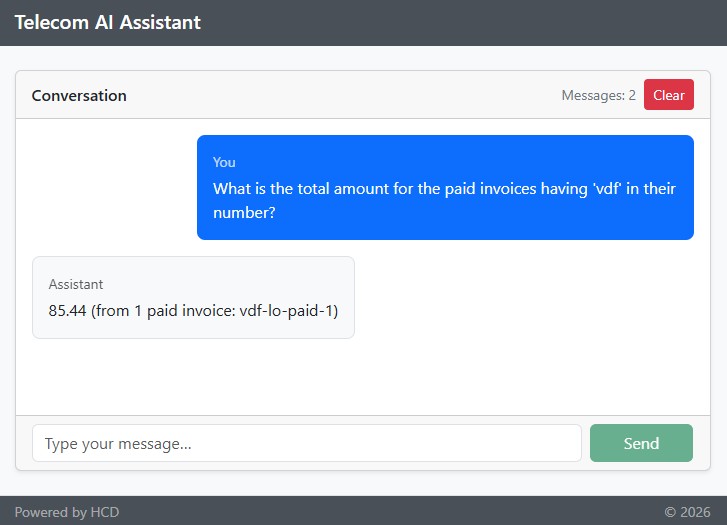
In the AI host logs, the server resolving process can be depicted.
DEBUG i.m.c.t.HttpClientStreamableHttpTransport - Sending message JSONRPCRequest[jsonrpc=2.0, method=tools/call, id=2902fe67-2, params=CallToolRequest[name=get-invoices-by-pattern-on-number, arguments={pattern=vdf}, meta={}]]
INFO  c.h.t.config.SecurityConfig - MCP Client request: method=POST, endpoint=http://localhost:8081/mcp-invoice, body={"jsonrpc":"2.0","method":"tools/call","id":"2902fe67-2","params":{"name":"get-invoices-by-pattern-on-number","arguments":{"pattern":"vdf"},"_meta":{}}}
DEBUG c.h.t.c.r.AbstractMcpServerResolver - [VendorMcpServerResolver]: Checking request towards http://localhost:8081/mcp-invoice.
DEBUG c.h.t.c.r.UrlMcpServerResolver - [VendorMcpServerResolver]: Target endpoint http://localhost:8081/mcp-invoice and config URL http://localhost:8082/mcp-vendor don't match.
DEBUG c.h.t.c.r.AbstractMcpServerResolver - [VendorMcpServerResolver]: Target endpoint http://localhost:8081/mcp-invoice not resolved. Delegating to [InvoiceMcpServerResolver].
DEBUG c.h.t.c.r.AbstractMcpServerResolver - [InvoiceMcpServerResolver]: Checking request towards http://localhost:8081/mcp-invoice.
DEBUG c.h.t.c.r.UrlMcpServerResolver - [InvoiceMcpServerResolver]: Target endpoint http://localhost:8081/mcp-invoice and config URL http://localhost:8081/mcp-invoice match.
DEBUG c.h.t.c.r.AbstractMcpServerResolver - [InvoiceMcpServerResolver]: Resolved target endpoint http://localhost:8081/mcp-invoice.
DEBUG i.m.c.t.HttpClientStreamableHttpTransport - Received SSE stream response, using line subscriber
DEBUG i.m.spec.McpSchema - Received JSON message: {"jsonrpc":"2.0","id":"2902fe67-2","result":{"content":[{"type":"text","text":"[{\"id\":8,\"number\":\"vdf-tf-rev-1\",\"date\":\"2025-05-20\",\"vendor\":{\"id\":2,\"name\":\"Vodafone\"},\"serviceType\":{\"id\":3,\"name\":\"TollFree\"},\"status\":\"UNDER_REVIEW\",\"total\":10.44},{\"id\":7,\"number\":\"vdf-mpls-app-1\",\"date\":\"2025-05-10\",\"vendor\":{\"id\":2,\"name\":\"Vodafone\"},\"serviceType\":{\"id\":4,\"name\":\"MPLS\"},\"status\":\"APPROVED\",\"total\":80.44},{\"id\":6,\"number\":\"vdf-lo-paid-1\",\"date\":\"2025-06-10\",\"vendor\":{\"id\":2,\"name\":\"Vodafone\"},\"serviceType\":{\"id\":5,\"name\":\"Local\"},\"status\":\"PAID\",\"total\":85.44}]"}],"isError":false}}
The invoice server validates the invoice-x-api-key header against its database-backed repository, and the tool call proceeds.
Final Notes
API key authentication is a pragmatic stepping stone, not an end state. In a production environment, OAuth 2.0 remains the recommended approach, and Spring Security supports both. Even with API keys in play, take the basics seriously: store secrets encoded (bcrypt or stronger), rotate them, use a distinct key per server, and combine with TLS so the headers aren't visible in transit. The resolver-chain pattern on the client side gives you a natural place to add more rules later — token-fetch logic for OAuth, region-based routing, anything URI-shaped — without touching the rest of the AI host.
The next (also the last) article in this series concludes the tutorial by instrumenting the chat client with advisors for memory, token tracking, and logging, and ultimately formulating several takeaways.
Resources
[1] – The source code for the Spring AI Telecom Assistant
[2] – asentinel-orm project
[3] – MCP Inspector
Published at DZone with permission of Horatiu Dan. See the original article here.
Opinions expressed by DZone contributors are their own.
Comments