

API Facade vs. Orchestration vs. Eventing, Now With AI in the Loop
Discover architectural patterns for integrating AI into enterprise systems without sacrificing governance, reliability, observability, or loose coupling.
 CORE
·
CORE
·
Join the DZone community and get the full member experience.
Join For FreeAI Doesn't Replace Your Architecture; It Becomes Part of It
Picture this. Your team has just integrated a large language model into your enterprise application. The demo looked compelling. The agent interpreted user intent, called several APIs, and returned a coherent result. Everyone in the room was impressed.
Then the questions started. What happens when the LLM misinterprets a request and calls the wrong API? Who owns the business logic embedded in that prompt? If the model changes, does the integration break? How do you audit what the AI decided and why?
These aren't AI questions. They're architecture questions, and they don't go away just because you've added intelligence to the system.
The most important architectural decision you'll make about AI isn't which model to use. It's where the AI sits relative to your existing integration layers. Get that right, and AI becomes a powerful, governable component in a coherent system. Get it wrong, and you'll end up with business logic scattered across prompts, brittle integrations that break when the model updates, and no clear line of accountability when something fails.
The question isn't "Can AI call APIs?" It's "Where should AI sit within your architecture?"
There are three architectural roles worth separating clearly.
- API facade. The edge layer that translates external requests into internal operations.
- Workflow orchestration. The layer that manages multi-step business processes and decision logic.
- Event-driven integration. The layer that lets systems react to changes without tight coupling.
Each serves a different purpose, and AI belongs in different places depending on the business problem you're solving. Figure 1 lays out all three roles side by side, including what AI owns and does not own in each one.
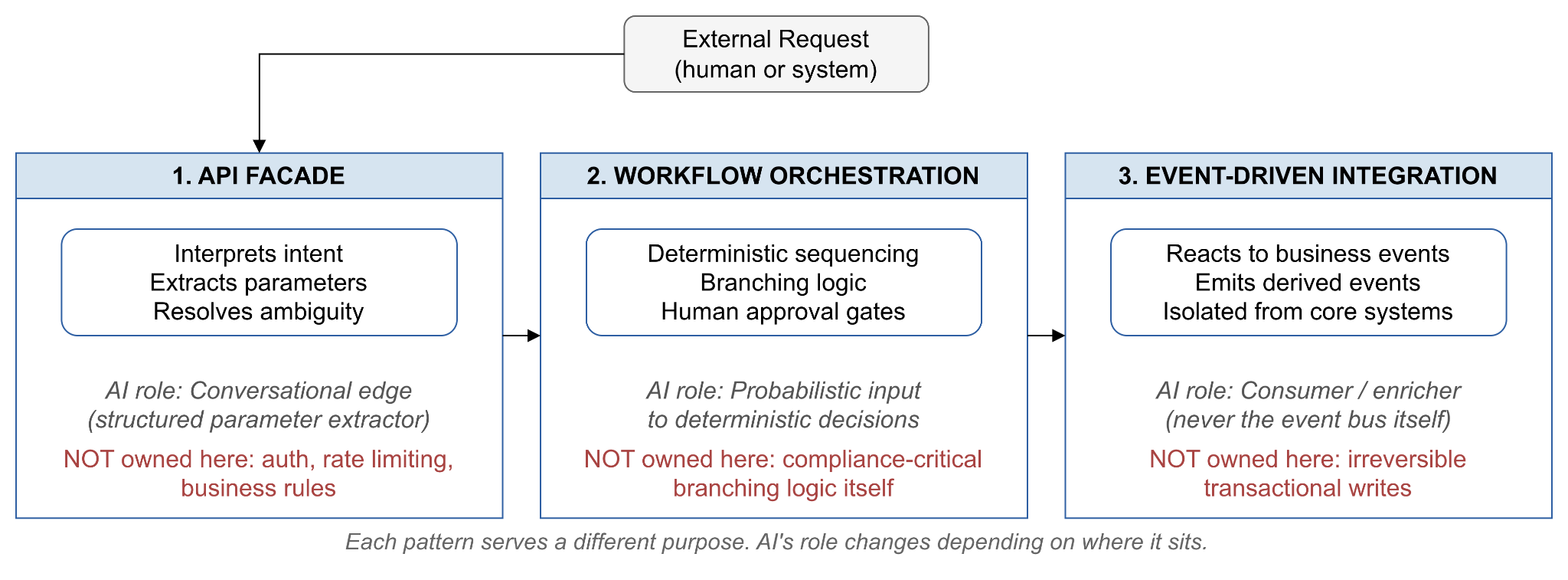
Figure 1. Where AI Sits: Three Architectural Roles
The table below gives a quick reference for how the three patterns differ before we walk through each one in detail.
|
Pattern |
Purpose |
Coupling |
Determinism |
Where AI Fits |
|---|---|---|---|---|
|
API Facade |
Translate external requests into internal operations |
Tight, synchronous |
Low, request-driven |
Interpreting intent, extracting parameters |
|
Workflow Orchestration |
Sequence multi-step business processes |
Moderate, coordinated |
High, explicit branching |
Providing probabilistic input to decision points |
|
Event-Driven Integration |
Let systems react to change asynchronously |
Loose, decoupled |
Variable, per consumer |
Consuming and enriching events, never the bus itself |
This article walks through where AI fits within each pattern, and just as importantly, where it doesn't.
1. Start by Defining What the AI Is Responsible For
Before you touch an integration pattern, answer a more fundamental question. What is the AI actually accountable for in this system?
This sounds obvious but gets skipped constantly. Teams reach for an LLM because it handles natural language well, then gradually load it with responsibilities it shouldn't own, like validating business rules, managing state, enforcing authorization logic, and driving deterministic workflows. The AI ends up doing everything, which means the architecture owns nothing clearly.
Ask these questions before making any integration decisions.
- Is the AI interpreting human input? Natural language understanding, intent classification, and entity extraction are AI-native tasks where models genuinely add value.
- Is the AI making recommendations or decisions? A recommendation, such as "this customer is likely to churn," is a probabilistic output. A decision, such as "cancel this subscription," is a deterministic action with business consequences. These require different ownership models.
- Is the AI coordinating business processes? If yes, be careful. Orchestration logic embedded in prompts is invisible to your governance tooling, untestable in any traditional sense, and will silently drift as the model updates.
- Which steps require human approval? Any action that is irreversible, regulated, or high stakes should have an explicit human checkpoint that lives in your workflow layer, not inside a prompt.
The cleaner your answer to these questions, the cleaner your integration design will be. Blurry responsibilities produce brittle architectures. Define the boundary first.
2. AI at the API Facade, the Conversational Edge
The API facade pattern sits at the edge of your system. It's the layer that translates external requests into internal operations. Traditionally, this meant REST or GraphQL endpoints that routed structured requests to back-end services. AI belongs here when the primary challenge is bridging the gap between unstructured human intent and structured system operations.
Think of an enterprise procurement assistant. A buyer types, "Reorder the same supplies we used for the Sydney office fit-out, but increase quantity by 20% and flag anything over $5,000 for manager approval." No traditional API handles that sentence on its own. The facade layer is exactly where an LLM adds value. It parses intent, extracts parameters, resolves ambiguity, and maps the request to specific downstream API calls.
What AI does well at the facade includes intent resolution, turning natural language into structured API parameters. It also handles entity extraction, pulling order IDs, product codes, dates, and names from conversational input. It supports contextual disambiguation, using conversation history to resolve references like "that vendor" back to a specific vendor ID mentioned earlier. And it enables response synthesis, taking structured API responses and returning natural language answers.
What AI should not own at the facade is just as important. Authorization logic belongs in your API gateway or identity layer. Rate limiting and throttling are infrastructure concerns, not model concerns. Core business rules, such as "orders over $5,000 require approval," should live in your workflow layer rather than in a prompt where they're invisible to compliance tooling.
The practical pattern is that AI at the facade acts as a structured parameter extractor. It takes conversational input, produces a clean structured intent object, and hands off to APIs that were designed for deterministic consumption. The model interprets. The API executes.
The example below shows what that structured intent object might look like once the model has parsed the procurement request above.
{
  "intent": "create_purchase_order",
  "reference_order": "sydney_office_fitout_2026",
  "quantity_multiplier": 1.2,
  "approval_required_above": 5000,
  "currency": "USD",
  "extracted_from": "conversational_input",
  "confidence": 0.94
}
Listing 1: Example structured intent object produced at the API facade.
Design your facade APIs to accept both human-readable context and machine-structured parameters. Build explicit validation at the API boundary so that when the model produces a malformed or out-of-range parameter, the error is caught and surfaced clearly, not silently swallowed or, worse, acted upon incorrectly.
3. AI Inside Orchestration, Where Flexibility Meets Business Workflows
Workflow orchestration manages multi-step business processes, including the sequence of steps, branching logic, error handling, retries, and human approval gates. It's the layer that knows how work gets done, in what order, and under what conditions.
The central tension when introducing AI into orchestration is that orchestration is deterministic by design, while AI is probabilistic by nature. A well-governed workflow produces the same output given the same inputs. An LLM does not. Mixing these carelessly produces workflows that are auditable on paper but unpredictable in practice.
The architectural resolution is to keep the orchestration layer deterministic while allowing AI to provide probabilistic inputs into specific decision points. Think of AI as a specialized step inside the workflow, one that produces an output that the workflow then acts on according to explicit, auditable logic.
A claims processing workflow illustrates this well. The overall process — intake, validation, AI-assisted assessment, human review, approval, and payment — is orchestrated deterministically. The AI participates at the assessment step. It analyzes claim documentation and produces a structured output: an estimated validity score, a list of missing documents, and a recommended action. The workflow then applies explicit branching logic. A score above 0.85 triggers auto approval. A score below 0.4 gets flagged for denial review. Everything in between routes to a human adjudicator. The AI informs. The orchestration decides. Figure 2 shows this flow end to end.
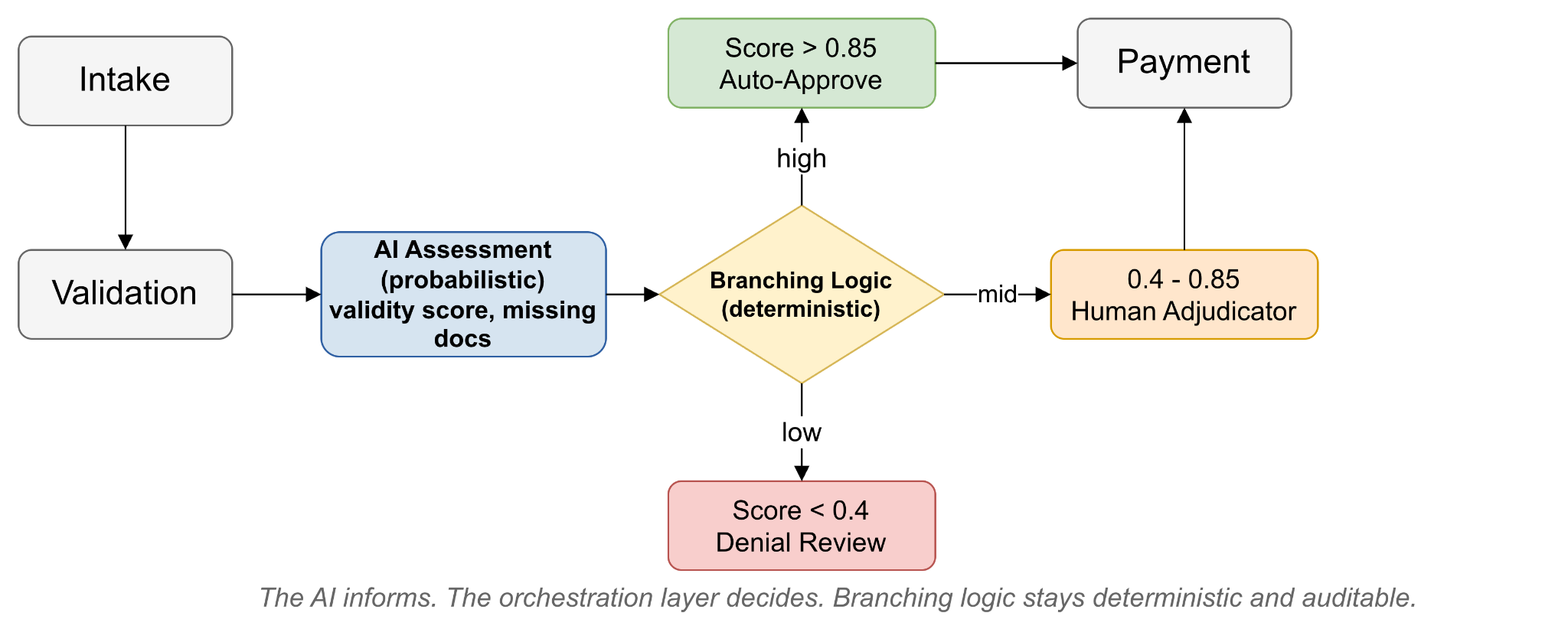
Figure 2. AI Inside Orchestration: Claims Processing Workflow
A few design principles matter here. Treat AI steps as typed operations with defined inputs and outputs. The orchestration layer should pass a structured payload to the AI and receive a structured response, not an open-ended conversation. This makes the AI step testable, replaceable, and governable. The snippet below shows a minimal example of what a typed contract for an AI step might look like.
// Typed contract for an AI step inside orchestration
interface ClaimAssessmentInput {
  claimId: string;
  documents: DocumentRef[];
}

interface ClaimAssessmentOutput {
  validityScore: number;      // 0.0 to 1.0
  missingDocuments: string[];
  recommendedAction: "approve" | "review" | "deny";
}
Listing 2: Example typed input/output contract for an AI step inside an orchestrated workflow.
Never let the AI own branching logic that has compliance or audit implications. If a decision must be explainable to a regulator, it should live in the orchestration layer where it's visible, versionable, and logged.
Design explicit human approval gates. In enterprise workflows, AI recommendations that trigger consequential actions, such as financial transactions, customer notifications, or system changes, should route through a human checkpoint unless you've explicitly validated and signed off on full automation.
Build retry and fallback paths. An AI step that fails, times out, or returns a low-confidence result needs a defined fallback, whether that's routing to a human, using a default, or escalating, built into the orchestration rather than handled ad hoc in the calling code.
Platforms like OutSystems, which provide visual workflow design alongside AI integration capabilities, make this separation of concerns tangible. You can see exactly where in the process flow an AI step participates, what it receives, and what happens next based on its output.
4. AI and Event-Driven Architecture, Reacting Without Controlling
Event-driven architecture decouples systems through a shared event bus. Producers emit events when something happens, and consumers subscribe and react without either party knowing the other exists. It's the pattern that makes large distributed systems composable and independently evolvable.
AI fits naturally into event-driven systems, but as a consumer and enricher, not as the event bus itself. The pattern works like this. A transactional system emits a clean, well-defined business event, such as OrderPlaced, CustomerChurnRiskFlagged, or SupportTicketOpened. An AI consumer subscribes, processes the event asynchronously, and either emits a derived event, like ChurnRiskClassified or TicketCategorized, or writes to a downstream store. Core transaction systems remain untouched.
This architecture has a key property for AI integration, which is isolation. The AI component can be updated, replaced, or retrained without touching the transactional system that produced the event. The event schema is the contract between them. As long as the AI consumer honors its output schema, the downstream systems don't care what model is running behind it.
AI adds value in event-driven systems in several ways. Real-time classification lets an incoming support ticket event trigger AI categorization and routing before a human ever sees it. Anomaly detection allows a stream of transaction events to feed an AI consumer that flags unusual patterns and emits a FraudSignalDetected event. Content enrichment means a DocumentUploaded event can trigger an AI pipeline that extracts entities, generates a summary, and writes structured metadata back to the event stream.
A few cautions are worth noting too. Don't use AI to produce events that trigger irreversible transactional operations without a validation step. An AI-emitted event that directly drives a financial settlement or account closure is a governance risk. Keep AI consumers idempotent, since event-driven systems often deliver events at least once, and your AI consumer should produce the same output for the same event input regardless of how many times it processes it. Version your event schemas independently of your AI models. When the model changes, the event contract should remain stable. Break this rule, and you'll find yourself coordinating model updates with schema migrations across multiple teams.
5. Design APIs for AI Variability, Not Just Traditional Applications
Traditional API design assumes well-behaved clients. They send valid, structured requests, handle errors predictably, and operate within known parameters. AI agents are different clients. They may generate requests outside expected parameter ranges, retry with slight variations when uncertain, pass natural language fragments where IDs are expected, or call endpoints in unconventional sequences.
This changes how APIs should be designed when AI is a first-class consumer.
Be explicit about parameter constraints and semantics. Document not just the type of a parameter but what it means and what values are valid. An AI agent that doesn't understand that "customer_status" is an enum with five specific values will guess, and it may guess wrong. Explicit schemas with enumerated values and clear descriptions dramatically reduce the error surface.
Return structured, self-describing error responses. When an AI agent calls an API and gets a validation error, the response should tell the agent exactly what was wrong and what correction is expected. A generic 400 with "invalid input" gives the agent nothing to act on. A structured error that says the field "quantity" must be a positive integer, and that a negative value was received, allows the agent to self-correct on retry.
Design for idempotency on write operations. AI agents may retry failed calls. Any write operation that could be called multiple times should be idempotent, meaning calling it twice with the same payload should produce the same result as calling it once. This is a baseline requirement for reliable agentic workflows.
Consider AI-specific API profiles alongside your standard endpoints. Some teams are building enriched API descriptions, effectively structured, semantic documentation that LLMs can consume during function calling or tool use scenarios. These profiles describe not just syntax but intent, preconditions, and expected postconditions. If your platform supports it, these descriptions significantly improve agentic reliability.
6. Preserve Loose Coupling as AI Capabilities Evolve
If there is one thing that is certain about the current AI landscape, it's that it will look different in 18 months. Model capabilities are improving rapidly. New reasoning architectures, longer context windows, better function calling, and multimodal inputs will change what AI can reliably do, which means the design decisions you make today about where AI participates in your architecture will need to evolve.
The integration architectures that will age best are the ones that treat AI as a replaceable component behind a stable interface, not as a load-bearing structural element that the rest of the system is built around.
Practically, this means a few things. The interface between your AI component and the rest of the system should be typed and versioned, just like any other service boundary. If you replace the LLM behind that interface with a better model, the orchestration layer and downstream consumers shouldn't need to change.
Business logic should not live in prompts. Prompts that embed business rules, such as approval thresholds, eligibility criteria, or routing conditions, will drift as models are updated and will be invisible to your governance tooling. Extract that logic into the orchestration or rules layer where it can be versioned and audited.
Test AI steps in isolation. Build evaluation harnesses that validate the AI component's outputs against known good test cases. When you upgrade a model, run the evaluation before you promote to production. This is standard software engineering discipline. It just hasn't been applied consistently to AI components yet.
Plan for model-level fallback. If a primary model is unavailable or underperforming, your architecture should support routing to a fallback. This is easier to build in advance than to retrofit during an incident.
The teams that will maintain architectural coherence as AI evolves are the ones that applied the same separation of concerns discipline to AI components that they've always applied to services, databases, and APIs.
7. Build Observability Across AI and Integration Layers
Debugging traditional distributed systems is hard. Debugging systems where one of the components is an LLM is harder. The failure modes are different. The system may be technically healthy while producing incorrect, inconsistent, or subtly wrong outputs. A 200 OK from an AI step tells you the HTTP call succeeded. It says nothing about whether the response was accurate, relevant, or safe.
Observability in AI integrated architectures needs to span multiple layers simultaneously.
At the AI component level, teams should capture the full prompt sent to the model, not just the output, along with the raw model response before any parsing or post-processing. Token counts, latency, and model version matter too, as do confidence scores or reasoning traces where the model provides them, and retry attempts or fallback triggers.
At the integration layer, capture which APIs the AI called, with what parameters, and what the responses were. Track workflow step durations and branching decisions, event payloads at each stage of processing, and human review decisions and overrides.
At the business outcome level, ask whether the end-to-end process completed successfully, whether AI-assisted decisions matched expected patterns, and where AI components are producing outputs that require human correction.
Platforms that provide centralized monitoring across application logic, integrations, and workflows, such as OutSystems, reduce the instrumentation burden by giving teams a single observability surface rather than requiring separate tooling for each layer. This matters most during incident response, when you need to trace a failure from a user-visible symptom back through the AI component, through the API calls it made, and into the underlying workflow state, quickly.
One practice worth establishing early is shadow mode evaluation. Before promoting AI-assisted decisions to full automation, run the AI in parallel with existing logic and compare outcomes without acting on the AI's output. This builds confidence in the model's reliability on your specific data distribution before you depend on it in production.
Conclusion. Integration Architecture Is Still the Foundation
AI agents are sophisticated components, but they're still components. They have inputs and outputs. They can fail. They need to be tested, monitored, versioned, and replaced, and crucially, they need to sit somewhere coherent in your architecture.
The teams that will get the most out of AI are the ones that ask the architectural questions first. What is the AI responsible for? Where does its output go? Who owns the logic around it? How will we know when it's wrong?
The answer isn't a different architecture for AI. It's the same architectural discipline that enterprise systems have always required, applied with precision to a new kind of component.
API facade, orchestration, and event-driven architecture were built to manage complexity, enforce separation of concerns, and keep systems evolvable. AI makes all three more valuable, not less. The question is simply where, within each, the intelligence belongs.
References
- APISDOR. "How AI Agents Are Reshaping Enterprise Software Architecture." 2026. https://www.apisdor.com/blog/how-ai-agents-are-reshaping-enterprise-software-architecture/
- Elementum. "Enterprise AI Orchestration: Complete Architecture Guide." 2026. https://www.elementum.ai/blog/enterprise-ai-orchestration-architecture
- DevRev. "AI Agent Orchestration: Patterns, Pitfalls & the Shared Memory Architecture." 2026. https://devrev.ai/blog/ai-agent-orchestration
- Viston AI. "Architecture for Enterprise AI Orchestration: A 2026 Blueprint." 2026. https://viston.tech/recommending-a-production-ready-architecture-for-enterprise-ai-orchestration/
- "Autonomous Event-Driven Multi-Agent Orchestration for Enterprise AI at Scale." arXiv, 2026. https://arxiv.org/pdf/2606.20058
- Zuplo. "The API Readiness Gap: How to Design APIs That AI Agents Can Actually Use." 2026. https://zuplo.com/learning-center/api-readiness-gap-agent-callable-apis
- freeCodeCamp. "How to Design APIs for AI Agents." 2026. https://www.freecodecamp.org/news/how-to-design-apis-for-ai-agents/
- "Self-Reflective APIs: Structure Beats Verbosity for AI Agent Recovery." arXiv, 2026. https://arxiv.org/pdf/2606.05037
- "Building Customer Support AI Agents at 100M-User Scale: An Evaluation-Driven Framework." arXiv, 2026. https://arxiv.org/pdf/2606.08867
- "Characterizing Faults in Agentic AI: A Taxonomy of Types, Symptoms, and Root Causes." arXiv, 2026. https://arxiv.org/pdf/2603.06847
- Agentive AI Agents. "AI Agent Error Handling: 7 Proven Practices." 2026. https://agentiveaiagents.com/ai-agent-error-handling-best-practices/
Opinions expressed by DZone contributors are their own.
Comments