

Chat With the Oracle DB
Learn how to leverage OpenAI models to query the Oracle DB, building a Text-to-SQL tool and testing it on a public dataset.
Join the DZone community and get the full member experience.
Join For FreeIn today’s data-driven world, the ability to harness vast amounts of information through sophisticated database queries is paramount. However, querying databases traditionally requires a fair degree of technical expertise, making it inaccessible to many individuals, including business users and non-technical stakeholders. To address this challenge, Text-to-SQL (Structured Query Language) has emerged as a transformative use case for Artificial Intelligence (AI), enabling users to interact with databases using natural language queries, thereby democratizing access to valuable data.
The Text to SQL AI use case is built upon groundbreaking advancements in natural language processing (NLP) and machine learning (ML) techniques. It aims to bridge the gap between human language and database operations by automatically transforming textual queries into SQL code, thereby facilitating efficient data retrieval and analysis without the need for explicit knowledge of the database structure or SQL syntax.
The Spider Dataset
The seminal work in this domain would be incomplete without mentioning the influential Spider dataset (Structured Query Parsing in Natural Language), which has become the de facto benchmark for evaluating text-to-SQL systems. As a large-scale complex and cross-domain semantic parsing and text-to-SQL dataset annotated by 11 Yale students, the Spider dataset comprises a vast collection of natural language questions paired with their corresponding SQL queries across a wide range of complex database schemas. This rich dataset has significantly accelerated research in the field and has been instrumental in propelling the development of robust and accurate text-to-SQL models.
Since the best performance on the dataset, available in SQLite, was achieved with the OpenAI GPT-4 API, I decided to experiment with an answering flow on Oracle DB and its SQL starting from the HR Sample Schema provided by Oracle without a defined test dataset composed by (text, SQL) tuples, just to start an interaction in natural language with a collection of tables in a schema, and then experiment the tool I’ve written, called SqlAI, on a limited subset of Spider dataset stored in an Oracle DB 23c, the department_management, part of training dataset section.
Next, I’ll leverage the upcoming ChatGPT-like models of Cohere, the CoralAPI, that will be released soon, but let's start with the approach and results we got.
Answering Flow
The approach adopted, as other top performer examples, is based on the Retrieval Augmented Generation (RAG), which uses in input a set of relevant/supporting documents represented by the DB schema definition, given as a source. This methodology is often used to augment documents transformed in vector embedding, stored in so-called “vector DB,” to be extracted through a similarity search with the question and to be added as a question’s context itself. This solution first avoids the model fine-tuning and, second, overcomes the tokens limit that you can provide to LLMs in a prompt, from 4k up to 32k using GPT-4.
In more sophisticated approaches, relationships among tables provide foreign keys and primary keys, but in my implementation, I haven’t included this information to augment the prompt. Only the list of table definitions in the schema provided is concatenated as context with the original input prompt and fed to the ChatGPT APIs, which produces the Oracle SQL output. The RAG approach is especially useful because it adapts the context at runtime on the schema that could change over time.
At a high level, this is the answering flow implemented:
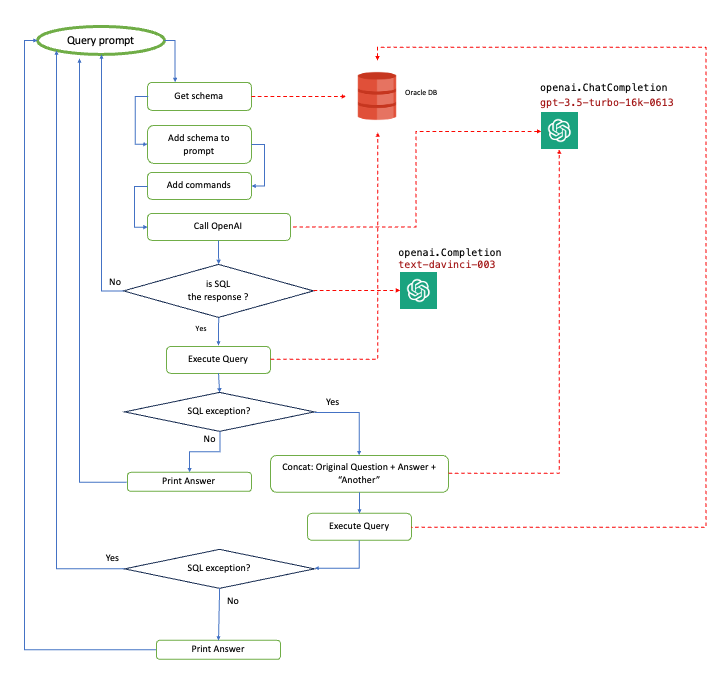
High-level flow
Models used in this implementation, as shown in the diagram, are:
- SQL check:
text-davinci-003 - NL2SQL:
gpt-3.5-turbo-16k-0613
Recently, the GPT-4 models for API have been released, too, but there are still some issues in access that have prevented me from using it; I’ll update this post as soon as I test it.
The most tricky part of implementation is the “add commands” step, in which they must be instructed on how to leverage the schema provided and return SQL code for Oracle DB. If you use the code generation as is, since the dataset available, which I presume has been trained for the OpenAI models based on MySQL or Postgres examples, the response will not be valid for the Oracle SQL. Another issue I’ve found is related to the “JOINs explosion,” i.e., the model tends to add complex JOIN to the SQL query, even if it is not necessary, and frequently provides a bad translation.
NOTE: From a security point of view, except for your DB Schema, nothing in terms of data will be exposed externally.
After several tests to add information to the original question, in order to instruct the model in response generation, the flow shown that adds a retry in case of SQL query failure has the best performance, augmenting the prompt with this schema:
# Give me only the SQL in the answer
### Oracle DB Schema:
# [SCHEMA Table 1]
...

# Give me in SQL for Oracle DB
# Use only Fields or Attributes present in Table
# Use JOIN only if needed
# Don't include the question in your response
Question to translate in Oracle SQL: ....
Where the sequence of [SCHEMA Table ..] is provided in this way:
# TABLE_NAME (FIELD_NAME(DATA_TYPE),....)
The most amazing behavior I’ve noticed is in the retry step. If SQL generates an exception related, usually, to a wrong field not existing in a table, the:
Error SQL: ORA-00904: "Table"."Field" : invalid identifier
Asking to solve the issue, for example, with the message like:
Retry
Fix error: Error SQL: ORA-00904: "D1"."HEAD_ID" : invalid identifier
# Give me only the SQL in the answer
# NO COMMENTS
# Fix without modifying DB schema
I haven’t got good results. Instead, with a prompt made by these messages:
messages=[
            {"role": "user", "content": [fullQuestion]},
            {"role": "assistant", "content": [answer]},
            {"role": "user", "content": "Another"},
        ],
Where for [fullQuestion] I mean, the augmented question provided by the user, the [answer] represents the previous SQL that triggered an exception, and simply adding “Another” the accuracy has been much better.
Demo
Just to have an idea of how it works, here is the tool I’ve written, called sqlai. This is an example of a session made on a db coming from the Spider dataset. The interaction is guided, showing first the list of tables available in the schema provided as an argument to the tool. If the SQL generated triggers an exception, there is one retry, as shown in the flow before.
Demo sqlai tool
Results
Asking simple questions to the Oracle HR sample schema, like:
get country ID for Country Argentina?
who has city in Roma in locations table?
give me the sum of Salary in Employees
I need first 5 locations
The translated SQLs have been pretty good. But for a more meaningful test, I’ve used a db included in the Spider dataset imported into the Oracle DB, the department_management. The import of this db, provided in SQLite code, is pretty easy: ask ChatGPT to convert SQL for you in Oracle SQL, adding the content of file: spider/database/department_management/schema.sql, in a question like:
translate to a Oracle SQL this SQLite code:
[schema.sql]
Testing on this schema, the sqlai tool fails on 2/16 queries, which represents 87% accuracy. I’ve started to test with a DB in the training dataset since, in this approach, we do not have a training phase, so it is reasonable to use the entire dataset to test the accuracy because it is unseen from the ML model.
The tool is able to translate questions like:
"What are the distinct creation years of the departments managed by
a secretary born in state 'Alabama'?"

SELECT DISTINCT T1.creation FROM department AS T1
JOIN management AS T2 ON T1.department_id = T2.department_id
JOIN head AS T3 ON T2.head_id = T3.head_id
WHERE T3.born_state = 'Alabama'
Or:
"Show the name and number of employees for the departments managed by heads whose temporary acting value is 'Yes'?"

SELECT T1.name , T1.num_employees FROM department AS T1
JOIN management AS T2 ON T1.department_id = T2.department_id
WHERE T2.temporary_acting = 'Yes'"
For sure, a reliable test should be based on the more than 8K samples available (7k train/ 1k validation), but this entails an extra effort in the development of a test suite able to compare query results coming from the text-to-SQL translation. However, since the score on the top performer based on ChatGPT is 85.3 %, I’m confident that it could get the same result on the entire dataset on an Oracle DB.
Conclusions
As the Text to SQL AI use case continues to thrive, it holds immense potential to revolutionize the way we interact with databases, unlocking a new era of accessibility and efficiency in data-driven decision-making. This paper delves into how it simply adapts LLM existing models capabilities on the Oracle Database within this exciting field, showcasing the significance of the Spider dataset as the backbone for evaluation and the impressive capabilities of cutting-edge APIs and services that could reshape the landscape of database query generation.
So, if you want to “talk“ with your Oracle DBs, overcoming the SQL barrier, now it’s feasible and opens enormous possibilities to leverage your data assets. If you want to try by yourself, in this paper, you have the core info needed; otherwise, don’t hesitate to contact me: I’ll release the code soon.
References
- Spider: “A Large-Scale Human-Labeled Dataset for Complex and Cross-Domain Semantic Parsing in Natural Language to SQL. B. Yu et al.” (2018).
@article{yu2018spider,
  title={Spider: A large-scale human-labeled dataset for complex and cross-domain semantic parsing and text-to-sql task},
  author={Yu, Tao and Zhang, Rui and Yang, Kai and Yasunaga, Michihiro and Wang, Dongxu and Li, Zifan and Ma, James and Li, Irene and Yao, Qingning and Roman, Shanelle and others},
  journal={arXiv preprint arXiv:1809.08887},
  year={2018}
}
- Spider “department_management” db data
- Oracle Database Sample Schemas 23c
- Code
- Installation doc
- HR Sample Schema
Disclaimer
The views expressed in this paper are my own and do not necessarily reflect the views of Oracle.
Published at DZone with permission of CORRADO DE BARI. See the original article here.
Opinions expressed by DZone contributors are their own.
Comments