

Agent Harness, Memory Indexing, and AI Governance in Test Automation
Learn how AI agent harnesses improve test automation through subagent orchestration, code indexing, tiered model routing, and governance.
Software teams are adopting AI agents to write, run, and repair tests faster than ever. The breakthrough is usually not the model alone. ChatGPT and Cursor can share the same underlying intelligence, yet one feels like a copy-and-paste assistant, while the other feels like a teammate that can edit files, run commands, and iterate until the job is done. The difference is the agent harness: the orchestration layer that wraps the model with instructions, tools, context, and guardrails so raw reasoning becomes reliable action.
In test automation, that gap matters even more. A failing scenario can produce thousands of lines of Playwright output, span page objects, step definitions, test data, and multiple environments. Dump all of that into a single long chat, and the model slows down, costs rise, and decisions get noisier. A well-designed harness treats the model as a planner, not a dump truck. It indexes the codebase so the agent can ask structural questions instead of reading entire files. It delegates test execution and file generation to smaller, isolated workers that return compact summaries. It validates credentials, environment profiles, and reference fixtures before a run starts, so failures are caught early instead of mislabeled as “broken locators.” And when something does break, it routes the failure through a governed path: diagnose, fix, audit the patch, re-run only what changed, report results in a form humans can act on.
This article walks through that architecture in practice: what an agent harness is, how memory and code indexing reduce token waste, why tiered model routing balances cost and quality, and how governance gates keep AI-assisted automation predictable rather than magical. Whether you are building on Cursor, Claude Code, or your own SDK integration, the pattern is the same. The model is the engine. The harness is what makes it drivable at scale.
Agent Harness
An agent harness is the software infrastructure that wraps around an AI model (like Claude, GPT-4) to turn it into an autonomous working agent. Harness acts more like an operating system, providing the model with memory, tools, execution environments, and guardrails to complete multi-step tasks in the real world
What the Harness Does
Harness handles three things:
- Instructions – system prompts, rules (like the CLAUDE.md), skills, and subagent definitions that shape behavior.
- Tools – file read/write, terminal, search, MCP servers, browser automation, etc.
- The loop – the model proposes an action → the harness executes it → results go back to the model → repeat until the task is done
Beyond that, a good harness also manages:
- Context – which files, docs, and tool outputs the model sees (and when to trim them)
- Orchestration – routing tasks to specialized subagents (planner vs. runner vs. reviewer)
- Safety boundaries – sandboxing, permissions, hooks
- Termination – knowing when the job is finished vs. stuck
What can a typical agent harness look like:
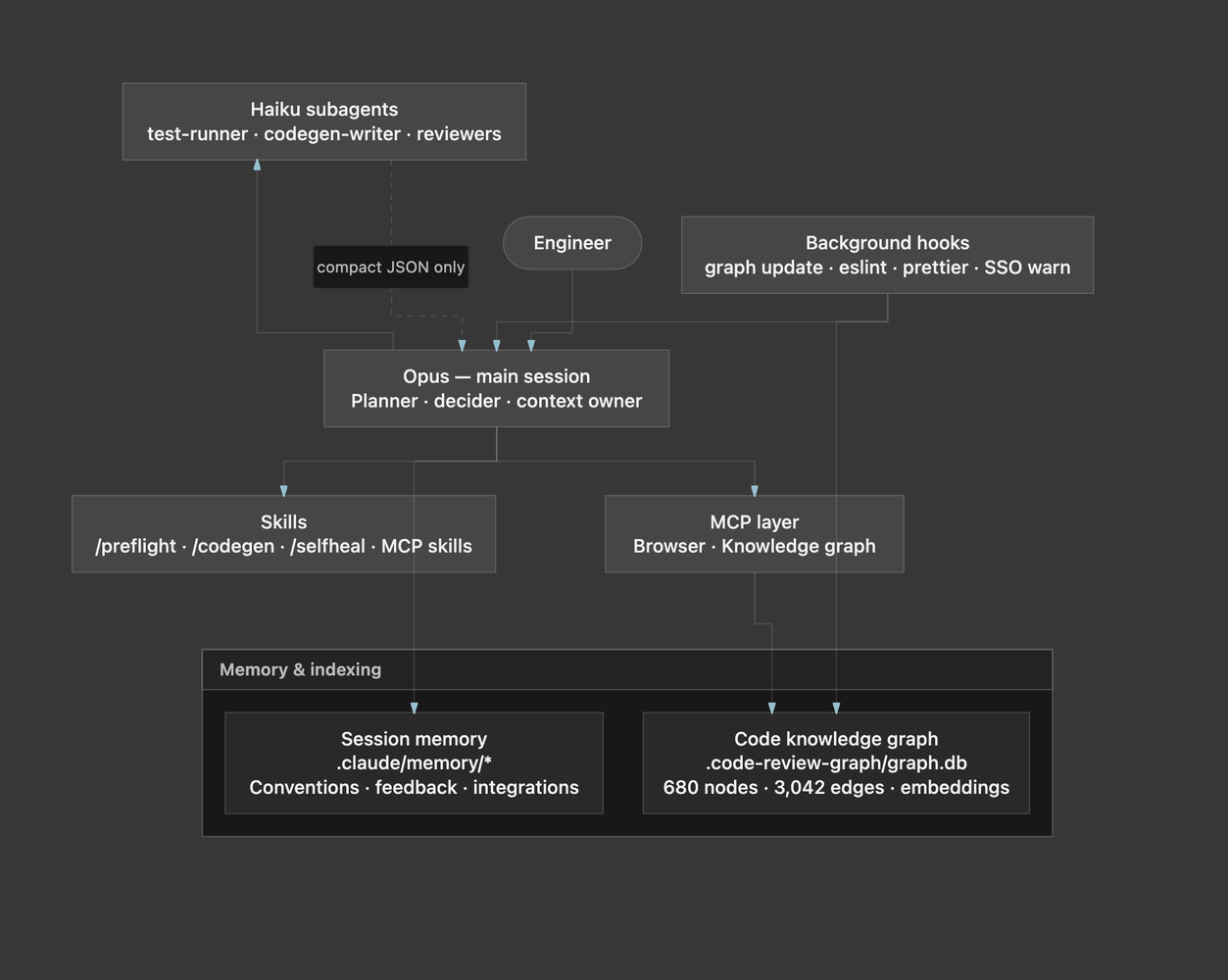
How Agent Harness Can Be Achieved
Agent harness cannot be achieved by a single library — it is a layered orchestration system built from Claude Code config files under .claude/, and CLAUDE.md as the control plane. The codebase needs to add rules for who does what, when to stop, and how information flows back.
- Control pane – CLAUDE.md + .claude/settings.json
- Skills – Orchestrated Workflow
- Subagents – constrained workers
- Infrastructure – MCP tools + hooks
Control Pane
Considering we are using Anthropic's ecosystem, the main session is always Opus (planning, judgment, MCP). Heavy but repetitive work goes to Haiku subagents in isolated contexts.
CLAUDE.md defines the routing table and hard rules — e.g., never run Playwright directly in Opus; always delegate to test-runner:
## Tiered model routing (Opus parent + Haiku runner)

This project pins the main Claude Code session to **Opus** (`.claude/settings.json` → `model: claude-opus-4-7`) and delegates **test execution only** to a Haiku subagent defined in `.claude/agents/test-runner.md`.
...
1. When the user says "run", "execute", "verify", or "re-run" a scenario id / tag / feature file → invoke the `test-runner` subagent. Do not run `npx playwright test` directly in the main session.
...
4. If `failure_category` is `auth`, `config`, `network`, or `other` → do **not** self-heal. Surface the JSON report and stop.
Skills: Orchestrated Workflows
Skills are markdown playbooks the Opus session follows. They encode multi-step pipelines with explicit gates.
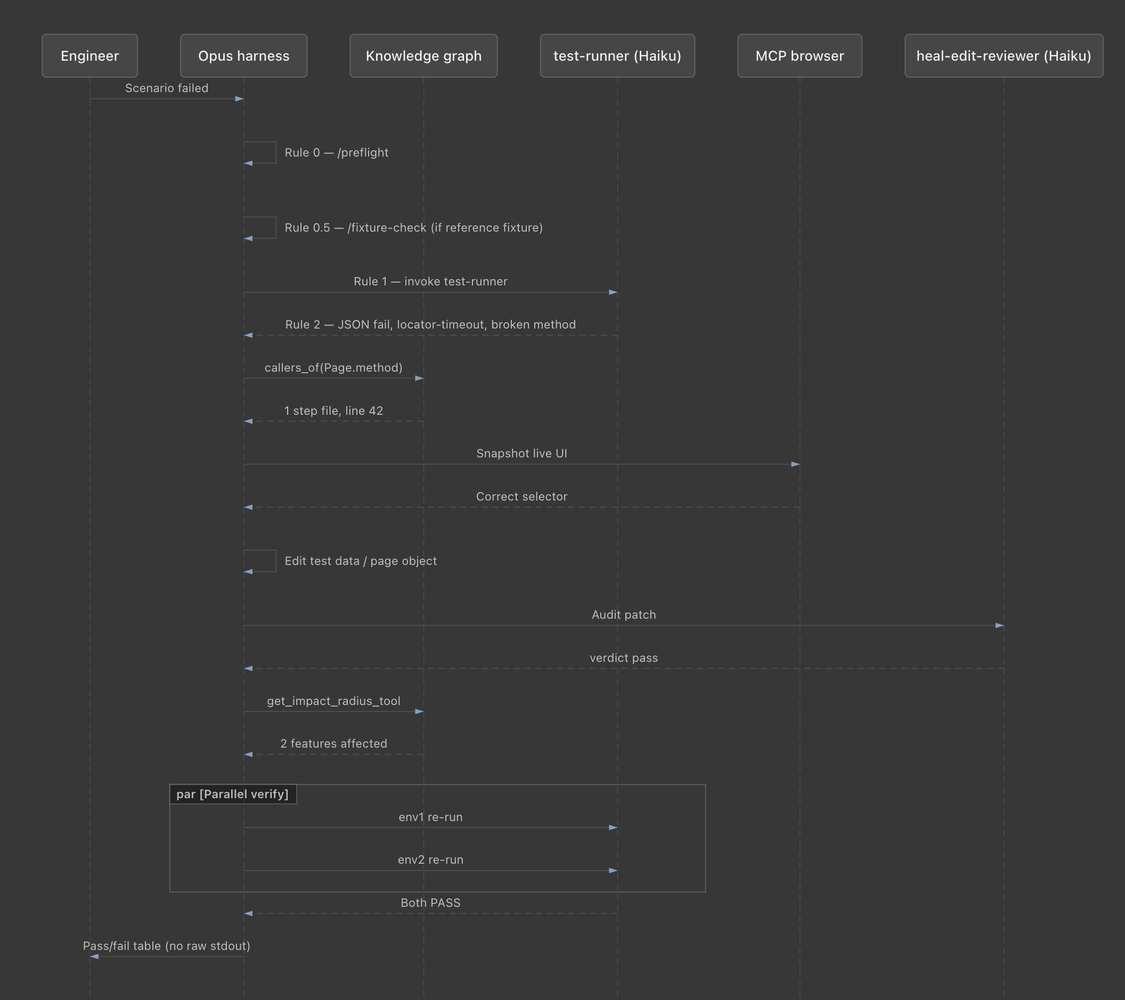
/selfheal — failure → fix → verify:
# Self-Heal Test

0. **Preflight.** Invoke `/preflight` ...
0.5. **Fixture check** ...
1. Run the failing scenario(s) via the `test-runner` subagent.
2. Inspect failures via MCP Playwright browser snapshot ...
...
5. **Invoke the `heal-edit-reviewer` subagent** ...
7. Identify **all affected scenarios** via `get_impact_radius_tool` ...
8. **Re-run in BOTH env1 and env2 — in parallel.**
/codegen — CSV → BDD with planner/renderer split:
0. **Preflight.** ...
2. **Plan reuse via graph.** ... `semantic_search_nodes_tool` ...
6. **Invoke `codegen-writer`** with the BuildSpec.
7. **Audit the `.feature` file** via `feature-reviewer` ...
8. **Audit the emitted `.ts` files** via `heal-edit-reviewer` ...
10. **Smoke-run one scenario.** ... via `test-runner` ...
Skills are the harness’s state machine — they define order, stop conditions, and which actor handles each step.
Subagents: Constrained Haiku Workers
Each subagent in .claude/agents/*.md is a specialized worker with a narrow tool set, fixed output schema, and hard prohibitions.
Example — test-runner:
---
name: test-runner
description: ... Does NOT self-heal, edit code, or modify any files.
model: claude-haiku-4-5
tools: Bash, Read, Glob
---
It must return strict JSON (~200 bytes) instead of flooding Opus with Playwright stdout:
{
  "status": "pass" | "fail",
  "exit_code": <number>,
  ...
  "failure_category": "locator-timeout" | ... | null,
  "stdout_tail": "<last ~30 lines of stdout/stderr>"
}
So the different subagents that the codebase harness are:
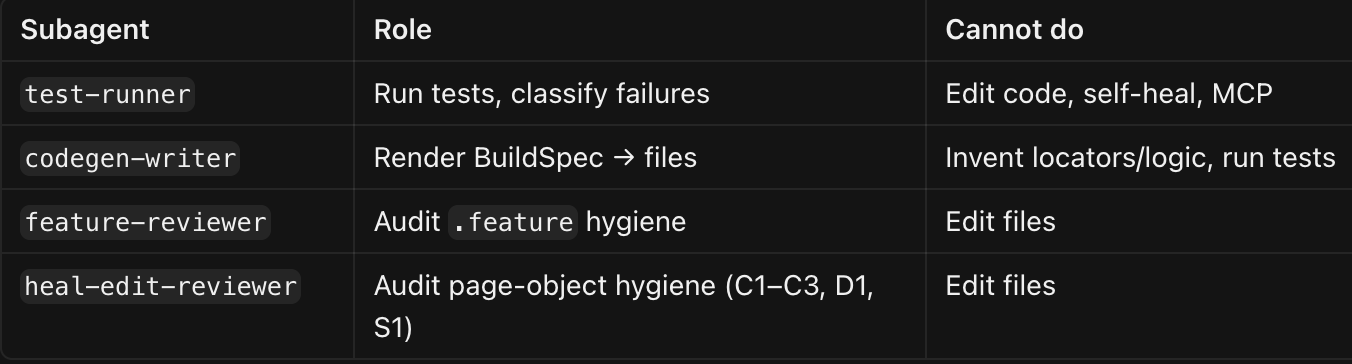
MCP servers extend what the harness can touch:
- Playwright browser – live UI inspection for locator discovery and debugging
- code-review-graph – structural + semantic code index (avoid reading full files)
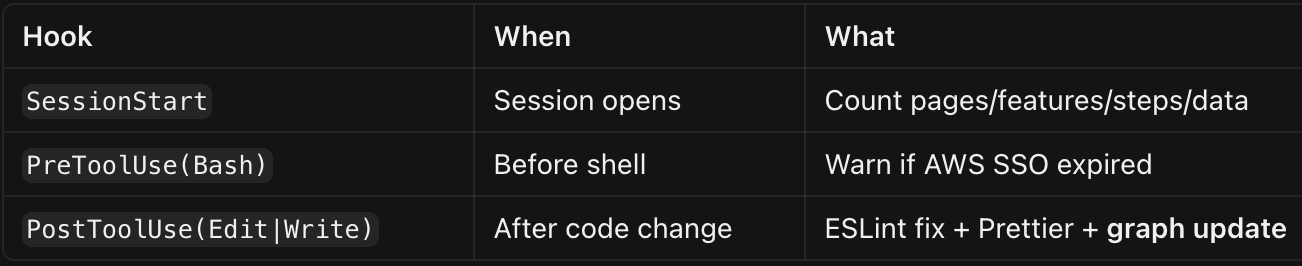
Hooks in .claude/settings.json run automatically outside the agent loop:
Memory and Indexing: Two Complementary Systems
“Memory indexing” here is not one thing. The project uses structural code indexing (knowledge graph) and persistent session memory (conventions/feedback). They solve different problems.
Code Knowledge Graph (Structural Indexing)
- Plugin: code-review-graph v1.8.x
- Update cadence: Incremental after every Edit/Write via PostToolUse hooks (~2s typical)
- What gets indexed (Tree-sitter AST parsing):
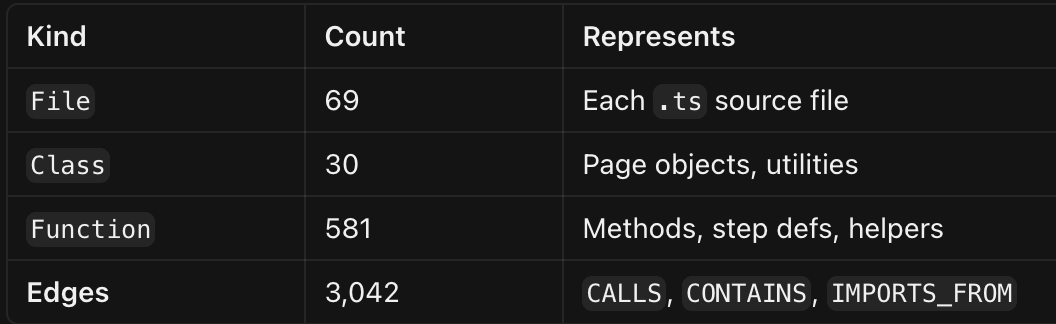
Each node stores: qualified name, file path, line range, parameters, return type, SHA-256 hash (for change detection).
Semantic layer: After embed_graph_tool, all ~611 code nodes get 384-dim vectors (all-MiniLM-L6-v2). This powers meaning-based search — e.g., CSV step "Validate that the username field is present" matches Username.verifyUsernameFieldVisible() even when names differ.
Primary MCP tools:
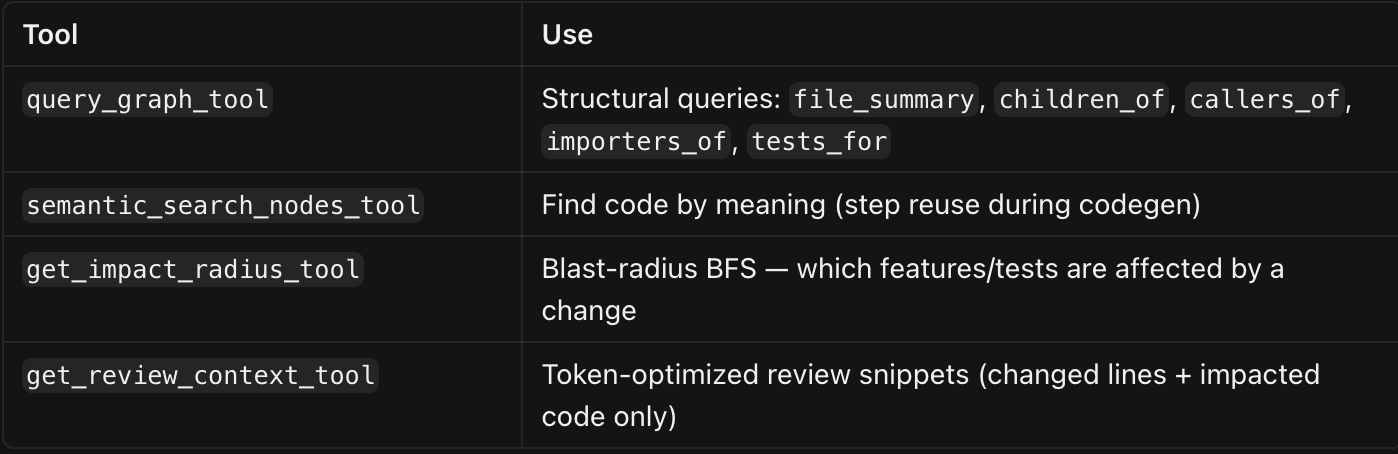
Graph-first rule (from CLAUDE.md): Query the graph before reading files. Read narrowly with offset/limit only when you need exact insertion points.
Session Memory (Governance & Conventions)
- Location: .claude/memory/ (initialized from .claude/memory-template/)
- Purpose: Persist decisions and feedback across sessions so the agent doesn’t re-learn conventions every time.
Documented memory categories include:

Session memory is always loaded alongside CLAUDE.md. It governs how the agent behaves; the knowledge graph governs what exists in the codebase.
How Indexing Is Used in Practice
During/codegen (CSV → BDD):
- Opus parses CSV → scenario titles and steps
- For each step: semantic_search_nodes_tool("<step text>") → reuse existing step or mark reuse: null
- Graph checks existing page object methods, fixtures, scenarios before emitting anything
- Haiku codegen-writer renders files from BuildSpec only — no judgment, no MCP
- Reviewers gate output before lint/smoke run
During/selfheal (locator failure):
- test-runner returns compact JSON (not raw stdout in Opus context)
- Opus scopes via graph: callers_of(brokenMethod) → read only affected steps
- MCP browser diagnoses live UI
- After fix: get_impact_radius_tool → re-run only affected scenarios
- Parallel test-runner on redama + fedramp
During reviews:
- /code-review-graph:review-delta — changes since last commit, target <800 tokens context
- /code-review-graph:review-pr — full PR with blast-radius and test-coverage gaps
Tiered Model Routing (Cost + Quality Governance)
The harness explicitly separates judgment from execution:
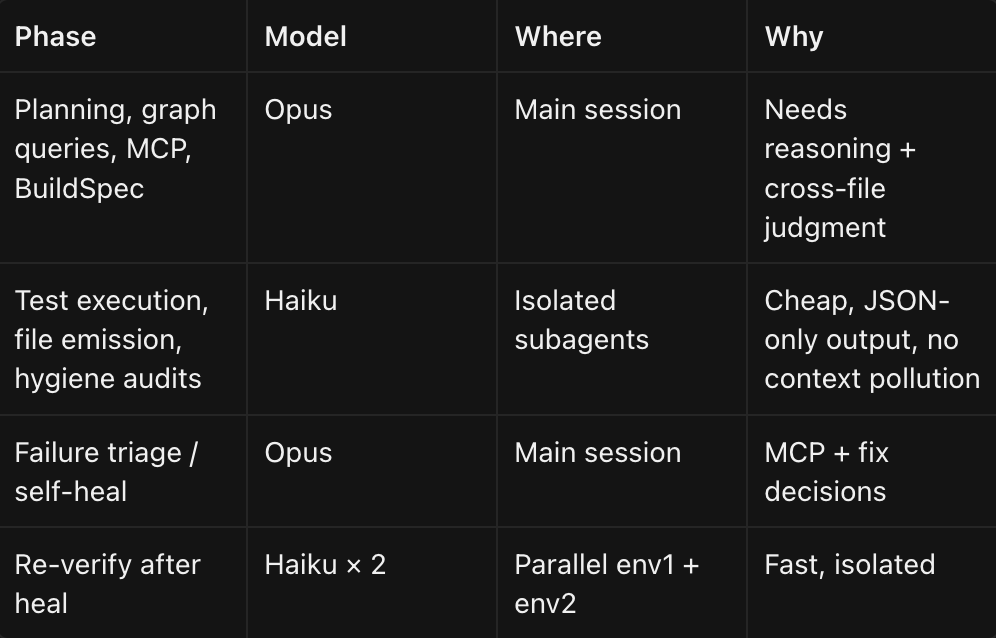
Haiku costs ~1/15th of Opus per token — so even when total system tokens rise slightly, the dollar bill drops.
Clean Governance of AI Usage
Preflight Gates (Fail Fast, Don't Self-Heal the Unhealable)
Governance here means predictable behavior, auditable outputs, and hard stops on bad patterns — not just “use AI less.”
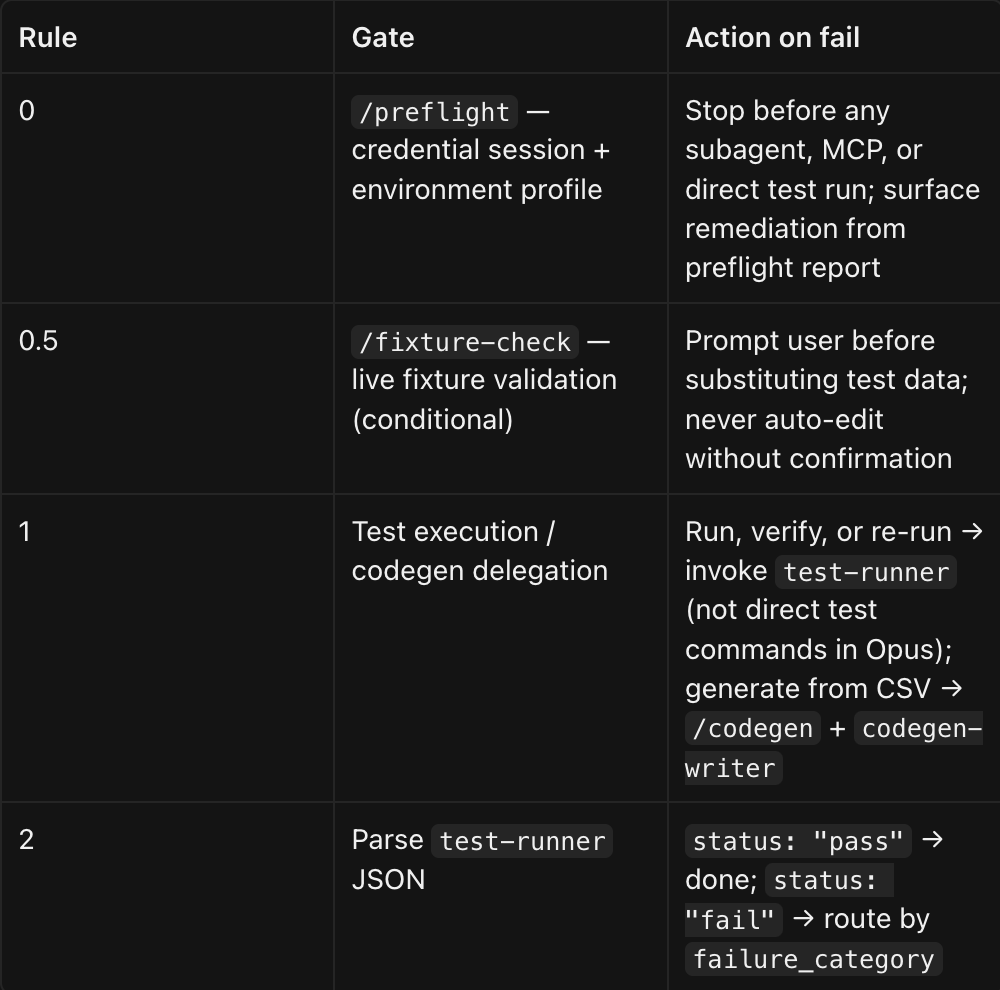
Separation of Concerns (No Guessing)
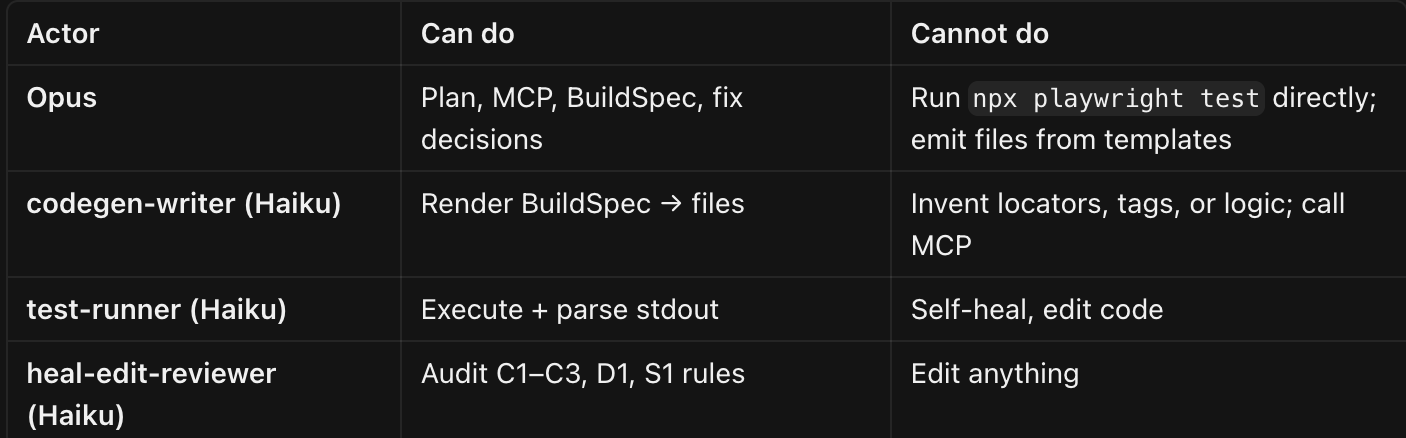
If spec is ambiguous → error JSON, not a guess
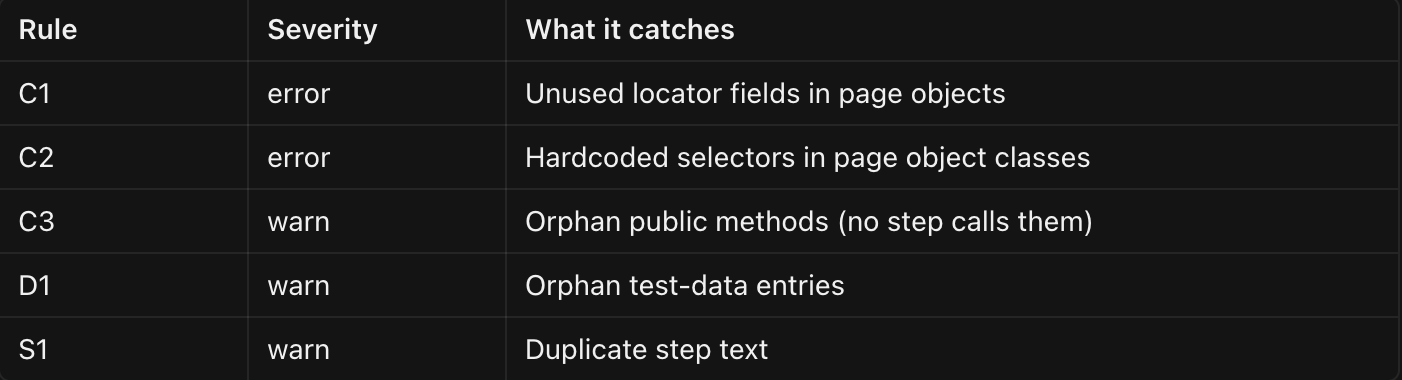
Hygiene Rules Enforced By Reviewers
Context Budget Rules (9 Rules in CLAUDE.md)
- Graph-first queries
- Narrow reads (offset/limit)
- Narrow MCP snapshots
- Delegate bulk I/O to subagents
- Trim subagent payloads (no stdout on pass)
- Reuse over rewrite (semantic search before authoring)
- Impact-radius re-runs (not whole suite)
- No echo-back of raw artifacts
- No cat/head/tail on source
Automatic Enforcement via Hooks
From .claude/settings.json:

Hooks run silently — governance without Opus token spend.
Output Contracts (Structured, Not Prose)
Every subagent returns strict JSON. The parent renders tables — never pastes raw JSON or full traces to the user. This is both UX governance and context governance.
Conclusion
The value of AI in test automation is not unlocked by choosing a larger model. It is unlocked by building a harness that knows what to delegate, what to validate, and what to keep out of the planner’s context.
At a high level, four principles hold across any stack:
Separate judgment from execution. One session plans, inspects, and decides. Specialized workers run tests, emit files, and audit changes — each with a narrow mandate and a structured response format. That boundary is what prevents a single conversation from drowning in logs and generated code.
Validate before you execute. Credential sessions, environment profiles, and reference fixtures should be checked at the door. Failures that originate in setup or data drift must not enter a self-heal loop designed for code and locator problems. Fail fast, report clearly, and reserve automated repair for repairable categories.
Index before you read. A maintained structural and semantic index turns broad codebase questions into small, precise queries. That reduces cost, speeds up triage, and keeps the planner focused on the lines that actually need to change.
Govern every exit path. Delegation rules, audit gates, bounded heal attempts, parallel multi-environment re-verification, and human confirmation on data substitution are not bureaucracy — they are the difference between a demo and a production workflow.
Taken together, these standards describe an agent harness that teams can adopt incrementally: start with an execution worker and structured JSON results, add preflight gates, introduce a code index, then layer in render and review workers as codegen volume grows. The model remains the reasoning engine throughout. The harness is what makes that reasoning trustworthy enough to run unattended, cheap enough to run often, and clear enough that engineers still know what happened when something goes wrong.
Opinions expressed by DZone contributors are their own.