

From Chatbot to Agent: Implementing the ReAct Pattern in Python
This article provides a raw Python implementation, moving beyond high-level frameworks to show exactly how the agentic loop works under the hood.
 ·
·
Join the DZone community and get the full member experience.
Join For FreeThe Problem: The Limits of a Static Chatbot
Most developers have mastered the basic LLM API call: send a prompt, get a completion. This works perfectly for summarization, sentiment analysis, or creative writing.
However, this architecture fails in real-world engineering scenarios where the application needs accurate, real-time information or needs to perform actions. If you ask a standard GPT-4 implementation: "What is the current stock price of Datadog multiplied by 1.5?", it will fail.
It fails because:
- Knowledge cutoffs: The model doesn't know today's stock price.
- Lack of math reliability: LLMs are probabilistic text generators, not calculators. They often hallucinate math.
To solve this, we need to move from a chatbot architecture to an agentic architecture.
The Solution: The ReAct Paradigm
ReAct (Reason and Act) is a prompting engineering technique that guides LLMs to generate both verbal reasoning traces and specific actions. Instead of immediately trying to answer, the model is instructed to "think out loud" about what it needs to do, execute a tool, observe the output, and repeat the process.
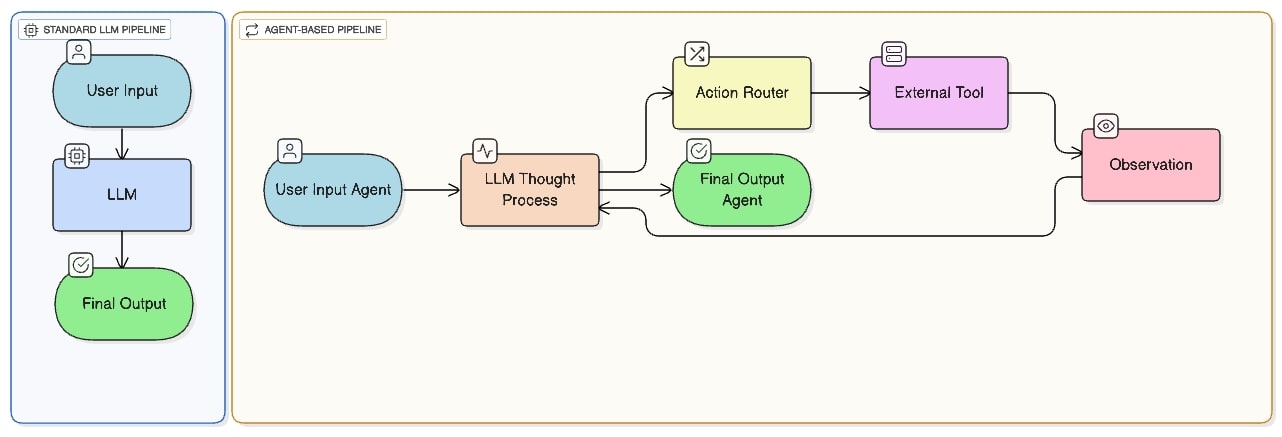
We are essentially moving the application flow from a linear request-response to an iterative loop.
Visualizing the Architecture Shift
Unlike a standard retrieval-augmented generation (RAG) pipeline, where data is fetched before the LLM call, an agent decides during execution what data it needs.
Step 1: The Baseline Failure
Let's define the problem. We want an AI to answer questions that require real-time data and math.
Here is standard Python code using OpenAI's client. It will fail to provide an accurate answer.
import os
from openai import OpenAI

# Setup OpenAI client (ensure OPENAI_API_KEY is set in environment)
client = OpenAI(api_key=os.environ.get("OPENAI_API_KEY"))

def query_llm(prompt):
    response = client.chat.completions.create(
        model="gpt-4o", # Or gpt-3.5-turbo
        messages=[
             {"role": "system", "content": "You are a helpful assistant."},
             {"role": "user", "content": prompt}
        ],
        temperature=0
    )
    return response.choices[0].message.content

# The difficult query
user_query = "What is the current stock price of Datadog (DDOG) multiplied by 1.5?"

print(f"User Query: {user_query}")
print("-" * 20)
print(query_llm(user_query))

# Output varies, but usually something like:
# "I cannot provide real-time stock prices as my data is not current..."
# Or worse, it hallucinates a number.
Step 2: Building the Agent Under the Hood
To turn this chatbot into an agent, we need three components:
- Tools: Python functions the LLM can "call".
- The ReAct prompt: Instructions that force the specific Thought/Action/Observation format.
- The execution loop: The engine that parses the LLM's response and executes the actions.
While frameworks like LangChain or Semantic Kernel abstract this, building it raw in Python is crucial for understanding the mechanics of AI engineering.
1. Define the Tools
We will define two simple tools: one to simulate fetching stock data, and one to perform accurate math.
# In a real app, this would hit an external API (e.g., Alpha Vantage or Yahoo Finance)
def get_stock_price(ticker: str) -> str:
    """Useful for when you need to find the current price of a stock."""
    print(f"[TOOL LOG] Fetching price for {ticker}...")
    # Simulating mock data for stability
    mock_data = {
        "DDOG": "120.50",
        "GOOGL": "175.20"
    }
    return mock_data.get(ticker.upper(), "Error: Ticker not found")

def calculator(expression: str) -> str:
    """Useful for performing math calculations. Input must be a valid python expression."""
    print(f"[TOOL LOG] Calculating: {expression}...")
    try:
        # WARNING: eval() is dangerous in production without strict sandboxing.
        # Using here for simplicity of tutorial.
        return str(eval(expression))
    except Exception as e:
        return f"Error calculating: {e}"

# Registry of available tools
tools_registry = {
    "get_stock_price": get_stock_price,
    "calculator": calculator
2. The ReAct Prompt
This is the most critical part. We must explicitly tell the LLM the available tools and the exact format it must follow.
REACT_SYSTEM_PROMPT = """
You are an agent designed to answer questions requiring external information and math.
You have access to the following tools:

1. get_stock_price(ticker: str): Useful for when you need to find the current price of a stock.
2. calculator(expression: str): Useful for performing math calculations.

Use the following format rigorously:

Question: the input question you must answer
Thought: you should always think about what to do next.
Action: the action to take, should be one of [get_stock_price, calculator]
Action Input: the input to the action, e.g., DDOG or 100 * 1.5
Observation: the result of the action
... (this Thought/Action/Action Input/Observation can repeat N times)
Thought: I now know the final answer
Final Answer: the final answer to the original input question

Begin!
"""
3. The Execution Loop (The Engine)
This loop manages the state. It sends the conversation history to the LLM, uses regex to find the Action: the LLM wants to take, executes the corresponding Python function, appends the output as an Observation:, and runs the loop again.
import re

def agent_execution_loop(user_query):
    # Initialize conversation history with the instructions
    history = [
        {"role": "system", "content": REACT_SYSTEM_PROMPT},
        {"role": "user", "content": f"Question: {user_query}"}
    ]

    max_steps = 5 # Safety mechanism to prevent infinite loops
    step_count = 0

    while step_count < max_steps:
        step_count += 1

        # 1. Call LLM with current history
        response = client.chat.completions.create(
            model="gpt-4o",
            messages=history,
            temperature=0, # Keep temp low for deterministic actions
            stop=["Observation:"] # Stop generating before it tries to fake an observation
        )
        llm_output = response.choices[0].message.content
        print(f"--- Step {step_count} LLM Output ---")
        print(llm_output)

        # Append LLM's thought process to history
        history.append({"role": "assistant", "content": llm_output})

        # 2. Check for Final Answer
        if "Final Answer:" in llm_output:
            return llm_output.split("Final Answer:")[1].strip()

        # 3. Parse Action and Input using Regex
        # Looking for patterns like: Action: get_stock_price\nAction Input: DDOG
        action_match = re.search(r"Action: (\w+)", llm_output)
        input_match = re.search(r"Action Input: (.+)", llm_output)

        if action_match and input_match:
            tool_name = action_match.group(1)
            tool_input = input_match.group(1).strip()

            # 4. Execute Tool
            if tool_name in tools_registry:
                tool_function = tools_registry[tool_name]
                observation = tool_function(tool_input)

                observation_message = f"Observation: {observation}"
                print(f"--- Step {step_count} Output ---")
                print(observation_message)

                # Append observation to history so the LLM sees it next turn
                history.append({"role": "user", "content": observation_message})
            else:
                 history.append({"role": "user", "content": f"Observation: Error: Tool {tool_name} not found."})

    return "Error: Maximum steps reached without final answer."
Running the Agent
Let's run the same query that failed earlier through our new agent loop.
# The difficult query again
user_query = "What is the current stock price of Datadog (DDOG) multiplied by 1.5?"

print(f"Starting ReAct Agent for: {user_query}\n")
final_result = agent_execution_loop(user_query)

print("\n" + "="*30)
print(f"FINAL RESULT: {final_result}")
The Output Trace
When you run this, you will see the agent "thinking" and executing step by step:
Starting ReAct Agent for: What is the current stock price of Datadog (DDOG) multiplied by 1.5?

--- Step 1 LLM Output ---
Thought: The user wants to know the current stock price of Datadog (DDOG) multiplied by 1.5. First, I need to find the current stock price of DDOG.
Action: get_stock_price
Action Input: DDOG

--- Step 1 Output ---
[TOOL LOG] Fetching price for DDOG...
Observation: 120.50

--- Step 2 LLM Output ---
Thought: I have the current stock price of DDOG, which is 120.50. Now I need to multiply this value by 1.5 to get the final answer.
Action: calculator
Action Input: 120.50 * 1.5

--- Step 2 Output ---
[TOOL LOG] Calculating: 120.50 * 1.5...
Observation: 180.75

--- Step 3 LLM Output ---
Thought: I have performed the calculation. The current stock price of DDOG (120.50) multiplied by 1.5 is 180.75.
Final Answer: The current stock price of Datadog (DDOG) multiplied by 1.5 is 180.75.

==============================
FINAL RESULT: The current stock price of Datadog (DDOG) multiplied by 1.5 is 180.75.
==============================
Key Engineering Considerations
Moving from this tutorial code to production requires addressing several challenges:
- Robust parsing: The regex used here (
r"Action: (\w+)") is brittle. In production, use more robust parsing or, better yet, OpenAI's native "Function Calling" (Tools API), which returns structured JSON instead of unstructured text that needs parsing. - Safety and sandboxing: Never use
eval()in production. Math tools should use libraries likenumexpr. Other tools intended to perform actions (like database writes or API posts) require strict permission layers. - Context window management: The
historylist grows with every step. For long-running tasks, you need strategies to summarize previous steps or eject older observations to stay within token limits. - Loop prevention: Always include a
max_stepscounter to prevent a confused agent from burning through your API credits in an infinite loop.
Conclusion
The ReAct pattern is a fundamental building block of agentic AI systems. By forcing the model to verbalize its reasoning and grounding its answers in external tool outputs, developers can overcome the inherent limitations of static LLMs. While modern frameworks handle the heavy lifting, understanding the raw "prompt-and-loop" architecture is essential for debugging and optimizing complex AI behaviors.
Opinions expressed by DZone contributors are their own.
Comments