

Setting Up Claude Code With Ollama: A Guide
Claude Code is a terminal-based AI coding assistant by Anthropic that can integrate with Ollama for local model inference.
 CORE
·
CORE
·
Nowadays, there are quite a lot of AI coding assistants. In this blog, you will take a closer look at Claude Code, a terminal-based AI coding assistant. Since mid January 2026, Claude Code can also be used in combination with Ollama, a local inference engine. Enjoy!
Introduction
There are many AI models and also many AI coding assistants. Which one to choose is a hard question. It also depends on whether you run the models locally or in the cloud. When running locally, Qwen3-Coder is a very good AI model to be used for programming tasks. In previous posts, DevoxxGenie, a JetBrains IDE plugin, was often used as an AI coding assistant. DevoxxGenie is nicely integrated within the JetBrains IDEs. But it is also a good thing to take a look at other AI coding assistants. In a previous blog, Qwen Code was used; now it is time to take a look at Claude Code.
Claude Code is the popular AI coding assistant from Anthropic. Since mid January 2026, Claude Code can be used in combination with Ollama, a local inference engine. Using local inference engines, you are 100% sure your data is not shared with third parties like Anthropic. In contrast to Qwen Code, which is based on Gemini CLI, Claude Code is not entirely open source; the core executable is closed source.
In this blog, you will take a closer look at Claude Code, how to configure it, and how to use it.
Sources used in this blog can be found on GitHub.
Prerequisites
Prerequisites for reading this blog are:
- Some experience with AI coding assistants.
- If you want to compare to DevoxxGenie, take a look at a previous post.
- You will need to have at least Ollama v0.14.0 installed.
Installation
Installation instructions for Claude Code can be found here.
Execute the following bash script.
curl -fsSL https://claude.ai/install.sh | bashSetup
Claude Code is installed now, but first, some configuration needs to be done. See also the official documentation for Claude Code.
1. Disable Data Usage
By default, Claude Code is monitoring data usage. It is not very clear whether this applies only when you use cloud models or cloud APIs. Nevertheless, it is advised to disable this by means of an environment variable. You can configure settings at different scopes: there is a managed, user, project, and local scope. For convenience, the user scope is used here.
Navigate to your home directory, and you will see a .claude directory. Create a file settings.json in this .claude directory. Disable the usage statistics. A full list of the environment variables can be found here.
{
  "env": {
    "CLAUDE_CODE_DISABLE_NONESSENTIAL_TRAFFIC": "1"
  }
}
Do note that this will also disable the auto-updates. In order to avoid this, you can disable all other traffic environment variables.
{
  "env": {
    "DISABLE_TELEMETRY": "1",
    "DISABLE_BUG_COMMAND": "1",
    "DISABLE_ERROR_REPORTING": "1"
  }
}
2. Configure Model
In this blog, a local model setup is used, using Ollama as the inference engine and Qwen3-Coder running as a local model. In order to create the setup for this, add the following to the settings.json file.
{
  "env": {
    "CLAUDE_CODE_DISABLE_NONESSENTIAL_TRAFFIC": "1",
    "ANTHROPIC_AUTH_TOKEN": "ollama",
    "ANTHROPIC_API_KEY": "",
    "ANTHROPIC_BASE_URL": "http://localhost:11434"
  }
}
And if you want to set the default model, you can do so as follows.
{
  "model": "qwen3-coder:30b",
  "env": {
    "CLAUDE_CODE_DISABLE_NONESSENTIAL_TRAFFIC": "1",
    "ANTHROPIC_AUTH_TOKEN": "ollama",
    "ANTHROPIC_API_KEY": "",
    "ANTHROPIC_BASE_URL": "http://localhost:11434"
  }
}
3. System Prompt
It is a good practice to add a system prompt to your AI coding assistant. You can add some instructions for the model in this system prompt. You can add it by creating a CLAUDE.md file in the .claude directory. This will ensure a default system prompt for all your projects. If you want to use a more specific system prompt for a particular repository, you can add a CLAUDE.md file in the repository itself.
If you are developing in Java, Spring Boot, etc., the following system prompt can be used as an example.
You are an expert code assistant for a professional Java developer. All code examples, reviews, and explanations must be idiomatic to the following tech stack:
* Backend: Java (latest LTS), Spring Boot (latest stable), PostgreSQL.
* Frontend: Vue.js (latest stable), Angular (latest stable).
* Follow modern best practices for RESTful APIs, object-relational mapping, unit testing (JUnit), and frontend-backend integration.
* Prefer Maven for Java dependency management.
* Whenever database code is required, use PostgreSQL syntax and conventions.
* For frontend, use Vue composition API where applicable.
* Always explain your reasoning, and reference documentation when giving architectural advice.
* When unsure, ask clarifying questions before producing code.
4. Default Editor
The default editor seems to be Visual Studio Code, but you can change this. In order to change it, you need to override the EDITOR environment variable. In the example below, it is set to vim. Add this to your .bashrc file.
export EDITOR='vim'5. Fix Slow Inference
Claude Code prepends and adds a Claude Code Attribution header, which invalidates the KV Cache, making inference 90% slower with local models. See this article for more information. You can solve this by setting the CLAUDE_CODE_ATTRIBUTION_HEADER to zero in the settings.json.
{
  "model": "qwen3-coder:30b",
  "env": {
    "CLAUDE_CODE_DISABLE_NONESSENTIAL_TRAFFIC": "1",
    "CLAUDE_CODE_ATTRIBUTION_HEADER" : "0",
    "ANTHROPIC_AUTH_TOKEN": "ollama",
    "ANTHROPIC_API_KEY": "",
    "ANTHROPIC_BASE_URL": "http://localhost:11434"
  }
}
First Startup
If you haven't done it already, now is the time to clone the GitHub repository. Be sure to check out the claude-code branch. If you want to execute the commands from this blog, you first delete the CLAUDE.md file and the src/test directory.
Claude Code is a terminal application, so you have some different options here:
- Open a terminal and navigate to the repository.
- Open your IDE, e.g., IntelliJ, and open a terminal from within IntelliJ (ALT+F12).
Do note that using the IntelliJ terminal will react differently than expected to certain commands. It is advised to use a regular terminal instead.
Start Claude Code by typing claude in the terminal. The first time you start Claude Code in a repository, it will ask you whether you trust this folder.
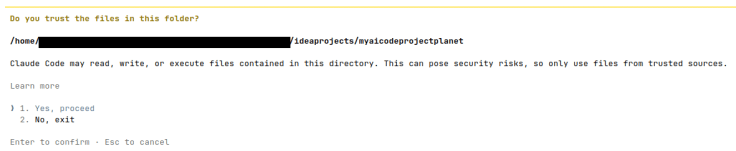
After confirmation, the Claude prompt is shown.
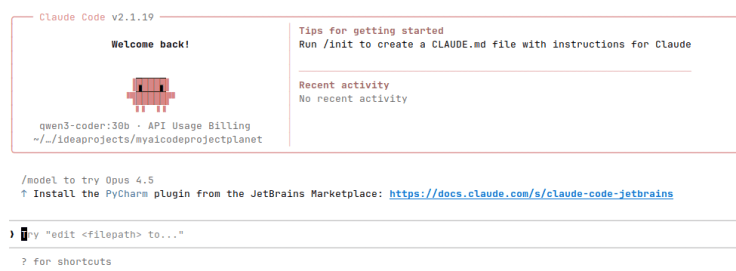
A first simple command is to show the model that is loaded. As expected, Qwen3-Coder is loaded.

When you want to show the memory content, you are asked to show the user or project settings. When you choose a user, the CLAUDE.md file is opened.
Now, in order to verify whether the connection with the model is functioning correctly, just enter a simple prompt like how are you? The response is the following:
● Hello! I'm functioning properly and ready to help with your Java development tasks. I'm set up to assist with Spring Boot backend development, PostgreSQL database integration, and Vue.js/Angular frontend work as
  specified in your preferences.

  Is there something specific you'd like me to help you with today? For example, I can help with:
  - Spring Boot application development
  - PostgreSQL database queries or schema design
  - Java code reviews
  - Vue.js/Angular frontend integration
  - RESTful API design
  - Unit testing with JUnit

  What would you like to work on?
No tasks found

● I don't see any existing tasks in the task list. Would you like me to help you with a specific Java development task? I'm ready to assist with Spring Boot backend development, PostgreSQL database work, or
  Vue.js/Angular frontend integration as per your preferences.

  You can ask me to:
  - Review or improve Java code
  - Help with Spring Boot application development
  - Assist with PostgreSQL database queries or schema design
  - Help with RESTful API implementation
  - Assist with unit testing using JUnit
  - Help with frontend-backend integration

  What would you like to work on today?
Create a Test
Let's continue with something useful and create a test for the CustomersController.
Using the @ character, you can add files to the context. When typing, a search is executed, and using the arrows, you can easily select the file you need. Using the tab, you select the file. After that, you can complete the prompt. The prompt used is:
@src/main/java/com/mydeveloperplanet/myaicodeprojectplanet/controller/CustomersController.java

Write a unit test for this code using JUnit.
Use WebMvcTest.
Use MockMvc.
Use AssertJ assertions.

Add the test in this repository
Claude Code starts analyzing the file and writes the test.
Claude Code will ask you whether it may execute bash.
The test created can be seen below. Just like with Qwen Coder, a similar error occurs. A type OpenAPICustomer is used, which does not exist.
package com.mydeveloperplanet.myaicodeprojectplanet.controller;

import com.mydeveloperplanet.myaicodeprojectplanet.model.Customer;
import com.mydeveloperplanet.myaicodeprojectplanet.openapi.model.Customer;
import com.mydeveloperplanet.myaicodeprojectplanet.service.CustomerService;
import org.junit.jupiter.api.BeforeEach;
import org.junit.jupiter.api.Test;
import org.springframework.beans.factory.annotation.Autowired;
import org.springframework.boot.test.autoconfigure.web.servlet.WebMvcTest;
import org.springframework.boot.test.mock.mockito.MockBean;
import org.springframework.http.MediaType;
import org.springframework.test.web.servlet.MockMvc;

import java.util.Arrays;
import java.util.List;
import java.util.Optional;

import static org.mockito.ArgumentMatchers.any;
import static org.mockito.Mockito.*;
import static org.springframework.test.web.servlet.request.MockMvcRequestBuilders.*;
import static org.springframework.test.web.servlet.result.MockMvcResultMatchers.*;

@WebMvcTest(controllers = CustomersController.class)
class CustomersControllerTest {

    @Autowired
    private MockMvc mockMvc;

    @MockBean
    private CustomerService customerService;

    private Customer customer1;
    private Customer customer2;
    private OpenAPICustomer openAPICustomer1;
    private OpenAPICustomer openAPICustomer2;

    @BeforeEach
    void setUp() {
        customer1 = new Customer(1L, "John", "Doe");
        customer2 = new Customer(2L, "Jane", "Smith");

        openAPICustomer1 = new OpenAPICustomer()
                .id(1L)
                .firstName("John")
                .lastName("Doe");

        openAPICustomer2 = new OpenAPICustomer()
                .id(2L)
                .firstName("Jane")
                .lastName("Smith");
    }

    @Test
    void customersGet_shouldReturnAllCustomers() throws Exception {
        // Given
        List<Customer> customers = Arrays.asList(customer1, customer2);
        when(customerService.getAllCustomers()).thenReturn(customers);

        // When & Then
        mockMvc.perform(get("/customers"))
                .andExpect(status().isOk())
                .andExpect(jsonPath("$.length()").value(2))
                .andExpect(jsonPath("$[0].id").value(1L))
                .andExpect(jsonPath("$[0].firstName").value("John"))
                .andExpect(jsonPath("$[0].lastName").value("Doe"))
                .andExpect(jsonPath("$[1].id").value(2L))
                .andExpect(jsonPath("$[1].firstName").value("Jane"))
                .andExpect(jsonPath("$[1].lastName").value("Smith"));

        verify(customerService, times(1)).getAllCustomers();
    }

    @Test
    void customersPost_shouldCreateNewCustomer() throws Exception {
        // Given
        when(customerService.createCustomer(any(Customer.class))).thenReturn(customer1);

        // When & Then
        mockMvc.perform(post("/customers")
                        .contentType(MediaType.APPLICATION_JSON)
                        .content("{\"firstName\":\"John\",\"lastName\":\"Doe\"}"))
                .andExpect(status().isCreated());

        verify(customerService, times(1)).createCustomer(any(Customer.class));
    }

    @Test
    void customersIdGet_shouldReturnCustomerWhenFound() throws Exception {
        // Given
        when(customerService.getCustomerById(1L)).thenReturn(Optional.of(customer1));

        // When & Then
        mockMvc.perform(get("/customers/{id}", 1L))
                .andExpect(status().isOk())
                .andExpect(jsonPath("$.id").value(1L))
                .andExpect(jsonPath("$.firstName").value("John"))
                .andExpect(jsonPath("$.lastName").value("Doe"));

        verify(customerService, times(1)).getCustomerById(1L);
    }

    @Test
    void customersIdGet_shouldReturnNotFoundWhenCustomerNotFound() throws Exception {
        // Given
        when(customerService.getCustomerById(1L)).thenReturn(Optional.empty());

        // When & Then
        mockMvc.perform(get("/customers/{id}", 1L))
                .andExpect(status().isNotFound());

        verify(customerService, times(1)).getCustomerById(1L);
    }

    @Test
    void customersIdPut_shouldUpdateCustomer() throws Exception {
        // Given
        when(customerService.updateCustomer(anyLong(), any(Customer.class))).thenReturn(customer1);

        // When & Then
        mockMvc.perform(put("/customers/{id}", 1L)
                        .contentType(MediaType.APPLICATION_JSON)
                        .content("{\"firstName\":\"John\",\"lastName\":\"Doe\"}"))
                .andExpect(status().isOk());

        verify(customerService, times(1)).updateCustomer(anyLong(), any(Customer.class));
    }

    @Test
    void customersIdDelete_shouldDeleteCustomer() throws Exception {
        // When & Then
        mockMvc.perform(delete("/customers/{id}", 1L))
                .andExpect(status().isNoContent());

        verify(customerService, times(1)).deleteCustomer(1L);
    }
}
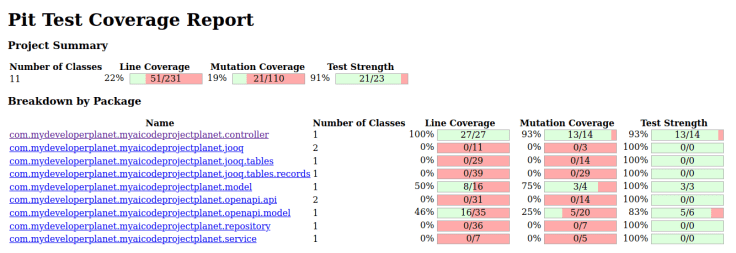
When you fix the import issue, the test is successful. When you generate the mutation test results using mvn verify and check the report in the target/pit-reports directory, you notice that this test has a line coverage of 100% and a mutation coverage of 93%, which is quite good. Generating this test with the Claude models of Anthropic results in similar numbers. The generated test using Qwen Coder also has similar results.
Commands
Claude Code supports commands. This is a convenient way of interacting with the model.
Command /clear clears the history.
When using the /init command, Claude Code analyses your repository and creates a CLAUDE.md file in your repository with project-specific information. Executing this command for this repository results in the following CLAUDE.md file. The result is really good.
# CLAUDE.md

This file provides guidance to Claude Code (claude.ai/code) when working with code in this repository.

## Project Overview

This is a Spring Boot 3.5 application that implements a RESTful API for managing customer data. The application uses:

- Spring Boot 3.5 with Java 21
- PostgreSQL database with Liquibase for database migrations
- JOOQ for database access
- OpenAPI/Swagger for API documentation
- Maven for build management

## Architecture

The application follows a layered architecture pattern:

1. **Controller Layer**: REST endpoints in `CustomersController`
2. **Service Layer**: Business logic in `CustomerService` and `CustomerServiceImpl`
3. **Repository Layer**: Database access in `CustomerRepository` using JOOQ
4. **Model Layer**: Domain objects in `Customer` class
5. **OpenAPI Layer**: Generated API interfaces and models from OpenAPI spec

## Key Files

- `src/main/java/com/mydeveloperplanet/myaicodeprojectplanet/MyAiCodeProjectPlanetApplication.java` - Main application class
- `src/main/java/com/mydeveloperplanet/myaicodeprojectplanet/controller/CustomersController.java` - REST endpoints
- `src/main/java/com/mydeveloperplanet/myaicodeprojectplanet/service/CustomerServiceImpl.java` - Business logic
- `src/main/java/com/mydeveloperplanet/myaicodeprojectplanet/repository/CustomerRepository.java` - Database operations
- `src/main/resources/db/changelog/migration/db.changelog-1.xml` - Database schema definition
- `src/main/resources/static/customers.yaml` - OpenAPI specification

## Development Commands

### Building
- `./mvnw clean compile` - Compile the application
- `./mvnw clean package` - Build a jar file
- `./mvnw clean install` - Install dependencies and build

### Running Tests
- `./mvnw test` - Run all tests
- `./mvnw test -Dtest=CustomersControllerTest` - Run specific test class
- `./mvnw test -Dtest=CustomersControllerTest#customersGet_shouldReturnAllCustomers` - Run specific test method

### Running Application
- `./mvnw spring-boot:run` - Run the application
- `./mvnw spring-boot:run -Dspring-boot.run.profiles=dev` - Run with specific profile

### Code Generation
- `./mvnw generate-sources` - Regenerate JOOQ and OpenAPI code
- `./mvnw compile` - Compile with generated code

### Mutation Testing
- `./mvnw org.pitest:pitest-maven:mutationCoverage` - Run mutation tests

## Database Setup

The application uses Liquibase for database migrations. The database schema is defined in `src/main/resources/db/changelog/migration/db.changelog-1.xml`. The application will automatically create the database schema on startup.

## API Endpoints

The API provides standard CRUD operations for customers:
- GET `/customers` - Get all customers
- POST `/customers` - Create a new customer
- GET `/customers/{id}` - Get a specific customer
- PUT `/customers/{id}` - Update a customer
- DELETE `/customers/{id}` - Delete a customer

## Key Implementation Details

1. The application uses JOOQ for type-safe database access
2. OpenAPI specification is used to generate API interfaces and models
3. The application uses Spring Boot's auto-configuration for database setup
4. Tests are written using Spring Boot's test framework with MockMvc for web layer testing
A really nice feature is the option to create custom commands with predefined prompts. Very useful when you want to use prompts repetitively, and you can share them easily with someone else.
Create in the .claude directory of your home directory a directory commands. Using extra directories inside this commands directory, you can create namespaces. As an example, the following directory tree.
$ tree
├── general
│   ├── explain.md
│   └── javadoc.md
├── review
│   ├── extended.md
│   └── simple.md
└── test
    ├── controller.md
    ├── integration.md
    ├── repositoryjooq.md
    └── service.md
The controller.md file contains the prompt you used for creating the test.
Write a unit test for this code using JUnit.
Use WebMvcTest.
Use MockMvc.
Use AssertJ assertions.
MCP
With Model Context Protocol (MCP) servers, you can enhance the capabilities of the model.
The configuration of an MCP server can be added to the .claude.json file in your home directory. The Context7 MCP server can be added as follows.
"mcpServers": {
    "context7": {
      "type": "stdio",
      "command": "npx",
      "args": ["-y", "@upstash/context7-mcp"],
      "env": {}
    }
  }
Start Claude Code in the repository and verify whether the MCP server is configured correctly.
/mcp
───────────────────────────────────────────────────────────────────
 Manage MCP servers
 1 server

   User MCPs (/home/<userdir>/.claude.json)
 ❯ context7 · ✔ connected

 https://code.claude.com/docs/en/mcp for help
Remove the previously created test, add the CustomersController and use the following prompt.
@src/main/java/com/mydeveloperplanet/myaicodeprojectplanet/controller/CustomersController.java /test:controller create the test in this repository, I am using spring boot 3.5, use the context7 mcp server to retrieve
  uptodate documentation, do not use deprecated functionality
This should result in invoking the Context7 MCP server, and as a result MockBean should not be used in the test, but MockitoBean should be used instead.
However, the Context7 MCP server is invoked, but still the test is generated with @MockBean. When you check the source of Context7, which is consulted, you will notice that neither @MockBean or @MockitoBean is mentioned. This works already better than Qwen Coder, where the Context7 MCP server was not invoked at all, even after many attempts.
Conclusion
Claude Code offers quite a few nice features. There is a lot more to discover, but the first impressions are good. It is also good to experiment with other AI coding assistants now and then, in order to see how they compare to the ones you are using. Compared to Qwen Coder, Claude Code seems to do a better job.
Published at DZone with permission of Gunter Rotsaert. See the original article here.
Opinions expressed by DZone contributors are their own.