

Claude Code Superpowers: The 5-Tool Stack That Ends Limits and Context Amnesia
Featured guide: Turn Claude Code into a continuous coding partner with OmniRoute, claude-mem, Headroom, official Claude Code Setup, and Task Observer.
 CORE
·
CORE
·
Join the DZone community and get the full member experience.
Join For FreeClaude Code has changed how many people write software. You type in the terminal, ask for a change, and the tool reads files, edits code, runs commands, and reports back. For a lot of daily work, it feels fast and useful.
Still, 2 problems show up again and again. First, you hit usage limits. A long coding session can stop in the middle of a task. You wait, switch accounts, or break the flow. Second, every new session starts blank. The tool does not remember the bug you fixed yesterday, the library versions you prefer, or the style rules you care about. You spend the first part of the day explaining the same project again.
Those two issues waste time. They also make the tool feel less like a partner and more like a one-shot helper.
A small set of real tools fixes most of that pain. This article walks through 5 of them in plain language. OmniRoute helps when you hit limits by switching to other models. claude-mem keeps project memory across sessions. Headroom shrinks big tool outputs so you use fewer tokens. Claude Code Setup (from Anthropic) looks at your repo and suggests useful helpers. Task Observer watches how you correct the AI and slowly learns your style.
These tools do not give you free top models forever. Free options help as a backup. Paid models stay the better choice for hard or important work. The goal is simple: fewer stops, less repeated explanation, and more time spent shipping code.
5 Tools (Along With Links)
- OmniRoute – runs on your computer and sends requests to many AI providers. When one is full or slow, it can switch to another (including free ones).
Link: https://github.com/diegosouzapw/OmniRoute - claude-mem – remembers what happened in past sessions and brings the useful parts back next time. It keeps data on your machine by default.
Link: https://github.com/thedotmack/claude-mem - Headroom – cuts down big tool outputs and repeated text before they go to the model. The full text stays on your computer if needed later.
Link: https://github.com/headroomlabs-ai/headroom - Claude Code Setup – official tool from Anthropic. It looks at your code and suggests the best hooks, skills, and helpers for your project. It only suggests; it does not change files by itself.
Link: https://claude.com/plugins/claude-code-setup (also in the official marketplace claude-plugins-official) - Task Observer – watches when you fix the AI's code or give better instructions. Later, it can suggest updates so the AI matches your style more.
Link: https://github.com/rebelytics/one-skill-to-rule-them-all
Start With This First
Put a clear CLAUDE.md file in your project. Claude Code already uses project notes and some memory. The tools below work better when that file is good.
1. Handle Limits With OmniRoute
OmniRoute sits on your computer. Claude Code talks to it instead of only to one company. OmniRoute can try a paid model first, then switch to free ones if needed.
It does not give you free Claude models. It just lets you keep going when the main path is blocked.
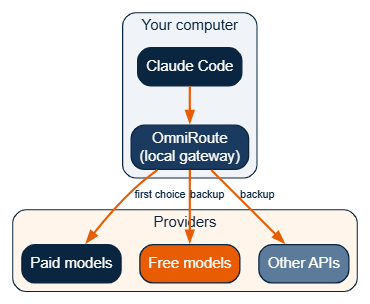
Free models change, have limits, and are not always as good. Use them when you are stuck. Use paid models for important work.
2. Remember the Project With claude-mem
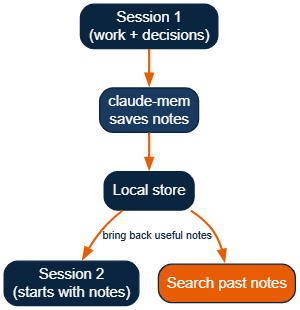
Normal sessions forget everything when they end. claude-mem notes useful things while you work, shortens them, saves them on your computer, and brings the right parts back next time. You can also search past notes.
3. Use Fewer Tokens With Headroom
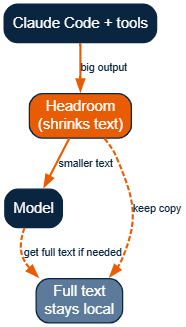
Long sessions and memory make prompts bigger. Tool outputs and logs eat tokens fast. Headroom shrinks the noisy parts before they reach the model. The full text stays on your computer if the model needs it later. How much you save depends on the work, but coding sessions usually get a clear drop.
4. Set Up the Project With Claude Code Setup
A messy project makes the AI guess wrong more often. Missing helpers, unclear structure, or no useful hooks lead to extra steps and more mistakes. Claude Code Setup is the official Anthropic plugin that helps fix that.
It does not rewrite your code. It only looks and suggests.
What It Does
Claude Code Setup scans your repository. It checks things like:
- File and folder layout
- Language and framework signals (for example, package.json, language files, common config files)
- Dependencies and patterns already in the project
From that scan, it recommends the most useful automations in five areas:
- MCP servers – connections to outside tools, docs, browsers, databases, and similar services
- Skills – ready-made instruction packs for common tasks
- Hooks - actions that run at key moments (for example, after an edit, before a commit, or when a file changes)
- Subagents – smaller specialist agents (for example, security review or performance review)
- Slash commands – short commands you can type for repeated workflows
It usually surfaces the top one or two ideas in each area. If you ask for one type only (for example, "what MCP servers should I use?"), it can give a longer list.
How to Use It
Install it from the official marketplace inside Claude Code:
/plugin install claude-code-setup@claude-plugins-officialOr open the plugin browser and pick it from the official list. Link: https://claude.com/plugins/claude-code-setup.
Then talk to it in plain words, for example:
- "recommend automations for this project"
- "help me set up Claude Code"
- "what hooks should I use?"
- "what MCP servers fit this repo?"
It stays in read-only mode. It does not change files by itself. You review the suggestions and decide what to add.
Why It Helps
Without this step, the agent often works with a half-ready environment. It may miss useful tools, skip helpful hooks, or invent steps that a good setup would handle automatically. After you apply the best suggestions, the same agent makes fewer wrong guesses and needs less hand-holding.
Simple Example
You open a React + Node project. Claude Code Setup might suggest:
- A browser or Playwright MCP for frontend checks
- A docs or package MCP for library lookup
- Hooks that format or lint after edits
- A security-focused subagent if it sees auth code
- Slash commands for common test or PR steps
You pick the ones that fit, install them, and keep going.
Where It Sits in the Stack
Run it early. A clear CLAUDE.md plus a tuned project setup gives the other tools (memory, compression, routing, style learning) a cleaner base to work on.
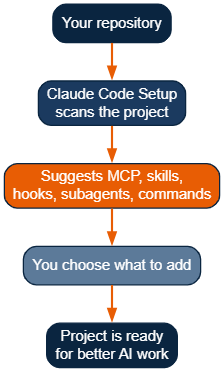
In short: Claude Code Setup is the official way to audit your repo and get practical, project-specific recommendations. Use it once on a new or large project, apply the highest-value ideas, and the rest of the stack works with less friction.
5. Learn Your Style With Task Observer
You fix the same style issues again and again. Task Observer notes those fixes and can suggest skill updates. You check the ideas first. Over time, the AI starts closer to how you write.
How the Pieces Fit
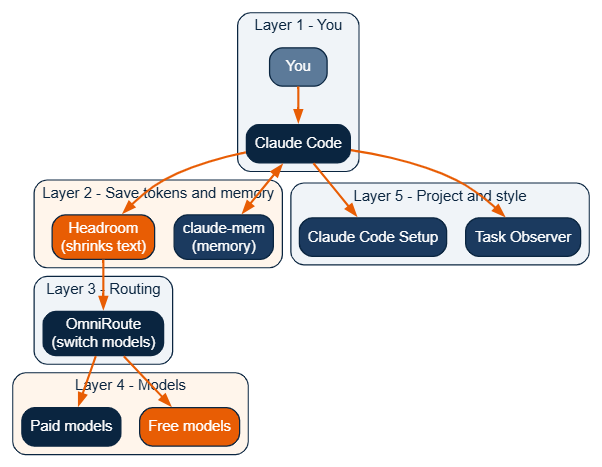
Good Order to Add Them
- Write or improve CLAUDE.md.
- Run Claude Code Setup and add the best ideas.
- Add claude-mem so sessions remember the project.
- Add Headroom if tokens or context size become a problem.
- Add OmniRoute when you hit limits often.
- Add Task Observer once the rest is stable and you want better style match.
Safety Notes
- OmniRoute, Headroom, and claude-mem (default) run on your computer.
- Free providers and any cloud sync send data outside. Check what they get.
- Only install tools you trust. Official Anthropic tools and well-known open projects are safer, but you still choose what runs.
- The extra layers add a little delay. On most computers, it is small next to model time.
Keep Expectations Real
Free models are not unlimited top quality. Limits and quality change. Paid models are still best for hard or important work. This stack mainly stops the daily restart and limit pain so you can code more.
What About GitHub Copilot?
Copilot has its own tools. This stack is made for Claude Code.
Some parts can be reused:
- OmniRoute can work with tools that accept a custom address.
- Headroom works with several coding tools.
- claude-mem works with some other tools, but not the same way.
Do not expect the same Claude Code Setup tips or Task Observer skill inside Copilot. Treat Copilot as a different setup that can share some routing or shrink tools, not the full stack.
Closing
Use a clear CLAUDE.md, OmniRoute for model switching, claude-mem for memory, Headroom for smaller prompts, Claude Code Setup for project fit, and Task Observer for style. You still face real limits. You just fight them less and ship more code.
Opinions expressed by DZone contributors are their own.
Comments