

Reproducible Development Environments, One Command Away: Introducing CodingBooth
We containerized production and CI, yet local development remains the least reproducible. CodingBooth fixes this by letting every project carry its own dev environment.
Join the DZone community and get the full member experience.
Join For FreeWe containerized production years ago. We containerized CI not long after. And yet the place where engineers actually spend the bulk of their workday — the local development loop on a laptop — is still, for most teams, the least reproducible part of the stack.
This is the story of why that happens, why it's gotten worse rather than better in the last few years, and what I ended up building to fix it for my own work.
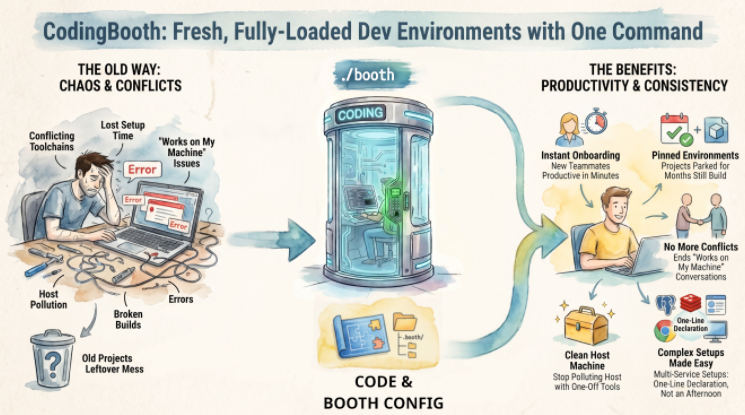
Three Failure Modes That Quietly Cost Teams Time
If you hop between projects — or onboard onto a sufficiently old one — you've almost certainly hit all three of these. They look different on the surface, but they degrade the same property: repeatability.
1. Project Residue
Every project a developer touches installs something. A JDK version. A Go toolchain. A specific Node release. A database client. A vendor CLI. After six months of project-hopping, the host machine is a graveyard of half-configured runtimes, and two projects that are conceptually independent end up sharing a broken global — a JAVA_HOME pointing at the wrong version, a mvn resolving to a build that used to work, a Python site-packages polluted by a one-off pip install.
The cost is rarely catastrophic. It's a slow tax: another twenty minutes diagnosing why the build behaves differently than it did last week.
2. Legacy Projects Are Punishing
The bigger and older a project is, the harder it is to set up — and even harder to set up the same way as the rest of the team. The onboarding doc is out of date by the time a new hire reads it. The setup script worked on someone's laptop in 2019 but assumes a Homebrew formula that's since been renamed. The "just works" version of the build tool isn't on Maven Central anymore. The native library the JNI wrapper needs requires a glibc that ships only on certain distros.
For large enterprise codebases, this isn't a small friction. It's the difference between a new hire being productive in week one or week four.
3. AI-Assisted Drift
This one is new, and it's getting worse. Coding assistants are tremendously useful, but they have no qualms about suggesting brew install something, go install that@latest, or pip install --user this-library while solving a small problem. Most developers accept these suggestions because, in the moment, they're correct — the immediate task gets unblocked. But unless someone is explicitly watching the environment, those installs accumulate on the host permanently.
Multiply that across a year of paired work with an assistant and the development environment quietly mutates in ways nobody documented. The agent doesn't know it's degrading reproducibility because reproducibility is an environmental property the agent can't see.
All three failure modes converge on the same outcome. Development becomes less repeatable. And the incompatibility is usually subtle — a minor version delta, a missing native lib, a stray PATH entry — so it goes undetected until much later, often when someone else tries to run the same code on a clean machine. By then, the blast radius is significantly larger.
What I Wanted Instead
The model I kept reaching for, and not finding, was something like:
- Every project carries its own development environment, declared in the repo.
- One command brings that environment up. One command tears it down.
- Whatever the project installs goes inside the environment, not on the host.
- The team gets parity by default — same image, same versions, same defaults.
- The UI on top is flexible: shell, browser-based IDE, notebook, full desktop — depending on what the project needs that day.
This is essentially "what production already does" applied to the development loop. The tooling for production containers is mature. The tooling for developer containers, at the time I started, was either:
- Too low-level (raw Dockerfiles + manually wired volume mounts and UID mapping), or
- Too coupled to a specific IDE/platform (devcontainers, GitHub Codespaces), or
- Too narrow (one tool, one variant, one workflow).
I wanted something polyglot, IDE-agnostic, runnable locally, with sane defaults out of the box. So I built it.
CodingBooth: The Model
CodingBooth gives each project an isolated, reproducible development environment, declared in the repo, brought up with a single command, and torn down without leaving residue on the host.
The mental model is small enough to fit in three bullets:
- Declare the environment in a
.booth/folder at the repo root — aBoothfile(high-level, declarative) or a plainDockerfileif you prefer raw Docker. - Run
./booth. The booth starts a container whose user is mapped to your host UID/GID, mounts your project in, and opens whichever front-end you chose. - Work inside the booth — edit, build, test. Files you create are owned by you on the host side. No
chowndance. No root-owned build artifacts.
The Boothfile is meant to be short. Here is the actual Boothfile that builds the booth I developed my Svelte + Firebase blog:
# .booth/Boothfile
# syntax=codingbooth/boothfile:1
# Configured by: booth config --no-tui --overwrite --variant codeserver --port 13579 --expose 5173 --select firebase+credential/claude-code+auto-accept+credential+settings-cache

setup claude-code
Two setup lines and the whole development environment is declared. Each line maps to a curated install script that wires the tool into PATH and sets sensible defaults — no FROM line, no ARG ceremony, no shell wrangling. The # Configured by: comment is the exact booth config invocation that produced this file, so the entire configuration is reproducible from a single command.
Runtime concerns — variant, port mappings, credential mounts — live in a small config.toml next to the Boothfile:
# .booth/config.toml
variant = "codeserver"
port    = "13579"

run-args = [
    "-v", "~/.config/configstore/firebase-tools.json:/etc/cb-home-seed/.config/configstore/firebase-tools.json:ro",
    "-v", "~/.claude.json:/etc/cb-home-seed/.claude.json:ro",
    "--publish", "5173:5173"
]
The mounts pass the host's Firebase and Claude Code credentials into the booth read-only, so deploys and AI assistance work inside the container without re-logging in. --publish 5173:5173 forwards the Vite dev server back to the host.
Variants: It Is Not Just a Terminal
The most common first reaction I get is that a "booth" sounds like a glorified terminal session in a container. That sells the model short. CodingBooth ships several variants — different front-ends that share the exact same underlying environment:
- base – minimal browser terminal via
ttyd - terminal – direct shell session in the host terminal
- notebook – Jupyter Lab with multi-language kernels
- codeserver – full browser-based VS Code, extensions and all
- desktop-xfce/desktop-kde – a complete Linux desktop in the browser, with GUI apps, file managers, browsers
Same booth underneath. Different UI. The environment is the unit of reproducibility; the UI is just a lens on it. A developer can open today's project in browser VS Code, re-open tomorrow as a notebook when they need to plot something, and switch to a full desktop variant when they need a GUI tool — without changing the toolchain underneath.
Set Up Without Hand-Writing YAML
Handwriting a Boothfile is fine for a small project. It stops being fun when an enterprise environment requires Java, Maven, a specific IDE, an AI assistant, a database client, and credential mounts. CodingBooth ships an interactive Config TUI for exactly that case:
booth configThe TUI is a multi-tab terminal interface that lets you browse 130+ templates across categories — languages, IDEs, AI coding assistants, databases, browsers, desktops, education stacks, dev tools — toggle the extensions you want, and preview the resulting .booth/ output before writing it. If a .booth/ folder already exists, the TUI pre-populates with current selections, so reopening the configurator on an existing project feels like editing, not starting over.
For CI and scripting use, the same selections work non-interactively:
booth config --no-tui \
    --select java+maven \
    --select claude-code+credential
Who Benefits Most
A few profiles where I've seen the model earn its keep:
- Polyglot engineering teams juggling several languages per quarter. One booth per project means no
sdkman,gvm,nvm, orpyenvjuggling — and no global version bleed. - Teams onboarding new members. Clone the repo, run
./booth, and be at parity with the rest of the team on day one. The setup wiki stops drifting because there is no setup wiki — there is a Boothfile. - Maintainers of large or legacy systems. Pin the toolchain to whatever actually still works, in the repo, and stop relying on tribal knowledge about which Maven build worked on which laptop.
- Educators and workshop runners. Hand out one repository; every student gets an identical environment without platform-specific debugging.
- Researchers reviving old work. Open a dormant project years later and bring up the original toolchain without archaeology on the current machine.
- AI-heavy workflows. Let the assistant install whatever it likes — the host stays untouched, and a bad suggestion is one
boothrestart away from being undone.
Installation and a 30-Second Demo
Installation is one command:
curl -fsSL https://codingbooth.io/install.sh | bashThe fastest way to feel what a booth does is to try a pre-built example:
booth example list
booth example try snake-zig my-snake
cd my-snake
The snake-zig example builds with Zig — a toolchain most developers do not have installed on their host. Inside the booth, you can edit and compile it; the resulting binary lands on the host side, ready to run. No Zig was installed on the host. Nothing to clean up afterward. That is the whole pitch in miniature.
Closing
Even this article was written inside a CodingBooth. Two lines of Boothfile, one config.toml, and one ./booth command brings the whole environment up. The development loop — the part of the day where engineers actually spend their hours — becomes as reproducible as the production container running next to it.
A booth per project. A clean host. A repo that brings its own environment.
Learn More
- Full write-up: nawaman.net/blog/2026-05-14#CodingBooth
- Website: codingbooth.io
- GitHub: github.com/NawaMan/CodingBooth
Published at DZone with permission of Nawa Manusitthipol. See the original article here.
Opinions expressed by DZone contributors are their own.
Comments