

Configuring Custom OAuth 2.0 Grant Type in WSO2 API-M 4.X
This article explains how we can configure a custom OAuth 2.0 grant type known as the “mobile” grant type in WSO2 APIM.
Join the DZone community and get the full member experience.
Join For FreeThis article explains how we can configure a custom OAuth 2.0 grant type known as the “mobile” grant type in WSO2 APIM. This mobile grant type is like the password grant type, where a mobile number will be passed as a parameter instead of a username and password.
Prerequisites:
- Apache Maven.
- Download the required source code from GitHub: https://github.com/wso2/samples-is/tree/master/oauth2/custom-grant
Custom-grant contains the source code for the mobile grant type that can be enhanced as per our requirement to configure the new grant type in WSO2 APIM.
Implementation:
Changes To Be Made for Customizing the Mobile Grant Type Handler (MobileGrant.java):
1. Change the isValidMobileNumber() method logic to check if a mobile no. is valid. Earlier, it would just check and pass nos. starting with 033.
private boolean isValidMobileNumber(String mobileNumber){
//(0/91): number starts with (0/91)
//[7-9]: starting of the number may contain a digit between 0 to 9
//[0-9]: then contains digits 0 to 9
Pattern ptrn = Pattern.compile("(0/91)?[7-9][0-9]{9}");
//the matcher() method creates a matcher that will match the given input against this pattern
Matcher match = ptrn.matcher(mobileNumber);
//returns a boolean value
return (match.find() && match.group().equals(mobileNumber));
}
2. Change the issue() method to generate a valid JWT token. Earlier implementation of this method would generate some random opaque token.
public OAuth2AccessTokenRespDTO issue(OAuthTokenReqMessageContext tokReqMsgCtx) throws IdentityOAuth2Exception {

    // calling super
    OAuth2AccessTokenRespDTO tokenRespDTO1 =  super.issue(tokReqMsgCtx);
    return tokenRespDTO1;
}
NOTE: We can enhance the mobile grant type code as per our requirements. Here it's just customized to check if a mobile number passed as a parameter is valid or not and to generate a valid JWT token in response.
Steps to Configure the New Mobile Grant Type:
1. After doing the required customization in MobileGrant.java, run the below Apache Maven command in the custom-grant folder using the command line.
mvn clean install2. Place the generated .jar file under the API-M path <APIM_HOME>/repository/components/lib.
3. Add the following configuration in <APIM_HOME>/repository/conf/deployment.toml file.
[[oauth.custom_grant_type]]
name="mobile"
grant_handler="org.wso2.sample.identity.oauth2.grant.mobile.MobileGrant"
grant_validator="org.wso2.sample.identity.oauth2.grant.mobile.MobileGrantValidator"
[oauth.custom_grant_type.properties]
IdTokenAllowed=true
4. Restart the APIM server.
Testing:
Now, the new mobile grant type can be seen in Devportal under all the applications.
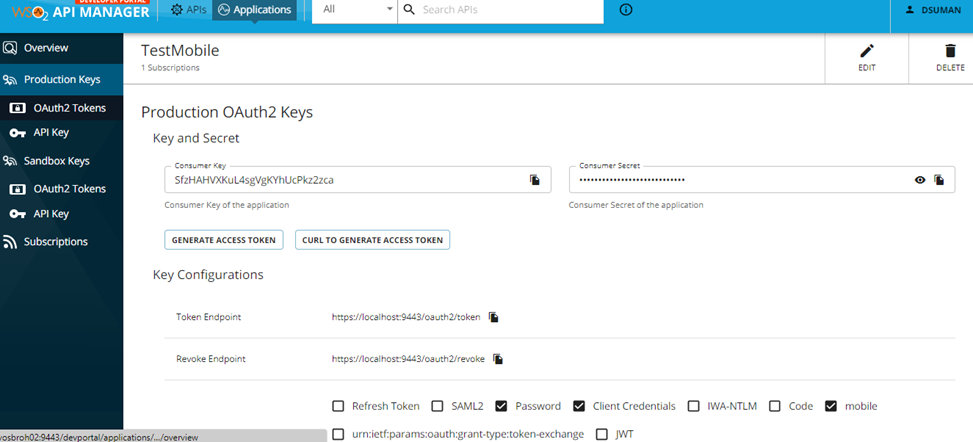
We can’t generate the access token using the new mobile grant type from Devportal, as Generate Access Token button gets enabled only on choosing the Client Credentials grant type.
We can get the access token using the new mobile grant type only by invoking the token API from a rest client. Copy the Consumer Key (Username) and Secret (Password) for any application (TestMobile in this case) from Devportal, and invoke the token API using Postman or any other rest client as shown below.

Under the Authorization tab, provide the Consumer Key and Secret, as seen in the above screenshot.
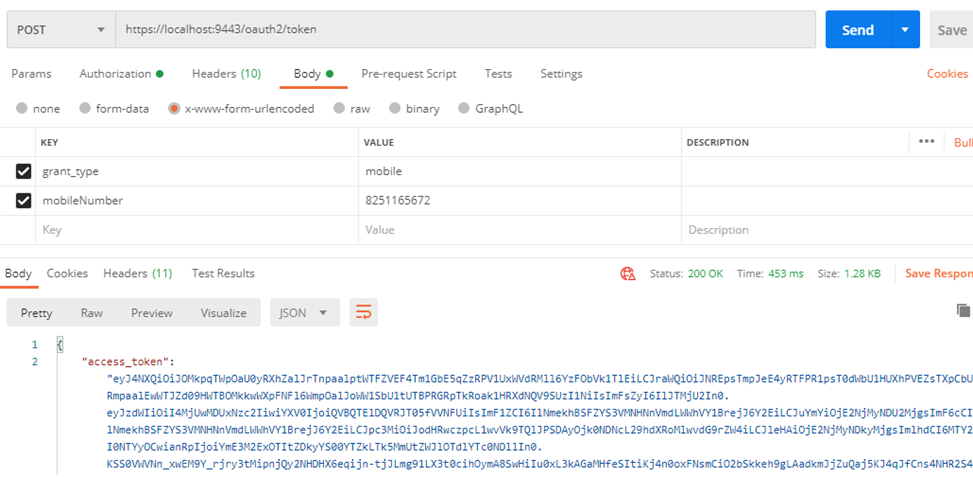
grant_type and mobileNumber are the 2 request parameters to be passed for invoking token API with mobile grant type, as seen above. The access_token we get in the response can be used to invoke any API that this application (TestMobile) has subscribed to.
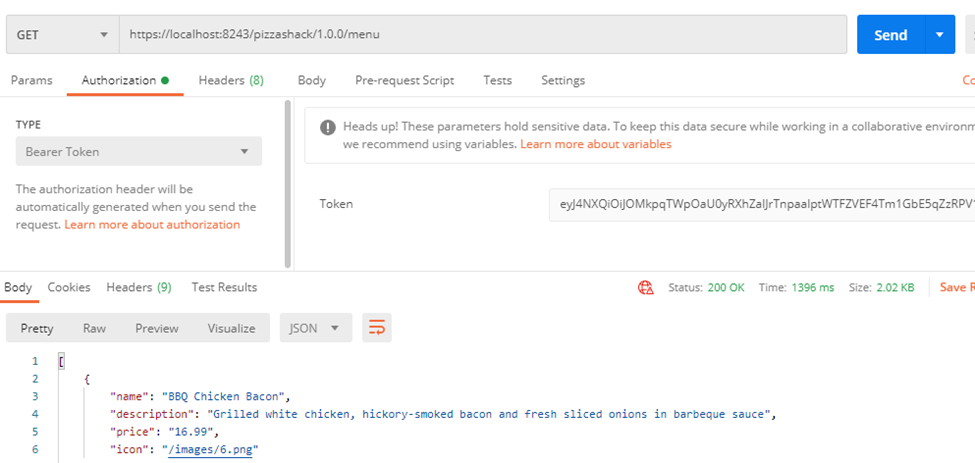
TestMobile application has subscribed to PizzaShack API, and we can invoke it using the access_token we got above, as seen below.
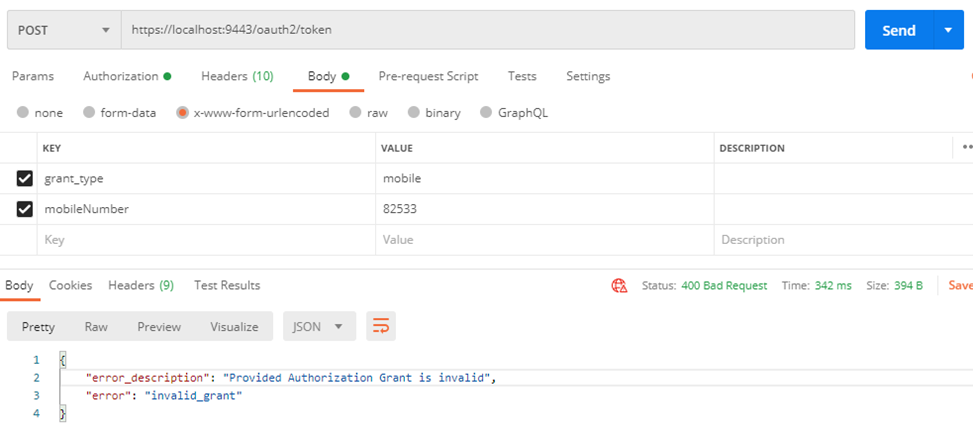
If you enter some invalid mobile number as a parameter, you will get a 400 Bad Request error, as seen below.
CURL command to invoke token API using the mobile grant type:
curl -k -X POST https://localhost:9443/oauth2/token -d "grant_type=mobile&mobileNumber=8251165672" -H "Authorization: Basic Base64(consumer-key:consumer-secret)"Opinions expressed by DZone contributors are their own.
Comments