

Connecting Angular to the Spring Boot and Slash GraphQL Recommendations Engine
In this article, I fine-tune the original recommendations engine, add a secondary data source, and write an Angular client to consume the data.
 CORE
·
CORE
·
In the "Building a Recommendations Engine Using Spring Boot and Slash GraphQL" article, the recently released Slash GraphQL hosted GraphQL backend by Dgraph was utilized as a system of record for a Java-based recommendations engine.
A graph datastore is a great fit for a use case such as a recommendation engine, where the relationships between the data are just as important as the data itself. And using Slash GraphQL allowed me to quickly get a fully managed GraphQL database up and running with minimal effort.
The article also provided insight on how the Slope One family of collaborative filtering algorithms could be utilized to predict the level of product interest based upon existing ratings. In short, the Slope One Ratings Algorithm would be at the heart of the recommendations engine.
The article concluded by providing RESTful URIs in the Spring Boot recommendation engine to provide recommendations from the data stored in the Dgraph Slash GraphQL SaaS service offering.
This article will take things a little further and introduce an Angular client to present this data in a way that's easier to consume...and hopefully appreciate.
Enhancements to the Data Domain
While the original article showed how the recommendations engine would work, I felt like my original data sample provided too many ratings for a few of the sample customers. Additionally, I felt like I needed to expand the number of artists used for this second example.
As a result, I purged the data in my existing Slash GraphQL database and started over. While it would have been easy to update, the underlying schema did not have to change for this exercise and remained as shown below:
type Artist {
name: String! @id @search(by: [hash, regexp])
ratings: [Rating] @hasInverse(field: about)
}
type Customer {
username: String! @id @search(by: [hash, regexp])
ratings: [Rating] @hasInverse(field: by)
}
type Rating {
id: ID!
about: Artist!
by: Customer!
score: Int @search
}
The new list of Artist items was added using the following mutation in the Slash GraphQL user-interface:
xxxxxxxxxx
mutation {
addArtist(input: [
{name: "Eric Johnson"},
{name: "Genesis"},
{name: "Journey"},
{name: "Led Zeppelin"},
{name: "Night Ranger"},
{name: "Rush"},
{name: "Tool"},
{name: "Triumph"},
{name: "Van Halen"},
{name: "Yes"}]) {
artist {
name
}
}
}
The updated Customer records were also inserted:
xxxxxxxxxx
mutation {
addCustomer(input: [
{username: "David"},
{username: "Doug"},
{username: "Jeff"},
{username: "John"},
{username: "Russell"},
{username: "Stacy"}]) {
customer {
username
}
}
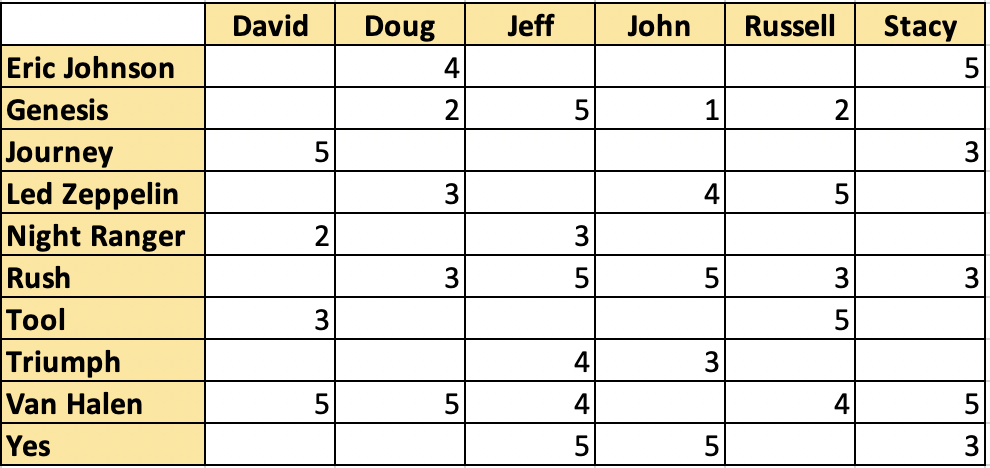
Using the same mutation as the original article, the ratings were added according to the table listed below:
Introducing the H2 (In-Memory) Database
For this second article I wanted to introduce an additional data source. Doing so would highlight the reality that information and facts often come from multiple data sources. I decided to use H2 — an open-source, lightweight and in-memory Java database. The H2 database can quickly and easily be added to Spring Boot using the following Maven dependency:
xxxxxxxxxx
<dependency>
<groupId>com.h2database</groupId>
<artifactId>h2</artifactId>
<scope>runtime</scope>
</dependency>
The H2 database will provide additional information for the Artist records stored in Slash GraphQL. The records will be stored in a table called Artists and the primary key will simply be the name of the Artist:
xxxxxxxxxx
(name = "artists")
public class Artist {
private String name;
private String yearFormed;
private boolean active;
private String imageUrl;
}
Because of the simplicity of this example, the H2 database table uses the name column for the key, which matches the key utilized in Slash GraphQL. An actual example would employ a unique attribute shared by both data sources.
A data.sql file, containing the information for this table, was created and stored in the resources folder of the Spring Boot repository. As a result, every time the server starts, the H2 database will be populated.
Evolving the Recommendations Engine
In order to see the value in the recommendations engine, the results provided by the engine need to include all the necessary information regarding the recommendation. To meet this need, the payload of the recommendations within the response was updated to include more Artist attributes, as shown below:
xxxxxxxxxx
{
"matchedCustomer": {
"username": string
},
"recommendations": [
{
"name": string,
"yearFormed": string,
"active": boolean,
"imageUrl": string,
"rating": number,
"score": number
}
]
}
The recommendations engine needed enhancements to accept two additional forms of metadata:
- the currently selected artist
- the current customer
By knowing the currently selected artist, the recommendations engine would know to exclude any recommendations for the same artist. Also, having the ability to know the current customer avoids the need to simply pick a customer at random.
Introducing an Angular Client
To quickly create a client, I decided to use Angular CLI. Angular CLI is a command-line interface that allows you to quickly and easily create and stub out components, services, and base functionality, allowing developers to focus on writing business logic to meet their current needs. It was an ideal choice for my skill set.
Within a short amount of time, I was able to use the Angular CLI to introduce the following items:
servicesthat connected toArtist,CustomerandRecommendationobjects in Spring Bootlist-artistscomponent to provide a simple list of artistsview-artistcomponent to display recommendations for the active customer and artist
Because of a strong Angular and npm community, I was even able to include a graphical star-rating solution using angular-star-rating and CSS-star-rating packages with a few commands and basic configuration changes. Of course, @ng-bootstrap and bootstrap packages were included as well, which made styling a little more presentable.
Using the Angular Client
With the Angular client configured and the Spring Boot recommendations engine running, the following URL can be used to start the application:
http://localhost:4200
When the application loads, the following screen is displayed:
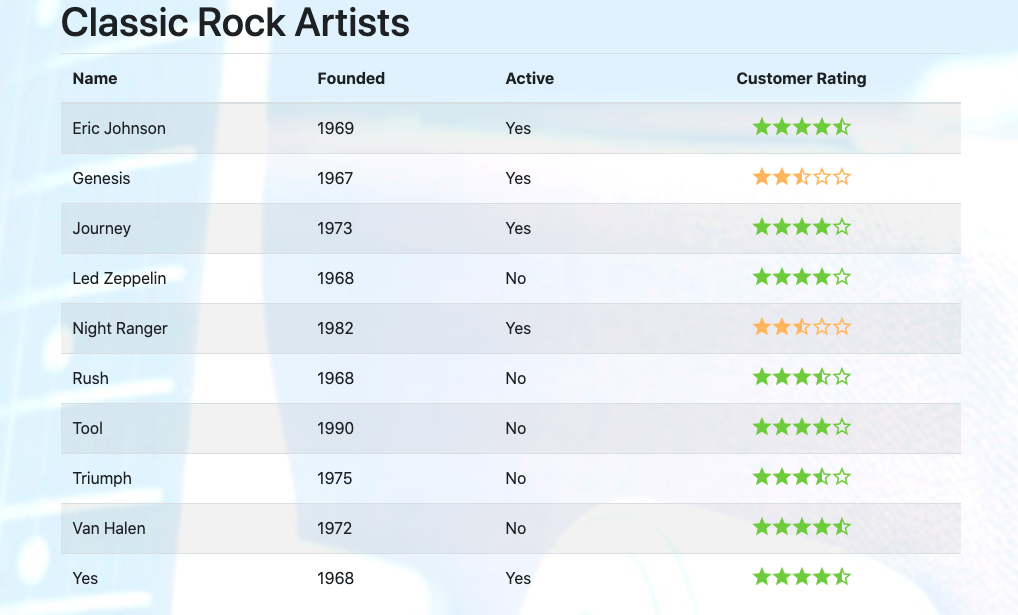
The list (from the list-artists component) provides information from both the H2 database and average ratings from the Dgraph Slash GraphQL database.
Single-clicking the Rush entry calls the view-artist component and displays information as shown below:
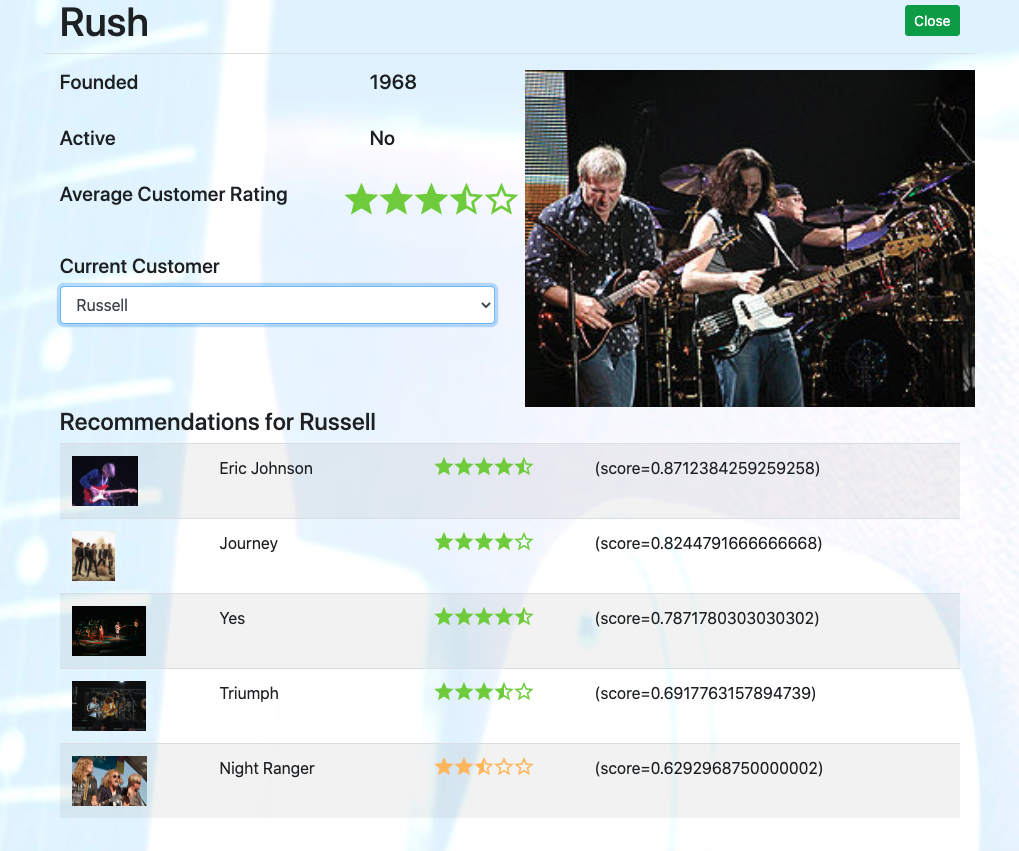
In this case, I have selected Russell as the current customer. At the top of the screen, the same information is displayed, with an image of the band on the right-hand side. Below is information from the Recommendation API within the Spring Boot service.
The results are catered to the customer named Russell and intentionally avoid making recommendations for the band named Rush.
If the customer is changed to be Stacy, the same screen is updated as shown below:
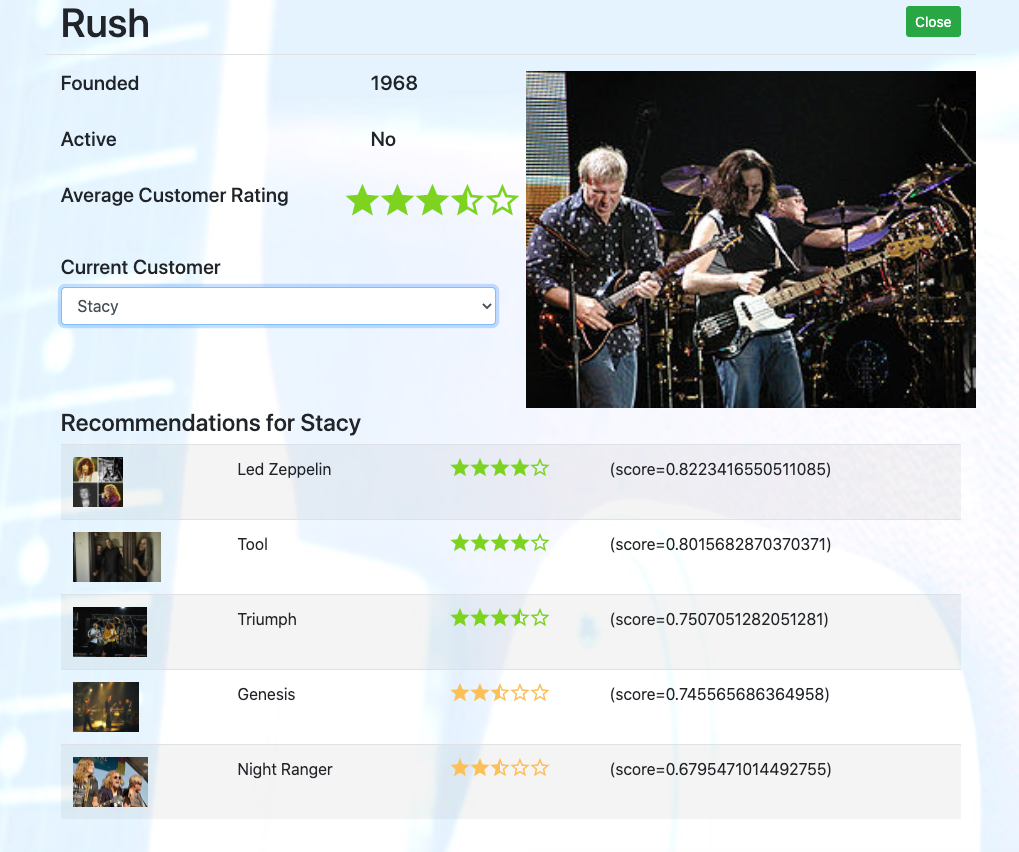
While the data at the top half of the screen remains the same, the recommendations section is completely different and catered to the newly selected user.
Conclusion
In this article, the recommendations engine was connected to a client application and further refined to provide more value than what the original article presented.
While this example's design is very simple, the concepts and approaches employed could be incorporated into a fully functional recommendations engine.
Using Dgraph's Slash GraphQL and Spring Boot certainly contributed to a very small time-to-market. They make it easy to prototype, analyze, and adopt new designs based upon lessons learned.
For those interested in the full source code, please review the slash-graph-ql-angular GitLab repository.
Current pricing for Slash GraphQL makes use of the service very attractive, at $9.99/month for 5GB of data transfer. No hidden costs. No costs for data storage. No cost per query.
Have a really great day!
Published at DZone with permission of John Vester. See the original article here.
Opinions expressed by DZone contributors are their own.