

Chat With Your Code: Conversational AI That Understands Your Codebase
In the ever-evolving software development landscape, interacting with your codebase conversationally can be a game-changer.
 CORE
·
CORE
·
Join the DZone community and get the full member experience.
Join For FreeImagine having a tool that understands your code and can answer your questions, provide insights, and even help debug issues — all through natural language queries. In this article, we’ll walk you through the process of creating a conversational AI that allows you to talk to your code using Chainlit, Qdrant, and OpenAI.
Benefits of Conversational AI for Codebases
- Streamlined code review: Quickly review specific code modules and understand their context without spending time digging through the files.
- Efficient debugging: Ask questions about potential issues in the code and get targeted responses, which helps reduce the time spent on troubleshooting.
- Enhanced learning: New team members can learn about how different components in the code work without having to pair with existing experts in the code.
- Improved documentation: Summarizing using AI would help generate explanations for complex code, making it easier to enhance documentation.
Now let us look at how we made that happen.
Preparing the Codebase for Interaction
The first step is to ensure the code base is ready for interaction. This can be possible by vectorizing the code and storing it in a vector DB, from which it can be efficiently reviewed.
import openai
import yaml
import os
import uuid
from qdrant_client import QdrantClient, models

# Load configuration from config.yaml
with open("config.yaml", "r") as file:
    config = yaml.safe_load(file)

# Extract API keys and URLs from the config
qdrant_cloud_url = config["qdrant"]["url"]
qdrant_api_key = config["qdrant"]["api_key"]
openai_api_key = config["openai"]["api_key"]
code_folder_path = config["folder"]["path"]

# Initialize OpenAI API
openai.api_key = openai_api_key

# Initialize Qdrant client
client = QdrantClient(
    url=qdrant_cloud_url,
    api_key=qdrant_api_key,
)

def chunk_code(code, chunk_size=512):
    """
    Splits the code into chunks, each of a specified size.
    This helps in generating embeddings for manageable pieces of code.
    """
    lines = code.split('\n')
    for i in range(0, len(lines), chunk_size):
        yield '\n'.join(lines[i:i + chunk_size])

def vectorize_and_store_code(code, filename):
    try:
        # Chunk the code for better embedding representation
        code_chunks = list(chunk_code(code))

        # Generate embeddings for each chunk using the OpenAI API
        embeddings = []
        for chunk in code_chunks:
            response = openai.embeddings.create(
                input=[chunk],  # Input should be a list of strings
                model="text-embedding-ada-002"
            )

            # Access the embedding data correctly
            embedding = response.data[0].embedding
            embeddings.append(embedding)

        # Flatten embeddings if needed or store each chunk as a separate entry
        if len(embeddings) == 1:
            final_embeddings = embeddings[0]
        else:
            final_embeddings = [item for sublist in embeddings for item in sublist]

        # Ensure the collection exists
        try:
            client.create_collection(
                collection_name="talk_to_your_code",
                vectors_config=models.VectorParams(size=len(final_embeddings), distance=models.Distance.COSINE)
            )
        except Exception as e:
            print("Collection already exists or other error:", e)

        # Insert each chunk into the collection with relevant metadata
        for i, embedding in enumerate(embeddings):
            point_id = str(uuid.uuid4())
            points = [
                models.PointStruct(
                    id=point_id,
                    vector=embedding,
                    payload={
                        "filename": filename,
                        "chunk_index": i,
                        "total_chunks": len(embeddings),
                        "code_snippet": code_chunks[i]
                    }
                )
            ]
            client.upsert(collection_name="talk_to_your_code", points=points)

        return f"{filename}: Code vectorized and stored successfully."

    except Exception as e:
        return f"An error occurred with {filename}: {str(e)}"

def process_files_in_folder(folder_path):
    for filename in os.listdir(folder_path):
        if filename.endswith(".py"):
            file_path = os.path.join(folder_path, filename)
            with open(file_path, 'r', encoding='utf-8') as file:
                code = file.read()
                print(vectorize_and_store_code(code, filename))

if __name__ == "__main__":
    process_files_in_folder(code_folder_path)
Let us look at the noteworthy aspects of the above code.
- Load your code files and chunk them into manageable pieces.
- Chunking is a very important aspect. The chunk size should not be too small, where the function or module you want to know about is available in multiple chunks, or too big, where multiple functions or modules are squeezed into a single chunk; both scenarios will reduce the retrieval quality.
- Used OpenAI's
text-embedding-ada-002model to generate embeddings for each chunk. - Processing and storing the embeddings in Qdrant for enhanced retrieval.
- Adding metadata to the code chunks will help retrieve specific components and make the code conversation powerful.
- For simplicity, I used a folder path where I placed a couple of code files that were used for building this conversational module. This can be enhanced to point to a GitHub URL.
- 2 Python files, namely ragwithknowledgegraph.py and ragwithoutknowledgegraph.py, were used to generate embeddings and store them in a vector DB, over which questions can be asked via the chat interface.
Building the Conversational Interface
We will now set up a chainlit interface that takes user input, queries Qdrant, and returns contextually relevant information about your code.
import chainlit as cl
import qdrant_client
import openai
import yaml
from langchain_openai import ChatOpenAI, OpenAIEmbeddings
from langchain.prompts import PromptTemplate

# Load configuration from config.yaml
with open("config.yaml", "r") as file:
    config = yaml.safe_load(file)

# Extract API keys and URLs from the config
qdrant_cloud_url = config["qdrant"]["url"]
qdrant_api_key = config["qdrant"]["api_key"]
openai_api_key = config["openai"]["api_key"]

# Initialize OpenAI API
openai.api_key = openai_api_key

# Initialize OpenAI Embeddings
embeddings = OpenAIEmbeddings(model="text-embedding-ada-002", openai_api_key=openai_api_key)

# Initialize Qdrant client
client = qdrant_client.QdrantClient(
    url=qdrant_cloud_url,
    api_key=qdrant_api_key,
)

# Initialize OpenAI Chat model
chat_model = ChatOpenAI(openai_api_key=openai_api_key, model="gpt-4")

# Define a simple QA prompt template
qa_prompt_template = PromptTemplate(
    input_variables=["context", "question"],
    template="Given the following context:\n{context}\nAnswer the following question:\n{question}"
)

# Chainlit function to handle user input
@cl.on_message
async def handle_message(message: cl.message.Message):
    try:
        # Extract the actual text content from the message object
        user_input = message.content

        # Generate the query vector using OpenAI Embeddings
        query_vector = embeddings.embed_query(user_input)

        # Manually send the query to Qdrant
        response = client.search(
            collection_name="talk_to_your_code",
            query_vector=query_vector,
            limit=5
        )

        # Process and retrieve the relevant context (code snippets) from the Qdrant response
        context_list = []
        for point in response:
            code_snippet = point.payload.get('code_snippet', '')
            filename = point.payload.get('filename', 'Unknown')
            context_list.append(f"Filename: {filename}\nCode Snippet:\n{code_snippet}\n")

        context = "\n".join(context_list)
        if not context:
            context = "No matching documents found."

        # Generate a response using the LLM with the retrieved context
        prompt = qa_prompt_template.format(context=context, question=user_input)
        response_text = chat_model.predict(prompt)

        # Send the LLM's response
        await cl.Message(content=response_text).send()

    except Exception as e:
        # Log the error
        print(f"Error during message handling: {e}")
        await cl.Message(content=f"An error occurred: {str(e)}").send()

if __name__ == "__main__":
    cl.run()
Important aspects of the above code:
- Initialize
chainlitand configure it to interact with OpenAI and Qdrant. - Generate query vectors for the input to help retrieve the relevant code snippets from Qdrant.
- Define a prompt template that combines the context retrieved from Qdrant with the user's question.
- Make the context and question available to OpenAI's language model and return the generated answer to the user.
- Please note that I have simplified some of the implementation for better understanding.
Output From the Chat Interface
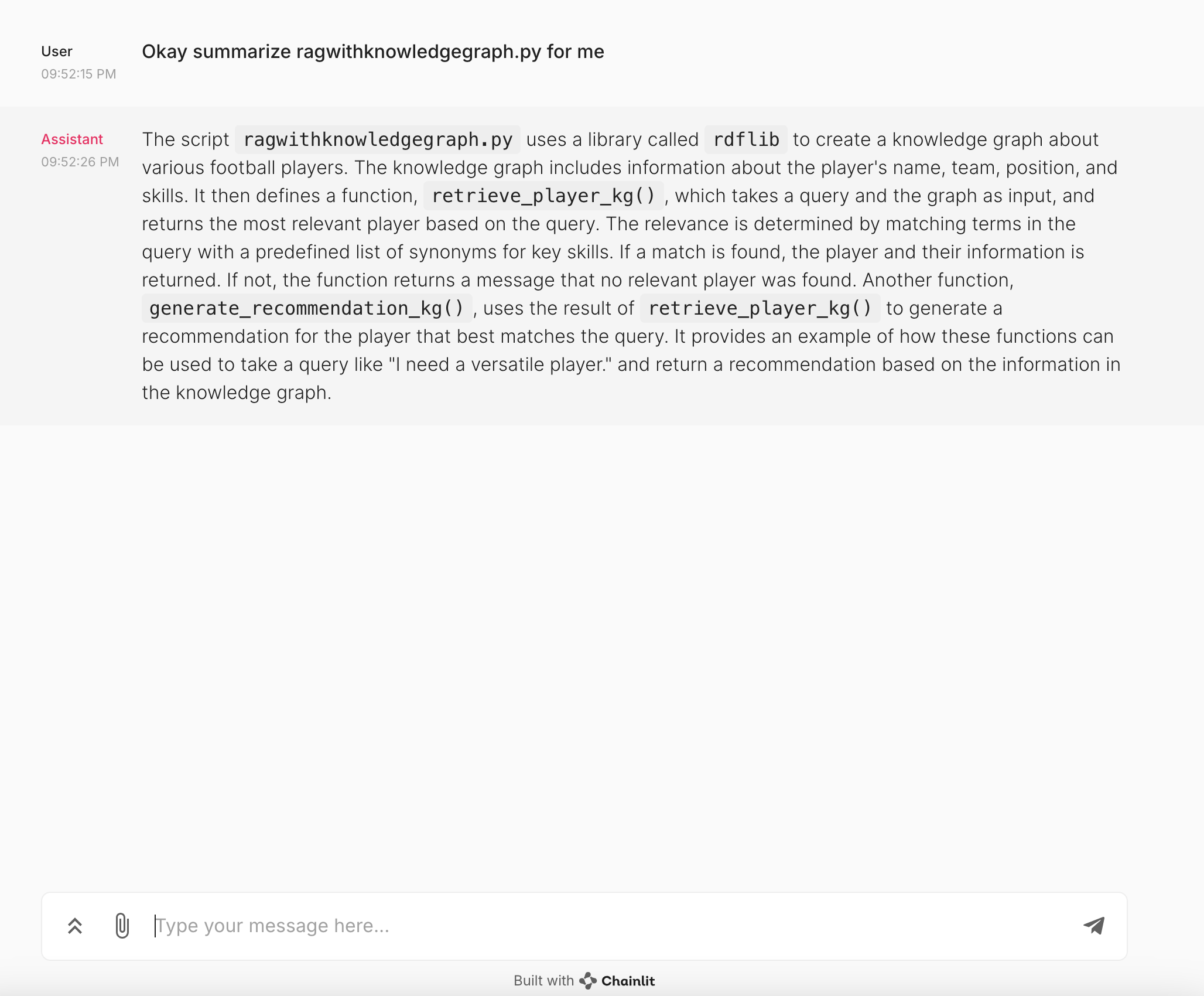
Let us look at the output generated by the chat interface when we asked to summarize one of the code files. As mentioned earlier, we loaded the 2 Python files to vector db, and I asked to summarize one of the scripts.
One uses a knowledge graph, and the other one does not for implementing a simple RAG use case. The LLM did a good job of summarizing the script in natural language.
Next Steps
- Improve retrieval by incorporating additional metadata to identify various aspects of the code.
- Integrate the chat interface to take in a GitHub URL and ingest the code base which can be used to ask questions.
- Test the application by asking specific and broad questions to see how well the application understands the context.
- Engineer prompts and test retrieval using various different prompts.
Conclusion
Creating a conversational AI that understands your codebase will unlock a new level of efficiency and insight in your development process. Whether you’re streamlining code reviews, accelerating debugging, or enhancing team collaboration, this approach offers immense value. With this simple approach, you can transform the way you interact with your code.
Share your experiences and improvements with the community to help shape the future of code interaction.
Opinions expressed by DZone contributors are their own.
Comments