

Creating an API Specification in a Design Center
Look at how to create an API specification in a design center.
Start by clicking into a design in the Anypoint platform:
Click the create button-->API specification.
Fill out the modal's text field with a name for API specification.
Choose "Start with API Designer"
Click create.
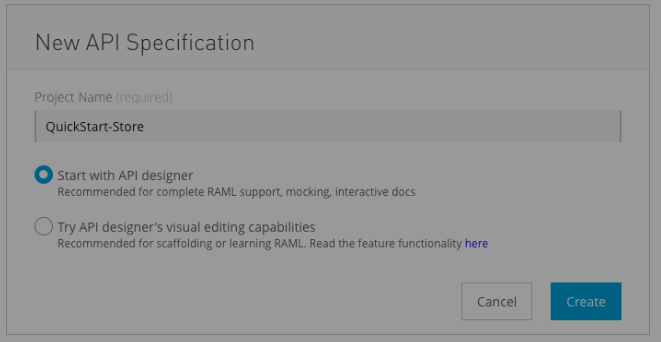
It will load a new API specification window in API Designer allowing you to create your API specification:-
Remove the default text in the textbox so it's empty.
Copy and paste the RAML below into a blank API designer textbox.
#%RAML 1.0
title: DevRel-Quick Start Products API
version: v1.0

securitySchemes:
  basic:
    description: |
      This API supports Basic Authentication.
    type: Basic Authentication


securedBy: [basic]

types:
  product:
    properties:
      identifier?: string
      identifiers: IdentifierMap
      brand: string
      model: string
      rating: number
      description?: string
      pictures: string[]
      price: price

  price:
    properties:
      amount: amount
      salesUnit: salesUnit

  amount:
    properties:
      currency: string
      currencyValue: number
      name : string

  salesUnit:
    properties:
      code: string
      name: string

  Identifier:
    type: string
    pattern: ^[0-9A-Za-z-]+
    minLength: 3
    maxLength: 36

  IdentifierMap:
    type: array
    items:
      type: object
      properties:
        /[0-9A-Z-]+/:
          type: Identifier

/products:
  /{productId}:
      uriParameters:
        productId: string
      get:
        responses:
          200:
            body:
              application/json:
                type: product
                example: |
                  {
                    "brand": "Anypoint",
                    "identifier": "eb8c8ca7-3c42-4489-a820-3aa138430b75",
                    "identifiers": [{
                      "SKU": "UGG-BB-PUR-06"
                    }],
                    "model": "Smart Slim Micro Stripe Shirt",
                    "rating": 5,
                    "description": "Shirt by ASOS Tall. Stripe woven fabric. Added stretch for comfort. Spread collar. Button placket. Slim fit - cut close to the body. Machine wash. 98% Cotton, 2% Elastane. Our model wears a size Medium Long and is 193cm/6'4\" tall",
                    "pictures": [
                      "https://launderkart.com/wp-content/uploads/2016/07/Shirt.jpg",
                      "https://cdni.llbean.net/is/image/wim/251423_47_41?wid=428&hei=494"
                    ],
                    "price": {
                      "amount": {
                        "currency": "USD",
                        "currencyValue": 34.90,
                        "name": "Amount"
                      },
                        "salesUnit": {
                        "code": "EA",
                        "name": "Each"
                      }
                    }
                  }
          404:
            body:
              application/json:
                properties:
                  message: string
                example: |
                  {
                    "message" : "Product not found"
                  }
If you see the above specification, that clearly shows you the total API from top to bottom
It demonstrates the access process and sends it globally for every endpoint that is secured by a Mulesoft parameter.
The feature designs a data-type of product with its parameters and methods of it. Below, you can check data types like map identifiers, sales units, and costs. By selecting these data types, they can Re_Implement by referring them to the complete RAML file.
Browsing further, the feature shows the endpoint and what it takes from the requester like content type, item ID, and query parameters with its responses. Last but not least, we can see one exception error with a status code as 404 Not found. On the off chance that you are intending to get into the API integration design, you ought to complete a Mulesoft training
Opinions expressed by DZone contributors are their own.